STM32CubeIDE is a free integrated development environment launched by ST, based on the Eclipse open-source framework, integrating free compilers and linkers such as GCC and GDB, supporting the entire series of STM32 chips. It can create C/C++ projects and supports debugging, real-time waveform simulation, and one-click downloading.
In actual projects, sometimes it is necessary to subdivide memory, such as specifying variables/functions/files to special addresses, etc. KEIL can achieve this through ‘*.sct’ files; IAR can achieve this through ‘*.icf’ files; for STM32CubeIDE, it can be achieved through ‘*.ld’ link files. This article will introduce the common usage of GCC’s ‘*.ld’ link files for your reference.
STM32CubeIDE Tips forld Link FilesBasic Concepts
‘*.ld’ link files combine many object and archive files, relocating their data and binding symbol references. Typically, the last step of the compilation process is to run the ‘*.ld’ link file.
In simple terms, link files can describe segments in the input files, map them to the output file, and specify memory allocation in the output file.
Below are relevant concepts involved in link files:
PART1. Memory
Syntax:

Comments:
The ‘attr’ here can only consist of the following attributes:
‘R’ Read-only section
‘W’ — Read/write section
‘X’ — Executable section
‘A’ — Allocatable section
‘I’ — Initialized section
‘L’ — Same as ‘I’
‘!’ — Invert the sense of any of the attributes that follow
Example:

Comments:
‘xrw’ indicates that the ‘RAM’ area is readable, writable, and executable, with the RAM starting address at ‘0x20000000’ and a length of 36K.
‘rx’ indicates that the ‘FLASH’ area is readable and executable, with the FLASH starting address at ‘0x08000000’ and a length of 128K.
PART2. Section
Sections can be loadable (可加载) or allocatable (可分配). Non-loadable and non-allocatable memory sections usually contain some debugging information.
Loadable (可加载) means that during program execution, this section’s content should be loaded into memory.
Allocatable (可分配) means that the content of this section should be reserved, but no other content should be loaded (in some cases, this memory must be zeroed).
Both loadable and allocatable sections have two addresses: ‘VMA’ and ‘LMA’.
VMA (the virtual memory address): This is the address of the section when running the output file. VMA is optional and can be left unset.
LMA (load memory address): This is the address when loading the section.
In most cases, these two addresses are the same. However, they can be different, as shown in the following example: the data segment is loaded into ROM and then copied to RAM at program startup (commonly used for initializing global variables). In this case, the ROM address is the LMA, and the RAM address is the VMA.
Syntax:
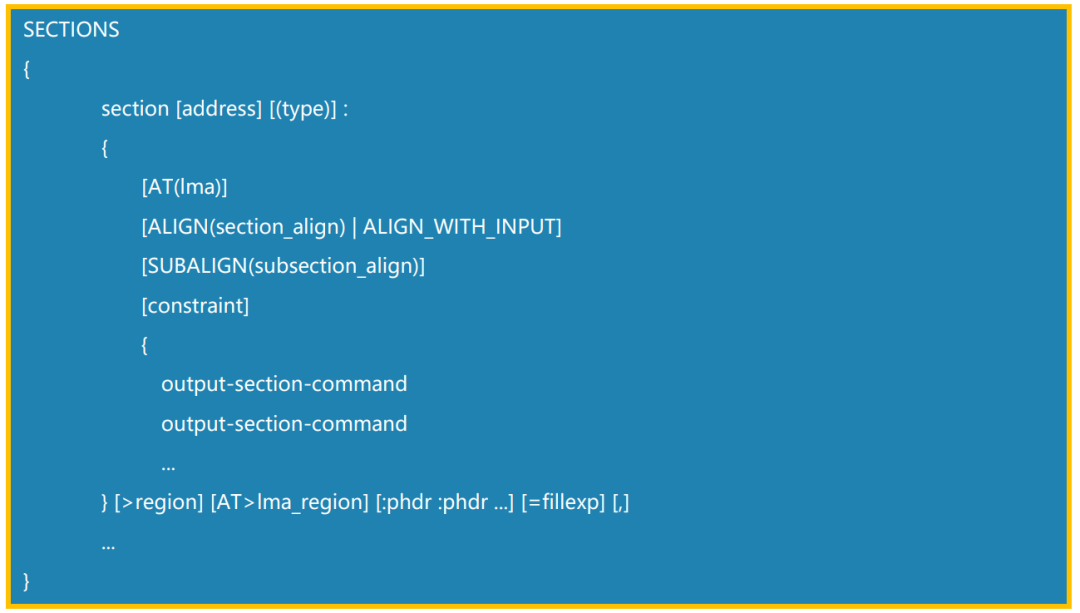
Comments:
Most sections only use a portion of the above attributes.
Example:
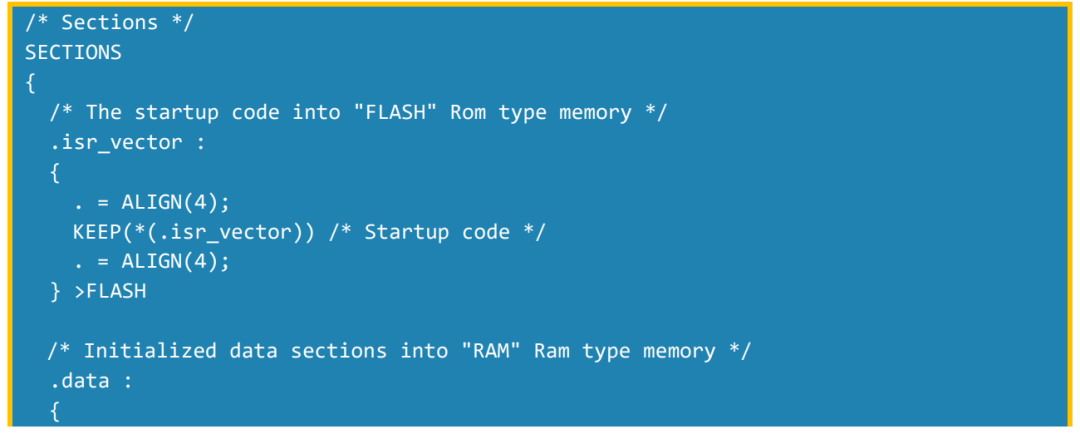
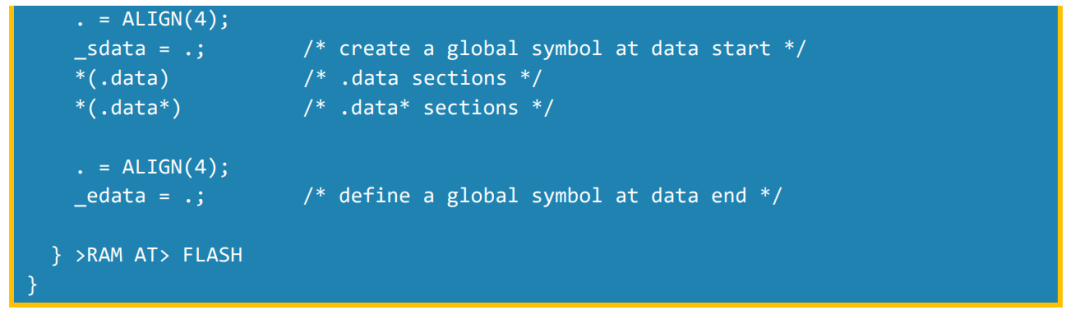
Comments:
In the above example, the LMA and VMA of ‘.isr_vector’ are equal. The ‘.data’ segment has the modifier ‘>RAM AT> FLASH’, indicating that the VMA of the .data segment is RAM, and the LMA is FLASH. That is, the content of the .data segment will be placed in FLASH, but during runtime, it will be loaded into RAM.
Link Script
A complete ‘*.ld’ link file usually includes entry points, memory, and section content.
PART1. Entry Point
Syntax:ENTRY(symbol)
Purpose:The first instruction to be executed in the program, also known as the entry point.
Example:

Comments:
In STM32 projects, the default entry point is the ‘Reset_Handler’ function.
PART2. Common Commands
1. ASSERT
Syntax:ASSERT(exp, message) Ensures that exp is non-zero; if zero, it exits the link file with an error code and outputs the message.
Purpose:Add assertions at necessary locations to clearly pinpoint issues.
Example:

Comments:
When ‘_estack’ in the example is greater than ‘_Min_Stack_Size + _Min_Heap_Size’, the following message will appear.

2. PROVIDE
Syntax:PROVIDE(symbol = expression)
Purpose:In some cases, the linker script only needs to define a referenced symbol that is not defined by any object included in the link.
Example:

3. HIDDEN
Syntax:HIDDEN(symbol = expression)
Purpose:For ELF target ports, the symbol will be hidden and not exported.
Example:

4. PROVIDE_HIDDEN
Syntax:PROVIDE_HIDDEN(symbol = expression)
Purpose:Same usage as PROVIDE; it is a combination of PROVIDE and HIDDEN.
Example:

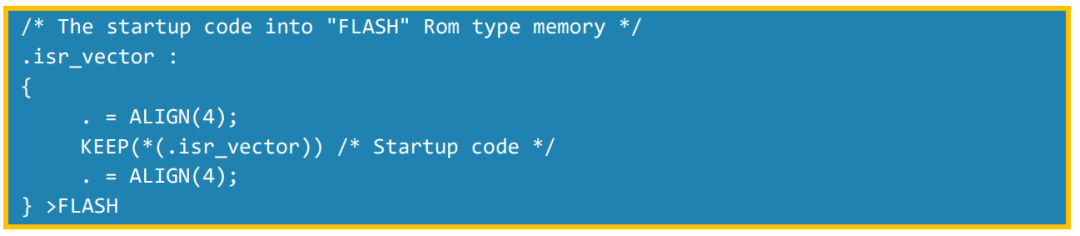
5. KEEP
Syntax:KEEP(symbol = expression)
Purpose:When the linker uses (‘–gc-sections’) for garbage collection, KEEP() can prevent the marked section’s content from being cleared.
Example:
PART1. Entry PointPART3. Simple Script Example
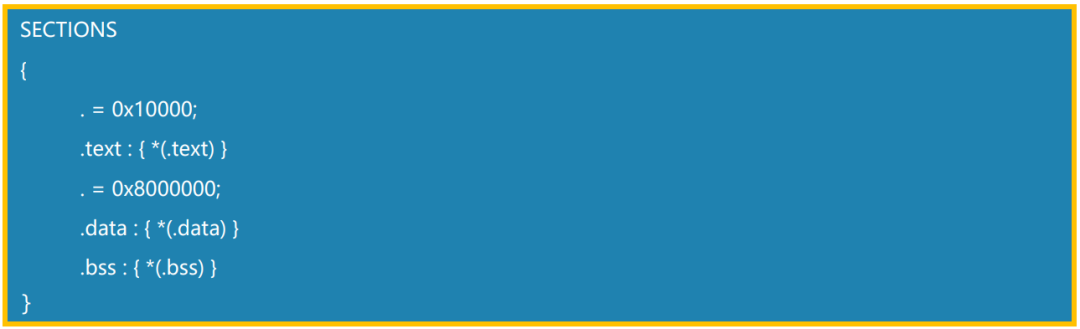
First, let’s look at a simple script example:
Comments:
This specifies the memory distribution for code, initialized data, and uninitialized data. For this example, the program will load code at address 0x10000, and the data will start from address 0x8000000. The special symbol ‘.’, is the location counter, which increments according to the size of the output segment, and setting the location counter can change the output segment’s address at the beginning of the ‘SECTIONS’ command, with the location counter’s value being ‘0’. The location counter can perform arithmetic operations.
Advanced UsagePART1. Location Counter
In the description of sections, the location counter ‘.’ can perform arithmetic operations, creating gaps to meet specific needs.


Comments:
For example, ‘. = . + 0x04;’ creates a gap of 0x04 in the SE_CallGate_Fun segment.
PART2. Specify Output Address of a Variable
You can define the following memory and then place the variable in that memory to control the variable’s output address.
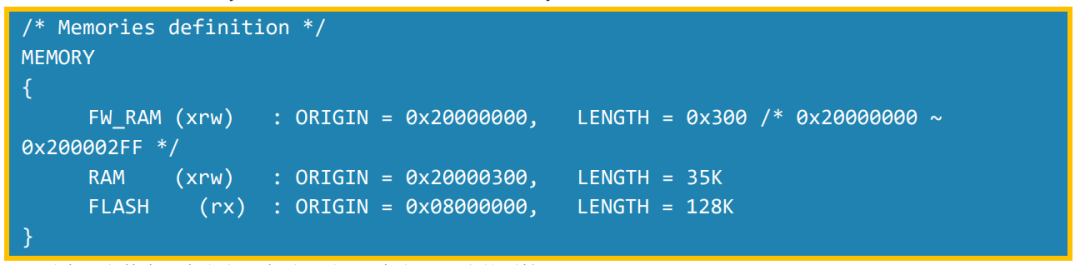
At the same time, in the C file, when defining the variable, add the corresponding attribute as follows

Comments:
The variable will be located in the ‘0x20000000 ~ 0x200002FF’ area (if only the key array is in that area, it will start from 0x20000000; if there are multiple variables stored in that area, they will be stored in order of compilation from 0x20000000).
PART3. Specify Output Address of a Function
You can define the following memory and section, then place the function in that section to control the function’s output address.
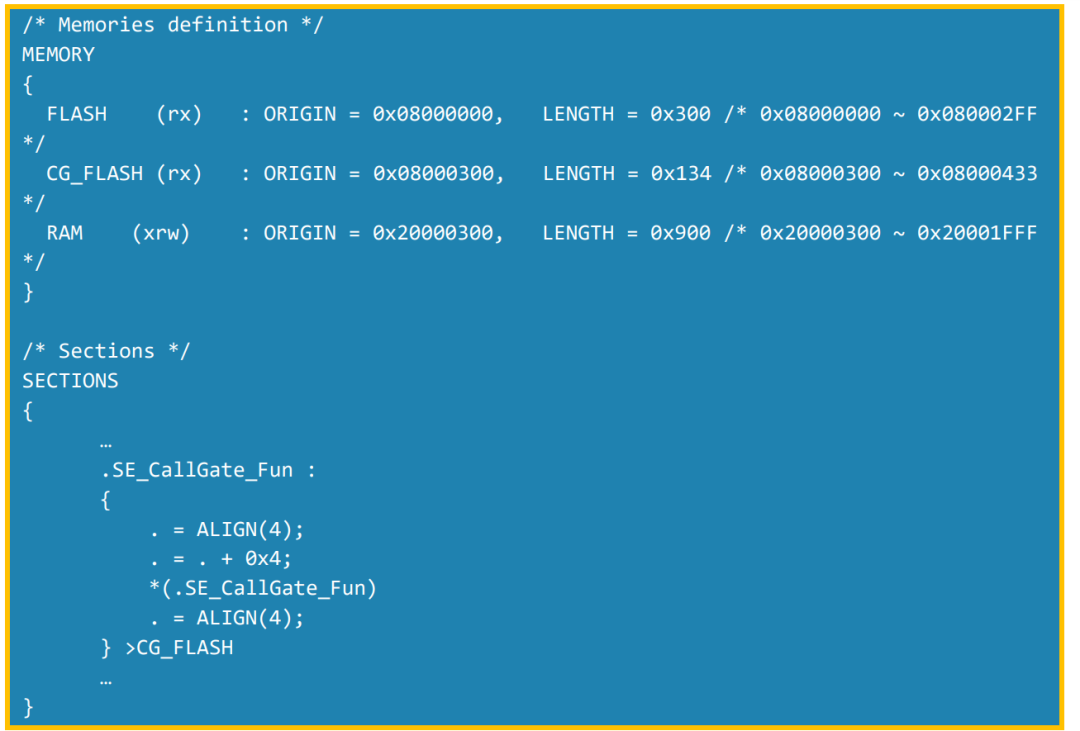
At the same time, in the C file, when implementing the function, add the corresponding attribute as follows:

Comments:
The function ‘call_gate’ will be stored at 0x08000304 (note that the location counter here will create a memory gap of 0x04).
PART4. Specify Output Address of a File
You can define the following memory and section, then place the specified file in that section to control the file’s output address.
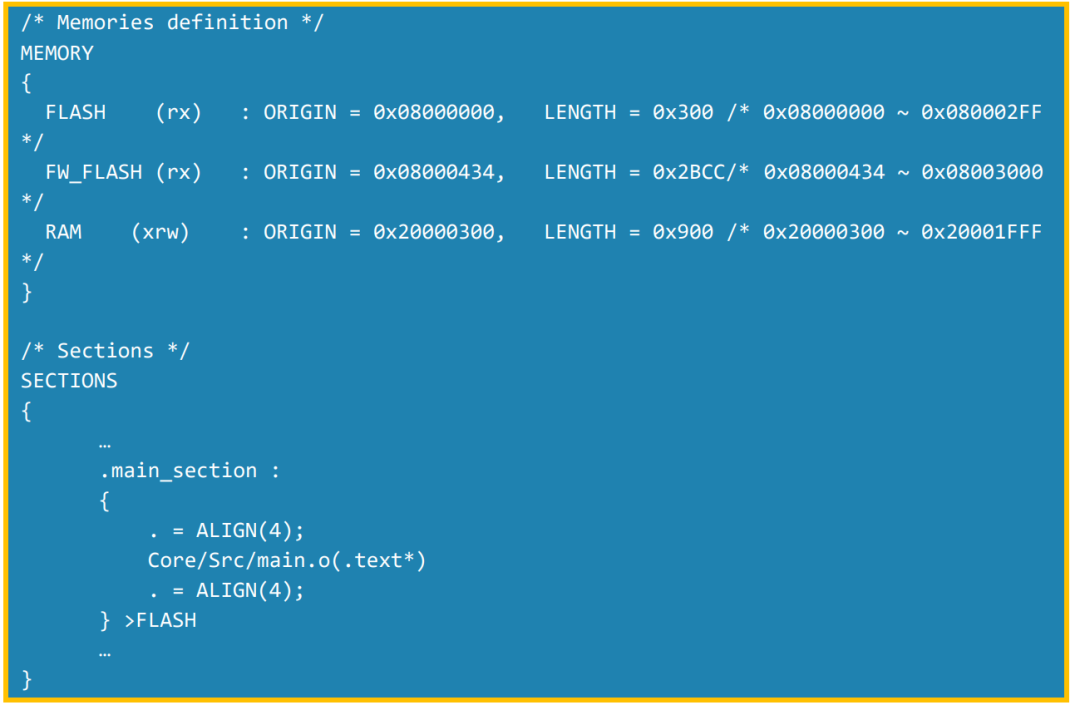
Comments:
The example specifies main.o to the FLASH area; changing the FLASH address or the main_section’s LMA can achieve placing specific files in specific memory areas.
Summary
The detailed documentation for STM32CubeIDE link files (‘*.ld’) can be found in ‘Help’ -> ‘Read STM32CubeIDE Documentation’ -> ‘C/C++ Linker’ (ld.pdf). This document provides a detailed description of the format and content of ld files, which can be referenced when needed. In actual projects, by comprehensively utilizing the above techniques, accurate memory allocation can be achieved to meet different application scenarios.
© THE END
 Click “Read Original” to download the document!