
Keywords: STM32CubeIDE, warning, compiler warnings
Table of Contents
1 Introduction2 Using Warnings Effectively3 Conclusion
1. Introduction
Compiler warnings are very common for engineers. For meticulous engineers, no warning is overlooked.
2. Using Warnings Effectively
In STM32CubeIDE, warnings (and even errors) can be used to notify engineers, ensuring that some easily overlooked configurations receive attention.
For example, when releasing reference code to customers, if we want them to notice the project name and version, we can emphasize the necessary modifications in the code using “#error” and annotate the points that need attention with “#warning”. The specific code is shown in Figure 1:
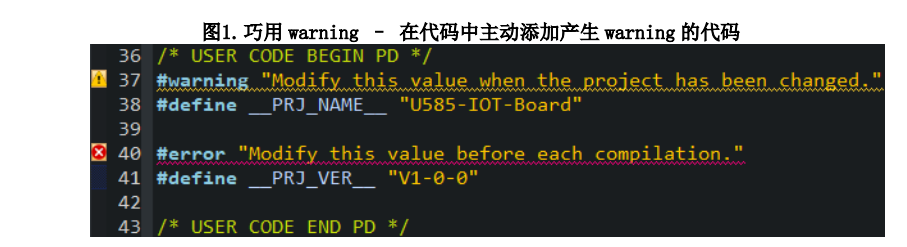
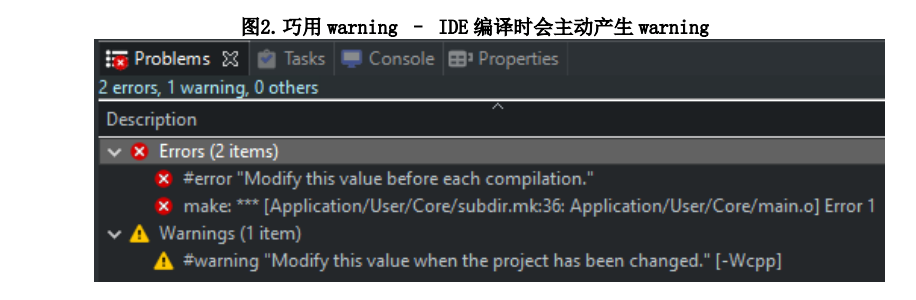
Thus, when the customer compiles the project, errors and warnings will appear, as shown in Figure 2; only by commenting out the “#error” and “#warning” lines will these two compilation messages be removed, achieving the purpose of alerting the customer.
2.1. Actively Suppressing Specific Warnings
In some scenarios, we can actively suppress specific warnings within certain code or file scopes.
For instance, if a test function “void MyTestFunction(void)” is written in the project but not called, compiling it directly will yield a “unused-function” warning.
However, if we add the following statement in the code:
#pragma GCC diagnostic ignored “-Wunused-function”.
/*Within this scope, if a function is declared but not called, no warning will be generated during compilation*/
void MyTestFunction(void){…}
#pragma GCC diagnostic pop
Since we configured “-Wunused-function”, even if MyTestFunction is not called, no warning will be generated during compilation.
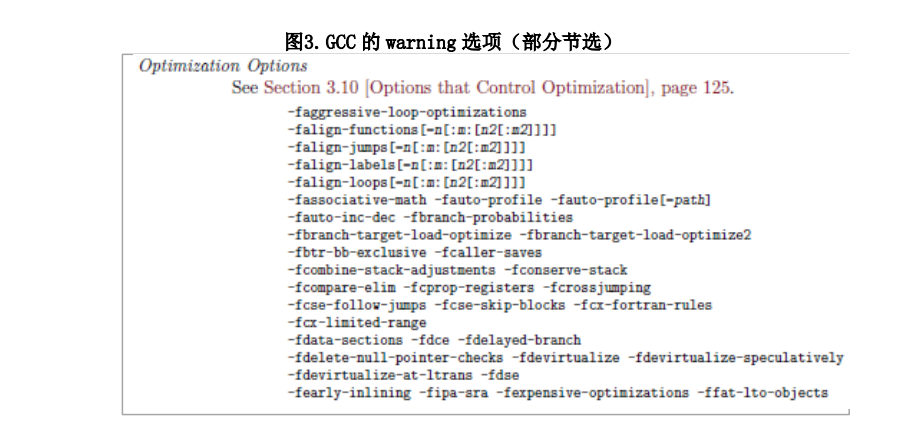
We can also find more warning options by going to “Help” -> “Information Center” -> “Read STM32CubeIDE Documentation” -> “C/C++ Compiler” in STM32CubeIDE, allowing us to actively suppress more warnings as needed. See Figure 3:
3. Conclusion
In fact, when compiling projects, warnings and errors are equally important; some hidden problems may be related to warnings. After gaining a deeper understanding of project code and compilers, we can cleverly use and suppress warnings to better manage projects.
For the complete content, please click “Read Original” to download the original document.

Long press to scan the QR code to follow the public account
More information is available at STM32
▽Click “Read Original” to download the original document