Hello everyone, I am Pi Zi Heng, a serious technical guy. Today, I will share with you the JLink command line and JFlash’s recognition of the address range for download algorithms.
Recently, I customized a SEGGER download algorithm for a client using the RT1170 and an Infineon MirrorBit type 64MB Flash. After completing it, I tested small data downloads in JFlash without any issues, but encountered an “address range not applicable” error when downloading large data. So today, we will delve into the issue of setting the effective address range for custom download algorithms:
Note: The JLink version tested in this article is V7.94f
1. Address Range Setting
Regarding the creation of SEGGER download algorithms, I have previously written two articles: “Serial NOR Flash Download Algorithm (MDK Tool Edition)” which discusses how to create FLM algorithm files (MDK algorithms are compatible with SEGGER algorithms), and “Serial NOR Flash Download Algorithm (J-Link Tool Edition)” which discusses the writing of the accompanying XML file.
The BaseAddr and MaxSize parameters set in the XML file are mainly used to select the applicable FLM algorithm file (i.e., Loader), while the FLASH_BASE_ADDRESS and FLASH_BASE_SIZE parameters in the FlashDev.c file of the generated FLM algorithm source project are used to determine the effective download data address range during the algorithm’s execution.
Note: For details on adding XML, see my previous article “Since JLink V7.62, the method of manually adding new MCU model support has been optimized”
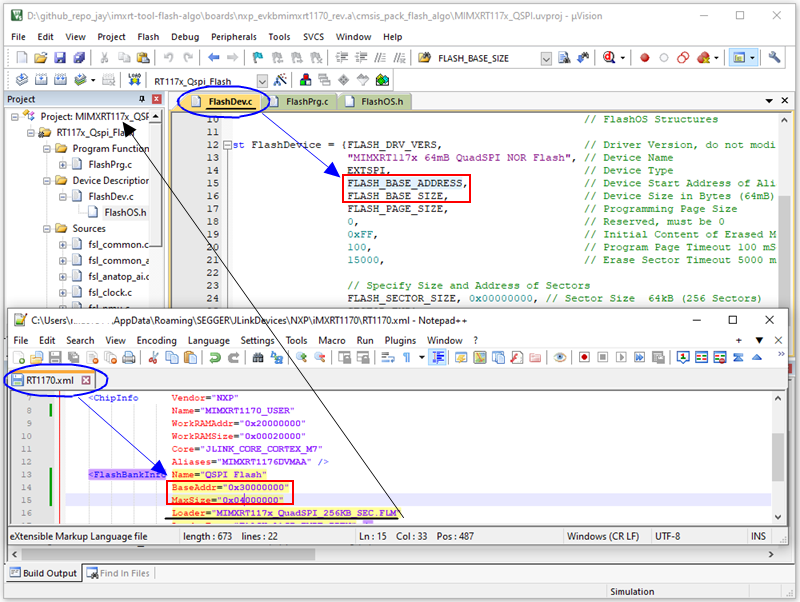
2. Testing Address Range
With the theoretical foundation above, let’s test the impact of address range settings on downloads. We based our tests on the NXP MIMXRT1170-EVKB evaluation board, selecting a 64MB NOR Flash connected to the FlexSPI1 peripheral (the AHB mapping starting address is 0x3000_0000, and FLASH_BASE_ADDRESS in the FLM download algorithm is fixed at 0x3000_0000).
2.1 Testing in JLink Command Line
First, we test using the LoadFile command in the JLink command line, which supports all mainstream program file formats. To facilitate the setting of the download starting address, we will use the .bin format for testing.
Command Format: LoadFile <FileName>, [<Addr> (.bin only)].
Command Explanation: Load data file into target memory. Supported ext.: *.bin, *.mot, *.hex, *.srec, *.elf, *.out, *.axf
If the XML, FLM, and LoadFile address ranges are all set correctly, a download progress bar window will pop up in the background when the command is executed, indicating that the FLM algorithm has been successfully invoked and is erasing the Flash normally.
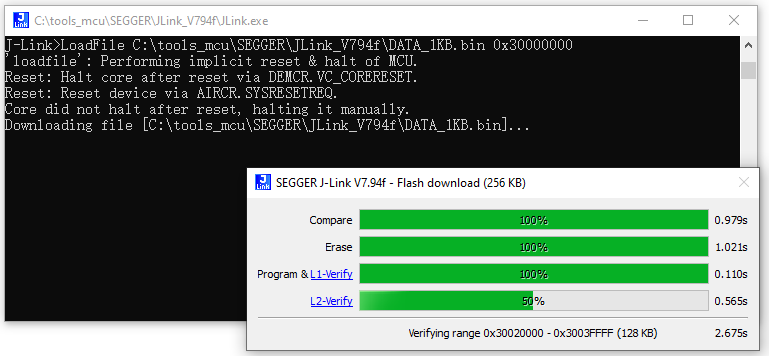
Now we try setting different address ranges (the test addresses set in the table that are outside the valid 64MB Flash space of 0x3000_0000 – 0x33FF_FFFF need to be truly invalid storage space addresses, not the SRAM mapping addresses within the MCU), and the results are as follows:
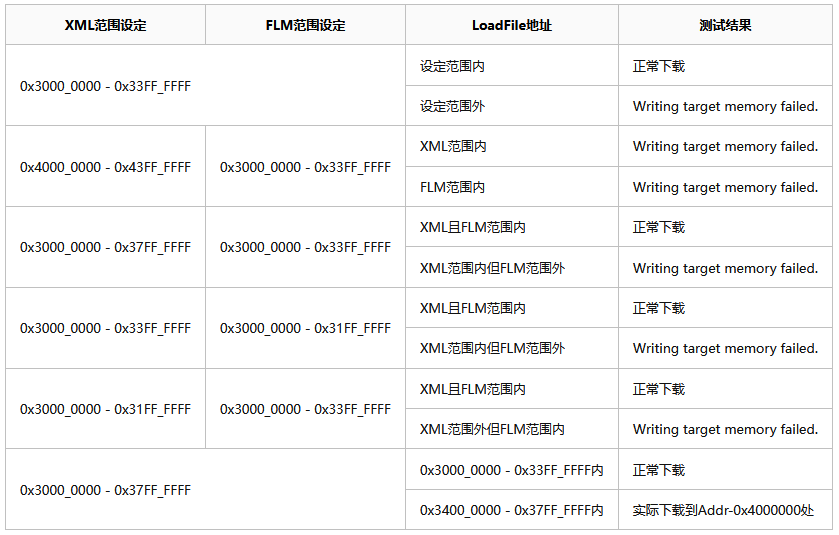
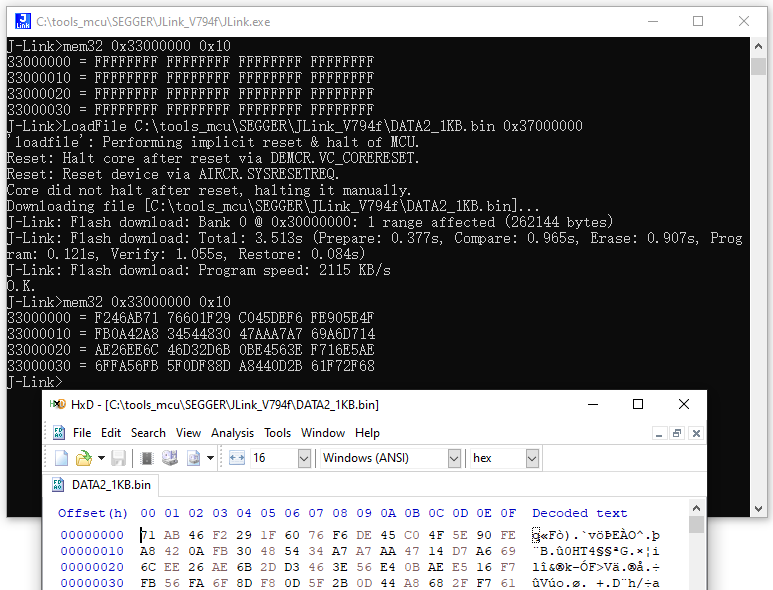
The above test results indicate that downloads only proceed normally when the program download address is within the range pointed to by both XML and FLM, and belongs to valid Flash space. Additionally, the last test item in the table indicates that even if it exceeds the actual connected Flash maximum space, the download does not report an error. This is because the command address sent by the MCU to the Flash operation overflows, and the overflow portion is automatically ignored by the Flash.
Note: To achieve the effect of the last test item in the table, when creating the FLM download algorithm, the AHB space of the MCU storage interface peripheral (for the i.MXRT1170, this is FlexSPI) must be consistent with the settings in FlashDev.c, and this space must not exceed the maximum AHB space allocated to peripherals by the chip system.
2.2 Testing in JFlash
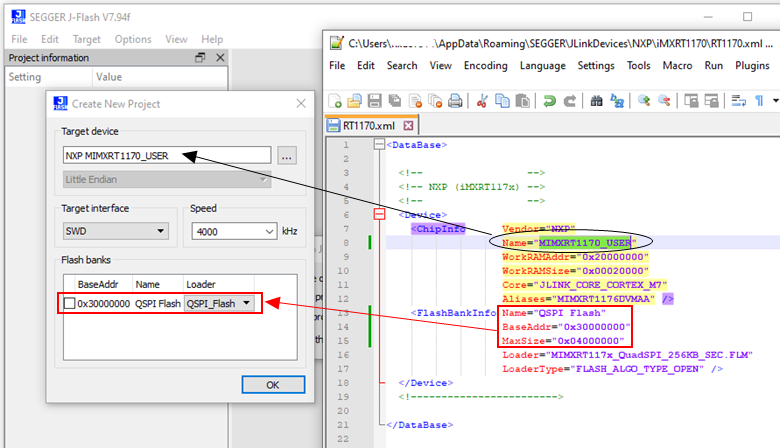
Next, we test in the JFlash interface. When creating a project, the Target Device must be set to the Name in the XML file ChipInfo, so that the custom FLM file can be specified. Here, we can also see that the Flash banks automatically recognize the address range set in the XML.
Note 1: The starting address recognized by JFlash must be the BaseAddr in the XML. Note 2: When the BaseAddr in the XML is consistent with the FLASH_BASE_ADDRESS in the FLM, the space length recognized by JFlash is determined by the smaller of MaxSize in the XML and FLASH_BASE_SIZE in the FLM. Note 3: When the BaseAddr in the XML does not match the FLASH_BASE_ADDRESS in the FLM, the space length recognized by JFlash is determined by MaxSize in the XML.
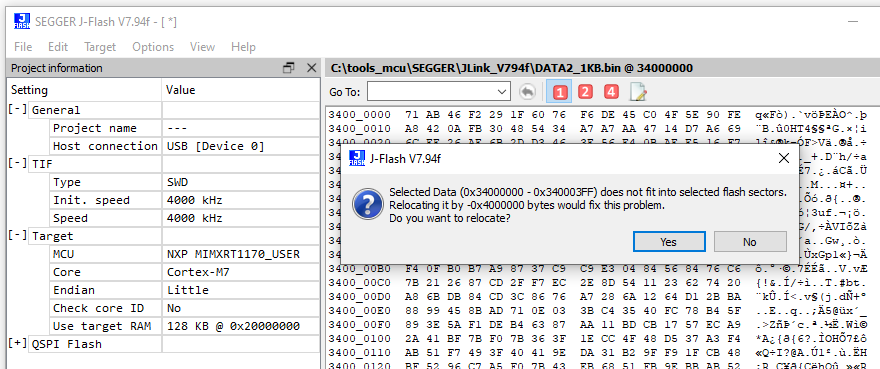
The testing results in JFlash are essentially consistent with the behavior in the JLink command line. We can understand that JFlash’s underlying implementation is essentially calling JLink commands, but with more checks and additional features in the interface. The above notes indicate that JFlash has pre-processed the address space length when loading algorithms, so when the program download address exceeds the range recognized by JFlash, a prompt will appear:
Thus, I have introduced the recognition of address ranges for download algorithms by JLink command line and JFlash. Where’s the applause~~~