In Python, print() is one of the most basic and commonly used functions, used to output information to the console (screen). Its usage is flexible and can meet different output needs. Here is a detailed introduction:
1. Basic Usage: Outputting a Single Item
# Output a string (must be enclosed in quotes, either single or double quotes are acceptable)
print("Hello, Python!") # Result: Hello, Python!print('这是一个字符串') # Result: 这是一个字符串# Output a variable
name = "小明"
print(name)  # Result: 小明
# Output numbers or expressions
print(123)          # Result: 123
print(3 + 5)        # Result: 8
print(2 * 6)        # Result: 12
2. Outputting Multiple Items: Separated by Commas
print() can output multiple elements at the same time, separated by commas, and will automatically separate each element with a space:
name = "小红"
age = 18
print("姓名:", name, "年龄:", age)  # Result: 姓名: 小红 年龄: 18
print(10, 20, 30, 40)                # Result: 10 20 30 40
3. Custom Separator (sep Parameter)
The default separator for multiple elements is a space, but you can specify a custom separator using the sep parameter:
# Separate with commas
print("苹果", "香蕉", "橙子", sep=",") # Result: 苹果,香蕉,橙子# Separate with hyphens
print("2023", "10", "01", sep="-") # Result: 2023-10-014. Custom End Character (end Parameter)
By default, print() will automatically add a newline after output (the end character is \n), but you can modify the end character using the end parameter:
# No newline, ends with a space
print("第一行", end=" ")
print("第二行")  # Result: 第一行 第二行
# Ends with an exclamation mark
print("Hello", end="!") # Result: Hello! (will not automatically newline)5. Output to a File (file Parameter)
In addition to outputting to the console, print() can also write content to a file (the file must be opened first):
# Open a file (create if it does not exist), mode is “w” (write)
with open("output.txt", "w", encoding="utf-8") as f:
    print("这行文字会被写入文件", file=f)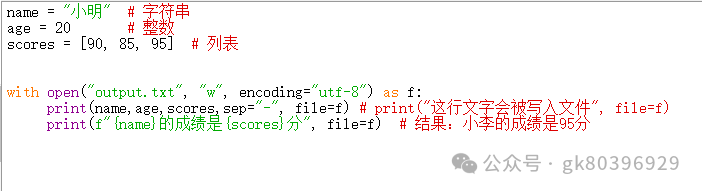
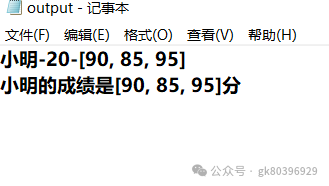
After execution, the current directory will generate an output.txt file, with the content being the text in the parentheses.
6. Formatted Output (Common Scenarios)
When specific formatting is needed for output (such as concatenating variables and text), there are several ways:
1. f-strings (recommended, Python 3.6+)
Add f before the string, and wrap variables in {} to directly embed them in the string:
name = "小李"
score = 95
print(f"{name}的成绩是{score}分")  # Result: 小李的成绩是95分
2. format() Method
Use {} as placeholders and pass variables through format():
name = "小张"
age = 20
print("姓名:{},年龄:{}".format(name, age))  # Result: 姓名:小张,年龄:20
3. Percent (%) Formatting
Similar to C language formatting (older, recommended to use the first two methods):
height = 1.75
print("身高:%.2f米" % height)  # Result: 身高:1.75米 (retains 2 decimal places)
Summary
The core syntax of the print() function is:
print(*objects, sep=' ', end='\n', file=sys.stdout, flush=False)Where:
• *objects: One or more objects to output (separated by commas)
• sep: Separator (default is space)
• end: End character (default is newline)
• file: Output target (default is console, can be changed to file)