Users of STM32 processors can generate basic projects using the STM32Cube tool and freely evaluate the functional safety operating system Flexible Safety RTOS binary library.
The STM32Cube ecosystem includes software tools and embedded software libraries, providing a complete set of PC software tools to meet all the needs of the complete project development cycle; it includes embedded software blocks running on STM32 microcontrollers and microprocessors, such as Flexible Safety RTOS.
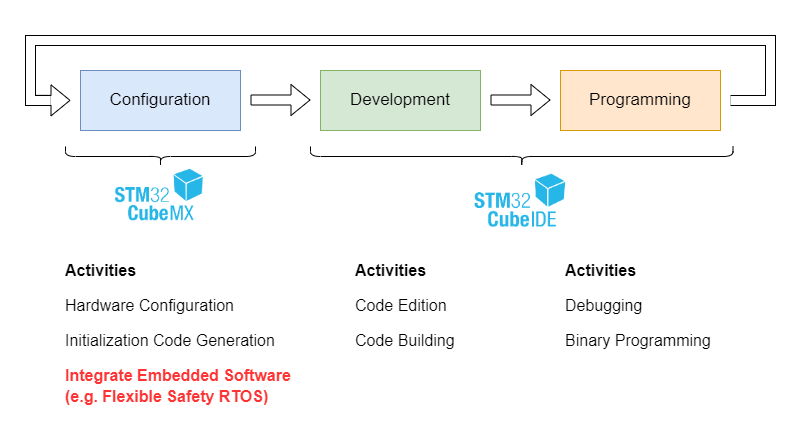
Figure 1
By adding the STM32Cube expansion package in the STM32CubeMX tool, the process of creating software package projects is simplified.
Software Version
During the development process of integrating and applying Flexible Safety RTOS, the version information of the development environment we used is as follows:
STM32Cube MX v6.11.1
STM32Cube IDE v1.15.1
Older software versions may not work properly. To avoid this, we recommend updating the local STM32Cube environment to the latest version.
Installing the Expansion Package
The installation of the STM32Cube expansion package is explained in detail in the STM32CubeMX user manual (https://www.st.com/resource/en/user_manual/um1718-stm32cubemx-for-stm32-configuration-and-initialization-c-code-generation-stmicroelectronics.pdf). This section describes how to activate the middleware software Flexible Safety RTOS (FS-RTOS).
1 Download the package from the link https://www.embedded-office.net/download/public/pack/st/EmbeddedOffice.I-CUBE-FS-RTOS.1.0.1.pack.
2 In STM32CubeMX, select Help->Manage embedded software packages, click From Local…, read and accept the License Agreement evaluation license agreement, start the installation, and close the Embedded Software Package Manager after the installation is complete.
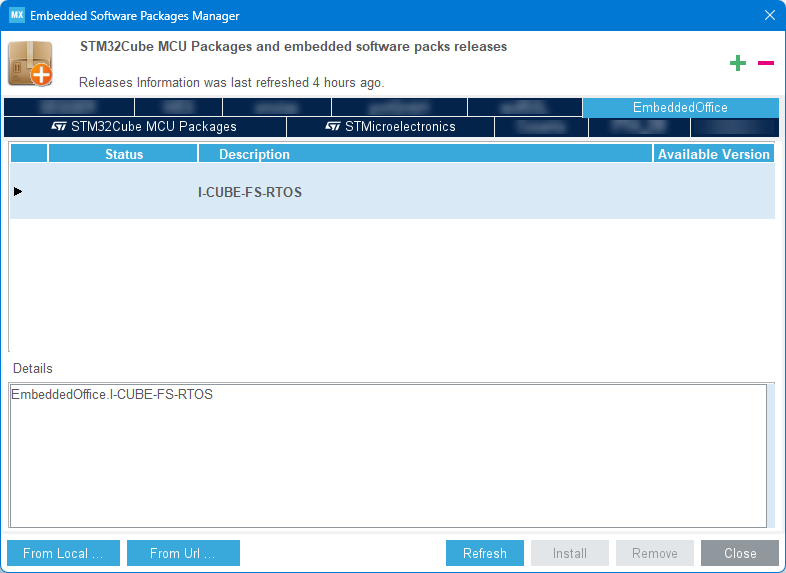
Figure 2
Using the FS-RTOS Package
After creating the STM32CubeMX project based on the MCU or evaluation board, click the “Software Packs” tab and select “Select Components,” as shown in Figure 3.
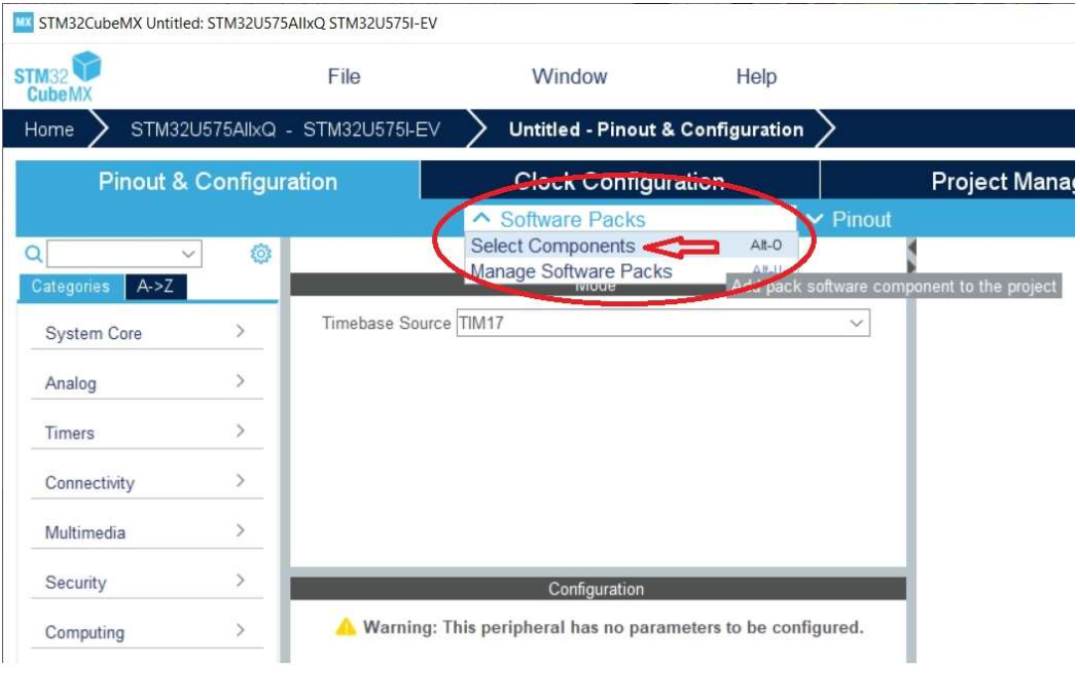
Figure 3
In the opened “Software Packs Component Selector” window, find the installed “EmbeddedOffice.I-CUBE-FS-RTOS” component. Open the component dropdown menu, set FS-RTOS to “Eval,” and then select an application, such as “Blinky,” and click the Ok button.
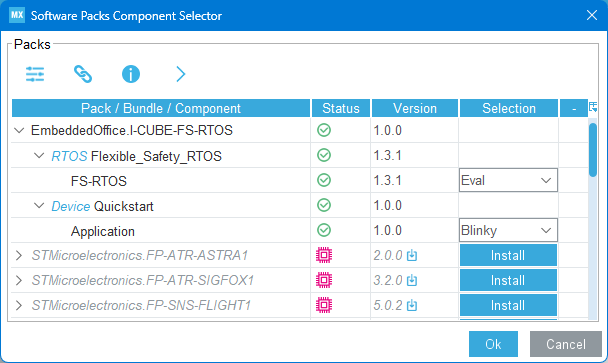
Figure 4
Hardware Settings
To ensure the project works properly, check the following settings:
1 In System Core->RCC->High Speed Clock, use an external crystal oscillator.
2 Ensure that the system clock is set to a reasonable value in the Clock Configuration tab (e.g., set HCLK to max).
3 In the generated application, use SysTick as the RTOS time base; therefore, the HAL library needs to use a different clock source. You can modify the HAL time base to another timer (such as Tim1) or disable the HAL time base (select None) via System Core->SYS->Timebase Source.
Note: If the HAL time base is disabled, the user needs to call the HAL_IncTick() function in the RTOS clock tick handling callback function App_TimeTickHook(), located in the file Blinky/App/app_blinky_callback.c.
4 At least one GPIO output pin must be selected and configured, which is used for application parameter settings.
Before generating the demo application, we may also need to configure the interrupt priority in System Core->NVIC to ensure the system works properly.
Configuring Flexible Safety RTOS
In the “Pinout&Configuration” tab, find the I-CUBE-FS_RTOS component in the “Middleware and Software Packs” category and configure the project:
1 Select the Flexible Safety RTOS component: I-CUBE-FS_RTOS.
2 Integrate Flexible Safety RTOS into your project (no additional parameter settings required).
3 Generate the selected demo application (e.g., Blinky).
4 Specify peripherals related to the application to generate the required BSP functions. In Figure 5, the configured GPIO output pin must be selected for the LED.
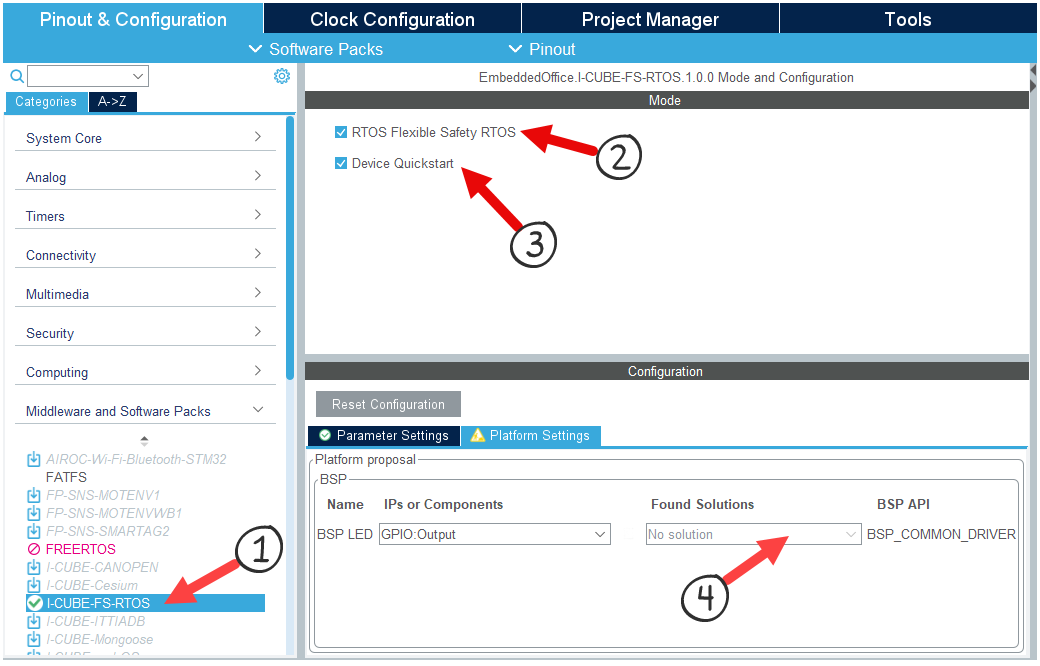
Figure 5
Code Generation
Finally, we perform some basic configurations for code generation in the Project Manager tab:
Project name: Project name.
Project Location: Workspace directory, save project.
Application Structure: Advanced (do not check Do not generate the main()).
Toolchain/IDE: Select toolchain STM32CubeIDE (or EWARM…), check Generate Under Root.
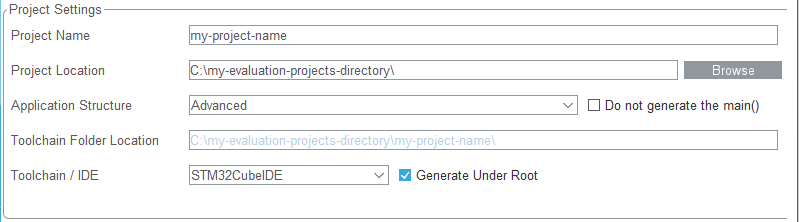
Figure 6
Other settings remain unchanged.
Project Structure
Click the GENERATE CODE button to start generating the project. The project structure generated by STM32CubeMX is as follows:
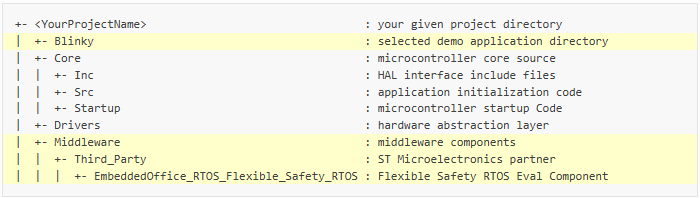
Figure 7
You can find the Flexible Safety RTOS evaluation package in the directory tree defined by ST, located in the Middleware and Blinky directories.
RTOS Integration
When the project is generated using the STM32Cube expansion package, the integration of Flexible Safety RTOS is complete. If you want to manually integrate Flexible Safety RTOS into an existing project, you need to add RTOS system tick handling in the generated callback function file Blinky/App/app_blinky_callback.c:
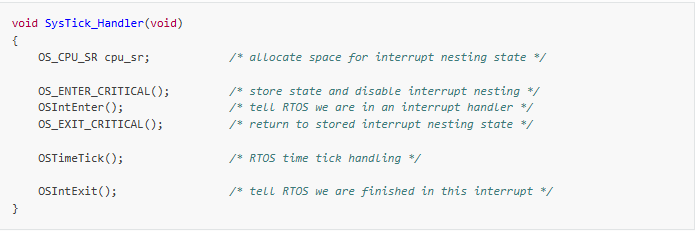
Figure 8
In the default configuration, OS_TICKS_PER_SEC is set to 1000, so the internal SysTick timer generates 1000 system tick interrupts per second.
Diagnostics
Memory Exception Handling
If you change routines and experiment, you may encounter memory exception issues. In this case, we recommend adding an access error diagnostic handler in the generated project.
In the generated interrupt handler file Core/Src/_it.c, add access violation information collection in the function MemManage_Handler():
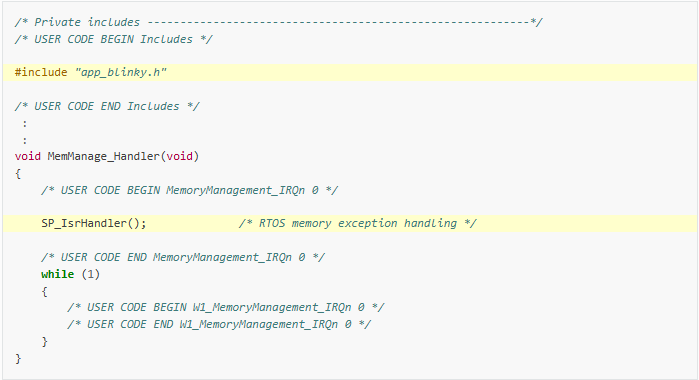
Figure 9
Access the fault callback function located in Blinky/App/app_blinky_callback.c to obtain the following information:
info->CurPrio: Which task execution caused the memory conflict.
info->IAddress: The instruction address where the exception occurred.
info->DAddress: The write-protected data address.

Figure 10
By following the above steps, we have completed the RTOS integration work. Next, you can delve into the file structure of the Flexible Safety RTOS component (https://www.embedded-office.net/eval/manual/latest/os/file.html#file-structure) and start building applications.
Flexible Safety RTOS is a functionally safe pre-certified operating system based on μC/OS-II. BMR Tech is the agent of Flexible Safety RTOS in China, with over 20 years of market, service, and training experience in embedded real-time operating systems and functional safety software. Contact [email protected].
Related articles: Industrial Safety Real-Time Operating System I Flexible Safety RTOS

Scan the QR code on the right to enter the online school for learning
Save the image to your album, open Taobao on your phone, and scan the code to purchase
Welcome to follow our WeChat public account【BMR Tech】, reply “Join Group” to join the technical exchange group
Product Consultation:
Beijing: 010-62975900
Shanghai: 021-62127690
Shenzhen: 0755-82977971