Click ↑↑ above to follow, reply “1” to receive PLC programming software
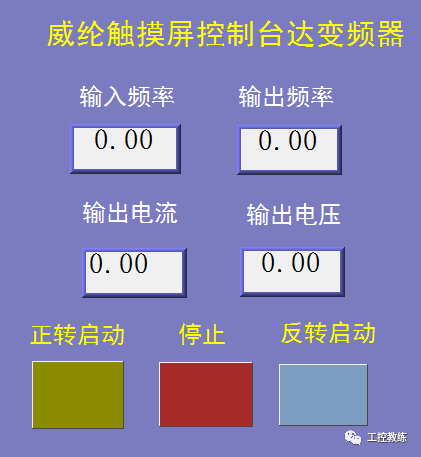

1. The touch screen controls the variable frequency drive (VFD) through PLC.
1. Currently, to control a variable frequency drive, it is generally necessary to use PLC to communicate with the VFD, read the information from the VFD, and then the touch screen communicates with the PLC to complete the functions of starting, stopping, and monitoring the operating frequency, current, voltage, etc. of the VFD.
2. The method of controlling the VFD through the touch screen and PLC
Connect the touch screen to the programming port of the PLC, then expand a 485 interface on the PLC, and communicate between the PLC and the VFD through 485. These two communications can operate independently, and then write the corresponding program as needed, so that the touch screen can change the frequency of the VFD through the PLC.
2. Without PLC, the touch screen directly controls the VFD
To get the VFD to run, two conditions must be met: the start signal and the frequency signal. Therefore, the essence of the touch screen controlling the VFD is to implement the start signal and frequency signal of the VFD on the touch screen.
Since the touch screen and VFD are connected via communication, this issue boils down to the touch screen acting as the master station and the VFD as the slave station to establish a connection.
The VFD is equipped with an RS485 interface that supports the MODBUS protocol, so we only need to establish a MODBUS slave in the touch screen. Below, we will demonstrate the method and steps to directly control the VFD with the touch screen using a practical case.
3. Communication ports between the touch screen and the VFD
1. Delta VFD’s RS485 communication port
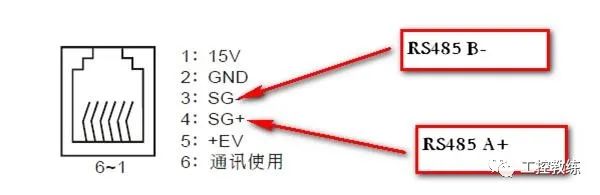
2. Wecon touch screen communication port
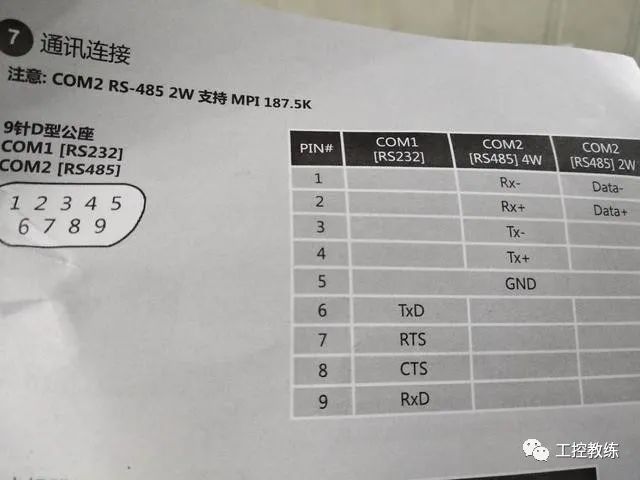
3. Here we need to connect the RS485 terminals of the touch screen and the VFD with wires.
4. Communication settings between the touch screen and the VFD
1. Set the VFD’s operation command and frequency command to use MODBUS communication, with the communication address set to 1, baud rate 9600, and data parity set to (E, 8, 1) even parity for RTU.
2. Set the communication parameters of the touch screen to: MODBUS RTU format, 9600, E, 8, 1
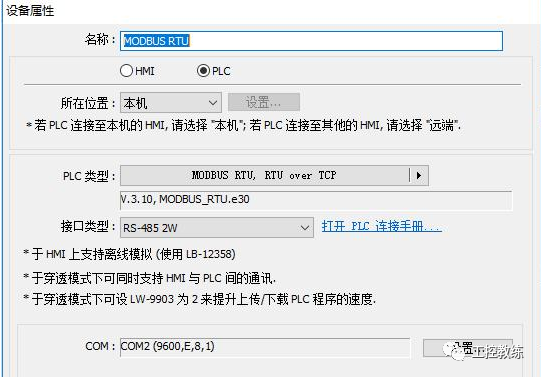
5. Steps to directly control the VFD with the touch screen
1. Make a communication cable to connect the touch screen and the VFD
2. Set the communication parameters of the VFD
3. Set the communication parameters of the touch screen
4. Create the operation screen on the touch screen
5. Wiring and debugging the master station controlling the slave station

Wecon touch screen control method for Delta VFD
↓ ↓ ↓
1. Demonstration of the Wecon touch screen controlling the VFD
2. Principle of touch screen controlling the VFD
3. Complete video set, click on “Read the original text” below