 Search on WeChat
 Technical Training
When using a touch screen, especially for water-related field engineering projects, it is essential to design a water flow control. So how should we control the water flow? Let’s implement it together.
1. Control Requirements
1. Start the water pump to fill the water tank (the flow block displays the current water flow status)
2. When the water in the water tank reaches one hundred percent, the water starts to drain controlled by a drainage valve (percentage filling shows the current water level)
3. When the water in the water tank is reduced to eighty percent, close the drainage valve and start the water pump to fill the tank (percentage filling shows the current water level)
4. While filling, three carts display the current water amount and move forward, during draining, three carts display the current water amount and move backward, repeating the cycle.
5. When manually starting the water pump, execute the above steps 1-4 and automatically cycle the water pump on and off. If you need to stop the cycle, you can manually shut off the water pump to stop everything.
2. Design Program
Step 1: (Self-increment program — equivalent to water flow in)

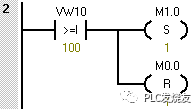
Step 2: (Set M1.0 when VW10 is greater than or equal to 100 while resetting M0.0)
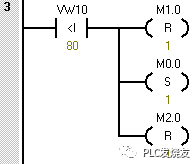
Step 3: (Reset M1.0 when VW10 is less than 80 — set M0.0 — reset M2.0)
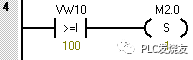
Step 4: (Set M2.0 when VW10 equals 100)
Step 5: (Self-decrement — equivalent to water flow out)

3. Design Touch Screen Interface
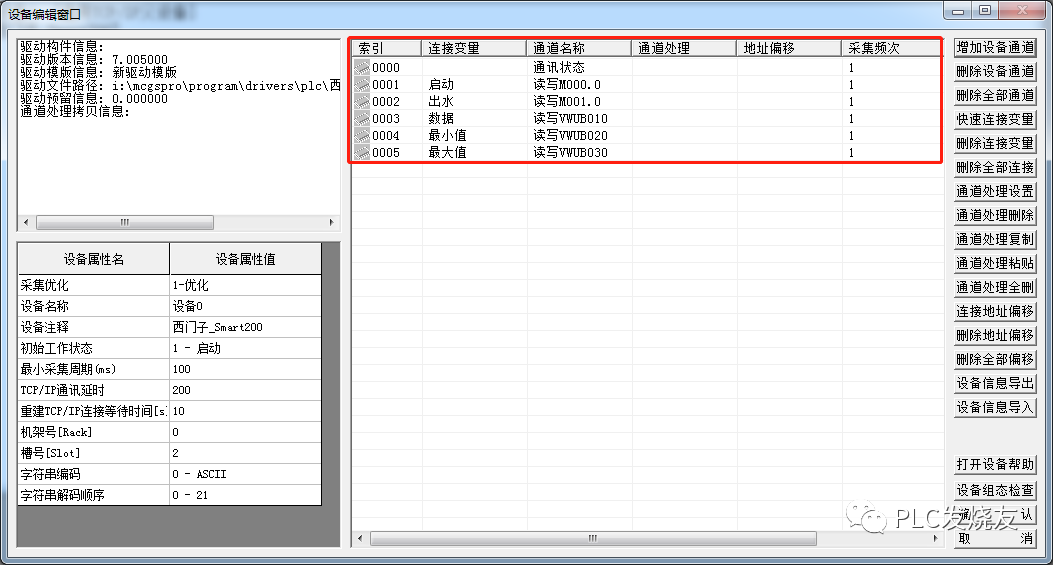
Step 1: (Fill in the touch screen variable address according to the PLC address)
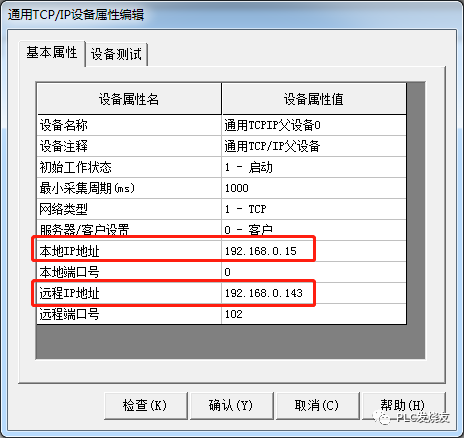
Step 2: (Set touch screen and PLC IP addresses)
The local IP address refers to the computer or touch screen’s IP address
The remote IP address refers to the PLC’s IP address
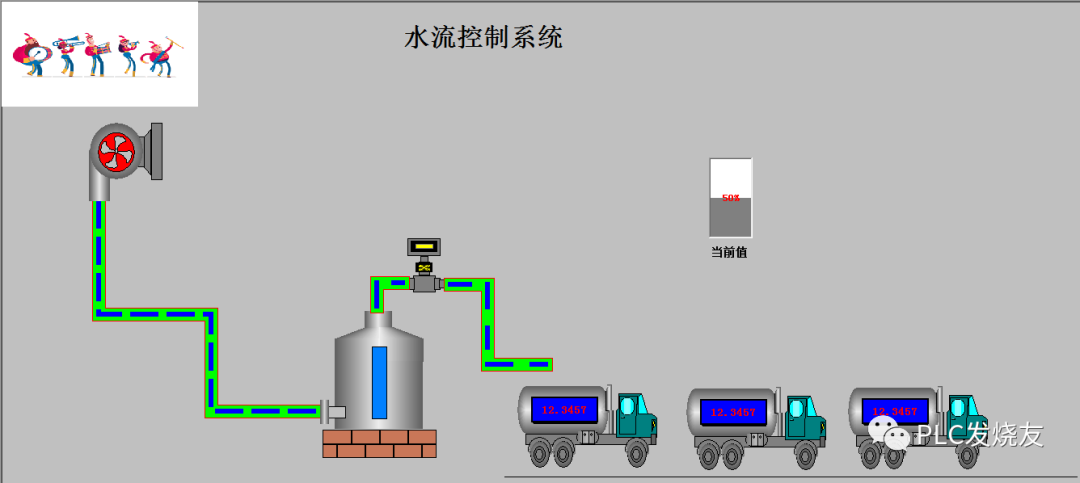
Step 3: (Design the configuration interface in the user window)
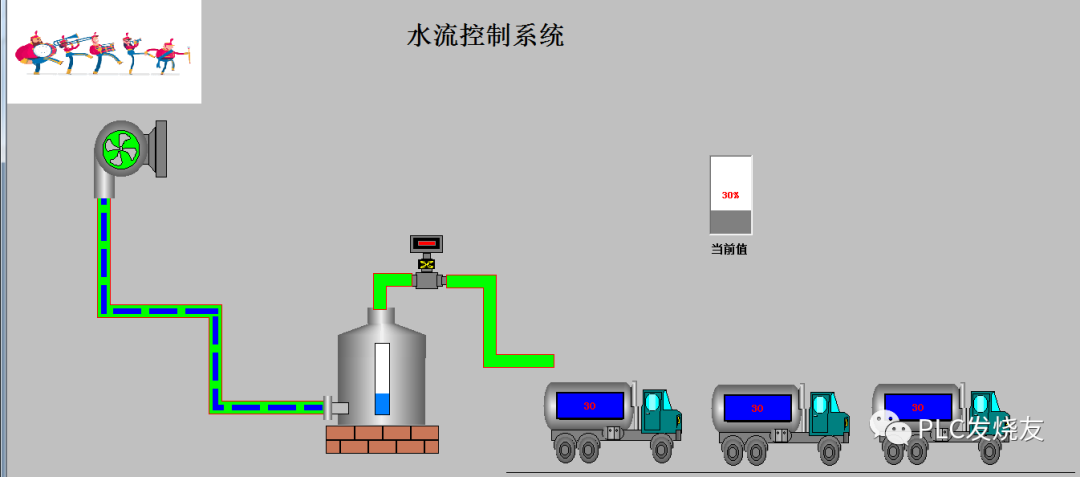
4. Operation Demonstration
Step 1: (Start water flow in)
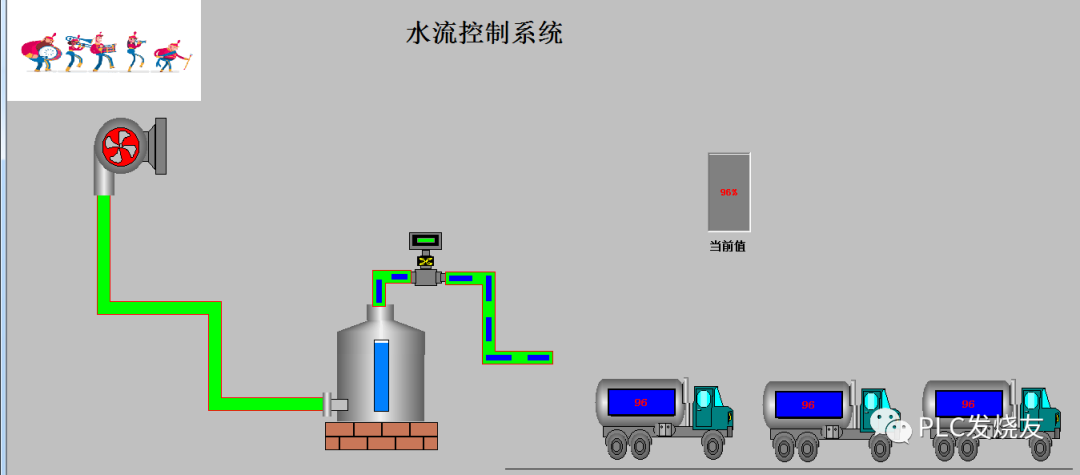
Step 2: (Close water input and start water flow out)
Source: Technical Training Network, Author: Xu Chenshuang, unauthorized reproduction is prohibited. Please supplement any explanations that may be incorrect or lacking in the comments section, so that the next reader can learn more; what you know is what everyone needs…
Below is the “Complete Siemens Set” materials prepared for you, including manuals, cases, software, etc. Don’t forget to claim them!


HISTORY/Previous Recommendations
2023 Electrical Engineer Junior Exam Question Bank Complete Edition (Including Answers)
Inverter Fault Query and Repair Difficult? Just One Click!
One Click to Brush Through All Electrical Exam Questions, Do You Not Own This Tool Yet?
Five Major Electrical Drawing Software (CAD, Eplan, CADe_simu…), Which One Do You Pick?
Latest Electrical Version CAD Drawing Software, Includes Very Detailed Installation Tutorial!
Latest Electrical Drawing Software EPLAN, Includes Very Detailed Installation Tutorial!
Common Problems with Beginners Using S7-200 SMART Programming Software (Includes Download Links)
Comprehensive Electrical Calculation EXCEL Sheets, Automatically Generated! No Need for Help with Electrical Calculations!
Bluetooth Headphones, Electrical/PLC Introductory Books Given Out Freely? Come Claim Your Electrical Gifts!
PLC Programming Basics: Ladder Diagrams and Control Circuits (Includes 1164 Practical Cases for Mitsubishi PLC)
Still Can’t Understand Electrical Diagrams? Electrical Diagram Basics, Simulation Software Available, Quickly Get Started with Theory and Practice!
12 Free Electrical Video Courses, 10GB Software/E-Book Materials, 30 Days of Free Live Electrical Courses!
Don’t forget to like and share!
 Click “Read Original” to Learn PLC/Electrician Courses for Free.