In the field of industrial automation, timely access to equipment failure information is crucial for improving production efficiency. The PLC SMS alarm technology is an ideal solution to meet this demand.
1. Overview of PLC SMS Alarm Technology
PLC SMS alarm is an industrial-grade remote monitoring technology based on GSM/GPRS networks. It achieves equipment failure alarms, status inquiries, and remote control through SMS. In scenarios such as industrial automation, environmental monitoring, and equipment maintenance, this technology can quickly send abnormal status of the PLC system to maintenance personnel’s mobile phones, significantly reducing fault response time.
Compared to traditional wired monitoring systems, PLC SMS alarms have advantages such as wide coverage, no need for the internet, simple deployment, and low cost. It is especially suitable for remote areas, mobile devices, or industrial sites where wiring is inconvenient.
2. Technical Principles and System Components
The core principle of the PLC SMS alarm system from Guangzhou Giant Control Electronics Technology Co., Ltd. is to collect data from the connected PLC through the Giant Control remote module (such as the GRM550 series). When the preset alarm conditions are met, the module automatically sends alarm SMS to the designated personnel’s mobile phone via the built-in GSM module.
Core components of the system:
-
Giant Control Remote Control Terminal: Such as the GRM550 series module, serving as the core processing unit, responsible for collecting PLC data, determining alarm conditions, and sending alarm information.
-
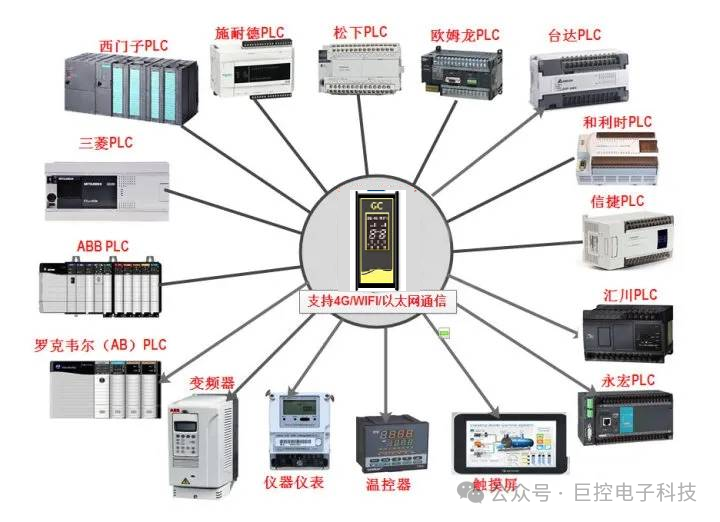
PLC System: Supports mainstream PLC brands, including Siemens, Mitsubishi, Omron, Delta, etc., covering almost all mainstream PLCs on the market.
-
Communication Network: Based on GSM/GPRS mobile communication networks, independent of the internet, utilizing the characteristics of SMS being “always online” and “delivery confirmation” to ensure that PLC status information is not lost.
-
Monitoring Center: Can configure multiple duty personnel mobile phone numbers to achieve a multi-level alarm mechanism, allowing important alarms to notify multiple responsible persons simultaneously.
System Workflow:
-
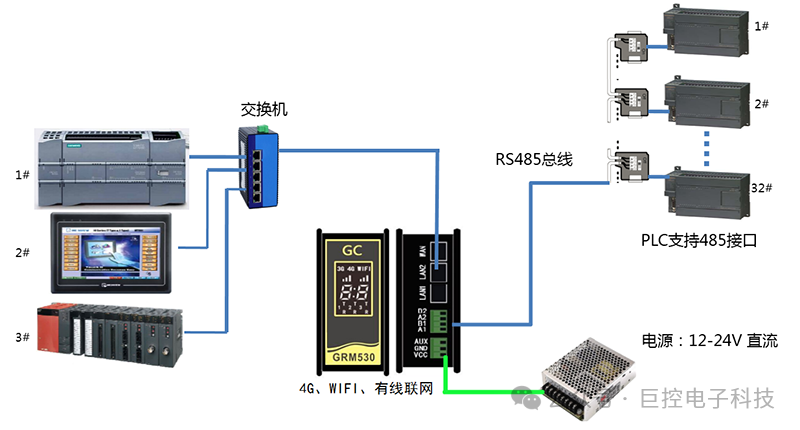
The Giant Control remote module establishes a physical connection with the PLC via RS485 interface or Ethernet port
-
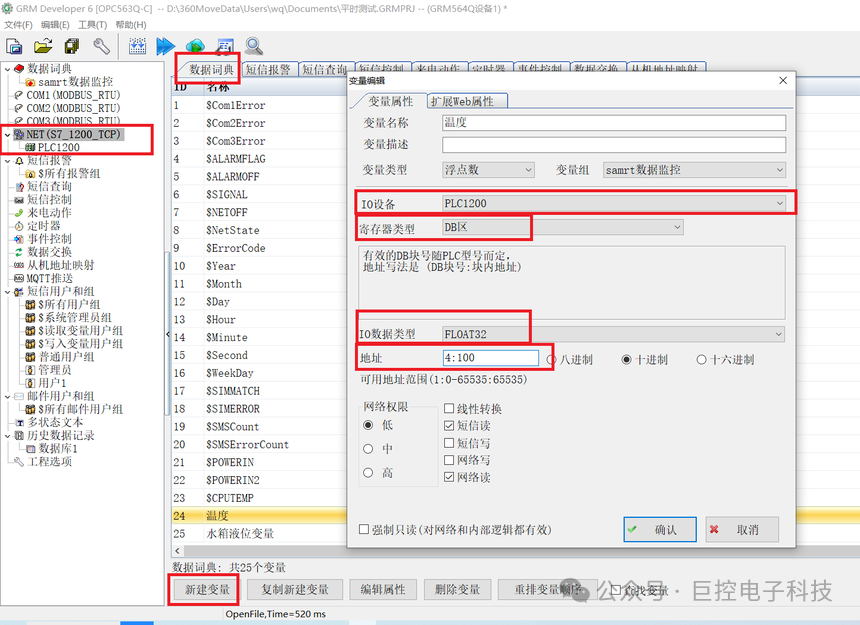
The module reads PLC register data in real-time through built-in protocols (e.g., Siemens S7 1200 TCP, reading DB4.DBD100 temperature)
-
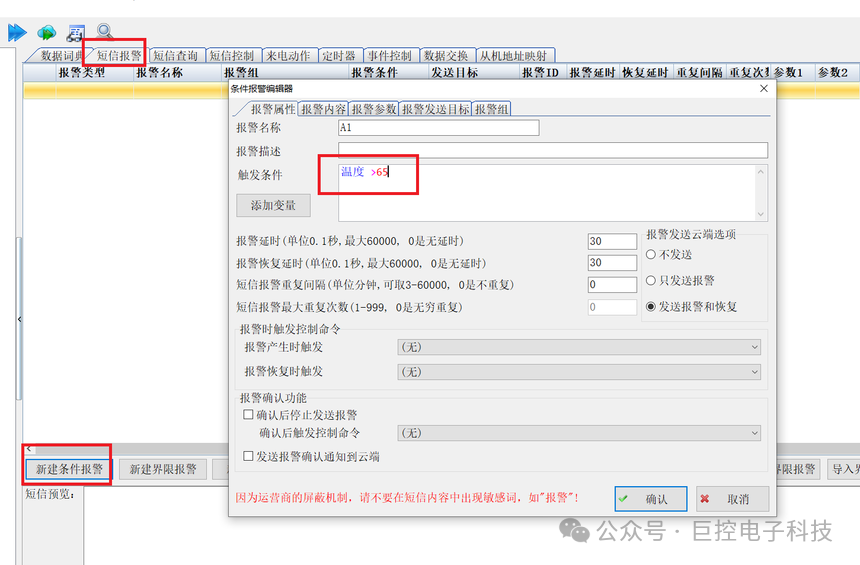
The internal processor of the module performs logical judgment on the collected data to detect whether the alarm conditions are triggered
-
Once the alarm conditions are met, the module sends alarm SMS to the preset mobile number via the built-in GSM module and SIM card
-
Duty personnel can implement remote control operations on the PLC by replying to the SMS, such as starting/stopping equipment, modifying parameters, etc.
3. Features of the Giant Control GRM550 Series Products
The Giant Control GRM550 series is an industrial-grade GPRS module designed specifically for PLC SMS alarms, with the following notable features:
-
Powerful Compatibility: Supports various mainstream PLC protocols without modifying the original PLC program, allowing for quick access.
-
Multiple Communication Guarantees: Adopts a redundant design combining GPRS and SMS/phone/WeChat communication, ensuring alarm notifications can still be sent via SMS or phone even if the GPRS network is interrupted.
-
Reliable Communication Mechanism: Utilizes SMS delivery confirmation mechanism to ensure that alarm information is 100% delivered, with no missed alarms.
-
High Usability: No need to write complex code; all settings can be completed through graphical configuration software, significantly shortening project implementation cycles.
4. Hardware Configuration and Connection
Required Hardware Components:
-
One Giant Control GRM550 series remote control terminal
-
One corresponding PLC (e.g., Siemens S7-200/1200/1500, Mitsubishi FX series, etc.)
-
One mobile or Unicom SIM card (it is recommended to choose a stable signal operator)
-
Antenna and power cable
-
Communication cable (choose RS485 or network cable based on PLC interface)
Steps for Hardware Connection:
-
Install the Giant Control GRM550 module in a suitable position in the PLC cabinet and secure it firmly
-
Connect the power cable of the GRM550, ensuring stable power supply
-
Connect the GRM550 to the PLC’s programming port or communication port via RS485 or network cable
-
Install the GSM antenna, ensuring good signal
-
Insert the activated SIM card
Electrical Connection Precautions:
-
The power supply must meet the module’s voltage requirements (usually DC24V)
-
RS485 wiring must pay attention to A/B polarity to avoid reverse connection
-
In environments with strong interference, it is recommended to use shielded cables and ensure that the shielding layer is grounded at one end
5. Software Configuration Method
Configuration Software Preparation:
Use the dedicated configuration software DEV6 provided by Giant Control, which has a user-friendly interface and can complete complex alarm logic settings through simple steps.
Detailed Configuration Steps:
-
Create a New Project: Open the DEV6 software, create a new project, and select the corresponding Giant Control module model.
-
Communication Configuration: Set the communication parameters with the PLC, including protocol type, serial port parameters (baud rate, data bits, stop bits, parity bits), or Ethernet parameters (IP address, port number).
-
Variable Definition: Define the PLC data addresses to be collected based on monitoring needs, such as input/output points, data registers, etc.
-
Alarm Settings:
-
In the SMS alarm editing block, create a new alarm
-
Set alarm trigger conditions, which can use various logical judgments such as equal to, greater than, less than, and, or, not, etc.
-
Set the alarm delay time, which is how long the alarm condition must be sustained before sending the alarm, usually in units of 0.1 seconds
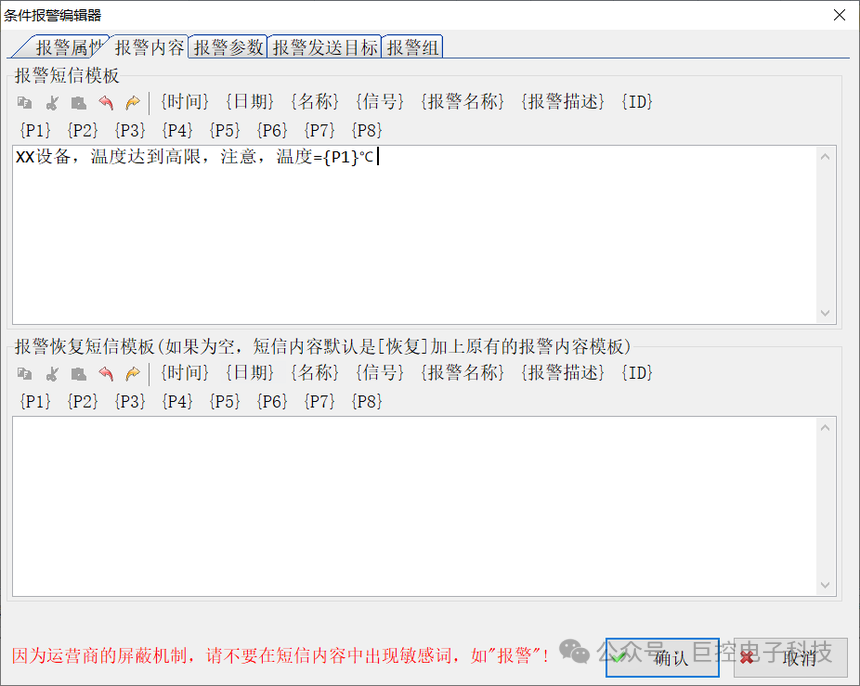
Alarm Content Editing: Write the content of the alarm SMS, which can include variable values, alarm time, device identification, etc., making the alarm information intuitive and easy to understand.
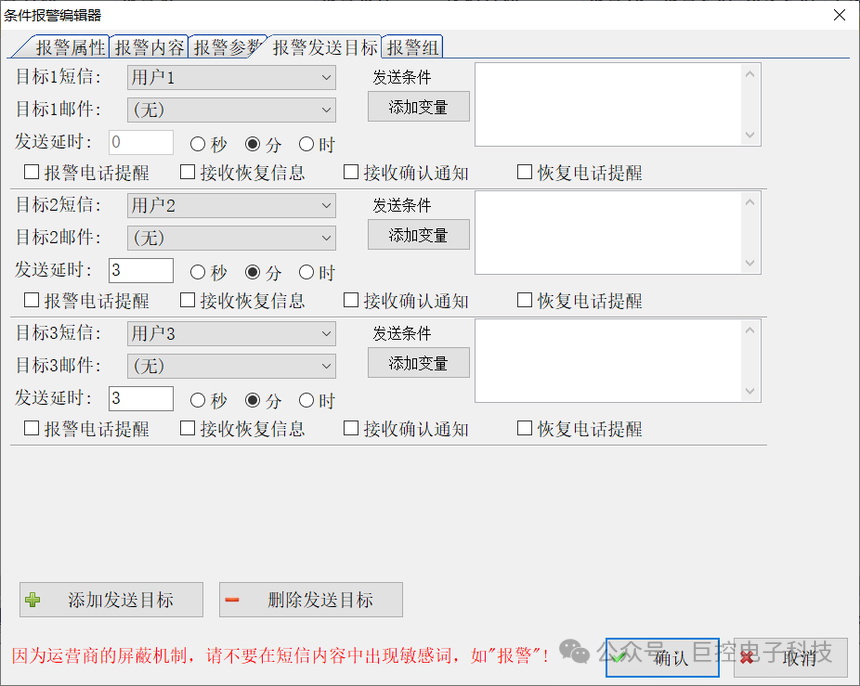
Recipient Settings: Add the mobile phone numbers of duty personnel receiving alarms, allowing for the establishment of multiple users and user groups to achieve flexible alarm distribution strategies.
Compile and Download: After completing all configurations, compile the project and download the configuration to the Giant Control GRM550 module.
Advanced Function Configuration:
-
Alarm Acknowledgment Mechanism: Can configure alarm acknowledgment functions, requiring duty personnel to reply with specific SMS to confirm important alarms
-
Hierarchical Alarms: Set different notification strategies and recipients based on alarm severity
-
Scheduled Reports: Can configure to send scheduled device status reports, allowing management personnel to grasp the system’s operating status in a timely manner
6. Application Scenarios and Advantages
Typical Application Scenarios:
-
Machine Room Temperature and Humidity Monitoring: Real-time monitoring of environmental parameters in the machine room, automatically sending alarm SMS when exceeding standards
-
Production Line Equipment Monitoring: Monitoring the status of key equipment on the production line, immediately notifying maintenance personnel in case of failure
-
Reservoir Water Level Monitoring: Remote monitoring of water levels, automatically controlling pumps or sending alarms based on water level
-
Power System Monitoring: Real-time monitoring of the operating status of power equipment such as distribution cabinets and transformers
-
Unattended Station Monitoring: Achieving remote fault alarms and equipment control at sites without personnel stationed
Advantages of the Technical Solution:
-
True Wireless at Both Ends: Both the device side and the user side do not require wiring, resulting in low construction costs and flexible deployment
-
Independent of the Internet: Can work relying solely on the GSM network, suitable for industrial sites with poor network conditions
-
High Reliability: Industrial-grade design, adaptable to harsh environments, ensuring stable system operation
-
Flexible Expansion: Supports multiple mobile phone alarms, scheduled control, and logical expression triggers, among other advanced features
-
Easy Maintenance: In case of failure, technicians can remotely query device status via SMS to quickly locate issues
7. Common Problems and Solutions
-
Weak Signal Issues: In environments with weak signals, high-gain antennas or signal amplifiers can be used, or the module can be installed near windows or in locations with better signals.
-
SMS Sending Failure: Check if the SIM card has insufficient balance, whether the antenna connection is reliable, and if the signal strength is adequate.
-
Communication Interruption with PLC: Check the communication cable connections, confirm that the communication parameter settings match the PLC, and verify that the protocol selection is correct.
-
Delayed Alarms: Adjust the alarm delay time appropriately to avoid false alarms caused by momentary signal fluctuations, while ensuring that the alarm condition settings are reasonable.
Conclusion
The PLC SMS alarm technology solution based on Guangzhou Giant Control products provides an economical and efficient, stable and reliable remote monitoring solution. This solution is easy to implement and maintain, significantly enhancing the monitoring level and fault response speed of industrial equipment, making it particularly suitable for the practical needs of various industrial enterprises in China.
With the deepening of Industry 4.0 and smart manufacturing, this wireless, intelligent monitoring solution will play an increasingly important role in the field of industrial automation, providing strong technical support for enterprises to achieve unattended and intelligent management.
WeChat Group: PLC Automation Technology Exchange(To join, please indicate: Name – Company) Industrial Control Wang Gong 18873166826

Guangzhou Giant Control Mobile APP Monitoring PLC Solution
How to collect data from WinCC
How to achieve mobile APP control of PLC
How to collect WinCC data and convert it to HTTPS protocol for third-party software
Methods for remote monitoring of 1200 PLC with WinCC
Wireless 4G communication between Kingsoft and PLC
How industrial control personnel use cloud configuration to achieve mobile APP remote monitoring of PLC
How to achieve PLC SMS WeChat alarm
4G remote wireless communication between two PLCs
How to remotely read WinCC data
How to quickly achieve internet remote monitoring of PLC?
S7-400H and WINCC communication
How to browse PDF files in WinCC screens
Using global variables in WinCC V7.5 SP1 VBS
How to communicate with WinCC through 4G network with 200smart
Methods for comparing actual trend curves with set value (ideal) curves in WINCC
How to remotely monitor Siemens 1500 PLC
Classic WinCC porting to WinCC Professional
Using MQTT to send WinCC data to the cloud
NET421/NET431 Siemens PLC and AB PLC communication gateway
S7-200 SMART and S7-1200 TCP communication—S7-200 SMART as server
How to automatically adjust screen resolution in WinCC Runtime Professional to fit window size?
How to achieve simple screen splitting in WinCC projects?
S7-1200 connects to the control room via 4G network
Quick start for WinCC C/S structure
How to prevent multiple WinCC clients from simultaneously operating or changing values?
How to periodically call scripts on the Jingzhi Comfort screen
Application scenarios of Giant Control protocol conversion gateway GRM321GRM322GRM323
How to use Modbus TCP/IP communication configuration with Jingzhi panel/second-generation simplified PN panel
How to quickly achieve OPC DA to WEB SERVER conversion
200smart data logging function
How HMI controls the start and stop of data recording through PLC variables
Synchronization of WinCC flexible recipes with PLC
Communication between HMI panel and S7-1500 R/H redundant PLC
Quick import of Smart PLC variables in WinCC Flexible Smart
Giant Control OPC560 series remote intelligent control terminal
Quick start for S7_1200 recipe function
PLC remote debugging monitoring module – Giant Control GRM530
PN IO device ET 200SP will support R1 mode
Common issues with SCL
PLC protocol conversion gateway: Giant Control NET400
How to determine S7 communication interruption
S7-1500R/H PROFIBUS DP communication
How to achieve PLC SMS alarm
WinCC Modbus TCP communication
WinCC remote and PLC communication solution
1500 PLC and WinCC remote communication via 4G network
Implementation method of custom XY axis multifunctional curve in WINCC
How to send alarms from WinCC to mobile via SMS
In WinCC (TIA Portal) projects, how to correctly use panels, templates, pop-up windows, and sliding windows?
Remote debugging and downloading of foreign PLCs through Giant Control GRM532Y-C
Overview of Giant Control remote module configuration process
Configuration method for WeChat alarm of Giant Control remote module
How to transfer actual values of data blocks to initial values in TIA
WinCC remote and PLC communication solution
How to use EXCEL to access real-time data in WinCC for reporting
Siemens PLC wireless communication solutions
Application of Giant Control wireless communication module in the belt conveyor industry
Troubleshooting and solutions for WinCC activation failures
Mobile monitoring of WinCC – Giant Control OPC560 solution
Profibus communication between PLCs
How to remotely control foreign PLCs