01Basic Understanding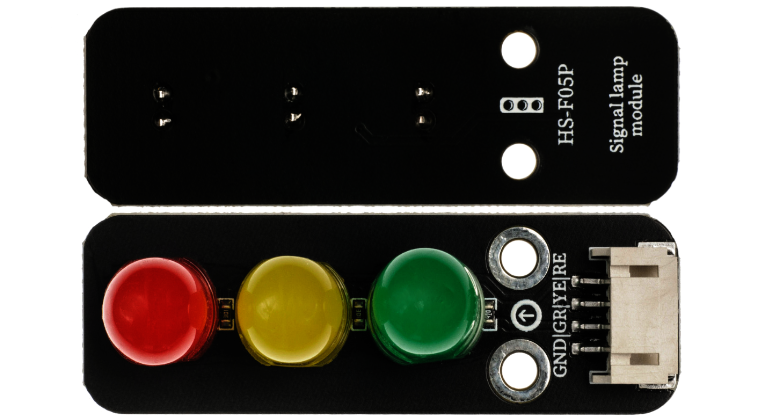 Model:HS-F05PName:Traffic Light ModuleSeries:Analog and Control ModuleDescription:This is an integrated analog traffic light module with red, yellow, and green LEDs. It has three independent driving circuits that can control the on/off state of the three colored lights through digital signals, simulating the working logic of real traffic lights. It features a compact structure, simple operation, and high scene restoration, making it a core component for traffic simulation, programming logic training, and interactive teaching.Usage Scenarios:STEAM education for primary and secondary schools (simulating traffic systems, understanding traffic rules and programming logic); intelligent traffic sand table models (using sensors to achieve traffic flow sensing control); children’s traffic safety teaching aids (learning traffic light rules through interactive games); automation production line indicator lights (using red, yellow, and green to indicate equipment stop, standby, and operation states); IoT scene demonstrations (remotely controlling traffic light states to showcase communication principles), in line with the “Guidelines for General Education in Artificial Intelligence for Primary and Secondary Schools (2025 Edition)”; traffic cognition assistive devices designed for special education (enhancing rule memory through synchronized sound and light). Disciplinary Integration:Physics, Mathematics, Sociology, Information TechnologyEthical Education:The time allocation of traffic signals reflects the fairness of social resources (such as the balance of rights of pedestrians and vehicles), requiring an understanding of the humanistic considerations behind technology; the rule design of the simulation system should reflect inclusivity (such as extending green lights for disabled individuals); the recycling of LEDs in electronic waste requires cultivating environmental responsibility awareness; technical failures leading to abnormal traffic lights may cause chaos, necessitating learning emergency plan design; understanding the concept of “dynamic fairness” in social governance through simulating traffic light adjustments under different road conditions.Note: Images are sourced from the internet, and the product is based on the actual purchase.
02Technical Parameters
Working Principle::
The module integrates three high-brightness LEDs (red at 620nm, yellow at 590nm, green at 520nm), corresponding to the three-color logic of real traffic lights. Each LED is independently connected to a control pin, controlled by digital signals (high/low level): when the signal is high, the LED lights up; when low, it turns off. The timing of the three colored lights can be programmed (e.g., red light on for 3 seconds → yellow light on for 1 second → green light on for 3 seconds → repeat), simulating the working mode of real traffic lights, and can also dynamically adjust the timing based on external sensor signals (such as traffic flow, pedestrian buttons).
Parameter Analysis:
G (GND): Power input negative/cathodeGR: Red LED control pin (digital signal)YE: Yellow LED control pin (digital signal)GE: Green LED control pin (digital signal)Single channel current: ≤20mA (rated working current for each color LED)Brightness: 6000-8000mcd (ensuring bright visibility)Viewing angle: 120° (suitable for multi-angle observation)Operating temperature: -20℃~60℃03Code Example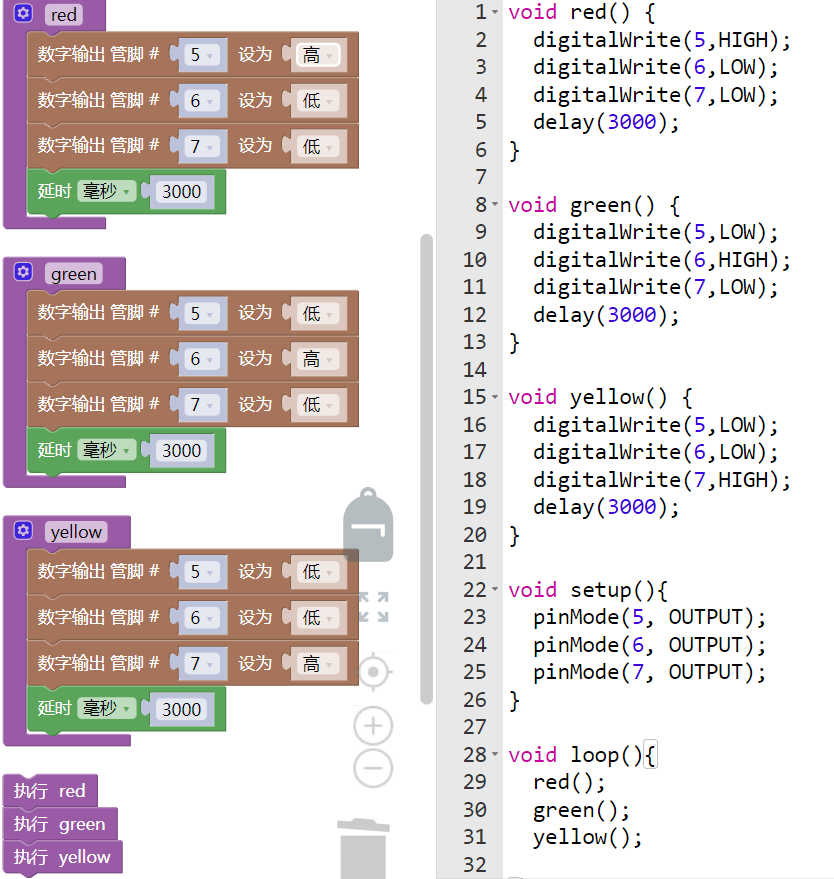
The connection pins are RE:D5, GR:D6, YE:D7.
Note: Students, think about whether you can control these lights using repeated execution; membership group limited time free entry remaining 6 days, charging mode will start after August 20.
 04Safety Measures
1. Power off before wiring, confirm the positive and negative terminals of VCC and GND; reverse connection may cause LED burnout;
2. Single channel current must not exceed 20mA; prolonged overcurrent will shorten LED lifespan; if necessary, connect a 100Ω current limiting resistor in series;
3. Avoid using in high-temperature environments (>60℃); high temperatures accelerate LED aging;
4. When soldering, keep the soldering iron temperature ≤300℃, soldering time ≤3 seconds to prevent high temperature damage to the pins;
5. If the module is used for public display, it must be securely installed to prevent falling and avoid children accidentally touching the wiring terminals;
6. If multiple lights are on simultaneously during debugging, check the code logic or pin short circuit issues;
7. If not used for a long time, power off and store in a dry environment to prevent pin oxidation.
05Extensions
Students can try the following methods:
1. Create an “Intelligent Traffic Light”: link with the HS-S59P slot-type photoelectric sensor to extend the green light time when vehicles are detected, and shorten it when no vehicles are present;2. Build a “Pedestrian Priority System”: combine with the HS-S38P human sensor to automatically trigger the green light when pedestrians are detected at the intersection;3. Design a “Traffic Sand Table Model”: use two HS-F05P modules to simulate traffic lights at an intersection, achieving alternating traffic logic for east-west and north-south directions;4. Develop a “Traffic Rules Learning Machine”: use the HS-S39A touch keyboard to answer questions related to traffic lights; when answered correctly, the green light lights up, and when answered incorrectly, the red light lights up with a buzzer prompt. Arduino Sensors: HS-S01A Infrared SensorArduino Sensors: HS-S02P Infrared Sensor (Obstacle Avoidance)Arduino Sensors: HS-S03P Ultraviolet SensorArduino Sensors: HS-S05P Sound SensorArduino Sensors: HS-F07P Active BuzzerArduino Sensors: HS-F02P Passive BuzzerArduino Sensors: HS-S08P Flame SensorArduino Sensors: HS-S09LB Raindrop SensorArduino Sensors: HS-S09PC Soil Moisture Sensor
Arduino Sensors: HS-S10P Mist Sensor
Arduino Sensors: HS-S11-L Gas Sensor
Arduino Sensors: HS-S20P Ambient Light Sensor
Arduino Sensors: HS-S21P Tilt SensorArduino Sensors: HS-S22P Grayscale SensorArduino Sensors: HS-S24P Digital Temperature SensorArduino Sensors: HS-S26A Temperature and Humidity SensorArduino Sensors: HS-S28P Potentiometer
Arduino Sensors: HS-S31P Touch Sensor
Arduino Sensors: HS-S37PS Water Level Sensor
Arduino Sensors: HS-S38P Human Sensor
Arduino Sensors: HS-S40P Hall Magnetic Sensor
Arduino Sensors: HS-S45P Pressure Sensor
Arduino Sensors: HS-S46P Weight Sensor
Arduino Sensors: HS-S59P Slot-Type Photoelectric Sensor
Arduino Sensors: HS-S70P Heart Rate and Blood Oxygen Sensor
Arduino Sensors: HS-S71P Film Pressure Sensor
Arduino Sensors: HS-S72P Metal Detection Sensor
Arduino Sensors: Infrared Receiver Module
Arduino Sensors: Infrared Transmitter Module
Arduino Sensors: Clock Module
Arduino Sensors: Rotary Encoder Module
Arduino Sensors: Dual-Axis Joystick Module
Arduino Sensors: Gyroscope Module
Arduino Sensors: Voice Broadcast Module
Arduino Sensors: Voice Recognition Control Module
Arduino Display Modules: LED Light Module
Arduino Display Modules: RGB Light Module
Arduino Communication Modules: Bluetooth Module
Arduino Control Modules: Self-Locking Button Module
Arduino Storage Modules: SD Card Module
Arduino Control Modules: Conductive Switch Module
— Previous Recommendations —