(In the debugging area of a food factory, Xiao A is holding a regular SD card, looking worriedly at the card slot of the S7-1200 PLC — he just tried to copy a program using a regular SD card, but not only did it fail, it also prompted “Storage card incompatible,” and the firmware update reported an error. Engineer Zhang walks over with a toolbox containing dedicated storage cards such as MMC cards, SMC cards, MicroSD cards, and printed reference documents.)
Xiao A (approaching and holding the regular SD card): Engineer Zhang, why can’t I use this regular SD card? I want to transfer a program to the S7-1200, but it says incompatible. Do I really have to use a dedicated card? They look similar, what could be the difference?
Engineer Zhang (taking the regular SD card and comparing it with the SMC card): The difference is significant! The dedicated storage cards for Siemens S7 series are not just “ordinary USB drives”; they are the “central storage brain” of the PLC. Our production line in the food factory relies on them to store programs and preserve data. Using the wrong card can lead to program transfer failures or, worse, data loss and production halts. Today, I will explain the differences using our S7-300 (flour silo), S7-1200 (yogurt line), and S7-200 SMART (sterilizer). You must never use the wrong card again.
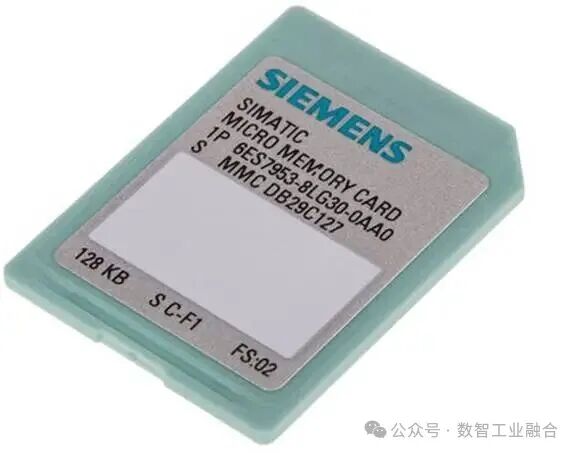
1. First, let’s look at the S7-300 series: The MMC card is a “must-have” for power failure program retention.
Engineer Zhang (taking out an MMC card and inserting it into the nearby S7-300 PLC): Look at the S7-300 in the flour silo; it must have this MMC card inserted to power on — it is the “loading memory” where all the PLC’s programs and data are stored, and it has a power failure retention feature. Even if the power is off for 3 days, the program will not be lost. Last time, an electrician accidentally removed the MMC card, and the S7-300 directly reported “No loading memory,” causing the flour silo’s level control to stop for 2 hours, almost leading to an overflow.
Xiao A: Can a regular SD card replace it? I have many idle SD cards at home; if they could be used, it would save costs.
Engineer Zhang: Absolutely not! Regular SD cards do not have power failure retention design; they can only retain data for a few hours at most after a power failure, and they are not compatible with the hardware protocol of the S7-300 — last time, an intern tried to insert a regular SD card into the S7-300, and not only did it fail to read the program, but it also caused the PLC to report “Storage card format error,” taking half an hour to recover.
Engineer Zhang (flipping through the reference document): Look at what the document says, the MMC card is a “necessary accessory” for the S7-300 CPU; without it, the PLC cannot operate at all. Our S7-300 in the flour silo relies on the MMC card to store the “level gauge interlocking logic”; if a regular SD card were used, the program would be lost after a power failure, and the level gauge would not control the feeding, causing flour to clog the pipeline, which takes at least half a day to clean up.
Xiao A: Does the MMC card have other functions besides storing programs?
Engineer Zhang: It can also store “power failure retention data”! For example, the cumulative output and equipment running time of the flour silo are stored in the MMC card, and they will not reset after a power failure; if they were stored in the PLC’s temporary memory, they would be lost as soon as the power goes out, and we would have to recount. Last time, during a power outage for maintenance in the flour silo, the cumulative output data in the MMC card was intact, saving us the trouble of recounting.
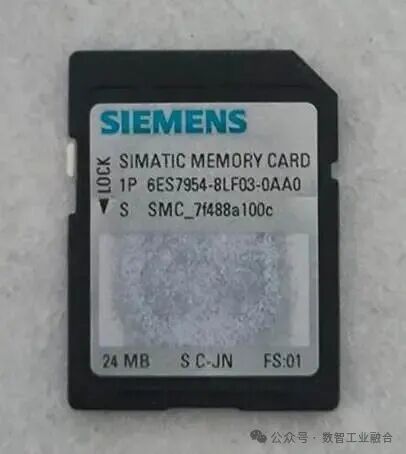
2. Now let’s look at the S7-1200/1500 series: The SMC card “looks like” an SD card, but it cannot be tampered with.
Xiao A (pointing at the S7-1200’s card slot): Engineer Zhang, this SMC card used in the S7-1200 looks exactly like a regular SD card. I almost thought they were interchangeable. Why can’t it be formatted like a regular SD card?
Engineer Zhang (taking out the SMC card and opening the TIA Portal software): Don’t be fooled by the appearance; there are many “intricacies” inside! The SMC card has hidden system files that are crucial for the PLC to recognize and operate. If you format it with a computer or delete the hidden files, it will turn into a regular SD card and can no longer be used with the S7-1200 — last time, the SMC card for the yogurt line was formatted by an intern using a computer, and the program could not be transferred. In the end, we had to buy a new one, costing over 300 yuan.
Engineer Zhang (demonstrating formatting in TIA Portal): The correct method is to “format online” in the TIA Portal software — first, connect the PLC and the computer, then find the storage card in the “Device View” and select “Format”; the system will automatically retain the necessary system files. Moreover, the SMC card not only stores programs but also updates the firmware for the CPU and IO modules. Last time, the firmware of the S7-1200 was too old to connect to the MES system, and it was only after updating the firmware with the SMC card that it worked. A regular SD card cannot do this.
Xiao A: If the SMC card is lost, can the S7-1200 still operate?
Engineer Zhang: It can run for a short time, but it cannot save new programs! The temporary memory of the S7-1200 can hold programs temporarily, but they will be lost as soon as the power goes out; without the SMC card, you cannot perform “service data reading” — last time, the S7-1200 on the yogurt line reported “filling valve fault,” and I used the SMC card to read the service data, quickly identifying it as a communication issue with the valve island. If I didn’t have the SMC card, I would have to disassemble the PLC to check the logs, which would take at least an hour. A regular SD card does not have this function; it cannot even read the PLC’s service data.
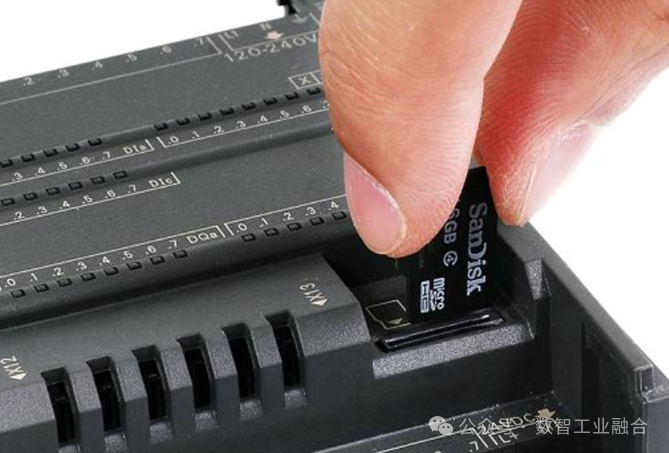
3. Finally, let’s look at the S7-200 SMART series: The MicroSD card “requires capacity and can restore factory settings.”
Xiao A (taking out a 32G regular MicroSD card): Engineer Zhang, for the S7-200 SMART of the sterilizer, I tried to transfer a program using this 32G regular MicroSD card, but it prompted “Capacity not supported.” What is going on?
Engineer Zhang (taking the 32G card and pulling out an 8G dedicated MicroSD card): The S7-200 SMART has strict requirements for the capacity of MicroSD cards. The reference document clearly states that it only supports 4G, 8G, and 16G; it does not recognize 2G and 32G cards — even if this 32G card were dedicated, it would not work, let alone a regular one. Last time, during the debugging of the sterilizer, the procurement department bought a 32G regular MicroSD card, and it did not respond when inserted, delaying the debugging process for half a day.
Engineer Zhang (inserting the dedicated MicroSD card): Moreover, the dedicated MicroSD card has two special functions that regular cards do not have: one is to restore factory settings — if the program of the S7-200 SMART is messed up, inserting the dedicated card while powered on can restore it to factory state; the second is faster program transfer. A regular MicroSD card takes 2 minutes to transfer a 1M program, while the dedicated card only takes 20 seconds. Last time, when the program of the sterilizer went wrong, I used the dedicated card to restore factory settings and retransmit the program, completing it in 10 minutes. If I had used a regular card, it might have taken half an hour.
Xiao A: So, even if a regular MicroSD card has the correct capacity, it still cannot be used?
Engineer Zhang: No! Regular MicroSD cards do not have Siemens’ encryption protocol, so the PLC does not recognize them; moreover, they do not have power failure retention functionality. The temperature parameters and pressure thresholds of the sterilizer are stored in them, and once the power goes out, they are lost, requiring reconfiguration. Last time, a maintenance worker used a regular MicroSD card to store sterilization parameters, and after a power failure, the parameters were lost, leading to a low sterilization temperature for a batch of yogurt, resulting in a total loss of over 5000 yuan.
4. Core differences: Dedicated cards are “exclusive tools for PLCs,” while regular SD cards are just “general storage.”
Xiao A (taking out a notebook and comparing the parameters of the two types of cards): Engineer Zhang, I summarize the differences between dedicated cards and regular SD cards. Is it mainly in terms of “functionality, compatibility, and operational prohibitions”?
Engineer Zhang: Exactly! Let me list the “three core differences” for you to refer to when selecting cards in the future:
(1) Functional differences: Dedicated cards can “manage the PLC,” while regular cards can only “store files.”
Engineer Zhang: The functions of dedicated cards are tailored for PLCs: 1. Store programs and power failure retention data (such as output and parameters); 2. Update firmware and read service data (for troubleshooting); 3. Restore factory settings (in emergencies). Regular SD cards only have the basic functions of “storing files and transferring data” and cannot even update the PLC’s firmware, let alone read fault data — last time, the S7-1200 on the yogurt line reported “communication fault,” and I used the SMC card to read the service data, finding the loose network cable in just 5 minutes. If I had used a regular SD card, I would have had to check each device, which would take too much time.
(2) Compatibility differences: Dedicated cards are “matched according to PLC models,” while regular cards are “difficult to use interchangeably.”
Engineer Zhang: Siemens provides dedicated cards for each S7 series: S7-300 uses MMC cards, S7-1200/1500 uses SMC cards, and S7-200 SMART uses specific capacity MicroSD cards. If the model is incorrect, it won’t work even if inserted. Regular SD cards are not compatible with either S7-300 or S7-1200; even if they can be read occasionally, they are unstable — last time, someone tried a regular SD card in the S7-300 of the flour silo, and although it read the program, it reported “data verification error” as soon as it ran, almost causing a feeding control error.
(3) Operational prohibition differences: Dedicated cards “must not be tampered with,” while regular cards can be “formatted at will.”
Engineer Zhang: This is the easiest place to make mistakes! Dedicated cards have strict operational prohibitions: SMC cards must not be formatted with a computer or have hidden files deleted; MMC cards must not be hot-swapped (they can only be removed when powered off); and the MicroSD card for S7-200 SMART must not exceed 16G. Regular SD cards can be formatted and have files deleted without any restrictions, but once used in a PLC, problems arise — last time, an intern deleted the hidden files of the SMC card, and it turned into a regular SD card, which could no longer be used with the S7-1200 and had to be scrapped.
5. Selection and usage in food factories: “Three looks and one avoidance” to avoid pitfalls.
Xiao A (holding a sample of the dedicated card): Engineer Zhang, how should I select dedicated cards in the future? For example, the new juice line will use the S7-1500; which card should I use?
Engineer Zhang: Remember the principle of “three looks and one avoidance” to ensure you choose correctly:
1. Look at the PLC model: S7-300 → MMC card, S7-1200/1500 → SMC card, S7-200 SMART → 4G/8G/16G dedicated MicroSD card; do not use across models;
2. Look at functional requirements: if you need to update firmware or read service data → choose original SMC/MMC cards, do not buy compatible cards; if you need to restore factory settings → the S7-200 SMART must use a dedicated MicroSD card;
3. Look at capacity compatibility: the S7-200 SMART must strictly select 4G/8G/16G; do not greedily buy 32G, and do not use 2G small capacity;
4. Avoid regular cards: whether SD cards or MicroSD cards, as long as they are not marked “Siemens dedicated,” do not insert them into the PLC, even in emergencies — last time, during the urgent debugging of the yogurt line, a regular SD card was used to transfer the program, resulting in program loss and a half-hour production halt, which delayed things even more.
Engineer Zhang (helping Xiao A transfer the program to the S7-1200 using the SMC card successfully): See, using the correct dedicated card, transferring programs and updating firmware goes smoothly. Don’t ever try using a regular SD card again.
Xiao A (nodding and organizing the dedicated card types): Great! I will now note down the dedicated card models corresponding to each PLC, so I can refer to them during future purchases and debugging, ensuring I won’t make mistakes again.