|
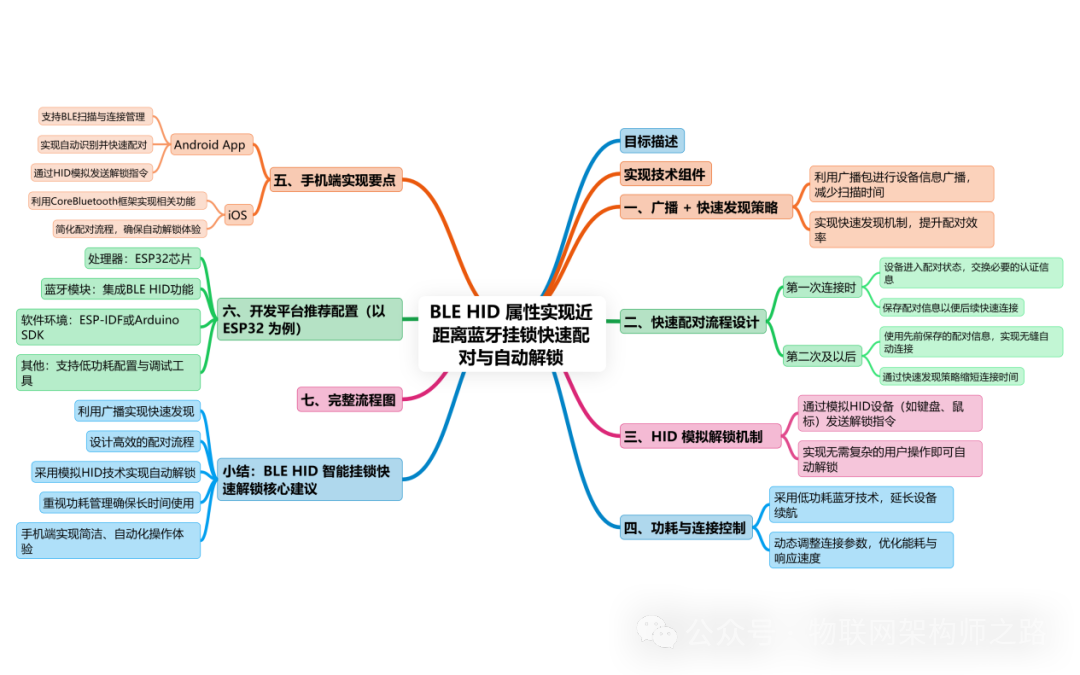
To achieve quick pairing and connection of the Bluetooth lock using BLE HID attributes when the phone is within a certain range, it is necessary to combine the following key technical modules to create a “proximity automatic unlocking experience“. |
Objective Description
•The lock is a BLE HID device (simulating input unlock commands)
•When the phone is close (e.g., <3 meters), it automatically pairs and connects to the lock
•The user can quickly complete the connection and unlocking without pressing the pairing button or opening the app
Implementation Technical Components
|
Module |
Technical Name |
Function |
|
Broadcast Discovery |
BLE Advertising + RSSI |
Detect whether the lock is within connectable range |
|
Fast Connection |
Fast Advertising + Preferred Connection Params |
Reduce connection establishment delay |
|
Automatic Pairing |
Just Works / Passkey Entry |
Establish BLE secure connection |
|
Identity Binding |
Bonding + Whitelist |
Automatic reconnection, prevent others from connecting |
|
Automatic Unlock Logic |
HID Input Simulation or GATT Command |
Simulate keyboard input password, trigger unlock command |
1. Broadcasting + Fast Discovery Strategy
Lock device-side broadcast parameter configuration (ESP32/nRF52 compatible):
|
C // Set broadcast interval for fast connection mode (30ms) .advertising_interval_min = 0x0020, // 20ms .advertising_interval_max = 0x0040, // 40ms .advertising_type = ADV_TYPE_IND, // Connectable broadcast |
Increase broadcast data content for identity identification:
•Add UUID identifier of HID Profile
•Custom Manufacturer Data indicating “I am a certain brand smart lock”
2. Fast Pairing Process Design
First connection:
1. The phone scans the broadcast
2. The user clicks to pair, using BLE Pairing mode:
○Just Works (no password, suitable for good experience but not secure)
○Passkey Entry (the lock or app displays/inputs a 6-digit password)
3. Establish connection + Bonding
4. The lock stores the phone MAC/identity in the whitelist
Second time and after:
1. When the phone is close, the lock discovers the trusted device in the broadcast packet
2. The phone OS automatically reconnects (supported by both iOS/Android)
3. After successful connection, directly trigger the unlock command (e.g., HID input “OPEN” + Enter)
3. HID Simulation Unlock Mechanism
BLE HID message control:
|
C // Simulate input character unlock password uint8_t report[] = {0x00, 0x00, 0x04, 0x00, 0x05, 0x00}; // a+b send_input_report(report); |
It is also possible to design a custom combination:
•HID input password:1 2 3 4 Enter
•The phone app listens to the input stream to trigger control logic
4. Power Consumption and Connection Control
•The device defaults to slow broadcast mode (power-saving)
•When the phone is close (RSSI > threshold, e.g., -70 dBm), switch to fast broadcast
•After connection establishment, enter short connection interval mode, e.g., 15ms
•After control is completed, revert to low power mode (parameters restore + sleep)
5. Key Points for Mobile Implementation
Android App:
|
Java // Set low latency mode during scanning ScanSettings settings = new ScanSettings.Builder() .setScanMode(ScanSettings.SCAN_MODE_LOW_LATENCY) .build(); // Listen for target device discovery, automatically connect when RSSI > -70 if (rssi > -70 && device.getName().equals(“SmartLockHID”)) { device.connectGatt(context, false, gattCallback); } |
iOS:
•iOS will automatically remember paired BLE HID devices
•If Background Mode (Bluetooth Central) is enabled, the device will automatically connect and launch the app when close
6. Recommended Development Platform Configuration (using ESP32 as an example)
•Support for BLE HID Profile (using NimBLE or Bluedroid)
•Support for dynamic update of connection parameters
•Support for Pairing + Bonding + Whitelist functions
•Support for adding device name and identity information in broadcasts
7. Complete Flowchart
|
Plain Text [Phone not connected] ↓ Lock slow broadcast (100ms) ↓ Phone close (RSSI > threshold) Switch to fast broadcast (20~30ms) ↓ Phone scans the lock, paired → auto reconnect ↓ BLE HID input password or control command ↓ Lock unlocks → auto disconnect or timeout to slow |
Summary: Core Recommendations for Quick Unlocking of BLE HID Smart Locks
|
Function |
Implementation Strategy |
|
Proximity Sensing |
Use RSSI to determine phone proximity |
|
Fast Connection |
Broadcast interval 20~30ms, connection parameters 15ms |
|
Automatic Connection |
Use Bonding + phone OS reconnection mechanism |
|
HID Control |
Simulate keyboard input to trigger unlock |
|
Secure Pairing |
It is recommended to use Passkey Entry + whitelist management |
|
Energy Saving Strategy |
Enter slow broadcast + sleep mode when idle |