1. The new 5 bit processing instructions (BSET, BRST, TEST, DTEST, BKRST) in FX5U PLC include the following functional characteristics:
1. Instruction format and parameter definitions: The complete format of each instruction, operand range, and data type requirements.
2. Functional logic explanation: The specific implementation of bit operation mechanisms (such as bit setting/resetting methods for word soft components, logic for condition testing, etc.).
3. Application scenario comparison: Advantages of using these instructions compared to traditional ZRST instructions and typical application cases.
4. Execution timing characteristics: Execution characteristics within the scan cycle and their impact on program efficiency.
5. Precautions: Errors to avoid during use and methods for handling special situations.
Please highlight the technical improvements of the new instructions in FX5U by comparing the bit processing instruction systems of FX3U and FX5U.
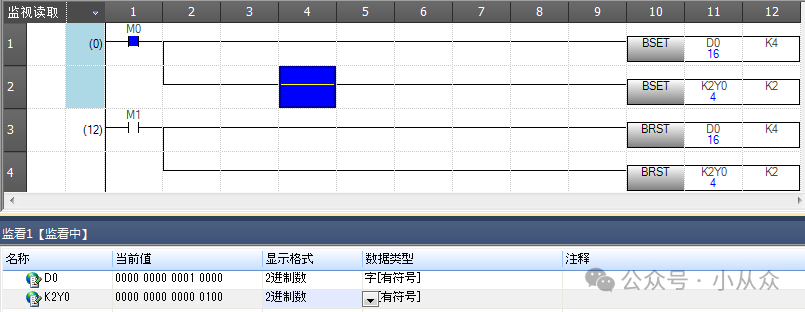
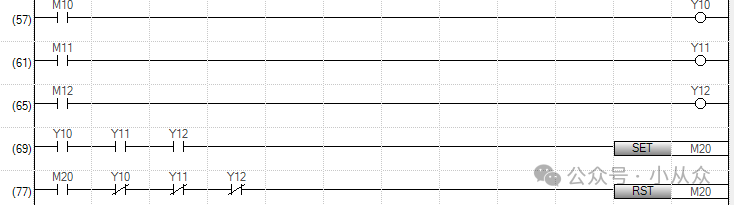
Bit setting and resetting of word soft componentsBSET and BRST
2. Analysis tasks for bit operation instructions of word soft components in PLC programming:
1. Instruction function comparison: A detailed comparison of the core differences between BSET/BRST instructions and traditional SET/RST instructions, emphasizing the uniqueness of bit operations in word soft component addresses.
2. Parameter analysis: Explanation of the complete parameter composition of BSET and BRST instructions, including specifications for word soft component addresses, bit numbering rules, and data range limitations.
3. Special case handling: In-depth analysis of the “low 4 bits data execution” mechanism when the bit number exceeds 15, with examples illustrating the value conversion process and the actual effective bit addresses.
4. Application examples: Provide 2-3 typical application scenario ladder diagram examples, demonstrating how to correctly use these two instructions to implement complex bit control logic.
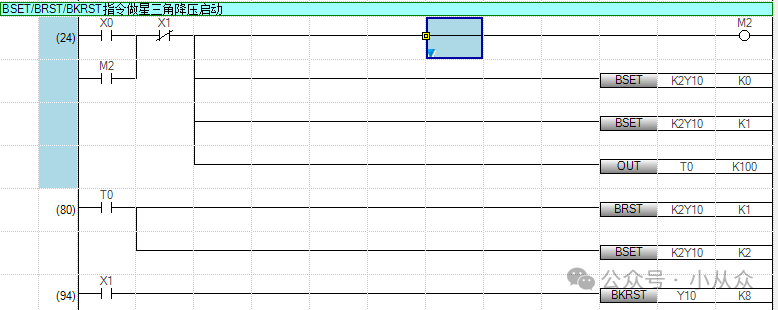
3. Case Study:BSET/BRST instructions for star-delta voltage reduction control program.
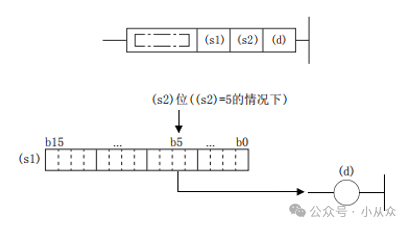
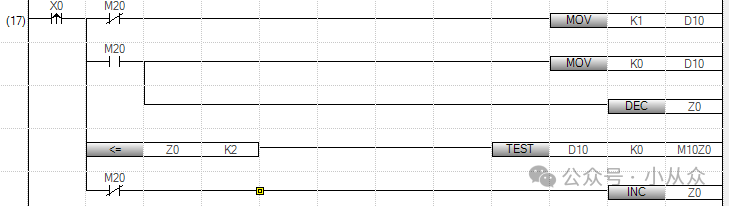
4. 16-bit/32-bit TEST/DTEST
The working principle of TEST/DTEST instructions, including the following content:
1. Basic function analysis: Explain the core functions of TEST and DTEST instructions in simple terms, distinguishing the main differences between the two.
2. Parameter explanation: Detailed explanation of the meanings, data type requirements, and valid value ranges of parameters s1, s2, and d.
3. Bit position calculation rules:
* For the TEST instruction, how to determine the actual bit position by “dividing by 16 and taking the remainder” when s2 specifies a value greater than 16.
* For the DTEST instruction, how to determine the actual bit position by “dividing by 32 and taking the remainder” when s2 specifies a value greater than 32.
* Provide 2-3 calculation examples (including the case of s2=20).
4. Execution process: Describe the complete execution process of the instruction from extracting bit data to writing to the target soft component in a step-by-step manner.
5. Application scenarios: Provide examples of the control needs or data processing scenarios in actual PLC programming where these two instructions are applicable.
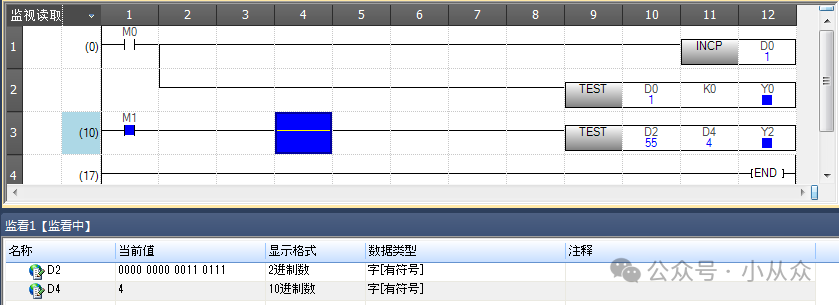
5. Case Study:TEST instruction for sequential start and stop of a motor with a single button control.
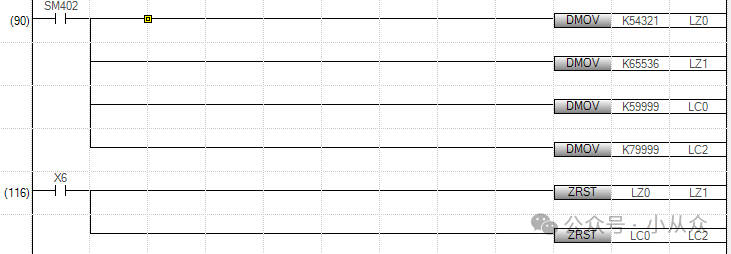
6. Batch Reset of Bit Soft ComponentsBKRST and Data Batch Reset ZRST
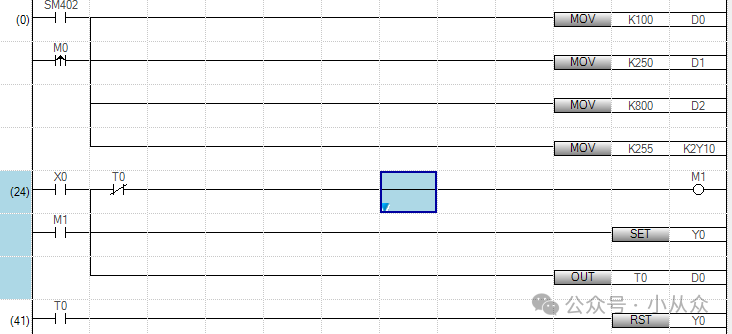
Comparison analysis and testing tasks of PLC data reset instructions:
1. Instruction characteristics analysis: A detailed comparison of the core characteristics of the four reset instructions BKRST, ZRST, RST, and FMOV, including the types of operation objects (bit/word soft components), reset ranges (single point/batch/range), data processing methods (clearing/resetting), and special application limitations.
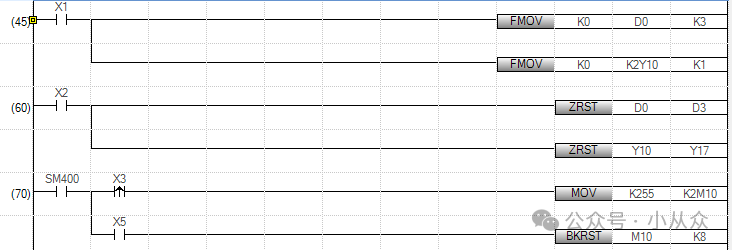
2. Test program design: Design a PLC test program that includes the following scenarios:
– Use BKRST to batch reset continuous bit soft components.
– Use ZRST to reset a range of word soft components.
– Use RST to reset a single bit/word soft component.
– Use FMOV to batch write the constant K0 to word soft components.
3. Execution result comparison: Simulate running the test program, record and compare the execution results of each instruction under the same initial conditions, focusing on:
– Differences in execution efficiency (impact of scan cycle).
– Memory usage.
– Processing capability of special soft components (e.g., LC/LZ).
– Handling of exceptional situations (e.g., out-of-bounds specification, type errors).
4. Application scenario summary: Based on the test results, summarize the most suitable industrial control application scenarios for each instruction and usage precautions.
Previous Recommendations
Detailed tutorial on connecting PLC via WIFI using Portal software (WIN10 system).
Detailed explanation of using Siemens Portal library files (creating, opening, archiving, and restoring).
It turns out that communication between S7-1200 PLC and Weintek touch screen DB address is so simple, with error explanations, recommended for collection.
S7-300 analog quantity FC.
Understanding the jog, self-locking, and interlocking of contactors.
How to set programmable buttons in ABB robot teach pendant.
Identifying transformer faults by sound.
Learning how to apply PLC analog quantities.
Portal software program version issues.
Red-green traffic light control.
Polling case of controlling two frequency converters with Mitsubishi PLC using BD board.
S7-200 SMART series PLC communication between S7.
Ethernet connection of multiple Mitsubishi FX5U PLCs with Mitsubishi touch screen.
Learning PLC programming starting from cylinder control cases.
Wiring of Siemens 1200 PLC with servo.
Program and memory structure of Siemens 200 PLC.
Ethernet connection of Omron NX with Weintek touch screen.
Practical case of Siemens S7-1200 PLC controlling motor forward and reverse.
Siemens S7-1200 PLC constant pressure water supply case.