In recent projects, we need to determine both rising and falling edges. Today, we will analyze how communication between the host computer and PLC determines rising and falling edges, focusing on the logical implementation that is independent of specific PLC brands and communication libraries.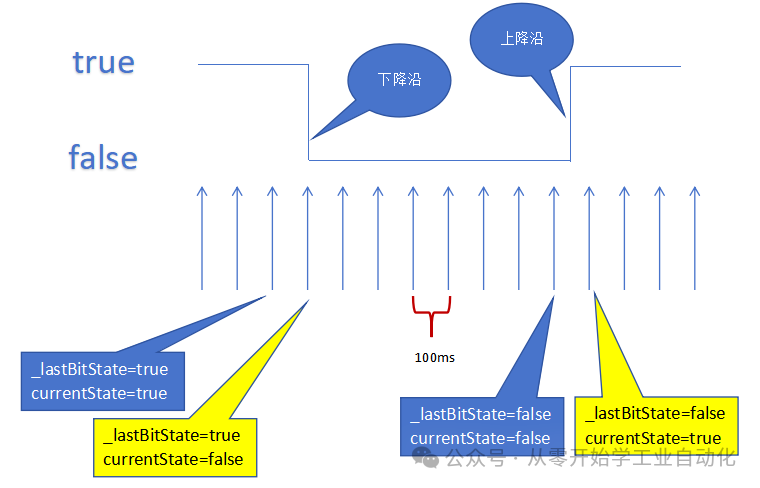 1. Principle of Edge DetectionEdge detection is essentially a state comparison: to determine if a bit has changed, we must know both the current state and the historical state. By comparing these two states, we can identify the type of edge.Rising Edge: Historical state is false → Current state is trueFalling Edge: Historical state is true → Current state is false2. Implementation Idea in WinForm1. State PreservationDefine variables to store the historical state.For a single point: use a boolean variable to save the last state.For multiple points: use an array or a custom class to save the historical state of each point.2. Periodically Read PLC StateIn WinForm, use a timer to cyclically read the PLC state:Set an appropriate sampling interval: recommended 50-200ms,Too short an interval increases CPU and communication load, while too long an interval may miss rapidly changing edges.In the timer’s Tick event, execute three steps: “Read current state → Compare with historical state → Update historical state”.3. Example of Logic Code for Judgment
// Assume current state has been read as currentStateif (_lastBitState == false && currentState == true){ // Rising edge detected, trigger corresponding logic OnRisingEdge();}else if (_lastBitState == true && currentState == false){ // Falling edge detected, trigger corresponding logic OnFallingEdge();}// Assign current state to historical state_lastBitState = currentState;4. Execute Loop Scanning in a Thread PLC communication operations are relatively time-consuming and should not be executed directly in the UI thread, as this may cause the interface to freeze. We place the operation of “reading PLC state” in an asynchronous method or background thread, and when updating UI controls, use Control.Invoke() or Control.BeginInvoke() to ensure it executes in the UI thread, avoiding cross-thread access exceptions.5. Exception HandlingWhen communication is interrupted, it is essential to stop detection and reset the rising and falling edge states and historical states, restarting the next read to avoid edge states appearing immediately upon power-up.3. SummaryLogic: Edge detection relies on comparing historical and current states, necessitating the preservation of the last state value.Implementation: Use a timer for cyclic sampling, employing simple boolean checks to identify rising edges (0→1) and falling edges (1→0).Other considerations: Communicate with the PLC to read states in a thread, avoiding communication in the main UI thread to prevent interface freezing or cross-thread exceptions.There are many related articles in the public account, if you like, please follow or share, thank you for your support.Entry Project [Automatic Screw Tightening Machine] C#, PLC, Touch Screen Practical (2/5): C# Winforms Host Computer DesignEntry Project [OpenCV Visual Sorting Robot Arm] (2/3): Host Computer Design. [C# Winforms, OpenCV Vision, PLC Practical]30-Day Quick Start to C# Winform Host Computer Development Day 1: Environment Setup and First ProgramWe have opened a WeChat technical exchange group, you can add it in the public account menu, and everyone is welcome to exchange and learn together.