Types of variables used in Huichuan PLC programming
In Huichuan PLC programming, the variety of variables is quite rich. Similar to other brands of PLCs, it generally includes soft components, custom variables, and system variables.
Soft components typically include: bit soft components X/Y/M/S/B, and sub soft components D/R/W.
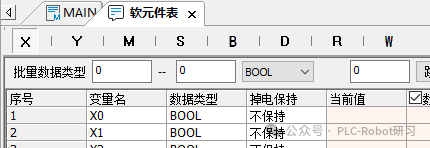
It is not difficult to see that the types of soft components are quite similar to those of Mitsubishi (X/Y/M/L/B/F). Below we look at the specific types, ranges, point counts, and descriptions of soft components:
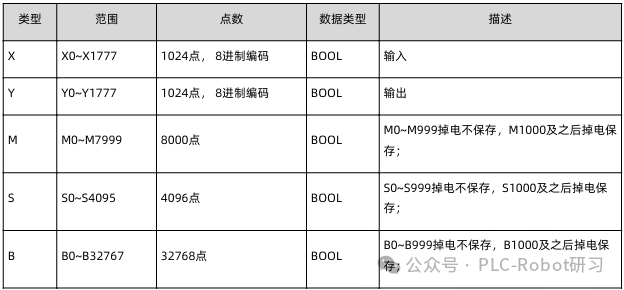
From the table, it can be summarized that bit soft components are all of BOOL type, used for BOOL type input/output instructions or output parameters.
As for the hardware points of the PLC itself, they are represented by X and Y for input and output respectively.
As ordinary auxiliary relays, M components total 8000 from 0-7999. After M8000, similar to Mitsubishi, they are also used for special functions, such as the M8000 program running flag in Huichuan.

Word soft components
In Huichuan PLC, the commonly used types of word soft components are shown in the table below:
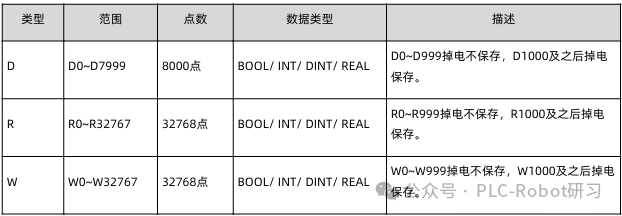
The functional range of word soft components is fixed, so the power-off retention type numbers cannot be changed.
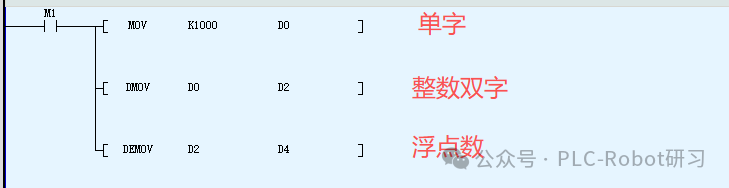
Word soft components can also be used as integers or floating-point numbers. When used as integers, it depends on the instruction whether to use a single word or double word. However, when used as floating-point numbers, it must occupy 2 words. Below are a few examples:
Special soft components
In Huichuan PLC programming, there are some special usages of soft components:
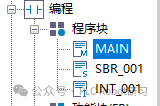
Among them, K/H/E are numeral representation symbols. This is similar to usage in other PLCs. For example, floating-point numbers:

Variables
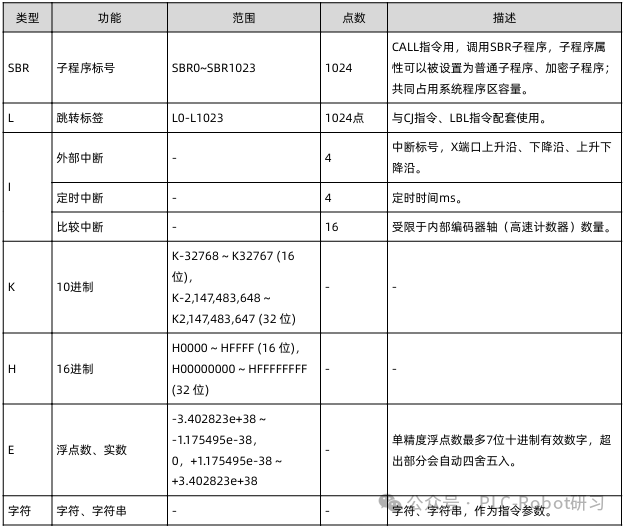
Variables refer to a type of identifier that does not have a specific storage address, apart from the conventional X/Y/M/D, etc. This is similar to the DB data blocks we create in Siemens PLCs. Although there is no specific storage address, the data type structure must comply with the general variable data types. That is, the named variables must still be BOOL/INT/REAL/BYTE, etc.
When defining custom variables, attention must be paid to the scope of variable usage. Global variables or local variables.
Global variables: Can be used in all programs, effective state.
Local variables: Only valid within their own program block.
The above two usages are similar to global and local variables in Siemens PLCs. Similarly, local variables are quite similar to the FB block usage in Mitsubishi PLCs.
Custom variable naming rules:
· Can only consist of “_, letters, numbers, Chinese characters” and cannot start with “_, numbers”.
· Cannot have the same name as “soft component types, constants, standard data types, instructions, subroutine names, interrupt subroutine names”.
· Cannot be “ARRAY, TRUE, FALSE, ON, OFF, NULL” and other keywords.
Variable data types
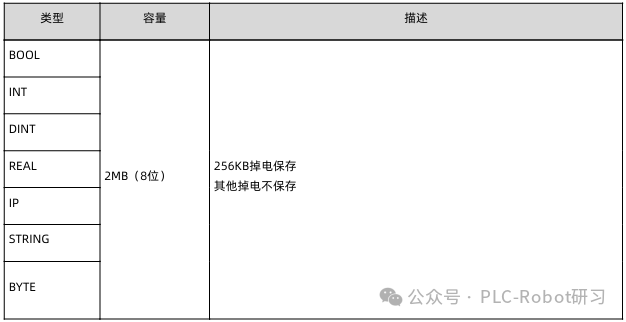
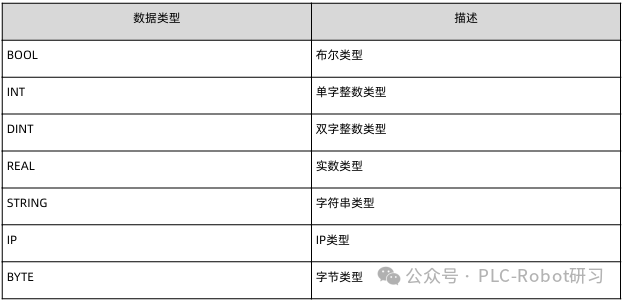
Variable definitions support structures and arrays, and variable data types support:
Taking the commonly used motor forward and reverse control as an example, we will see how to implement variable applications.
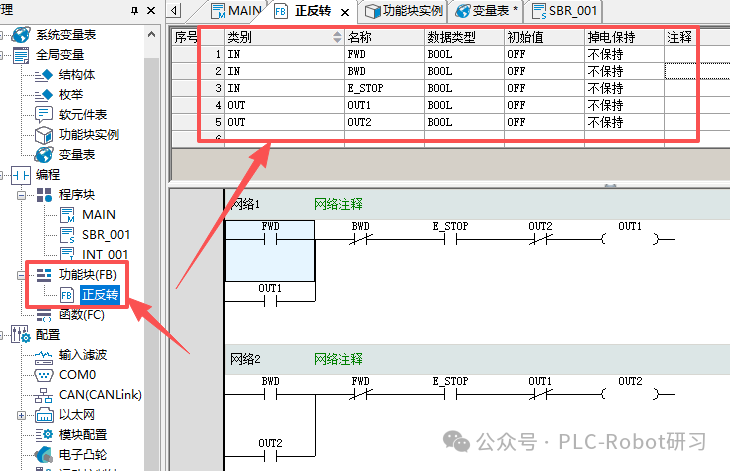
First, create a function block FB, double-click to open the function block, and define the relevant variables and variable types in the local variable input box above. For forward and reverse control, several essential buttons are “Forward”, “Reverse”, “Stop”, “Forward Output”, “Reverse Output”. As shown in the figure below:
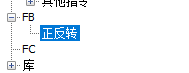
In the program editing area, input the forward and reverse control ladder diagram, then compile it. After the program is correct, a custom function block FB will be generated. In the toolbox area under FB, it can be seen as shown in the figure below:
Then, return to the main program and drag the function block into the network. This way, the input pins of global variables can normally control the forward and reverse control of the motor and can be called repeatedly.
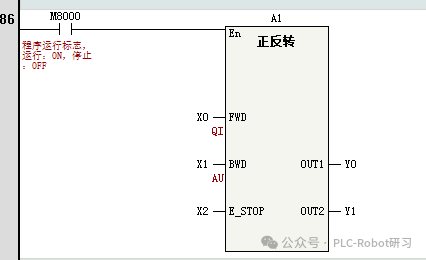
In this case, the variables defined in the function block FB are local variables, which are only valid within the FB and cannot be used in other programs. When calling the function block, the variables X/Y given by the pins are the basic soft components of the PLC and are also global variables.
Custom variables can also be defined under global variables. Open the project management window – global variables – variable table, and define the variables:

Variable name: Custom variable name, the input rules must follow the previously mentioned variable rules. The global variables defined here can be used directly by variable names during programming.
Data type: Define the data type of the current variable, types can be used as shown in the previous table.
Initial value: An initial value can be set for the variable. In arrays and structures, each element’s initial value can be defined separately, which is also the case in Siemens PLCs.
Network public: This is somewhat similar to “optimized block access” in Siemens PLCs. What does this mean? When we set the custom variable to “public”, after the project program is compiled, a label configuration file “LabelConfig.xml” will be generated in the “InteractiveFile” folder under the current project. This configuration file can be imported into other software to achieve label communication.


For example, when imported into HMI, it is associated with buttons for control.
Array variables
When customizing variables in Huichuan PLC programming, arrays are also frequently used, with the array data type being ARRAY.
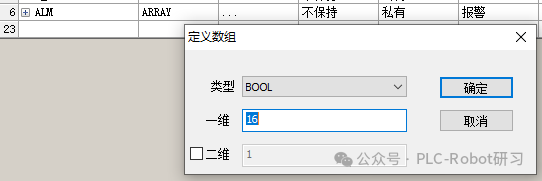
First, open the variable table, enter a variable name, set the variable type and data length, and click confirm to define an array variable, as shown in the figure below:
Clicking the “+” sign next to the variable name can expand the detailed information of the sub-variables of the array variable, and initial values and comments can be assigned to each sub-variable.
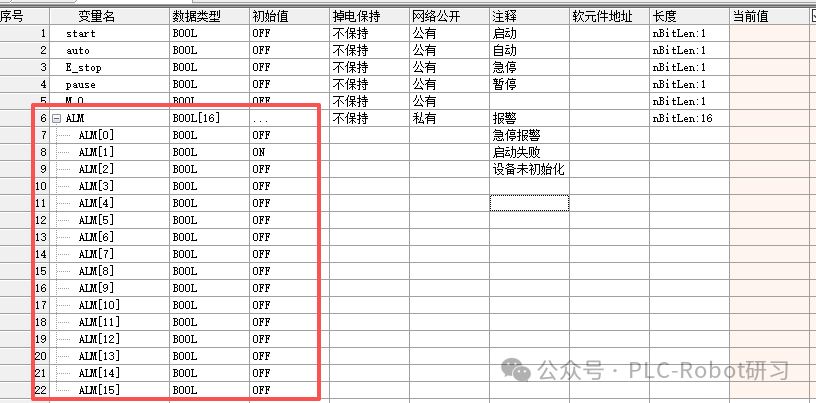
Arrays can also use numeric type variables, which also have data register functionality.

When using arrays in programming instructions, attention must be paid to inputting the array index. The first element of the array is numbered 0, which is consistent with the bit sequence number of word soft components. When using arrays in instructions, if no array index is input, it will start accessing from the first element. If an index is input, it will start accessing from the element indicated by the index.

As shown in the figure above: No index specified, so this instruction indicates that the four INT type data in the array DATE are assigned 0.
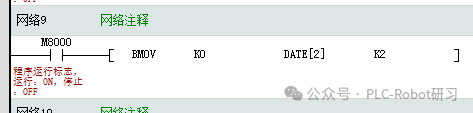
As shown in the figure above: The array specifies the index DATE[2], so it indicates that DATE[2]-DATE[3] is assigned 0.
If it is the ALM array defined above, then each BOOL type sub-variable can represent an alarm code.
Structures
When defining variables, if you need to define structure variables, you must first define the data structure of the structure.
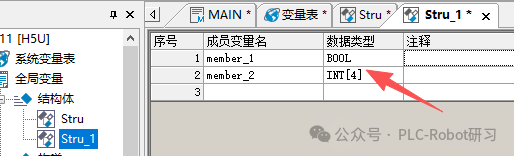
Similarly, under global variables – click “Structure” to create a new data structure, input the structure name, thus defining the structure. Then in the variable table, different variables can be defined. As shown in the figure below:
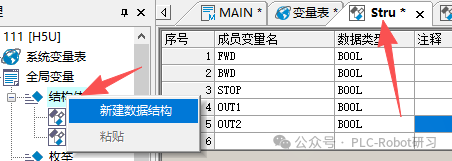
It can also be associated with the variable table. When the structure is created, we can choose “Structure” when creating new variables in the variable table, which is our self-defined structure. As shown in the figure below:
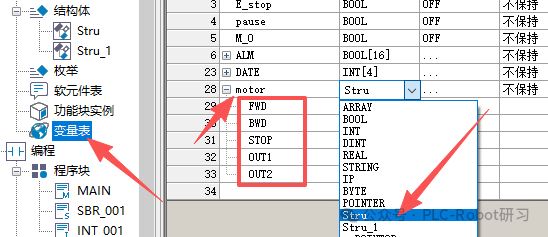
In the variable table, when a new structure variable is created, it can be expanded to see sub-elements with the same names as in the structure.
Additionally, the structures defined in the variable table can also be batch associated with actual addresses, achieving data storage and access. As shown in the figure below:

At this point, we may have a question: What is the difference and relationship between structures and variables?
First, a structure does not just define one data type, but can combine multiple variables into a complex data type. In contrast, the variables in the variable table are relatively independent.
Relevance:
Variable encapsulation: Structures can encapsulate multiple variables (such as integers, boolean types, strings etc.) into a whole, for example, combining device status, control commands, and other attributes into a structure variable.
Address binding: Structure variables can be bound to soft component addresses (such as D registers, M components), achieving data storage and access.
Batch operations: Through structures, variable addresses can be batch bound, reducing manual configuration, for example, quickly mapping variables in recipe management or touch screen configurations.
At this point, those who have used Siemens PLC programming software will definitely find this similar to Siemens PLC programming. Proper use of structures can reduce memory waste.
Enumerations
In Huichuan programming software version V4.11.0 and above, a new global variable called “enumeration” has been added. An enumeration is a collection of member values that increment. By default, it starts incrementing from 0, but its values can also be manually changed. It is commonly used for state representation, enhancing program readability.
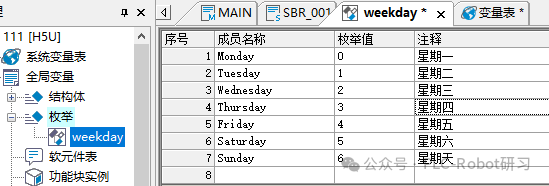
Under global variables, right-click on enumeration – create a new enumeration structure, input the name to complete the “enumeration” definition. Then in the member name column, input from Monday to Sunday, and the enumeration values will automatically increment from 0 without changing the default values.
Once the enumeration members are set, when customizing variables in the variable table, the data type can be selected as the defined “enumeration” type.
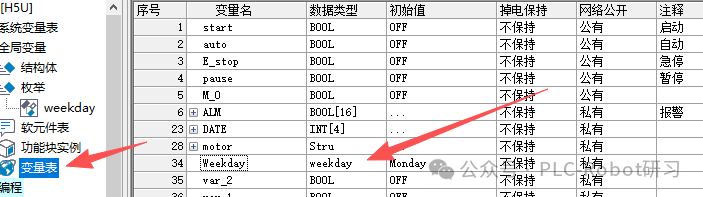
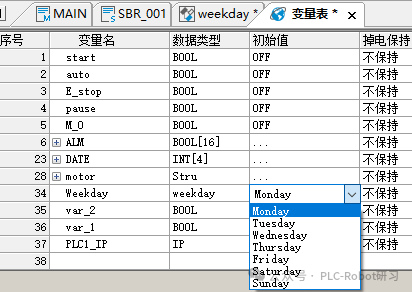
At this point, click on the initial value column of the defined enumeration variable name, and select the enumeration value from the drop-down list. If not selected, the default is the first member of the enumeration.
Enumerations declare a set of constants, generally used in CASE statements. As we know, a CASE statement executes its actions only when the value of the variable equals one of the values in the CASE.
Defining IP Variables
IP variables are supported for use in ST language, but cannot be used in ladder diagrams. IP variables can be customized in the variable table or program, and IP type variables occupy 32 bits, with a default value of “192.168.1.0”.

In ST language programs, to use IP variables, the IP variable must be assigned a value in single quotes.
var_1:=‘192.168.1.10’;
。。。。