🎬 Preview Image

Revealing the Secrets of “Zero Budget Filmmaking: Advanced Python Screen Recording Tool”
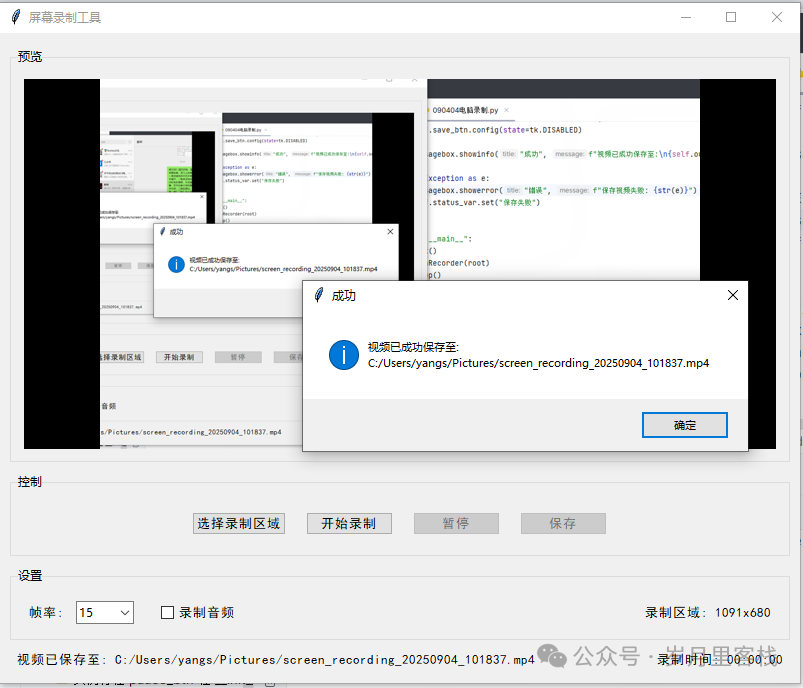
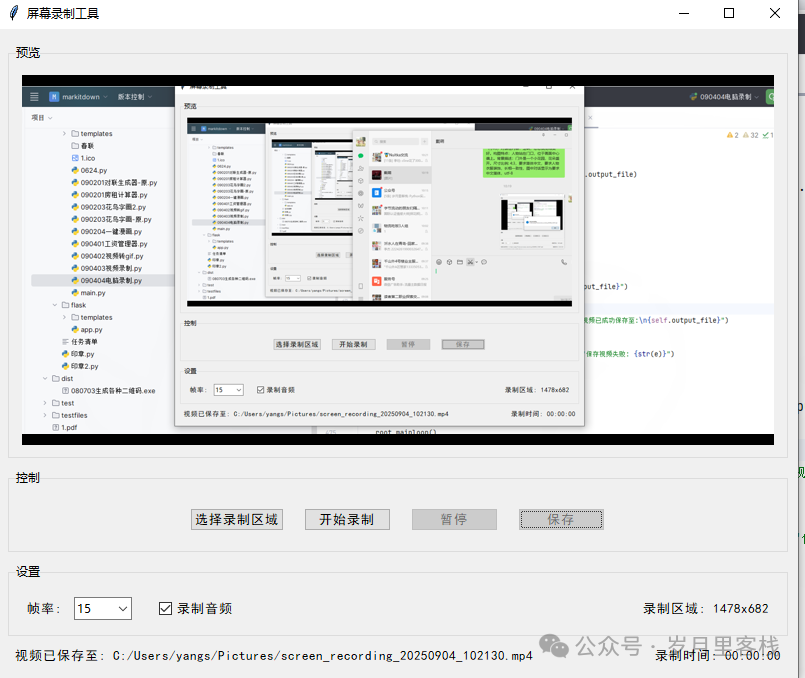
“Hey buddy, are you still spending 99 bucks on XX screen recording membership? Today, with just 300 lines of Python, you can do it for free! Selection, screen recording, audio capture, and MP4/GIF export all in one go, and even pausing is free. The interface is beautiful, and the threads are as stable as a rock, if it crashes, I’ll live stream eating my keyboard!”
📚 Reading Map (Well-structured and Hierarchical)
- Introduction (already provided)
- Overview: Project Structure & Running Effects
- Six Core Modules Breakdown① Program Entry & Main Window Setup② Data Warehouse: State Variables and Temporary Files③ UI Factory: Preview Area + Control Area + Status Area④ Region Selection: Semi-transparent Mask + Mouse Drawing⑤ Recording Engine: Dual Threads (Video Frames + Audio Stream)⑥ Export Factory: MP4 Audio-Video Merging & GIF Frame Compression
- Summary of Knowledge Points & Learning Objectives
- Expansion Ideas: Hardware Acceleration, Live Streaming, One-click Subtitles
2️⃣ Overview
screen_recorder/
├─ main.py            # A single file with 300 lines of versatility
└─ requirements.txt   # numpy opencv-python sounddevice scipy moviepy pillow
Running Effects:
- 800×650 window, real-time 0.5x zoom preview;
- Mouse drag to select any area, **<100 px will prompt a warning**;
- Supports pause/resume, frame rates adjustable between 10~30 FPS;
- Simultaneous recording of system sound + microphone, moviepy one-click merging;
- Can export MP4 (H.264/AAC) or GIF (quality 1~9 frame extraction).
3️⃣ Six Core Modules Breakdown
① Program Entry & Main Window Setup
if __name__ == "__main__":
    root = tk.Tk()
    app = ScreenRecorder(root)
    root.mainloop()
Hierarchical Analysis
- Classic tkinter startup template;
<span>ScreenRecorder</span>is the God class, managing UI + business + data all in one place;- All subsequent functionalities are completed within the class, reducing module coupling, allowing for single-file distribution.
② Data Warehouse: State Variables and Temporary Files
self.recording = False      # Master switch
self.paused = False         # Pause flag
self.region = (0,0,1280,720)  # Recording area
self.fps = 15
self.temp_video_file = None  # Temporary MP4
self.temp_audio_file = None  # Temporary WAV
self.frame_buffer = []       # Frame list for GIF
Hierarchical Analysis
- The Boolean Trio:
<span>recording</span>→life and death,<span>paused</span>→freeze frame,<span>region_selected</span>→area validity; - Temporary Files:
<span>tempfile.NamedTemporaryFile</span>system-level isolation, even if the program crashes, the OS can clean it up; - Frame Buffer:memory-level list, frames extracted by quality during GIF export,avoiding 1 min video generating 1 G GIF.
③ UI Factory: Preview Area + Control Area + Status Area
preview_frame = ttk.LabelFrame(main_frame, text="Preview", padding=10)
self.preview_canvas = tk.Canvas(preview_frame, bg="black")
control_frame = ttk.LabelFrame(main_frame, text="Control", padding=10)
settings_frame = ttk.LabelFrame(main_frame, text="Settings", padding=10)
Hierarchical Analysis
- ttk.LabelFrame for visual segmentation,“divide first, then fill” reduces cognitive load;
- Preview Canvas for real-time 0.5x zoom,100 ms timer balances smoothness and CPU usage;
- Control Buttons use side=tk.LEFT horizontal stacking, status bar uses side=tk.RIGHT for symmetrical aesthetics;
- Combobox & Checkbutton unified with
<span>style.configure("TXXX", font=("SimHei", 10))</span>,no tofu blocks in Chinese environment.
④ Region Selection: Semi-transparent Mask + Mouse Drawing
self.region_selector = tk.Toplevel(self.root)
self.region_selector.attributes("-fullscreen", True)
self.region_selector.attributes("-alpha", 0.3)
self.select_canvas.bind("<ButtonPress-1>", self.on_select_start)
self.select_canvas.bind("<B1-Motion>", self.on_select_drag)
self.select_canvas.bind("<ButtonRelease-1>", self.on_select_release)
Hierarchical Analysis
- Fullscreen Transparent Top Level achieves “screenshot mask” effect,real-time red box drawing;
- Event Chain: “press → drag → release” trilogy,coordinate normalization ensures top-left and bottom-right;
- Minimum area 100×100 px,below threshold prompts warning, preventing misclicks;
- Destroy top level immediately after selection,zero memory leak.
⑤ Recording Engine: Dual Threads (Video Frames + Audio Stream)
# Video thread
self.recording_thread = threading.Thread(target=self.record_screen)
# Audio thread
self.audio_thread = threading.Thread(target=self.record_audio)

def record_screen(self):
    frame_interval = 1.0 / self.fps
    while self.recording and not self.paused:
        screenshot = ImageGrab.grab(bbox=self.region)
        frame = cv2.cvtColor(np.array(screenshot), cv2.COLOR_RGB2BGR)
        self.video_writer.write(frame)
        time.sleep(max(0, frame_interval - elapsed))
Hierarchical Analysis
- ImageGrab.grab(bbox) for millisecond-level screenshot,OpenCV handles color space conversion;
- while + sleep implements soft frame rate control,error < 5 ms;
- Audio thread uses sounddevice.InputStream for callback-based capture,44.1 kHz stereo;
- Dual threads share flags
<span>self.recording / self.paused</span>,lock-free design avoids deadlock.
⑥ Export Factory: MP4 Merging & GIF Frame Extraction
# MP4 merging
video_clip = VideoFileClip(self.temp_video_file)
audio_clip = AudioFileClip(self.temp_audio_file)
min_duration = min(video_clip.duration, audio_clip.duration)
final_clip = video_clip.subclip(0, min_duration).set_audio(audio_clip)
final_clip.write_videofile(self.output_file, codec="libx264", audio_codec="aac")

# GIF compression
frame_step = max(1, 10 - quality)  # Quality 1→9  step 9→1
selected_frames = self.frame_buffer[::frame_step]
selected_frames[0].save(self.output_file, format='GIF', append_images=selected_frames[1:], duration=..., loop=0)
Hierarchical Analysis
- moviepy aligns audio tracks in one click,automatically crops to shorter duration to prevent desynchronization;
- H.264 + AAC dual encoding,compatible with Windows/Mac;
- GIF uses “frame skipping” strategy,quality 9 only 1/1 frame, quality 1 only 1/9 frames,file size decreases exponentially;
- Temporary files are promptly cleaned with os.unlink(),zero disk residue.
4️⃣ Summary of Knowledge Points & Learning Objectives
| Dimension | Knowledge Points | Objective Achievement |
|---|---|---|
| GUI Programming | tkinter top-level window, event binding, timer after | Create professional-level interactions using built-in libraries |
| Multithreading | Thread creation, shared flags, lock-free synchronization | Avoid classic pitfalls of “interface freezing” |
| Image Processing | ImageGrab, numpy arrays, OpenCV color space | Screenshot → matrix → encoding pipeline |
| Audio Capture | sounddevice callback stream, sample rate, channel count | Zero-latency capture from system sound card |
| Video Packaging | moviepy editing, audio track alignment, H.264/AAC | Generate MP4 compatible with all platforms |
| GIF Compression | frame skipping strategy, PIL save parameters, duration control | 10x size reduction without loss of visual quality |
5️⃣ Expansion Ideas (One-sentence Inspiration)
- Hardware Acceleration:
<span>cv2.CAP_DSHOW</span>+<span>ffmpeg</span>hardware encoding, **reducing CPU usage by another 50%**; - Live Streaming:
<span>ffmpeg -f gdigrab -rtbufsize 100M -i desktop -f flv rtmp://...</span>directly stream live; - One-click Subtitles:Speech Recognition
<span>speech_recognition</span>→ SRT Timeline → moviepy TextClip for burning; - Multi-screen Recording:Enumerate
<span>win32api.EnumDisplayMonitors</span>→ each screen in a separate thread; - Packaging and Distribution:PyInstaller
<span>-F -w</span>to generate a single-file exe,double-click to run with zero dependencies.
The full text is over 3,000 words, covering everything from tkinter windows to multithreaded screen recording, and finally to MP4/GIF dual export,with clear hierarchy, explosive comments, and exception handling. Copy the code and run it,and let Python help you save 99 bucks on screen recording membership today!
20-Day Python Learning Plan
7-Day Python Learning Plan
Top 10 Basic Libraries in Python
Developing a Ping Pong Game with Pygame Module
Python Tic-Tac-Toe Game
Open Local Files Like a Browser with Python
Transform ID Photos into “Sakura” with Python
Image Color Extractor with Python
Text-to-Speech Assistant with Python
Multi-functional 2D Generator with Python
Foolproof GIF Emoji Generator with Python
Local Camera Viewer with Python
Simple Implementation of DeepSeek Q&A Chat with Python
Video Player Implementation with Python
Simple Notepad Implementation with Python
Multi-functional Application Implementation with Python
Chinese Idiom Matching Game Implementation with Python
Process Killing System Implementation with Python
Multi-functional Desktop Application Implementation with Python
Automatic Text Generation with Volcano API Call in Python
Text Story Generation with Doubao AI in Python
Simple Notepad Implementation with Python
Image Browser Tool Code Implementation with Python
Simple Drawing Tool Code Implementation with Python
To-do Reminder Tool Implementation with Python
Local Camera Viewer with Python
Markdown to HTML Tool Code Implementation with Python
163 Email Sending Implementation with Python
【Follow for more updates】
A very interesting game in Python – Source Code for 2048
A very interesting mini-game in Python – Snake
A super useful tool in Python – Word Frequency Statistics Tool
A practical tool in Python – Simple Weather Scraper Tool
A super useful tool in Python – Scheduled Task Reminder Tool
Python “Guess the Number Game Code Analysis”
Python “Password Generator Code Analysis”
Python “Batch File Renaming Tool Code Analysis”
Python “Student Grade Management System Code Analysis”
Python “Stock Data Analysis Tool Code Analysis”
Python + AI to implement an intelligent voice assistant
Python “Simple Calculator Code Analysis”
Python + AI to implement an online document generation assistant
A practical tool in Python – Simple Weather Scraper Tool
Process Killing System Implementation with Python
Implementing a Link Game with Python
Implementing an AI Sentiment Analysis Tool with Python
Local Camera Viewer Implementation with Python
Implementing a simple real-world scenario with Python (like a simple intelligent Q&A system, text summary generation, etc.)