
Source丨Network
In daily development work, one often encounters the following problem: needing to match a certain field in the data, but there may be slight differences in this field. For example, in the recruitment position data, some write “Guangxi”, while others write “Guangxi Zhuang Autonomous Region”, and there are even some that write “Guangxi Province”… As a result, a lot of code has to be added to handle these cases.
Today I want to share with you FuzzyWuzzy, a simple and easy-to-use fuzzy string matching toolkit. It will help you easily solve troublesome matching problems!
Introduction
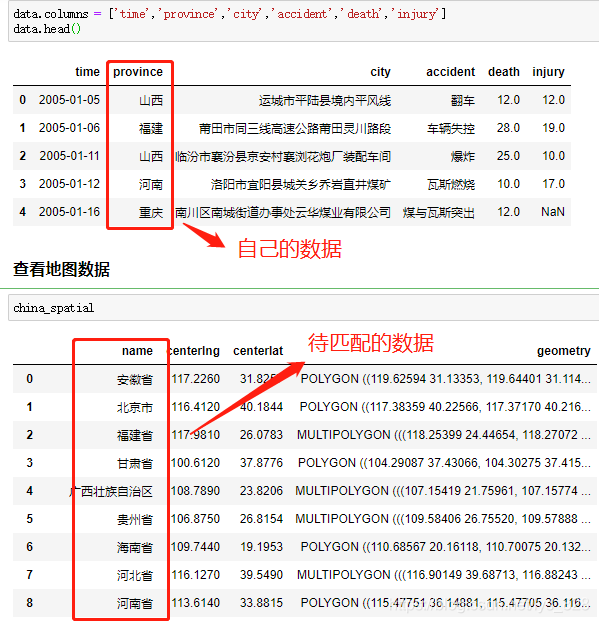
In the process of handling data, one inevitably encounters scenarios similar to the following, where the data fields you have are simplified, but the data to be compared or merged is the complete version (sometimes it can also be the other way around).
A common example is: in geographic visualization, the data you collected only retains abbreviations, such as Beijing, Guangxi, Xinjiang, Tibet, etc., but the fields to be matched are Beijing City, Guangxi Zhuang Autonomous Region, Xinjiang Uygur Autonomous Region, Tibet Autonomous Region, etc. Therefore, there needs to be a way to quickly and conveniently match corresponding fields and generate results in a separate column, which can be achieved using the FuzzyWuzzy library.
Introduction to FuzzyWuzzy Library
FuzzyWuzzy is a simple and easy-to-use fuzzy string matching toolkit. It calculates the differences between two sequences based on the Levenshtein Distance algorithm.
The Levenshtein Distance algorithm, also known as the Edit Distance algorithm, refers to the minimum number of edit operations required to transform one string into another. Permitted edit operations include replacing one character with another, inserting a character, and deleting a character. Generally speaking, the smaller the edit distance, the greater the similarity between the two strings.
Here, we are using the jupyter notebook programming environment under Anaconda, so enter the following command in the Anaconda command line to install the third-party library.
pip install -i https://pypi.tuna.tsinghua.edu.cn/simple FuzzyWuzzy
1 Fuzz Module
This module mainly introduces four functions (methods), namely: Simple Match (Ratio), Partial Match (Partial Ratio), Ignore Order Match (Token Sort Ratio), and Deduplicated Subset Match (Token Set Ratio).
Note: If you directly import this module, the system will prompt a warning, but this does not indicate an error; the program can still run (the default algorithm used runs slower). You can install the python-Levenshtein library as suggested by the system to assist, which helps improve calculation speed.

1.1 Simple Match (Ratio)
Just get a simple understanding of this; it is not very accurate and not commonly used.
fuzz.ratio("Henan Province", "Henan Province")
output
100
fuzz.ratio("Henan", "Henan Province")
output
80
1.2 Partial Match (Partial Ratio)
Try to use partial match, which has higher accuracy.
fuzz.partial_ratio("Henan Province", "Henan Province")
output
100
fuzz.partial_ratio("Henan", "Henan Province")
output
100
1.3 Ignore Order Match (Token Sort Ratio)
The principle is: using spaces as delimiters, lowercasing all letters, and ignoring other punctuation marks outside of spaces.
fuzz.ratio("Tibet Autonomous Region", "Autonomous Region Tibet")
output
50
fuzz.ratio('I love YOU','YOU LOVE I')
output
30
fuzz.token_sort_ratio("Tibet Autonomous Region", "Autonomous Region Tibet")
output
100
fuzz.token_sort_ratio('I love YOU','YOU LOVE I')
output
100
1.4 Deduplicated Subset Match (Token Set Ratio)
This is equivalent to comparing with a deduplication process of a set beforehand; note the last two, which can be understood as this method adds the functionality of deduplication on top of the token_sort_ratio method, and the following three matches are in reverse order.
fuzz.ratio("Tibet Tibet Autonomous Region", "Autonomous Region Tibet")
output
40
fuzz.token_sort_ratio("Tibet Tibet Autonomous Region", "Autonomous Region Tibet")
output
80
fuzz.token_set_ratio("Tibet Tibet Autonomous Region", "Autonomous Region Tibet")
output
100
The results obtained from these ratio() functions (methods) are all numbers. If you need to obtain the string result with the highest match, you still need to choose different functions based on your data type and then extract the results. While this method can quantify the degree of text data matching, it is not very convenient for extracting the matching results, hence the process module.
Process Module
This module is used to handle situations with limited candidate answers, returning fuzzy matched strings and similarity.
2.1 Extract Multiple Data
Similar to select in web scraping, it returns a list that contains many matching data.
choices = ["Henan Province", "Zhengzhou City", "Hubei Province", "Wuhan City"]
process.extract("Zhengzhou", choices, limit=2)
output
[('Zhengzhou City', 90), ('Henan Province', 0)]
The data type after extract is a list. Even if limit=1, it is still a list, note the difference with extractOne below.
2.2 Extract One Data
If you want to extract the result with the highest match, you can use extractOne. Note that here the return type is a tuple, and the result with the highest match is not necessarily the data we want. You can experience this with the following example and two practical applications.
process.extractOne("Zhengzhou", choices)
output
('Zhengzhou City', 90)
process.extractOne("Beijing", choices)
output
('Hubei Province', 45)
3 Practical Applications
Here are two small examples of practical applications. The first is fuzzy matching of company name fields, and the second is fuzzy matching of province and city fields.
3.1 Fuzzy Matching of Company Name Fields
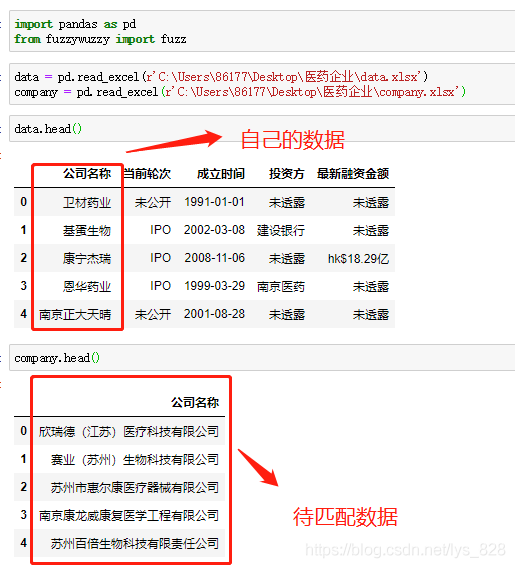
The data and the style of the data to be matched are as follows: the names of the fields you obtained are very concise and not the full names of the companies, so two fields need to be merged.
Directly encapsulate the code into a function, mainly for the convenience of future calls. The parameter settings are relatively detailed, and the execution results are as follows:
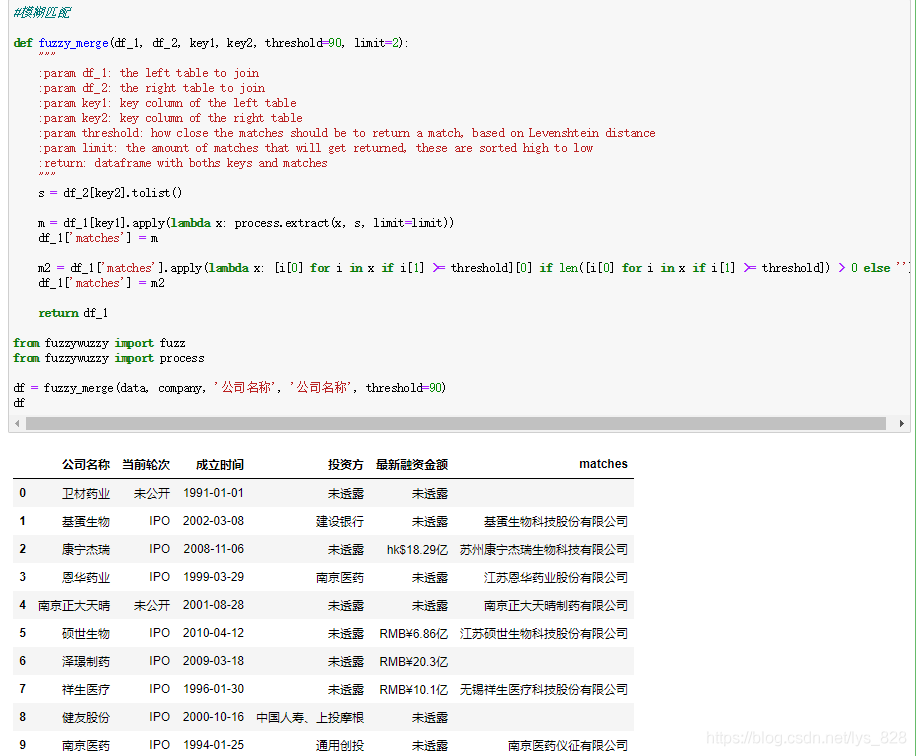
3.1.1 Parameter Explanation
- The first parameter
df_1is the left data (here it is thedatavariable) you want to merge; - The second parameter
df_2is the right data you want to merge (here it is thecompanyvariable); - The third parameter
key1is the field name to be processed indf_1(here it is the ‘Company Name’ field in thedatavariable); - The fourth parameter
key2is the field name to be matched indf_2(here it is the ‘Company Name’ field in thecompanyvariable); - The fifth parameter
thresholdis set to determine the standard for extracting the matching degree of results. Note that this is an improvement on theextractOnemethod, as the maximum matching result extracted is not necessarily what we need. Therefore, a threshold value is set to judge, which is 90; only those matching results greater than or equal to 90 can be accepted. - The sixth parameter, the default parameter, only returns two successful matches.
- The return value: a new DataFrame data with the ‘matches’ field added to
df_1.
3.1.2 Core Code Explanation
The first part of the code is as follows, which can refer to the above explanation of the process.extract method, as it is used directly, so the returned result m is in a list nested tuple data format, styled as: [(‘Zhengzhou City’, 90), (‘Henan Province’, 0)], so the data written into the ‘matches’ field for the first time is in this format.
Note that in the tuple, the first is the successfully matched string, and the second is the number object compared with the set threshold parameter.
s = df_2[key2].tolist()
m = df_1[key1].apply(lambda x: process.extract(x, s, limit=limit))
df_1['matches'] = m
The second part of the core code is as follows. With the above sorting, the data type in the ‘matches’ field is clear, and then data extraction is done, with two points to note:
- Extract the successfully matched strings and fill empty values for those with a score less than 90.
- Finally, add the data to the ‘matches’ field.
m2 = df_1['matches'].apply(lambda x: [i[0] for i in x if i[1] >= threshold][0] if len([i[0] for i in x if i[1] >= threshold]) > 0 else '')
# To understand what the data type of the first 'matches' field is, it is not difficult to understand this line of code.
# Refer to this format: [('Zhengzhou City', 90), ('Henan Province', 0)]
df_1['matches'] = m2
return df_1
3.2 Fuzzy Matching of Province Fields
The background introduction of my data and the data to be matched has already been displayed in the image above. The fuzzy matching function has also been encapsulated above, so you can directly call the function with the corresponding parameters. The code and execution results are as follows:
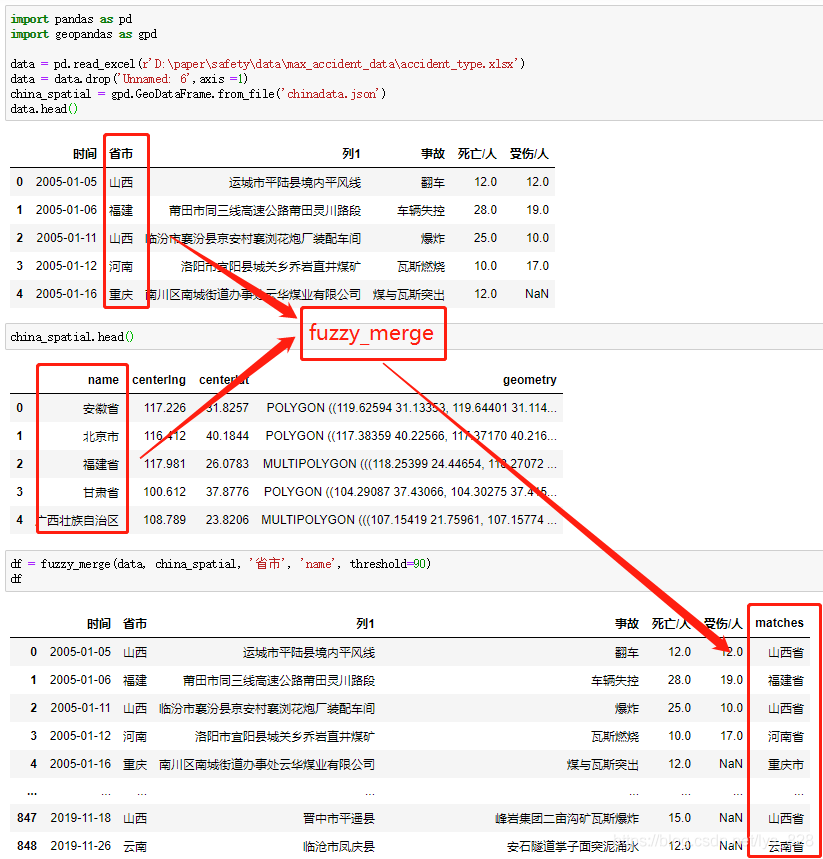
Data processing is complete, and the encapsulated function can be directly placed under your custom module name file, making it easy to import the function name in the future.
4 Complete Function Code
# Fuzzy Matching

def fuzzy_merge(df_1, df_2, key1, key2, threshold=90, limit=2):
    """
    :param df_1: the left table to join
    :param df_2: the right table to join
    :param key1: key column of the left table
    :param key2: key column of the right table
    :param threshold: how close the matches should be to return a match, based on Levenshtein distance
    :param limit: the amount of matches that will get returned, these are sorted high to low
    :return: dataframe with both keys and matches
    """
    s = df_2[key2].tolist()

    m = df_1[key1].apply(lambda x: process.extract(x, s, limit=limit))
    df_1['matches'] = m

    m2 = df_1['matches'].apply(lambda x: [i[0] for i in x if i[1] >= threshold][0] if len([i[0] for i in x if i[1] >= threshold]) > 0 else '')
    df_1['matches'] = m2

    return df_1

from fuzzywuzzy import fuzz
from fuzzywuzzy import process

df = fuzzy_merge(data, company, 'Company Name', 'Company Name', threshold=90)
df