Effect Diagram
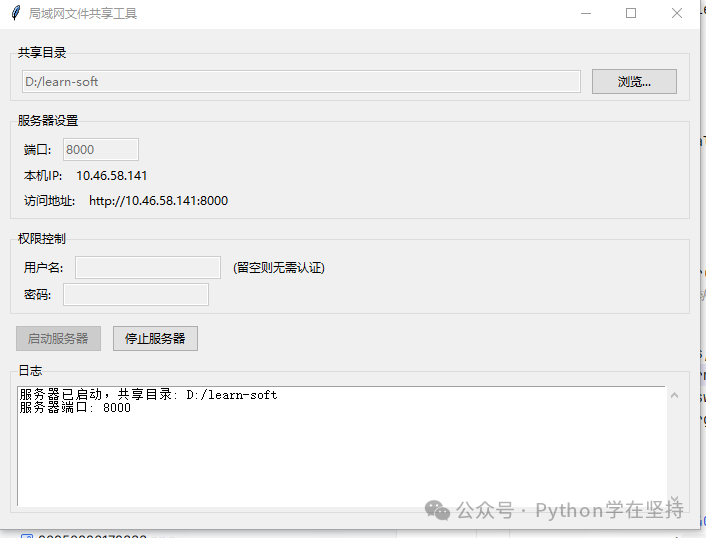
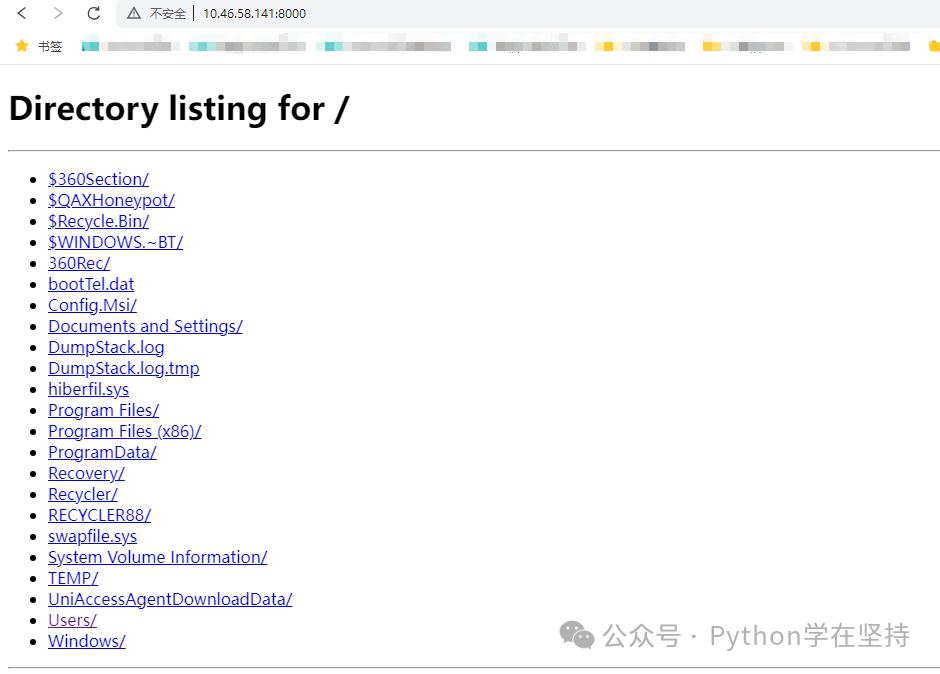
LAN File Sharing Tool: Turn Your Computer into a “NAS” with One Click!
“Hey, Xiao Ming from the next desk is coming to you again with a USB drive to copy ‘study materials’? Stop plugging and unplugging! Today, we will write a small tool that can build a site in 10 seconds, allowing your computer to instantly become a ‘private cloud storage’: just plug in the network cable, run the script, and the girl next door can happily download your ‘study materials’ using a browser, with a password lock to prevent Old Wang, the boss, and mischievous kids! All it takes is a single Python file, zero dependencies, zero configuration, and zero complaints—Mom no longer has to worry about me not knowing how to set up a server!”
Table of Contents
1. Project Overview: Understanding the Structure at a Glance
┌-------------------------------┐
│         FileSharingGUI        │  ← Responsible for the beautiful interface (tk interface)
├-------------┬-----------------┤
│  FileSharingServer            │  ← Responsible for the backend (socket service)
├-------------┴-----------------┤
│  AuthHTTPRequestHandler       │  ← Responsible for security (Basic Auth)
└-------------------------------┘
- Level 1:
<span>__main__</span>starts<span>FileSharingGUI</span>. - Level 2:
<span>FileSharingGUI</span>creates an instance of<span>FileSharingServer</span>. - Level 3:
<span>FileSharingServer</span>runs<span>socketserver.TCPServer</span>in a separate thread and hands requests to<span>AuthHTTPRequestHandler</span>. - Level 4:
<span>AuthHTTPRequestHandler</span>inherits from<span>http.server.SimpleHTTPRequestHandler</span>and adds authentication in<span>do_GET</span>.
2. Startup Entry and Main Window: The Essentials of tk
Code
if __name__ == "__main__":
    root = tk.Tk()
    app = FileSharingGUI(root)
    root.mainloop()
Line-by-Line Explanation
| Line Number | Function |
|---|---|
| 1 | Python’s common practice: start the GUI only when the script is run directly; remain silent when imported. |
| 2 | Create the tk root window, equivalent to a canvas. |
| 3 | Pass the root window to the <span>FileSharingGUI</span> “renovation team” to decorate it. |
| 4 | Enter the tk event loop, equivalent to “the store is open, welcome!”. |
3. Core Engine: Full Analysis of FileSharingServer
3.1 Class Definition & Member Variables
class FileSharingServer:
    def __init__(self, gui):
        self.gui = gui          # Callback GUI to write logs
        self.server = None      # Instance of socketserver.TCPServer
        self.server_thread = None  # Thread handle
        self.running = False    # State machine: running or idle
- self.gui:Pass the GUI instance for convenient logging.
- self.server:The TCP server that actually handles
<span>accept()</span><span> in the background.</span> - self.server_thread:To prevent blocking the GUI, the server runs in a background thread.
3.2 Start: <span>start()</span> Method
def start(self, directory, port, username, password):
    if self.running:
        return False

    os.chdir(directory)  # Change to the shared directory, so SimpleHTTPRequestHandler can read files directly

    handler_class = partial(
        AuthHTTPRequestHandler,
        username=username or None,
        password=password or None
    )

    socketserver.TCPServer.allow_reuse_address = True
    try:
        self.server = socketserver.TCPServer("")
        self.server.log_callback = self.gui.add_log  # Connect logs
        ...
<span>partial</span>:Pre-fill<span>username</span>and<span>password</span>into the constructor of<span>AuthHTTPRequestHandler</span>, making it elegant and convenient.<span>allow_reuse_address = True</span>:Prevent the “port already in use” disaster.
3.3 Stop: <span>stop()</span> Method
def stop(self):
    if self.running and self.server:
        self.server.shutdown()       # Stop serve_forever
        self.server.server_close()   # Close socket
        self.running = False
        self.server_thread.join()    # Wait for the thread to exit gracefully
<span>shutdown()</span>will break out of the<span>serve_forever</span>loop, and the thread will naturally end.
4. Security Access Control: AuthHTTPRequestHandler Keeps Old Wang Out
4.1 Constructor
def __init__(self, *args, username=None, password=None, **kwargs):
    self.username = username
    self.password = password
    super().__init__(*args, **kwargs)
- Store the username/password as instance variables for use in
<span>do_GET</span>.
4.2 Send 401 Challenge
def do_AUTHHEAD(self):
    self.send_response(401)
    self.send_header('WWW-Authenticate', 'Basic realm="File Sharing"')
    self.send_header('Content-type', 'text/html')
    self.end_headers()
- Classic Basic Auth: When the browser sees 401 +
<span>WWW-Authenticate</span>header, it will pop up a login box.
4.3 Main Authentication Process
def do_GET(self):
    if self.username and self.password:
        auth_header = self.headers.get('Authorization')
        if not auth_header:
            self.do_AUTHHEAD(); return

        auth_type, auth_data = auth_header.split(maxsplit=1)
        if auth_type.lower() != 'basic':
            self.do_AUTHHEAD(); return

        username, password = base64.b64decode(auth_data).decode().split(':', 1)
        if username != self.username or password != self.password:
            self.do_AUTHHEAD(); return

    # Authentication passed, let the parent class take over
    super().do_GET()
- If either username or password is empty, skip authentication—convenient for pure intranet sharing.
4.4 Logging & Exception Handling
def log_message(self, fmt, *args):
    if hasattr(self.server, 'log_callback'):
        self.server.log_callback(fmt % args)
- Redirect logs that would normally print to the console to the GUI’s Text control for real-time updates.
5. The Inner Workings of the GUI: FileSharingGUI Builds the Wheel
5.1 Initialization
def __init__(self, root):
    self.root = root
    self.root.title("LAN File Sharing Tool")
    self.root.geometry("700x500")
    self.server = FileSharingServer(self)  # Create the engine
5.2 create_widgets
Use <span>ttk.LabelFrame</span> to divide the interface into four main sections:
- Shared Directory (with browse button)
- Server Settings (port, IP, URL)
- Access Control (username/password)
- Log Text Box + Scroll Bar
5.3 Browse Directory
def browse_directory(self):
    directory = filedialog.askdirectory()
    if directory:
        self.shared_directory = directory
        self.dir_entry.delete(0, tk.END)
        self.dir_entry.insert(0, directory)
<span>filedialog.askdirectory()</span>brings up the system folder selector, which is a thousand times more elegant than manually entering the path.
5.4 Start Server
def start_server(self):
    directory = self.dir_entry.get().strip()
    if not os.path.isdir(directory):
        messagebox.showerror("Error", "Please select a valid shared directory")
        return
    ...
- Various boundary checks: directory does not exist, illegal port, only username filled without password… all trigger warning pop-ups.
5.5 Dynamic URL
local_ip = self.ip_label.cget("text")
self.url_label.config(text=f"http://{local_ip}:{port}")
- The girl next door just needs to enter this address in her browser to see the “materials” you shared.
6. Threads and Logs: Keeping the Interface Responsive While Logging in Real-Time
6.1 Thread Startup
self.server_thread = threading.Thread(target=self.server.serve_forever)
self.server_thread.daemon = True
self.server_thread.start()
<span>daemon=True</span>:When the main thread exits, the child thread goes down with it, preventing it from hanging around.
6.2 Thread-Safe Logging
def add_log(self, message):
    self.log_text.config(state=tk.NORMAL)
    self.log_text.insert(tk.END, message + "\n")
    self.log_text.see(tk.END)
    self.log_text.config(state=tk.DISABLED)
- The Text control is by default
<span>DISABLED</span>, preventing users from accidentally deleting logs; it is set to<span>NORMAL</span>before writing, and disabled again afterward.
7. Packaging, Deployment, and Common Pitfalls
- Single File Packaging:
<span>pyinstaller -F -w share_server.py</span>generates a console-less exe that can be double-clicked to use. - Windows Firewall:The first run will prompt for interception, click “Allow”.
- Chinese Path:
<span>os.chdir</span>has good support for Chinese, but if the terminal encoding is incorrect, logs may garble; you can use<span>chcp 65001</span>.
8. Summary of Knowledge Points and Advanced Ideas
| Category | Mastered | Can Continue to Explore |
|---|---|---|
| Networking | socketserver, Basic Auth | Switch to HTTPS, JWT |
| Concurrency | threading.Thread | asyncio + aiohttp |
| GUI | tkinter/ttk | PyQt, Web Frontend |
| Packaging | PyInstaller | Nuitka, Docker |
| Functionality | Static Files | Upload, Resume Upload, QR Code |
Project Goals Achieved
- No Foundation Required can share folders with one click.
- Password Support, Mom no longer worries about Old Wang next door.
- Real-Time Logs, like watching bullet comments to see who is stealing your files.
- Cross-Platform, compatible with Windows/Mac/Linux.
Throw the script into a USB drive, next time you go to your mother-in-law’s house, just plug it into the computer to share wedding photos—When programmers get romantic, even the network cable is bubbling with pink bubbles!
Click 【Follow + Collect】 to get the latest practical code examples
Python 20-day Learning Plan
7-Day Python Learning Plan
Python Implementation of an Online Calligraphy Generator
Python Implementation of Leaf Carving Images
Python ID Photo Multi-Size Generator
Python Implementation of Background Replacement for Portrait ID Photos
Python Development of Custom EXE Packaging Programs
Python Implementation of Seal Generators
Python Implementation of Batch Certificate Production Factory
Python One-Click Generation of Word Leave Requests with Seals
Python Quick PS Image Color Picker and Other Editors
Python Implementation of Batch Certificate Production Factory
Python Quick PS Image Color Picker and Other Editors
Python Implementation of Custom Color Pickers
Python Implementation of Automatic Gentle Watercolor Sketches
Python Implementation of Creative Drawing Board Code
Using Python to Create a Chinese Character Stroke Query Tool: From GUI Interface to Stroke Animation Implementation
Python Implementation of Meme Maker
Python Implementation of Chinese Chess Mini Game
Python Implementation of Seal Generators
Python Simulation of Jinshan Typing Software
Python Super Practical Markdown to Rich Text Tool—Complete Code Analysis
Python Implementation of Snake Game Source Code Analysis
Python Implementation of QR Code Generation
Python Implementation of Video Player
Python Implementation of Seal Generators
Python Implementation of Online Seal Making
Python + AI Implementation of a Simple Smart Voice Assistant
Python Implementation of Simple Notepad
Python Implementation of Markdown to HTML Tool Code
Python Implementation of Creative Drawing Board Code
Python Implementation of Simple Drawing Tool Code
Python Implementation of Video Player
Python Implementation of Simple Notepad
Python Implementation of Connect Four Game Code Analysis
Python Implementation of Simple Computer Process Manager
A Super Practical Tool in Python – Word Frequency Statistics Tool
Python Simple Web Scraper Weather Tool
Python Scheduled Task Reminder Tool
Python “Guess the Number Game Code Analysis”
Python “Simple Calculator Code Analysis”
Python + AI Online Document Generation Assistant
Python “Password Generator Code Analysis”
Python | + AI Implementation of a Simple Smart Voice Assistant
Python Implementation of Simple Drawing Tool Code
Python Implementation of Markdown to HTML
Python Implementation of Video Player
Python Implementation of Simple Notepad
Python Implementation of Connect Four Game Code Analysis
Python Implementation of Simple Computer Process Manager
【Practical 1】
-
Python: QR Code Generator
-
Python-pgame Implementation of Maze
-
Python – Implementation of Weather Clock Assistant
-
Python-QrCode Implementation of Various QR Codes
-
Python-pyglet Implementation of Harmony Clock
-
Python-pickle Parsing to Get WeChat Friend Information
-
Python-wxPy Initial Version Implementation of WeChat Message Bombing
-
Python Implementation of Eight Trigrams Starry Sky Clock
-
Python Implementation of National Day Red Flag Avatar Effect
-
Python-PIL Implementation of Adding Icons to Specified Positions on Images
【Practical 2】
-
Python-wxPy Initial Version Implementation of WeChat Message Bombing
-
Python-PIL Library Image Class Parsing
-
Python-tlinter Implementation of Simple Student Management System
-
Python-itChat Implementation of WeChat Message Pushing
-
Python Implementation of Pdf to Word
-
Python – Implementation of Automatic Couplets Generation Assistant
-
Py2Exe Another Way of Packaging
-
Python-tts Generation Voice Conversion Assistant
-
python-win32 Implementation of Automatically Adding exe to Computer Startup Options
-
python Implementation of Desktop Video Recording
-
PySimpleGUI-checkbox Python Implementation of Image Cropping into a Grid
-
python Packaging into exe File
-
Python-faker Generation of Virtual Data
-
python Implementation of Player Python-FastApi Simple Implementation
-
python Scraping Douban Movie Reviews
-
Python Scraping Public Account Article Collection
【Practical 3】
-
python Implementation of Simple Flowering Order
-
python – Get Image for Guessing Idioms
-
python – Menu Implementation
-
Python-pySimpleGUI Implementation of Interface
-
Python – Color Image Conversion to Sketch
-
Python-moviepy – Implementation of Audio and Video Player
-
Python Operating SQLite Database
-
Python-PySimpleGUI Implementation of Menu
-
python-Tkinter Implementation of Personalized Signature
-
Python-WordCloud Cloud Word Map
-
Python-customTkinter Usage
-
Python-tkinter (Down)
-
Python-tkinter (Middle)
-
python-tkinter (1)
-
Python Implementation of Video Assistant
【Practical 4】
-
Python Implementation of Video Assistant
-
Python-flask-1: Building the Main Page
-
Python ttkbootstrap Interface
-
python-PyQt5 Implementation of Image Display and Simple Reader
-
Configuring Qt Designer and Pyuic on Pycharm
-
Python PIL Implementation of Cropping and Generating Images of One Inch and Two Inches
-
Python Scraping Results from Jinshan Dictionary
-
python Implementation of Generating Personalized QR Codes
-
AI Human-Machine Battle Version of Gomoku Game (AI + pygame Implementation)
-
python Implementation of Garbage Classification Query Tool
-
python – Implementation of Menu
-
Python Field Application: Automated Testing
-
Python Field Application: Web Development
-
Python Field Application: Automated Operations