Skip to content

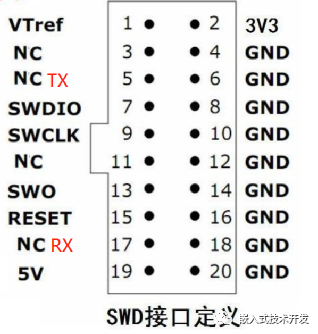
USB to Serial is a small tool often used for debugging microcontroller programs. The Jlink version V9 and above provides a virtual serial port function, which can be used for serial transmission and reception testing. The interface is defined as follows: pin 5 is Jlink-TX, and pin 17 is Jlink-RX. It is important to note that the virtual serial port can only be used in SWD mode because its pins conflict with JTAG.
The virtual serial port function of J-link is disabled by default and can be enabled in J-link Commander.
First, type f to confirm if the J-link version is V9 or above.

If it is V9 or above, type vcom enable.If the following prompt appears, it indicates that the configuration is successful; simply power cycle the Jlink.

If the following prompt appears: The connected probe does not support VCOM functionality, re-enter the following commands:
If unsuccessful, try powering on multiple times; J-link Commander must also be reopened..
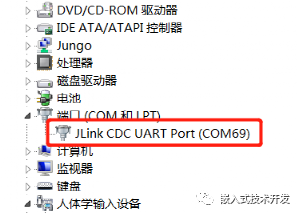
If there are no error prompts, everything is normal. Power cycle the J-link, and you will see the driver reload. A new serial port device will appear in the device manager, indicating that the setup is successful.This serial port can be used directly as a USB to serial device without affecting J-link debugging.
If you need to disable this function, simply type vcom disable.
Welcome to follow the public account “Embedded Technology Development”. You can leave messages to communicate with me in the background. If you find this public account helpful, feel free to recommend and share it with others.