Hello everyone, I am Pi Zi Heng, a serious tech enthusiast. Today, I will share with you how JLink 7.62 optimizes the method for manually adding support for new MCU models.
The JLink tool is an essential artifact for microcontroller development, including a hardware emulator (with different versions: EDU/BASE/PLUS/WIFI/ULTRA+/PRO) and driver software for PC (frequently updated from the traceable version 3.00 in 2006 to the current version 7.96). Besides its stable hardware, the rich features provided by its driver software have captured the hearts of many developers. The topic I am introducing today is the method for manually adding new MCU models in the JLink driver:
Note: JLink driver release notes https://www.segger.com/downloads/jlink/ReleaseNotes_JLink.html
1. Review of Old Methods
After we have installed a local version of the JLink driver, if we want to support a new MCU model (not in the supported list of that version), there are usually two methods: 1. Install a newer version of the JLink driver that supports the MCU model; 2. Find the JLlink Patch package for the MCU model on the MCU manufacturer’s official website and import it into the current JLink driver path. If we want to further update the download algorithm support for existing MCU models in the driver, we must use method two.
The old method referred to here is method two, which involves patching the current JLink driver. I have written about this method in the following three articles. In simple terms, it involves importing the files from the Patch package into the locally installed driver path \SEGGER\JLink_Vxxx\ with a specific directory structure.
“Easily Design Updates for Segger J-Link Flash Download Algorithm Files”
“Serial NOR Flash Download Algorithm (J-Link Tool Section)”
“Super Download Algorithm RT-UFL v1.0 Release, with J-Link Installation Tutorial”
If you have been using the old method to add support for new MCU models, you will find that this patching method has some pain points: for example, if multiple JLink drivers are installed on the computer and you want all of them to support the MCU model, you need to patch each driver individually. As the number of patches accumulates, the workload increases significantly.
2. Embracing the New Method
To address the pain points of the old method, starting from JLink V7.62, a new patching method has been introduced. We can find the explanation in the 34th update regarding DLLs in the Release Note of V7.62:
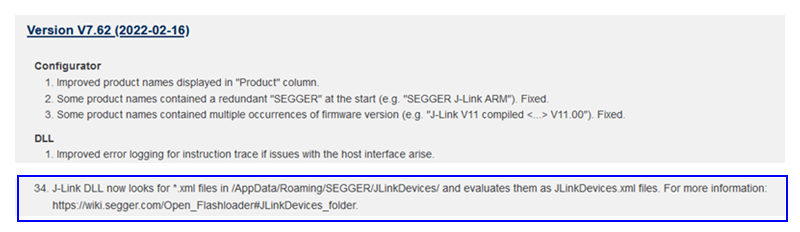
Following that explanation, we found a detailed description at https://wiki.segger.com/J-Link_Device_Support_Kit. The new method places the files from the Patch package in a unified path that is not related to the specific JLink driver installation directory. From now on, as long as you apply the patch in this unified path, all JLink drivers can use this patch, eliminating repetitive work.
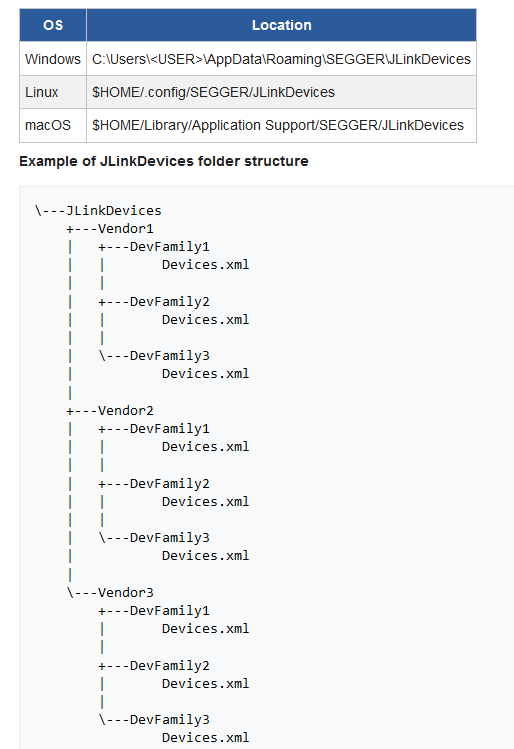
Regarding the most important .xml file, the name no longer needs to be strictly JLinkDevices.xml as in the old method; it can be a custom named *.xml file, and its location is not fixed. It can support up to 4 levels of directories, and JLink DLL will recursively search for the most suitable xml file to recognize the patch.
That concludes my introduction to how JLink 7.62 optimizes the method for manually adding support for new MCU models. Where are the applause~~~