A reader asked earlier: I can choose to generate a Bin file in IAR, why is there no option in MDK-ARM to configure the generation of Bin files?
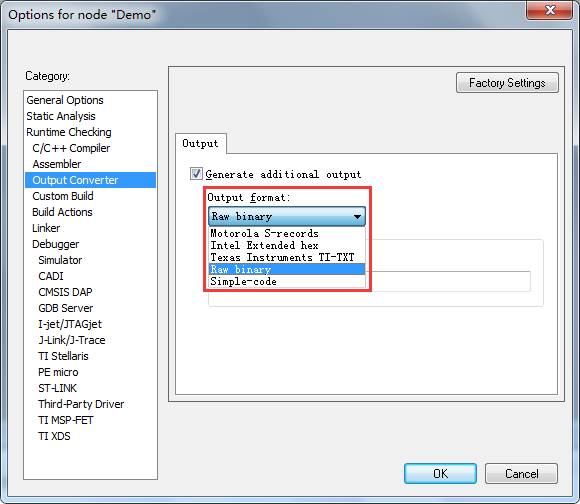
Friends who have used IAR should know: In IAR, project configuration options can configure the generation of Hex and also Bin.
Project -> Options -> Output Converter to select the output format, as shown in the figure below:
In MDK-ARM, the IDE comes with a tool that can convert axf to a Bin file, and this tool is fromelf.exe.
In different versions of MDK-ARM, its path varies, and you can search directly.
For example, in version V4: C:\Keil/ARM/BIN40 below;
While in version V5, it is located at: C:\Keil_v5\ARM\ARMCLANG\bin below. (Red marked as installation directory).
We just need to add the command in project configuration Project -> Options for Target -> User -> After Build/Rebuild.
C:\Keil_v5\ARM\ARMCLANG\bin\fromelf.exe –bin -o ./Bin/Demo.bin ./Objects/Demo.axf as shown in the figure below:
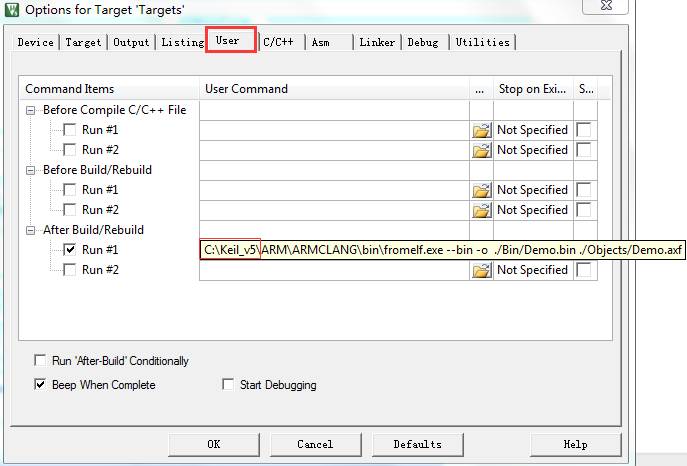
Format: fromelf [options] input_file output_file
To facilitate everyone’s learning, here is a software engineering demo [STM32F103ZE (Keil) Generate Bin File], the WeChat public account does not support external links, please copy the download address:
http://pan.baidu.com/s/1hskScba
Recommended reading:
1. MDK-ARM Project Target Option Configuration
2. Explanation of the roles and functions of some common file types in Keil
Search WeChat for “EmbeddDeveloper” or scan the QR code below to follow, and check out more exciting content in my bottom menu!

Long press to recognize the QR code to follow