1. Introduction
Keil C51 is a C language software development system for the 51 series compatible microcontrollers produced by Keil Software, USA. Compared to assembly language, C language has significant advantages in functionality, structure, readability, and maintainability, making it easier to learn and use. After using assembly language, developing with C provides a deeper understanding. The Keil C51 software offers a rich set of library functions and powerful integrated development and debugging tools, all in a Windows interface. Additionally, it is important to note that by looking at the assembly code generated after compilation, one can appreciate the high efficiency of the target code produced by Keil C51, as most statements generate compact and easily understandable assembly code. The advantages of high-level languages are more evident when developing large software projects. Below, we will detail the functions and usage of each part of the Keil C51 development system. The overall structure of the C51 toolset is shown in Figure (1), where uVision and Ishell are the integrated development environments (IDE) for C51 for Windows and for DOS, respectively, capable of completing the entire development process including editing, compiling, linking, debugging, and simulation. Developers can use the IDE itself or other editors to edit C or assembly source files. The C51 and A51 compilers then compile the source files to generate object files (.OBJ). The object files can be used by LIB51 to create library files, or they can be linked with library files using L51 to generate absolute target files (.ABS). The ABS files are converted into standard Hex files by OH51 for use with debuggers like dScope51 or tScope51 for source-level debugging, and can also be used directly by simulators for debugging the target board, or written directly into program storage like EPROM.
C51 is a C language compiler, and its usage is: C51 sourcefile [compilation control directives] or C51 @ commandfile, where sourcefile is the C source file (.C). A large number of compilation control directives complete all functions of the C51 compiler, controlling the output files C.LST, .OBJ, .I, and .SRC, as well as the source file (.C) controls, which will be detailed in the fifth section. The Commandfile is a linking control file that includes the .C source files and various compilation control directives; it does not have a fixed name, and developers can specify it according to their preferences, making it suitable for situations with many control directives.
A51 is the assembler language compiler, and its usage is: A51 sourcefile [compilation control directives] or A51 @ commandfile, where sourcefile is the assembly source file (.asm or .a51). The use of compilation control directives is similar to other assemblers like ASM language, and can refer to other assembly language materials. The Commandfile is similar to the Commandfile in C51, making A51 usage and modification convenient.
L51 is the linker/locator provided by the Keil C51 software package, which connects the compiled OBJ files with library files to generate absolute target files (.ABS). Its usage is: L51 target file list [library file list] [to outputfile] [link control directives] or L51 @ Commandfile. After the source programs are compiled separately by C51 and A51, multiple OBJ files are generated, and when linking, these files are all listed in the target file list as input files. If library files (.LiB) also need to be linked, they must be listed afterwards. outputfile is the output file name; if missing, it defaults to the first module name with a .ABS suffix. Link control directives provide all control functions during linking and locating. The Commandfile is a linking control file that includes the target file list, library file list, output file, and linking control commands, replacing the first cumbersome format. Since there are usually multiple target module library files, this second method is more common, and the file name can be specified by the user.
BL51 is also a linker/locator in the C51 software package, which has all the functions of L51, and additionally has the following three special features: a. It can link and locate programs larger than 64kBytes. b. It has code domain and domain switching functions (CodeBanking & Bank Switching). c. It can be used with the RTX51 operating system. RTX51 is a real-time multitasking operating system that changes the traditional programming model, even not requiring a main() function. The trend of microcontroller system software moving towards RTOS is more evident and necessary for 186, 386, and 68K series CPUs, while for 8051, due to its simpler CPU, the program structure is not too complex, making the role of RTX51 less prominent. The professional version software PK51 package does not even include RTX51Full, but only has an RTX51TINY version of RTOS. RTX51 TINY is suitable for microcontroller systems without external RAM, so its scope of use is very narrow and will not be introduced in this article. Bank switching technology is also not introduced due to its infrequent use.
The content discussed in this article is the introduction, download, installation, and registration of the Keil MDK-ARM version.
Introduction, Download, Installation, and Registration of Keil (C51):
http://blog.csdn.net/ybhuangfugui/article/details/52932112
The Keil MDK-ARM version has undergone significant changes in architecture from V4 to V5, so it is necessary to add an installation “support package” during installation [the installation of the support package will be discussed after the software installation is complete]. However, in terms of usage, there are not many significant changes for compatibility.
2. Keil Introduction
1. Overview
MDK: Microcontroller Developer Kit, a microcontroller development tool.
Keil MDK-ARM is an IDE (Integrated Development Environment) produced by Keil Software Company (now acquired by ARM) that supports ARM microcontrollers.
MDK-ARM includes the industry-standard Keil C compiler, macro assembler, debugger, real-time kernel, and other components. It features a leading ARM C/C++ compilation toolchain that perfectly supports Cortex-M, Cortex-R4, ARM7, and ARM9 series devices, including chips from world-renowned brands such as ST, Atmel, Freescale, NXP, TI, and many others.
2. Product Components
MDK-Core is based on the μVision IDE for Cortex-M devices, including support for the new ARMv8-M architecture. DS-MDK includes the Eclipse-based DS-5 IDE/debugger and supports 32-bit Cortex-A and Cortex-M processors or hybrid systems.MDK includes two ARM C/C++ compilers and assemblers, linkers, and highly optimized runtime libraries tailored for optimal code size and performance.The software package can add device support and middleware updates at any time from the toolchain, regardless of MDK-Core or DS-MDK. They include device support, CMSIS libraries, middleware, board support, code templates, and example projects.Newly added is the extension of ARM mbed™ software components for IoT (Internet of Things) applications, incorporating IPv4/IPv6 network communication protocol stacks.
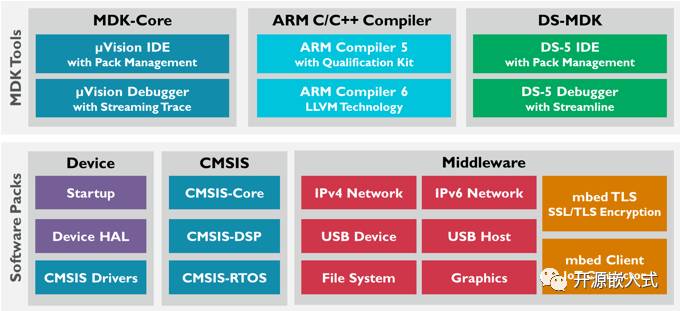
3. Supported Chips
Keil MDK-ARM supports thousands of devices including Cortex-M, Cortex-R, ARM7, ARM9, and Cortex-A8 series.
Official supported chip address: http://www.keil.com/dd2
3. Download
The Keil MDK-ARM software can be downloaded from the official website or from my Baidu Cloud. The installation and registration discussed in the following sections are also from the software downloaded from the official website. To facilitate everyone, I have uploaded it to Baidu Cloud (same as the official website).
1. MDK-ARM Installation Package Download
As of now (October 2016), the latest official version of Keil MDK-ARM is V5.21a.
MDK-ARM installation package download address:
Official website: http://www.keil.com/download/product
Baidu Cloud: http://pan.baidu.com/s/1eRLbgIY
2. MDK-ARM Support Package Download
The biggest difference between MDK-ARM V4 and V5 during installation is that the V4 version integrates the device support package, while the V5 version separates it for independent installation. Therefore, it is necessary to download the corresponding device support package according to your chip model (I have provided the device support package for ST company for download on Baidu Cloud).
MDK-ARM device support package download address:
Official website: http://www.keil.com/dd2/Pack
Baidu Cloud: http://pan.baidu.com/s/1o8fd6jS
4. Install Software
The installation of the Keil MDK-ARM integrated development environment is relatively simple (basically just click Next all the way). I will explain the installation process with the downloaded “MDK521a.EXE” software as an example.
Supported operating systems: http://www2.keil.com/system-requirements
Windows Vista, Windows 7, Windows 8, and Windows 10
[Note: V5.21a no longer supports Windows XP. Windows XP can still be used, but there may be some compatibility issues, so it is recommended to install it on officially specified operating systems.]
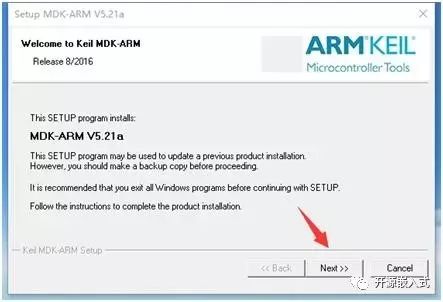
1. Download the software, double-click the installation package, enter the installation wizard interface, and click “Next”
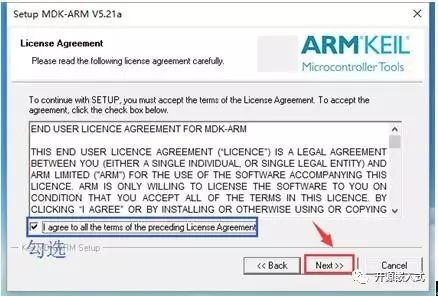
2. Check “I agree to…”, and click “Next”
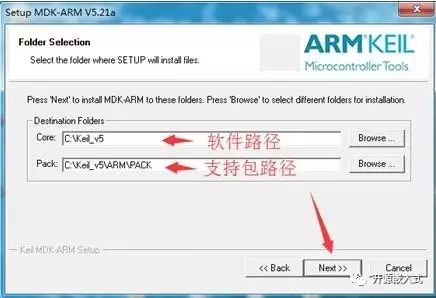
3. Choose the installation path for the software and support package (can be default), click “Next”
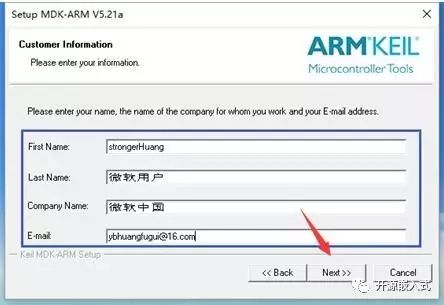
4. Fill in the information (can fill in anything), click “Next”
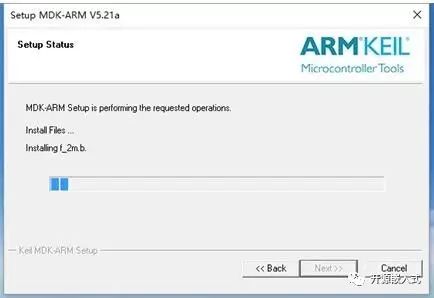
5. Wait for a few minutes during the installation process
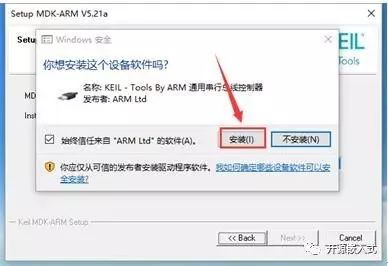
6. At the end of the installation, a prompt will pop up; select “Install”
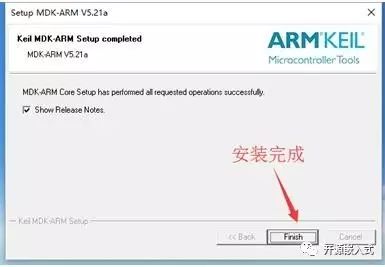
7. After installation is complete, click “Finish”
8. Automatically update the “support package”; you can exit directly and install it yourself.
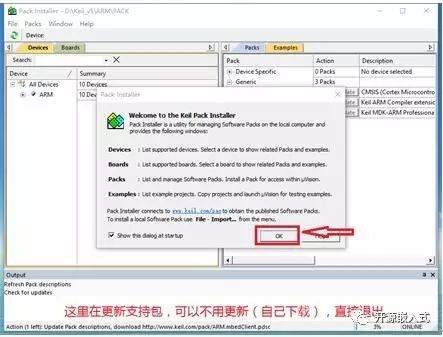
Thus, the Keil MDK-ARM installation is complete, and you can create a new project to use it. However, to avoid limitations on the size of compiled code and for a better user experience, you need to purchase a license or register.
5. Software Registration
Keil MDK-ARM is a paid software, and the official crackdown on piracy is quite strict. If you are using it for commercial purposes, it is recommended to purchase the legitimate software. You can use a keygen to crack it.
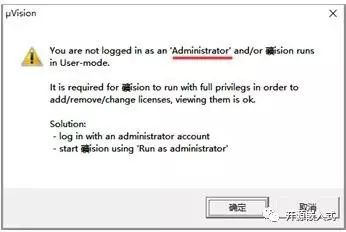
1. Open the installed Keil MDK-ARM. If the prompt appears as shown below, please close the software and run it again as an administrator (select KeiluVision5 -> right-click -> run as administrator).
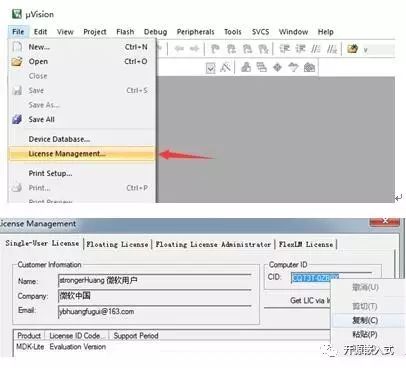
2. Open the license management window (File -> License Management) and copy the CID (for backup).
3. Open the “keygen”:
(1) Paste the copied CID;
(2) Select ARM as the target;
(3) Generate the registration code;
(4) Copy the registration code.
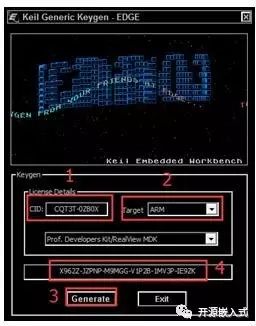
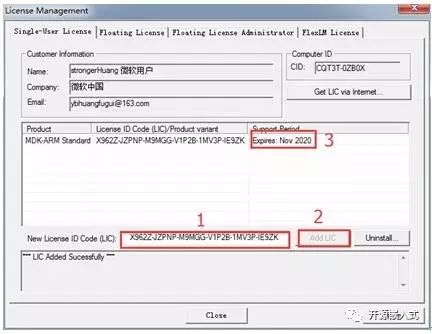
4. Return to the registration interface: (1) Paste the generated “registration code”, (2) click “Add LIC”, (3) see the message indicating successful registration.
6. Installing Device Support Packages
The difference between Keil MDK-ARM V5 and V4 installation is that V5 requires the installation of device support packages separately, while V4 does not.
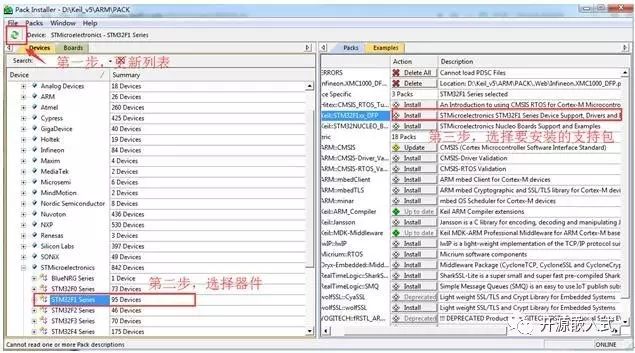
Support packages can be installed online or downloaded as offline packages for installation.
1. Online Installation of Support Packages
Online installation means using the installed software to automatically download support packages. Click the “Install Support Package” icon:
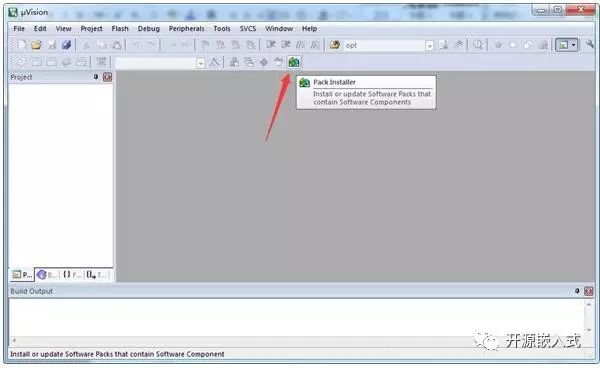
If the software installation does not have an updated list after installation, using this method to install the support package requires updating the list; otherwise, the devices (Devices) below will not be visible.
2. Offline Installation of Support Packages
Offline installation of support packages means downloading the support packages and installing them yourself. You can download the ST series support packages from my Baidu Cloud (you can also download the corresponding support packages for your chip from the official website).
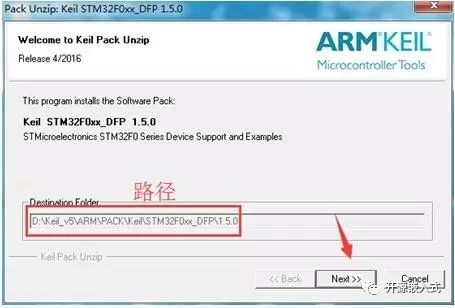
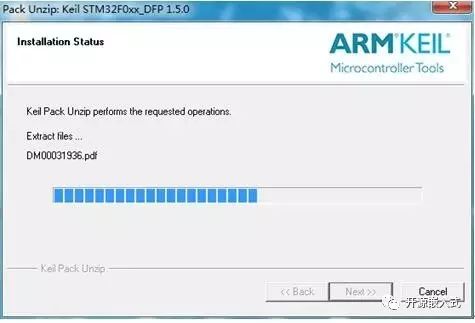
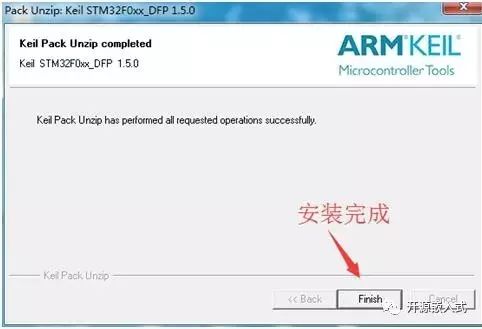
After you install the MDK-ARM V5 software, the path for the support packages is already set. When you double-click the downloaded support package, the path is fixed (cannot be changed), simply click “Next” to install the support package. The installation process is quick, and finally click “Finish” to complete the installation.
7. Notes
Keil MDK-ARM is a paid software, and the official crackdown on piracy is quite strict. If you are using it for commercial purposes, it is recommended to purchase the legitimate software.
Our official QQ group 1: 281549832
Our official QQ group 2: 386393398
Our open-source team is constantly expanding, and we hope everyone will join us.
Thank you all for your strong support! If you have any questions, you can consult us.
Please remember to share this so that more people can learn development skills. Thank you for your support!