Follow and star our public account to not miss exciting content
Many friends have been using MDK-ARM for a long time but are unaware of what its optimization options are for or how to use them.
This article discusses the MDK-ARM optimization options and related knowledge (micro libraries, practical applications, debugging), hoping to help you in your future development projects.
The optimizations we refer to mainly involve two aspects:
In MDK-ARM, the configuration options related to optimization are:
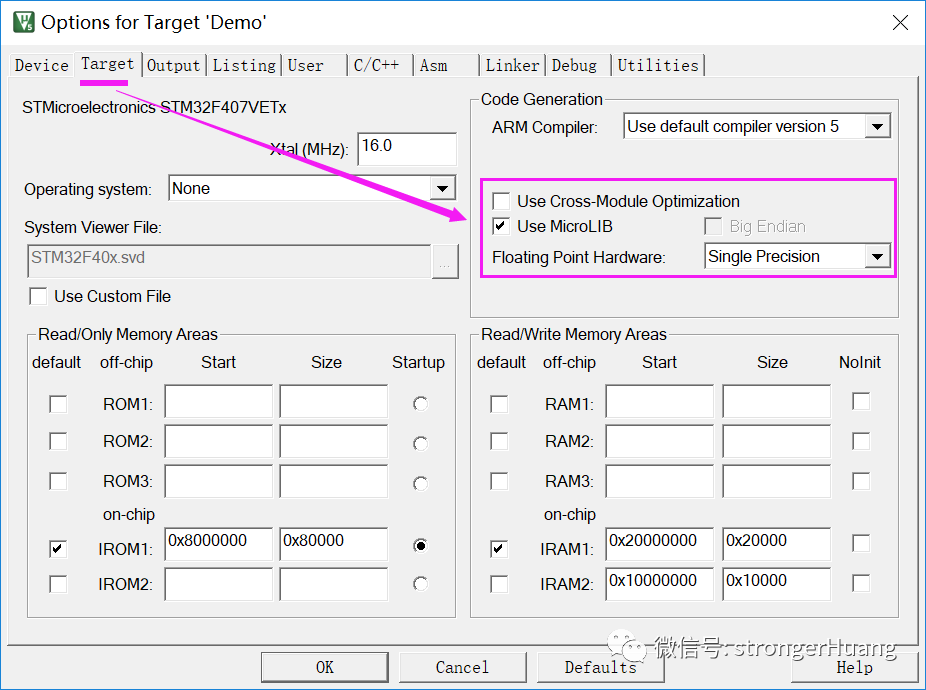
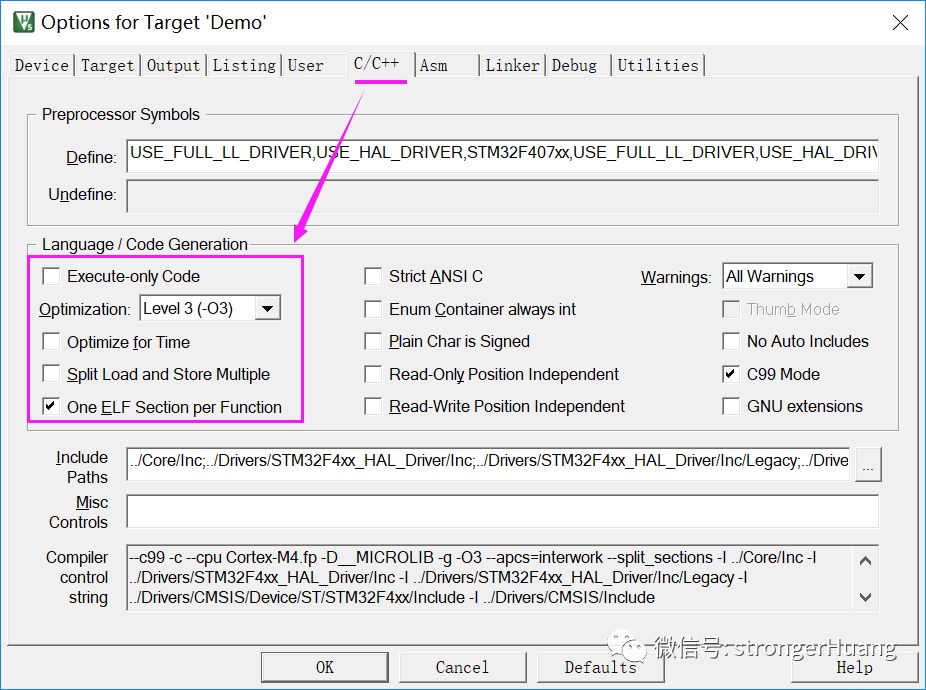
Of course, if you choose different compilers (AC5, AC6), the optimization options will also differ (discussed below).
When the MCU capacity is limited for certain projects, besides modifying the code (optimizing costs), it is also necessary to use optimization options.
For certain projects (such as specific algorithms) that require efficient (shortest time) execution, it is necessary to use optimization options.
2Explanation of Optimization Options
This section details the optimization-related options, and there are differences when choosing compilers AC5 and AC6, which will be discussed separately below.
1. Use Cross-Module Optimization: Enable Cross-Module Optimization
Using cross-module optimization allows the linker feedback file (requiring two compilations) to enable further code optimization.
A. Do not perform cross-module optimization on library targets.
B. Cross-module optimization will increase the time required to build the project, as it will automatically execute multiple compilation and linking steps.
2. Use MicroLIB: Use Micro Library
It is a subset of the ISO standard C runtime library (part of it) that provides a trade-off between performance and code size.
MicroLIB is not fully ANSI compliant, but it is sufficient for most small embedded applications.
3. Use Link-Time Code Generation: Use Link-Time Code Generation (Optimization)
This optimization option was available before version V5, allowing optimization at link time during multi-file compilation:
-
Function cross-module inlining
-
Remove unused variables and functions
-
Optimize memory access by rearranging variables
-
Reuse memory where possible
4. Execute-only Code: Generate Execute-Only Code
Does not include unused (functions, variables, etc.) code segments.
C, Thumb code
Based on Cortex-M3, M4 processors
Compiler version 5.04 and above
5. Optimize for Time: Optimize for Time
At the cost of larger code size, reduce execution time. For example: using inline functions.
For compiler AC6, this option is 【Link-Time Optimization】, performing inter-module optimization during link state.
6. Split Load and Store Multiple: Split Load and Store Multiple
Instructs the compiler to split LDM and STM instructions into two or more LDM or STM instructions to reduce latency; this option can improve overall system performance.
7. The One ELF Section per Function: One ELF Section per Function
ELF code sections usually contain code for many functions; this option tells the compiler to place all functions into their own ELF sections, allowing the linker to remove unused ELF sections (instead of unused functions).
8. For AC5: Optimization Options
<default>: Default value, focusing on optimizing performance.
Level 0 (-O0): Turns off most optimizations, except for some simple transformations; the generated code has the best debugging view.
Level 1 (-O1): Applies limited optimizations.
For example: removes unused inline functions and static functions, removes redundant code, and reorders instructions, etc. The generated code is reasonably optimized with a good debugging view.
Level 2 (-O2): Highly optimized; the mapping of target code to source code does not necessarily correspond, which is not conducive to debugging.
Level 3 (-O3): Maximum level of optimization; level 3 combined with time optimization may generate more code than level 2.
9. For AC6: Optimization Options
When the compiler chooses AC6, the optimization options differ (with more optimization options):
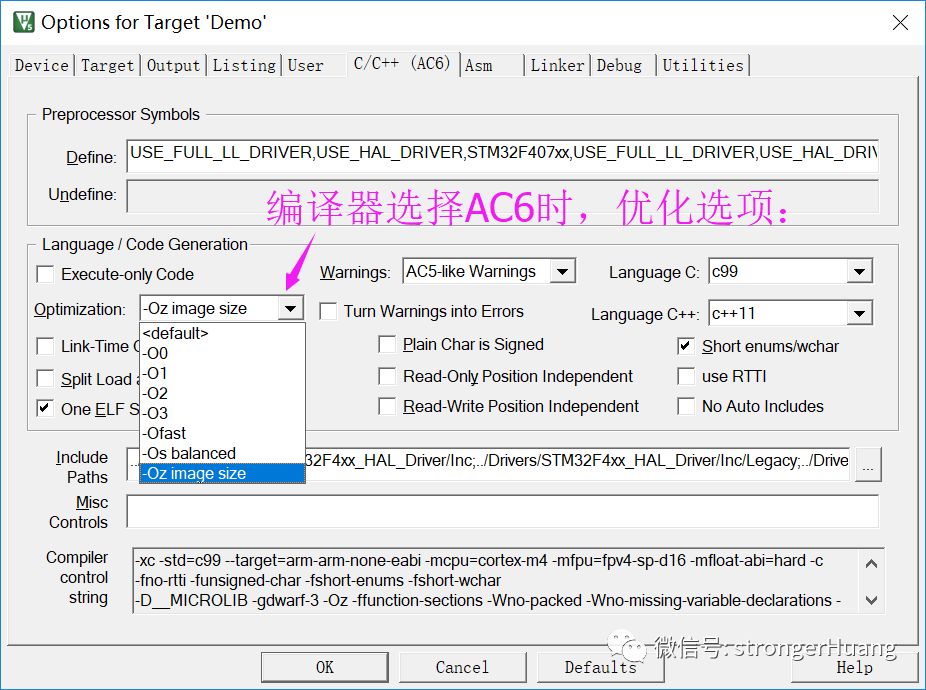
The first five options in AC6 optimization (default, -O0 ~ 3) function similarly to those in AC5, but AC6 has three additional options.
-Ofast: Enables all optimizations of -O3, as well as other optimizations that may violate language standards (strict compliance).
-Os balanced: Balances code size and code speed. By default, the compiler performs optimizations to improve performance, but this may increase the image file size.
-Oz image size: Optimizes for code size.
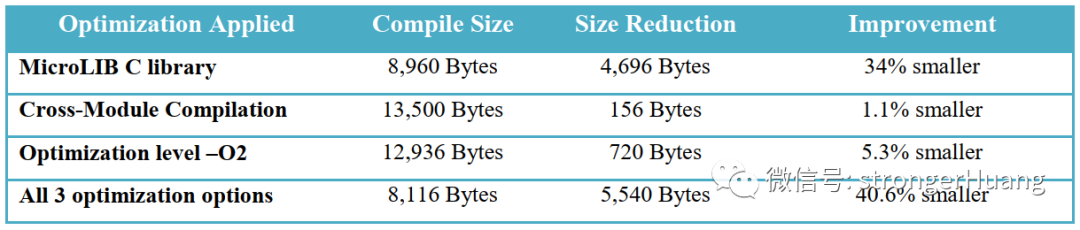
This section discusses three types of compilation optimizations to achieve the best results (smallest code, best performance).
A. If the code size is large (ELF code sections usually contain code for many functions), consider using The One ELF Section per Function option to reduce code size.
B. The AC6 compiler has improved optimization capabilities (the three additional options integrate optimization capabilities).
Code Size Optimization (Comparison):
2. Optimize Code Performance
-
Optimization: -Ofast
-
Link-Time Optimization
Code Performance Optimization (Comparison):
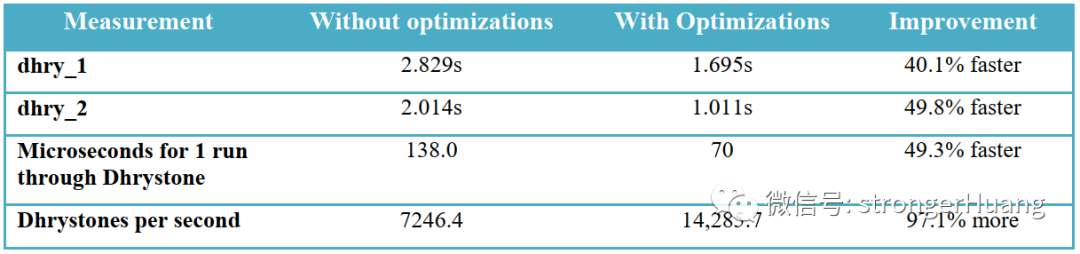
In this case, while meeting code size requirements, we should also strive to meet performance.
This is essentially a balance between related factors; based on the above two optimization methods, we should consider our actual situation. Generally, the optimization considerations are as follows:
Of course, the -Os balanced optimization option in AC6 is smarter.
The optimization capabilities of MDK-ARM need to be combined with the actual situation of the project for optimization. It can be very helpful for some projects, but optimization may also bring some impacts.
1. Using high-level optimizations (-O1 and above) may affect debugging (because after optimization, the compiled output does not match the actual code).
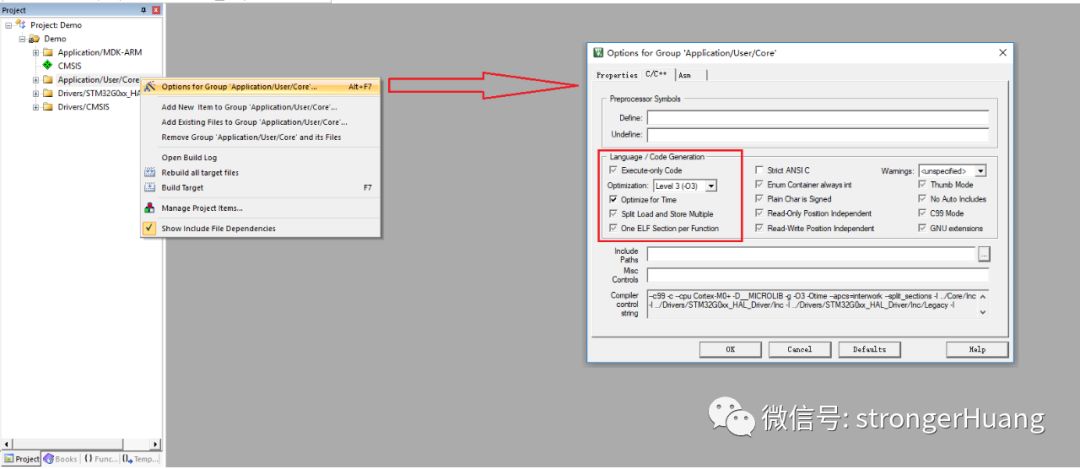
2. Specify optimization for source files/file groups
Some code does not require optimization; we can optimize the specified source files/file groups.
My Zhihu: strongerHuang
My Website: www.strongerhuang.com
If you find this article helpful, a thumbs up or share would be a great support and encouragement for me.
Follow the public account ‘strongerHuang’ to see more exciting content in the bottom menu!

Long press to scan the QR code in the image to follow us