Click the blue text to follow us
When using Siemens touch screens, many engineers find that their response speed is noticeably slower compared to certain brands (such as MCGS). This is primarily because the default variable acquisition cycle for Siemens touch screens is set to 1 second. This delay is particularly evident in scenarios requiring quick operations or real-time feedback, and the key to solving this issue lies in adjusting the HMI variable acquisition cycle. (If you have not used MCGS touch screens, feel free to leave a comment, and if enough people are interested, we will also create a guide for using MCGS.)
The Mystery of Siemens Touch Screen Response Speed
Siemens touch screens are widely used in industrial automation, known for their stability and powerful features. The default 1-second acquisition cycle is a conservative setting based on overall system stability and communication load.
For most applications that do not require extremely high real-time performance, a 1-second cycle is sufficient. However, when operators frequently click and require quick responses, this delay becomes apparent, giving a “lagging” feeling.
How to Optimize the Acquisition Cycle to Improve Response Speed
Of course, this lagging sensation does have a certain impact during use, but since Siemens’ default acquisition cycle is 1 second, the lag is quite noticeable. Next, I will teach you how to modify the default acquisition cycle to make our touch screen more responsive.
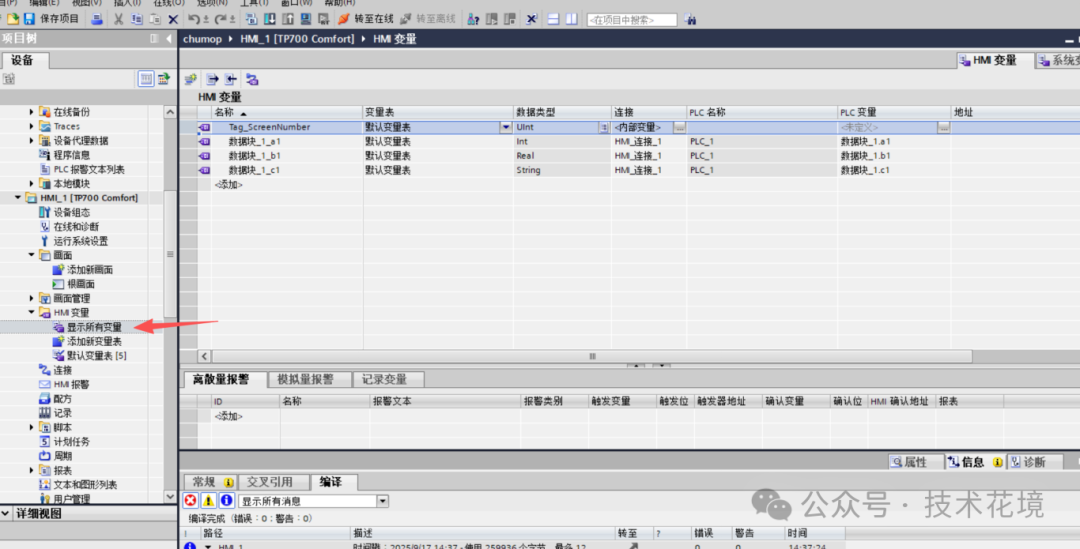
First, we open the touch screen, select HMI variables, and here we can see all the variables currently connected to our touch screen.
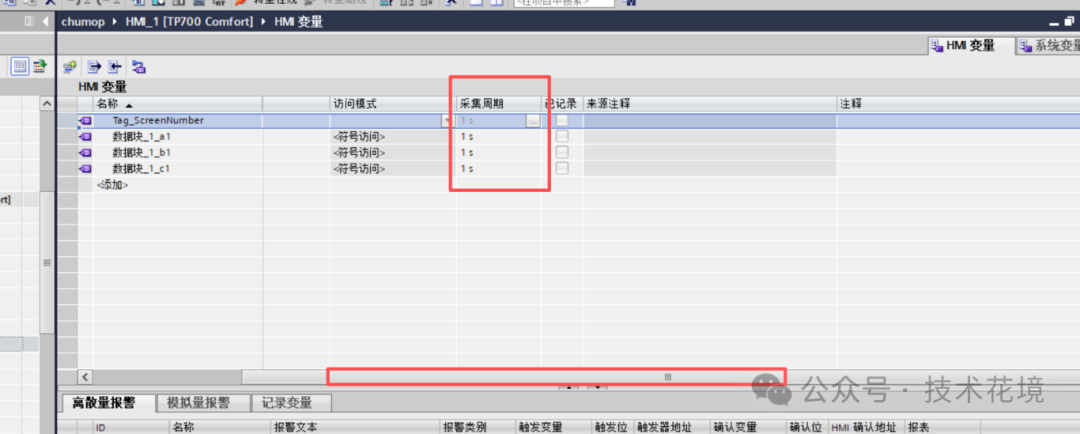
Then, we drag the scrollbar to the far right, as shown in the image below, and we can see that the acquisition cycle for all connected variables is set to the default of 1 second.
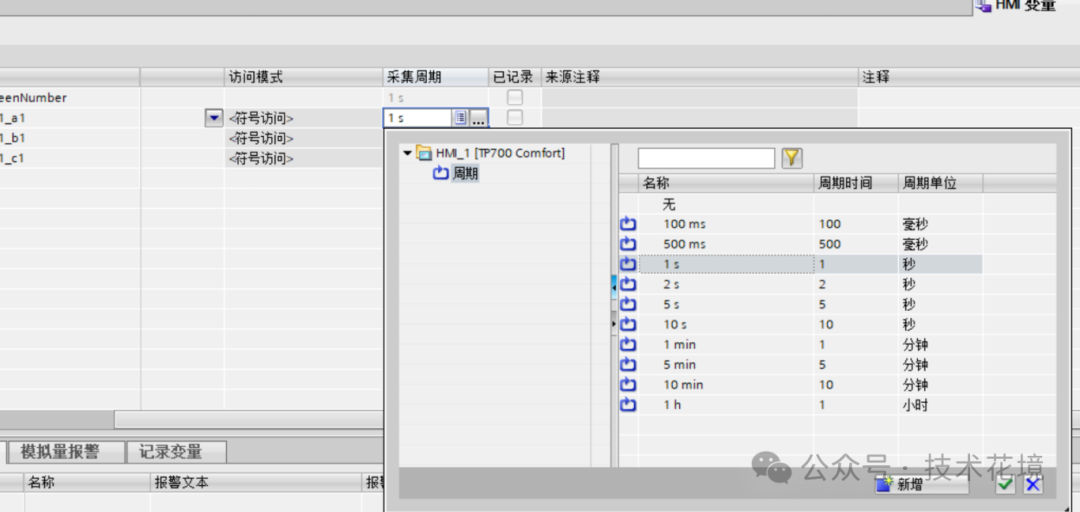
By clicking the three dots, we will see all the acquisition cycles supported by the Siemens touch screen, and we can choose a cycle that meets our needs, thus eliminating the lagging sensation.
Please Note: A cycle that is too short will increase the load on the communication network, so please ensure that your PLC and network can handle a higher communication frequency to avoid affecting the overall stability of the system.
Understanding the Collaboration Mechanism Between Touch Screens and PLCs
The response speed of Siemens touch screens not only depends on their own acquisition cycle but is also closely related to the PLC’s scanning cycle.
PLCs operate in a “sequential scanning, continuous loop” manner, where one scanning cycle goes through input sampling, program execution, and output refreshing in three stages. The touch screen needs to complete data exchange with the PLC before it can update the display.
Therefore, optimizing the touch screen response is a system engineering task. While adjusting the touch screen acquisition cycle, one should also examine the efficiency of the PLC program; a dual approach is necessary to achieve the best results.
The key to optimizing touch screen response speed lies in finding the best balance between “speed” and “stability” based on actual needs.
By simply adjusting the HMI variable acquisition cycle, one can significantly improve the operational experience, making the device’s response more “agile.” Remember to conduct comprehensive testing of the system after modifications to ensure stable and reliable communication.


 Technical Insights
Welcome to follow us