LoRA Fine-Tuning for Flan T5 Small Model
“Train your own AI model using just a Mac, without a GPU or cloud services.”
1. Why Choose LoRA?
-
Lightweight: Only trains 0.1% to 1% of new parameters, fast speed, and low memory usage.
-
Pluggable: Multiple LoRA adapters can be switched at any time, allowing for versatile use.
-
No Risk: The base model is frozen, eliminating the fear of “catastrophic forgetting.”
2. Environment Setup
| Step | Command |
|---|---|
| Install pyenv | brew install pyenv |
| Install Python version | pyenv install 3.11.9 |
| Create virtual environment | python3.9 -m venv .venv |
| Activate virtual environment | source .venv/bin/activate |
| Install PyTorch (MPS) | <span>pip install torch torchvision --index-url https://download.pytorch.org/whl/cpu</span> |
| Install core libraries | <span>pip install transformers datasets peft accelerate</span> |
3. Prepare Data (Example: Local JSONL)

4. Create Script finetune_lora.py
import torch
from transformers import (
    AutoModelForSeq2SeqLM,   # —— Seq2Seq architecture model (using google/flan-t5-small here)
    AutoTokenizer,           # —— Tokenizer that matches the model
    TrainingArguments,       # —— Container for Trainer hyperparameters
    Trainer,                 # —— HuggingFace training loop wrapper
    DataCollatorForSeq2Seq   # —— Dynamic batch padding + label processor
)
from datasets import load_dataset      # —— Easily read/stream various datasets
from peft import (                     # —— PEFT = Parameter-Efficient Fine-Tuning
    LoraConfig, TaskType, get_peft_model, PeftModel
)

# ---------- Step 1: Read JSONL Data ----------
# data.jsonl each line is like {"instruction": "...", "output": "..."}
dataset       = load_dataset("json", data_files="data.jsonl")
train_dataset = dataset["train"]

# ---------- Step 2: Text Preprocessing ----------
model_name = "google/flan-t5-small"
tokenizer  = AutoTokenizer.from_pretrained(model_name)

def preprocess(example):
    # Encode "instruction" as input_ids
    model_input = tokenizer(
        example["instruction"],
        max_length=512,
        truncation=True,
        padding="max_length"
    )
    # Encode "output" as labels (Teacher forcing)
    labels = tokenizer(
        example["output"],
        max_length=128,
        truncation=True,
        padding="max_length"
    )
    model_input["labels"] = labels["input_ids"]
    return model_input

train_dataset = train_dataset.map(preprocess)

# ---------- Step 3: Load Base Model + Inject LoRA ----------
base_model = AutoModelForSeq2SeqLM.from_pretrained(model_name)

lora_config = LoraConfig(
    r=8,                     # Low-rank matrix rank
    lora_alpha=16,           # Scaling factor
    lora_dropout=0.1,        # Dropout
    bias="none",
    task_type=TaskType.SEQ_2_SEQ_LM
)
model = get_peft_model(base_model, lora_config)  # Returns a trainable model with only a few thousand new parameters

# ---------- Step 4: Device ----------
device = "mps" if torch.backends.mps.is_available() else "cpu"
model.to(device)

# ---------- Step 5: Training Parameters ----------
training_args = TrainingArguments(
    output_dir="./lora_finetune_output",
    per_device_train_batch_size=2,     # Actual batch size = 2 × gradient_accumulation
    gradient_accumulation_steps=4,
    num_train_epochs=5,
    learning_rate=1e-4,
    logging_steps=1,
    save_strategy="no",
    report_to="none",
    fp16=False                         # Use float32 for stability on Apple Silicon
)

data_collator = DataCollatorForSeq2Seq(tokenizer, model=model)

# ---------- Step 6: Start Training ----------
trainer = Trainer(
    model=model,
    args=training_args,
    train_dataset=train_dataset,
    data_collator=data_collator,
    tokenizer=tokenizer
)
trainer.train()

# ---------- Step 7: Save LoRA Adapter ----------
model.save_pretrained("lora_adapter")

# ---------- Step 8: Inference Testing ----------
print("🎯 Inference Testing:")
base        = AutoModelForSeq2SeqLM.from_pretrained(model_name).to(device)
lora_model  = PeftModel.from_pretrained(base, "lora_adapter").to(device)

def infer(prompt: str) -> str:
    """Single inference: pass in instruction, return generated text from model"""
    inputs = tokenizer(prompt, return_tensors="pt").to(device)
    outputs = lora_model.generate(**inputs, max_new_tokens=1)
    return tokenizer.decode(outputs[0], skip_special_tokens=True)

test_prompts = [
    "what is the capital of China?",
    "what is the capital of France?",
    "what is the airplane?"
]

for p in test_prompts:
    print(f"🧠 Prompt: {p}")
    print(f"📝 Answer: {infer(p)}")
    print("-" * 40)
- Training log output
(.venv) ➜  aigc python finetune_lora.py
Generating train split: 1000 examples [00:00, 452655.30 examples/s]
Map: 100%|███████████████████████████████████████████████████████████████████████████████████████████████████████████████████████████████████████████████████████████████| 1000/1000 [00:00<00:00, 9258.42 examples/s]
{'loss': 41.4961, 'grad_norm': 3.4582340717315674, 'learning_rate': 0.0001, 'epoch': 0.01}
{'loss': 45.12, 'grad_norm': 4.7143425941467285, 'learning_rate': 9.984e-05, 'epoch': 0.02}
{'loss': 43.707, 'grad_norm': 3.819638252258301, 'learning_rate': 9.968000000000001e-05, 'epoch': 0.02}
{'loss': 40.973, 'grad_norm': 3.7596452236175537, 'learning_rate': 9.952e-05, 'epoch': 0.03}
{'loss': 45.6711, 'grad_norm': 4.67157506942749, 'learning_rate': 9.936000000000001e-05, 'epoch': 0.04}
{'loss': 42.3758, 'grad_norm': 4.384180068969727, 'learning_rate': 9.92e-05, 'epoch': 0.05}
{'loss': 36.1399, 'grad_norm': 3.7017316818237305, 'learning_rate': 9.904e-05, 'epoch': 0.06}
{'loss': 44.6688, 'grad_norm': 4.85175085067749, 'learning_rate': 9.888e-05, 'epoch': 0.06}
{'loss': 44.2394, 'grad_norm': 4.683821201324463, 'learning_rate': 9.872e-05, 'epoch': 0.07}
{'loss': 41.7887, 'grad_norm': 4.8903913497924805, 'learning_rate': 9.856e-05, 'epoch': 0.08}
{'loss': 44.2073, 'grad_norm': 4.807693004608154, 'learning_rate': 9.84e-05, 'epoch': 0.09}
{'loss': 42.7997, 'grad_norm': 4.235534191131592, 'learning_rate': 9.824000000000001e-05, 'epoch': 0.1}
{'loss': 39.6141, 'grad_norm': 4.627796173095703, 'learning_rate': 9.808000000000001e-05, 'epoch': 0.1}
{'loss': 41.5859, 'grad_norm': 4.959679126739502, 'learning_rate': 9.792e-05, 'epoch': 0.11}
{'loss': 44.5831, 'grad_norm': 5.254530429840088, 'learning_rate': 9.776000000000001e-05, 'epoch': 0.12}
{'loss': 43.8274, 'grad_norm': 5.325198173522949, 'learning_rate': 9.76e-05, 'epoch': 0.13}
{'loss': 41.8024, 'grad_norm': 5.138743877410889, 'learning_rate': 9.744000000000002e-05, 'epoch': 0.14}
{'loss': 41.099, 'grad_norm': 5.499021530151367, 'learning_rate': 9.728e-05, 'epoch': 0.14}
{'loss': 41.2216, 'grad_norm': 11.285901069641113, 'learning_rate': 9.712e-05, 'epoch': 0.15}
{'loss': 37.4023, 'grad_norm': 4.781173229217529, 'learning_rate': 9.696000000000001e-05, 'epoch': 0.16}
{'loss': 41.2696, 'grad_norm': 5.610023021697998, 'learning_rate': 9.680000000000001e-05, 'epoch': 0.17}
{'loss': 37.7613, 'grad_norm': 3.9915575981140137, 'learning_rate': 9.664000000000001e-05, 'epoch': 0.18}
....
As we can see, the loss value decreases with each epoch. On the M3 MacBook, 5 epochs take approximately 3 minutes, so results can be seen very quickly.
6. Practical Results
Here is my question:
test_prompts = [
    "what is the capital of China?",
    "what is the capital of France?",
    "what is the airplane?"
]
The outputs from the LoRA fine-tuned model are as follows:
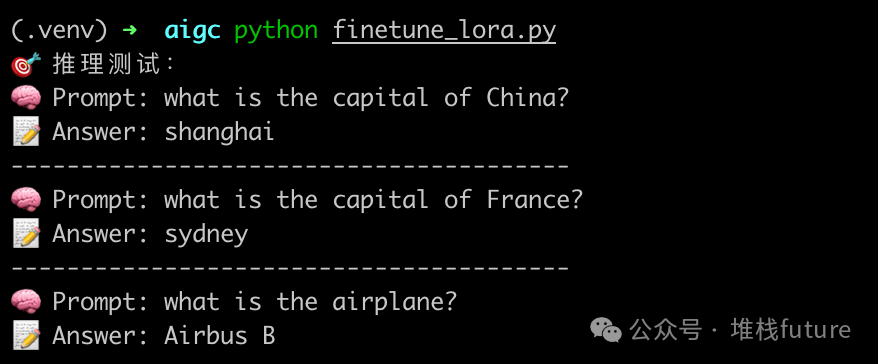
From the results, the answers are acceptable, but if you look closely, you will find that the answers are incorrect. Clearly, the capital of China is Beijing, not Shanghai, and the capital of France is Paris, not Sydney.
Since we only used the Google T5 base small model for fine-tuning demonstration, the quality of the fine-tuned model is not very good due to various factors such as a small dataset, insufficient GPU, and an average base model. If you have more GPUs and memory, it is recommended to try larger models, such as 7B or above, as the fine-tuned models should perform better.
7. Summary
-
LoRA = Less modification, more gain (freeze all parameters and only update local parameters that need fine-tuning);
-
M-series Macs = Portable “GPU” (Note: Must have 16GB or more memory and 8 or more cores);
-
HuggingFace + PEFT = Zero barrier to entry (HuggingFace has a wealth of datasets and models that can be directly used for training).
Finally, I pose a question: Is it better to fine-tune specialized knowledge into the base model or to use RAG technology + specialized knowledge base + general large model?
Series of articles on historical large models:
- Experience of Local Deployment of DeepSeek Large Model
- Revealing Prompt Engineering
- OpenAI: Interpretation of Six Major Strategies for GPT Prompts
- Practical GPT Prompting: Responding with Popular Memes in the Style of Li Jiaqi, Quite Interesting
- All About Prompts
- Thorough Understanding of Inference Models and General Models
- Developing Large Model Applications Based on LangChain – Part One
- Developing Large Model Applications Based on LangChain – Part Two (Retriever)
- Developing Large Model Applications Based on LangChain – Part Three (Dialogue Retriever (Chatbot))
- Developing Large Model Applications Based on LangChain – Part Four (Agent)
- Developing Large Model Applications Based on LangChain – Part Five (LangServe Service Development)
- Building nl2sql Applications with LangStudio: Just Input Text to Execute SQL and Output Results
- Unveiling the Mystery of Manus: Demonstrating the Power of Multi-Agent (Agent) Search by Jack Ma
- OWL by Camel-AI for Handling Real-World Automation Tasks
- How Do Large Models Know Iron is Conductive?
- Building File Applications with LangStudio: Just Input Address to Create Your Own Knowledge Base
- AI Large Model Learning Framework
- Building Weather Forecast Applications Based on Bailian, Very Simple
- Building Weather Forecast Agents Based on MCP
- “No Code + AI Empowerment! Quickly Build Intelligent Crawlers Based on Alibaba Cloud Bailian MCP”
- Efficient Information Steward in the AI Era: Practical Implementation of Web Summarization Agents Based on MCP-Agent and Tongyi Qianwen
- Manus is Finally Open!