In the PCB design community, there is an “invisible hero” that is often overlooked by beginners — it may seem like an inconspicuous little dot, but it can transform a product from “frequent rework” to “one-time success,” and from “cost overruns” to “efficient mass production.”
This is the Mark point. Today, let’s discuss in simple terms why it is essential to include Mark points in PCB design and how to place them correctly to avoid pitfalls.
Don’t Underestimate This Little Dot! 5 Major Functions, Missing One Can Be Troublesome
Some may ask: “If the PCB traces I designed are correct, is it necessary to include this point?” The answer is no! Although the Mark point seems simple, it actually serves as a “navigator” throughout PCB manufacturing and assembly. Without it, the subsequent processes can become chaotic.
1. Ensures Component Placement with “Zero Deviation,” Bidding Farewell to “Hectic Operations”
Currently, mainstream SMT (Surface Mount Technology) relies on machines to automatically place components onto the PCB. But how does the machine know “where to place the components”? The answer is the Mark point.
By recognizing the Mark point, the machine can accurately locate the position and angle of the PCB. Even if the PCB is slightly misaligned, it can automatically adjust. Without the Mark point, either manual alignment is required (which is painfully slow), or the machine may place components incorrectly, leading to product scrap.
Even in scenarios requiring manual assembly, the Mark point helps operators quickly find the correct positions, making it much easier than measuring against a drawing.
2. Shortens Manufacturing Cycle, Doubles Efficiency
The first step in PCB manufacturing is to determine the position of the board. In the past, without Mark points, workers had to manually measure and mark using a ruler. While this is manageable for a single board, it consumes a lot of time during mass production just for positioning.
With Mark points, the situation changes — machines can instantly “grab” the markers, completing positioning in seconds, significantly reducing preparation time. This boosts production efficiency and allows for faster product delivery, which is a real competitive advantage.
3. Reduces Rework Waste, Directly Lowers Costs
Human operations are prone to errors: for example, misplacing components or misaligning the board during soldering… These mistakes can lead to PCB scrap, and re-manufacturing not only incurs costs but also delays timelines.
The Mark point allows for more precise automated operations, reducing the probability of “misplacing or mis-soldering” from the source. Don’t underestimate this; in mass production, reducing scrap by just 10% can save a significant amount of costs.
4. Prevents Reflow Soldering Failures, Significantly Reduces Defect Rates
After components are placed on the PCB, they must go into a reflow oven for heating, allowing the solder to melt and secure the components. This process has very high alignment requirements — if the board is not positioned correctly, components may shift during heating, leading to cold solder joints.
With Mark points, the reflow soldering machine can automatically align the PCB, ensuring that the heating position and time for each board are precisely consistent, which directly reduces defect rates, eliminating the need for time-consuming sorting and repairing of defective boards.
5. Ensures Product Stability, Providing Greater Peace of Mind
Whether it’s a smartphone, computer, or industrial equipment, the stability of the PCB directly determines the product’s lifespan. Mark points ensure that every PCB’s manufacturing and assembly are “standardized” — there won’t be some boards with components placed correctly and others misaligned.
With increased consistency, the stability and reliability of the product naturally improve, significantly reducing the probability of subsequent failures.
How to Place Mark Points? 3 Key Details, Even Beginners Can Get It Right the First Time
Now that you understand the importance of Mark points, the next step is to learn how to place them correctly. The method is quite simple; just remember these 3 key points:
1. Style & Size: Follow the “1-2-3” Standard, Don’t Make Your Own Changes
Mark points cannot just be randomly drawn; they have a fixed “golden ratio”:
- The center is a 1mm diameter pad (equivalent to the core of a small circle);
- Surrounding it is a 2mm diameter solder mask opening (to expose the pad for easy machine recognition);
- The outermost layer is a 3mm diameter lead (which can be circular or polygonal, depending on personal preference, no difference).
Just stick to these dimensions; there’s no need to innovate — after all, factory machines are calibrated to this standard, and any changes may lead to recognition issues.
2. Position: Prioritize the “Component Side,” 3 Points Are Enough
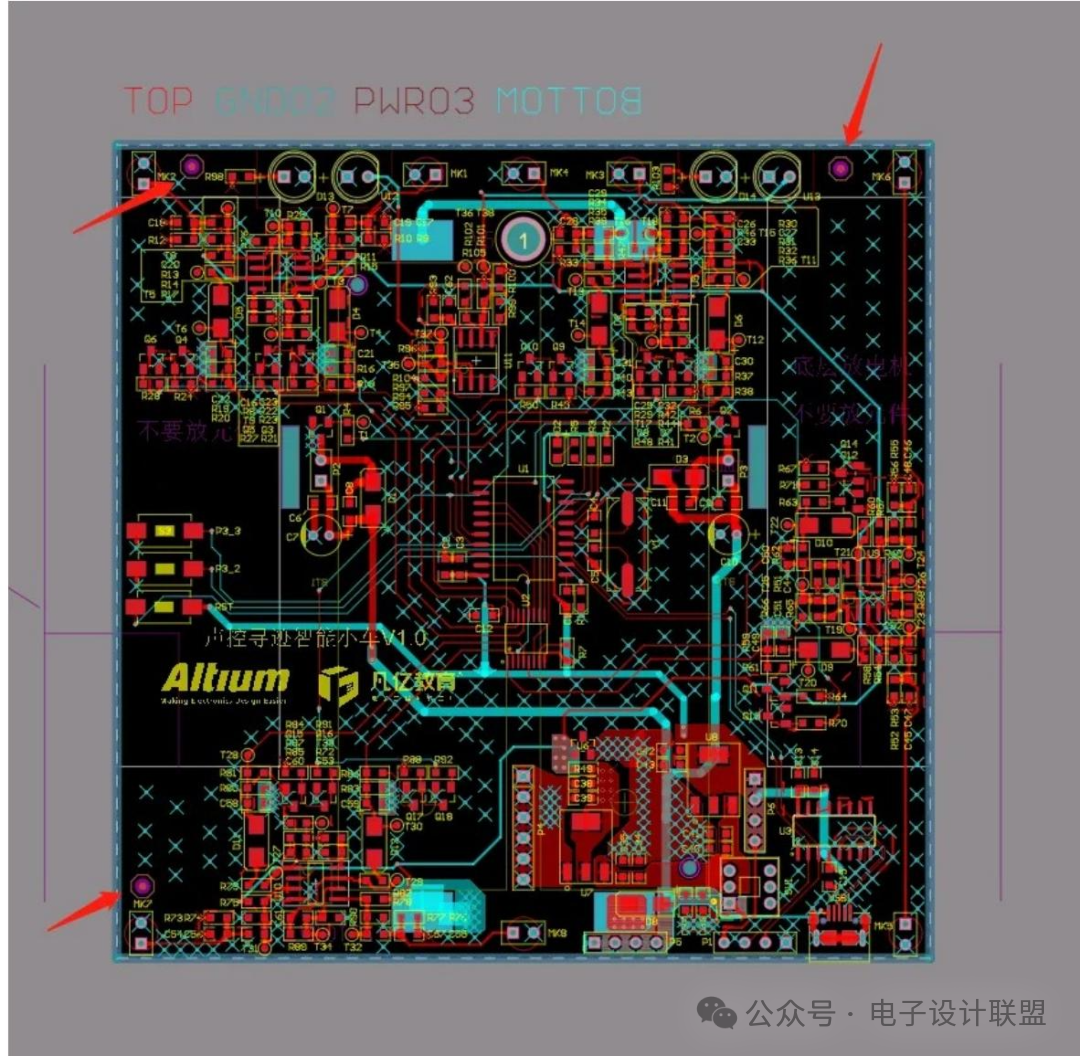
- Where to place: If the PCB has components on only one side (single-sided layout), place them only on that side; if both sides have components, place them on both sides.
- How many to place: 3 points on one side are sufficient; more would be redundant.
- Specific position: It is best to place them in the corners near the edge of the board, about 3mm away from the edge — this allows for easy machine recognition without affecting the layout of other components.
Final Reminder: Don’t Wait Until You Make a Mistake to Remember It!
Many beginners focus on circuit design and layout when designing PCBs, only to forget to include Mark points. When the factory reports “unable to produce” or “placement errors,” they then go back to make modifications, which not only wastes time but may also delay the project.
In fact, designing Mark points is not complicated; spending a few minutes to place them according to standards can save countless troubles later. Remember: the “last mile” of PCB design often lies in these seemingly inconspicuous little details.
Have you ever encountered pitfalls with Mark points while designing PCBs? Feel free to share your experiences in the comments, and don’t forget to forward this to friends who need it, so we can all avoid pitfalls together!
Disclaimer:This article is an original piece by Gan Yi Education; please indicate the source when reprinting!For submissions/recruitment/advertising/course collaboration/resource exchange, please add WeChat: 13237418207
Why is hardware development more challenging yet pays less than software? What is the underlying issue?
2025-11-17
Hardware Development Process Standards: Chip Selection, Power Consumption Calculation, and Grounding Design
2025-11-14
Designing Communication Interfaces This Way, Stable!
2025-11-12