Adhering to high-quality original content, rejecting content piling, if you like it, click the star above to receive updates promptly, thank you for your attention!
We previously learned how to compile and run kernel modules, but in reality, many driver modules are quite complex. Most driver modules consist of multiple files, and there are dependencies between modules.
For example, in the previous section, we mentioned <span>amdgpu</span>, which has several pages of module parameters. It is unrealistic to implement all functionalities in a single module and a single file, and it does not align with the concept of modularity and software layering.
When multiple modules have dependencies, issues may arise during compilation and loading due to the use of function symbols from other modules, as shown below:
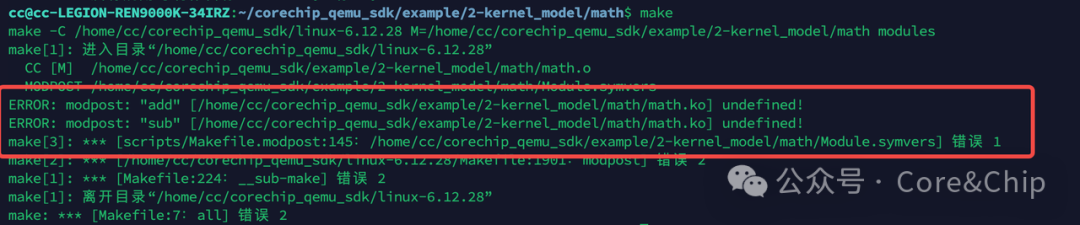
In our previous study of compiling out-of-tree kernel modules, our <span>Makefile</span> had to specify the path to the kernel source code and emphasized that the kernel must be compiled before compiling the kernel module. What is the reason for this? In this issue, we can explain this based on the knowledge we have acquired so far.
In this section, we will introduce how to handle dependencies between multiple modules when writing kernel modules, as well as how to compile kernel modules that consist of multiple files.
1. Inter-Module Dependencies
The C language is a modular language, and we all know the concept of function encapsulation. In app development, we can use header files to reference functions implemented in other files.
So, can a kernel module provide interfaces for other kernel modules? The answer is certainly yes, but not in the form of header files; instead, we need to use <span>EXPORT_SYMBOL</span>. We will explain in detail why we need to use <span>EXPORT_SYMBOL</span>.
Moreover, when there are dependencies between modules, the loading order must also be considered to ensure that the dependent modules are loaded first to provide the necessary interfaces for other modules. But how can we ensure this loading order? We will explain this step by step.
Below is a simple example of multiple modules with dependencies: there are three files that will produce three modules, namely <span>sub.ko </span>, <span>add.ko</span>, and <span>math.ko</span>. The implementation is quite simple: <span>sub</span> provides the implementation for subtraction, <span>add</span> implements addition, and <span>math</span> uses the interfaces provided by <span>sub</span> and <span>add</span> to create dependencies between these two modules.
1.1 EXPORT_SYMBOL
When a kernel module wants to expose an interface for use by other modules, it needs to use the method <span>EXPORT_SYMBOL(function_name)</span>.
Below is the simplest kernel module file, with the code for header files, <span>module_init</span>, and other content omitted, only showing the key parts.
int sub(int a, int b)
{
    printk(KERN_INFO "add function called!\n");
    return a - b;
}
EXPORT_SYMBOL(sub);
int add(int a, int b)
{
    return a + b;
}
EXPORT_SYMBOL(add);
#include <linux/init.h>
#include <linux/module.h>

// Declare external interfaces
extern int add(int a, int b);
extern int sub(int a, int b);

MODULE_LICENSE("GPL");
MODULE_AUTHOR("YourName");
MODULE_DESCRIPTION("math module - uses add and sub");

static int __init math_init(void)
{
    int a = 12, b = 8;
    int s, d;

    printk(KERN_INFO "math module loaded!\n");

    s = add(a, b);
    d = sub(a, b);

    printk(KERN_INFO "math: %d + %d = %d\n", a, b, s);
    printk(KERN_INFO "math: %d - %d = %d\n", a, b, d);

    return 0;
}

static void __exit math_exit(void)
{
    printk(KERN_INFO "math module exited!\n");
}

module_init(math_init);
module_exit(math_exit);
1.2 Writing Makefile for Module Dependencies
When there are dependencies between modules, if we compile <span>math.c</span> separately, the following error will occur:
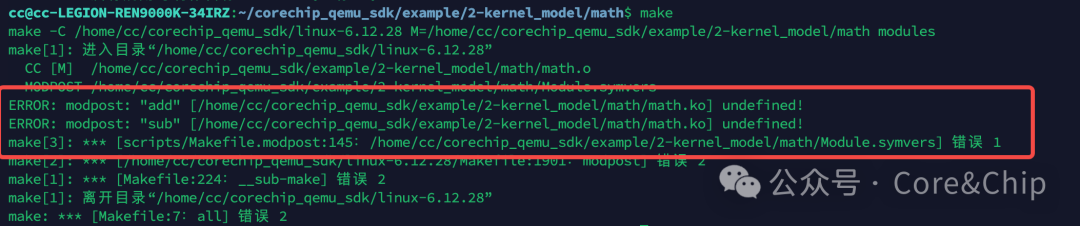
The reason is simple: it cannot find the functions <span>add</span> and <span>sub</span>. There are two solutions:
When we use <span>EXPORT_SYMBOL</span>, if we try to compile the module, we will find that the <span>Module.symvers</span> file contains records of the exported symbols.

So the first method is to compile the <span>add</span> and <span>sub</span> modules first, and then in the <span>Makefile</span> of the <span>math</span> module, reference the other two modules’ <span>Module.symvers</span> using <span>KBUILD_EXTRA_SYMBOLS</span>, so that when compiling <span>math</span>, it can find the symbols and compile successfully.
KBUILD_EXTRA_SYMBOLS += /path/to/another/Module.symvers
KDIR := /path/to/kernel_source
PWD := $(shell pwd)

all:
        $(MAKE) -C $(KDIR) M=$(PWD) modules

clean:
        $(MAKE) -C $(KDIR) M=$(PWD) clean
The second method, which is simpler, is to place the related modules in the same directory. The Makefile is as follows, and the compilation order of the modules does not matter.
obj-m += math.o
obj-m += sub.o
obj-m += add.o

KDIR := /path/to/kernel_source
PWD := $(shell pwd)

all:
        $(MAKE) -C $(KDIR) M=$(PWD) modules

clean:
        $(MAKE) -C $(KDIR) M=$(PWD) clean
It is important to emphasize that what we discussed above is the <span>out-of-tree</span> compilation method. If it is in-source compilation, according to our previous article: Essential Kernel Course for BSP Engineers: 2.2. A Caregiver’s Guide to In-Source Compilation and Running Kernel Modules, by configuring the <span>kconfig</span> dependency relationships, the <span>kbuild</span> system will automatically compile the related modules.
1.3 Module Dependency Loading Methods
1.3.1 insmod
Loading modules is similar to compilation; due to the dependencies, the order must be noted when using <span>insmod</span>. As shown in the figure below, the dependent modules <span>sub</span> and <span>add</span> should be loaded first, followed by loading <span>math</span> to run successfully and call the corresponding functions of the modules that are <span>EXPORT</span>ed.
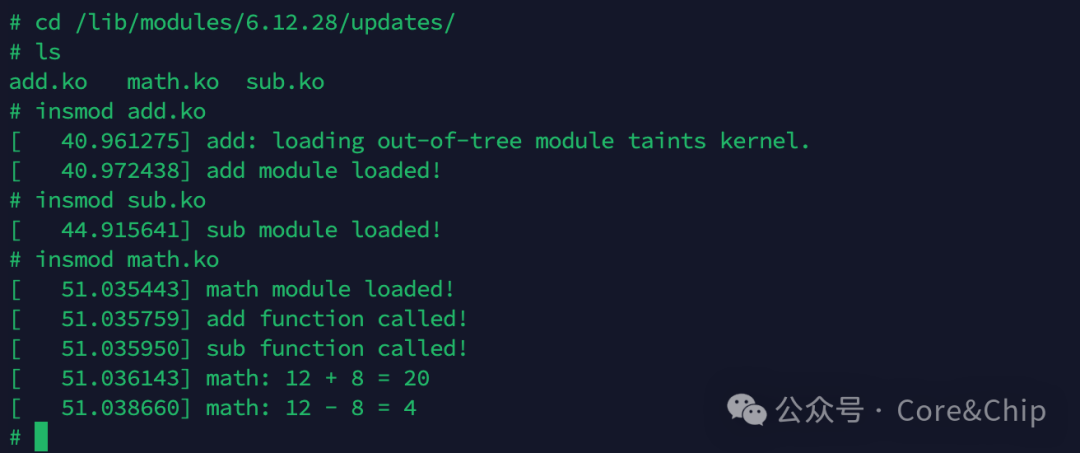
If the dependent module is not loaded, the loading will fail due to unresolved symbols.

1.3.2 depmod and modprobe (Recommended)
However, when the modules are complex, it is not easy to understand the relationships between them. What should we do in this case?
At this point, we can use the <span>depmod -a</span> command to generate a dependency report file, and then directly use <span>modprobe math.ko</span>, and we will find that the other two modules that <span>math.ko</span> depends on are automatically loaded.
<span>modprobe -r math.ko</span> will also check if there are other modules depending on <span>add</span> and <span>sub</span>. If not, these two modules will also be unloaded in order.
This way, we no longer need to pay attention to the dependencies and loading order of the modules!
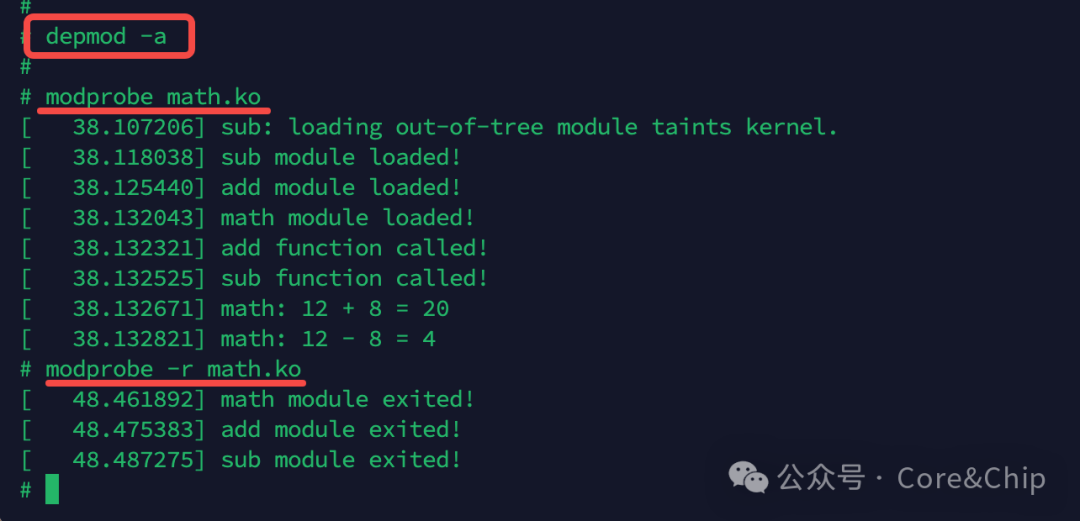
Does it seem smart and magical? The principle is quite simple:
<span>depmod</span> tool scans all <span>.ko </span> files in the <span>/lib/modules/$(uname -r)/</span><code><span> directory, and the metadata of the </span><code><span>.ko</span> files will have these unresolved <span>symbols</span> and the names of the dependent modules.
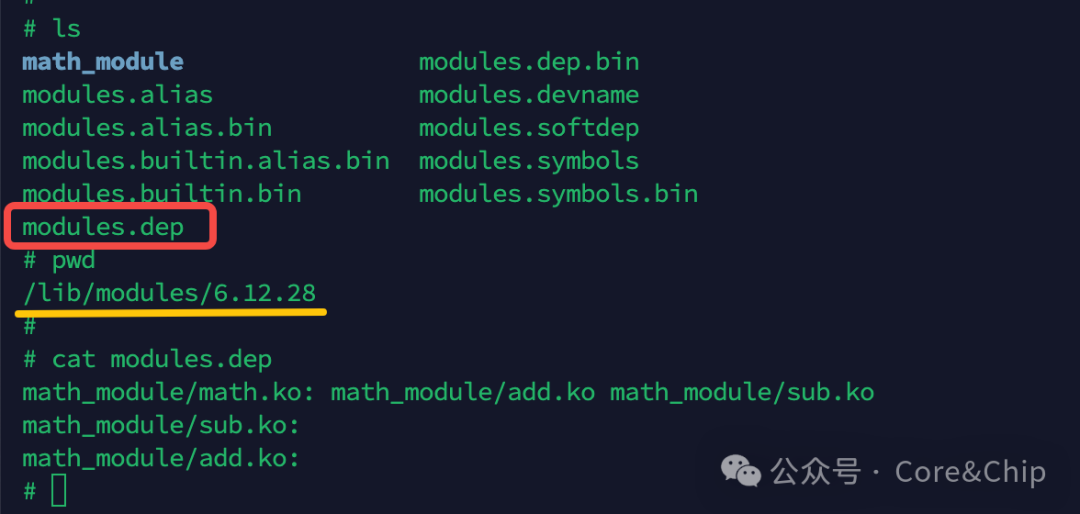
<span>depmod</span> collects “who uses other people’s <span>symbols</span>” and “which <span>symbols</span> are provided by whom (<span>EXPORT</span>)”, thus generating the dependency relationship and creating the <span>modules.dep</span> file.
As shown in the figure below, the <span>modules.dep</span> file shows that <span>math.ko</span> depends on <span>add.ko</span> and <span>sub.ko</span>, and these two <span>ko</span> files have no other dependencies.<span>modprobe</span> will read the <span>modules.dep</span> file when loading, and recursively load the dependent modules.
2. Compiling Multi-File Modules
Having discussed how to handle inter-module dependencies, we find that for a module consisting of a single <span>.c</span> and <span>.h</span> file, it often cannot meet our needs. So how do we compile multiple files into a single module?
To compile into a single <span>ko</span>, the various <span>.c</span> files do not need to use <span>EXPORT_SYMBOL</span>, and only one <span>module_init/exit</span> should be retained as the main entry point, which we will not demonstrate here.
The Makefile is as follows:
obj-m := math_module.o
math_module-objs := math.o add.o sub.o
KDIR := /home/cc/corechip_qemu_sdk/linux-6.12.28
PWD := $(shell pwd)

all:
    $(MAKE) -C $(KDIR) M=$(PWD) modules

clean:
    $(MAKE) -C $(KDIR) M=$(PWD) clean
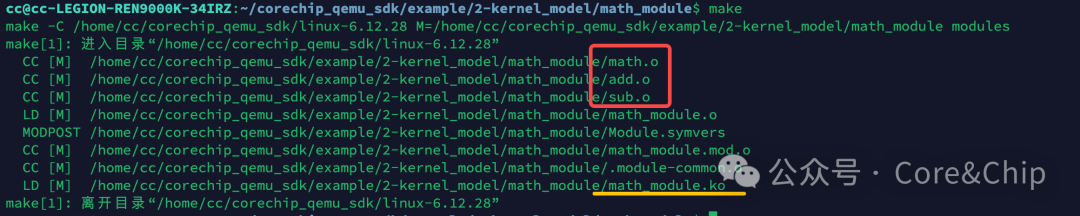
As you can see, the various <span>.o</span> files are compiled in order and linked into <span>math_module.ko</span>
3. Brief Analysis of the Principle of EXPORT_SYMBOL
We have discussed the existence of inter-module symbol and function interface calls, dependencies, and how multiple files can be compiled into a single <span>ko</span> file. It can be observed that when multiple files are compiled into a module, we only need to provide header files as usual to call functions from other files.
Why is it necessary to use <span>EXPORT_SYMBOL</span> to call interfaces from other kernel modules? The principle of <span>EXPORT_SYMBOL</span> involves a lot of compilation-related knowledge, which can be overly complex and fragmented. Here, we will only discuss the core idea, and if there is interest, we can elaborate on it later.
In our previous article discussing the differences between monolithic kernels and microkernels, we mentioned that the Linux kernel is a monolithic kernel, where all symbols in the kernel reside in the same address space, allowing direct function calls.It is like all employees being in the same room; you can just call out to find anyone..
Therefore, if there were no module mechanism, all symbols would be statically linked to the kernel at compile time, and there would be no need to use <span>EXPORT_SYMBOL</span>.
However, since the kernel supports runtime dynamic loading of modules, and modules are compiled independently of the kernel, the kernel does not know about the existence of these symbols when it is compiled.
When we compile kernel modules separately, do you remember that we specified the source path in the <span>Makefile</span>? Why is this necessary? Because when a kernel module references symbols in the kernel, it generates “unresolved references” during compilation. This reference will look for the corresponding address of <span>EXPORT_SYMBOL</span> during dynamic loading to complete the loading.
This is why the kernel must be compiled before compiling kernel modules, as kernel modules need to rely on the symbol list generated by the kernel compilation as references.
Moreover, if you compile a kernel module on one kernel version and try to load it on another version, issues may arise. This is because the kernel module pointing to different kernels can lead to differences in the arrangement of symbol segment addresses, causing crashes when the kernel module attempts to load symbols at the same address that are inconsistent.
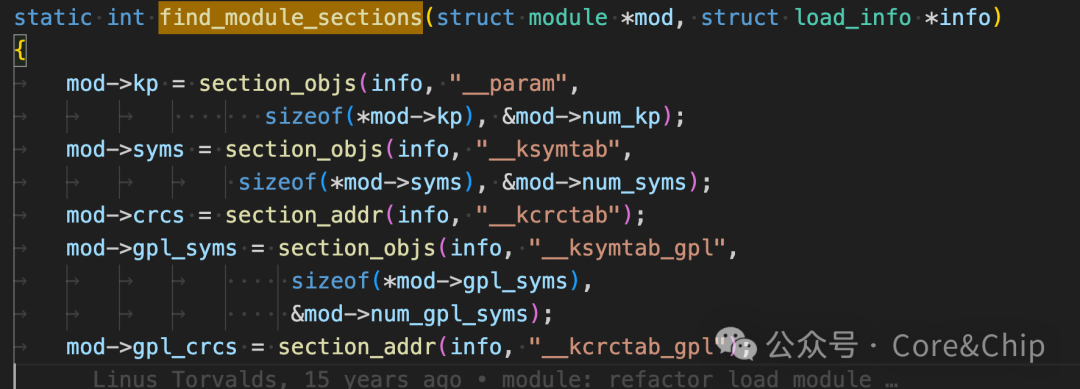
The implementation of <span>EXPORT_SYMBOL</span> is somewhat similar to the module parameters we discussed in the previous section, as it saves parameters in a specific <span>section</span> (<span>ksymtab</span>),
// In include/linux/export.h
#define EXPORT_SYMBOL(sym) \
    __EXPORT_SYMBOL(sym, "")

#define EXPORT_SYMBOL_GPL(sym) \
    __EXPORT_SYMBOL(sym, "_gpl")

#define __EXPORT_SYMBOL(sym, sec) \
    extern typeof(sym) sym; \
    __CRC_SYMBOL(sym, sec) \
    static const char __kstrtab_##sym[] \
    __attribute__((section("__ksymtab_strings"), used, aligned(1))) \
    = #sym; \
    __KSYMTAB_ENTRY(sym, sec)
Then, during module initialization, it looks up the required symbols in the section and records the references in the <span>mod</span> pointer. When calling functions provided by other modules, it can complete the call through the pointer.
4. Summary
In this section, we introduced:
-
The situation of inter-module dependencies, how to compile kernel modules, and how to load kernel modules
-
Learned the usage of
<span>depmod</span>and<span>modprobe</span>, which can automatically generate dependency relationships and load in order, which is highly recommended -
How to compile multiple files into a single kernel module file
-
A brief introduction to the principle of
<span>EXPORT_SYMBOL</span>
We all know that kernel modules must declare their entry and exit functions using <span>module_init</span> and <span>module_exit</span>. In the next section, we will introduce the loading process of kernel modules to gain a deeper understanding of the operating principles of kernel modules.
– END –
If you have any questions, feel free to add me on WeChat for discussion. I have created a small group, and I will gradually add some industry leaders I know, all of whom are engineers from top companies at P7 level and above. Welcome to chat~~

Self-introduction:Previously worked at AMD, currently a senior BSP engineer in a chip department at a major company.Advocating pragmatism, advocating learning by doing.Series Introduction:Essential Kernel Skills for BSP Engineers, aimed at explaining kernel knowledge and underlying principles that driver and BSP engineers will use in their work.Previous Recommendations:Ubuntu 24.04 + Qemu + ARMV8 + Linux 6.12 Caregiver-level Development Environment Setup TutorialAs the AI era progresses, the irreplaceability of low-level software engineers becomes increasingly prominent.