In November 2025, while most electrical automation learners were still troubled by the lack of training equipment, Jicheng Training quietly launched a revolutionary virtual simulation platform that combines reality and virtuality. This virtual training system, which replicates real equipment 1:1, supports Mitsubishi and Siemens PLC controllers, allowing students to complete the entire training process from wiring to programming and debugging right from their computers. Even more exciting is that with just one PLC, a complete set of industrial equipment can be simulated, and the Siemens S7-1200 series even supports pure software simulation—this means that the long-standing industry problem of “high training costs and significant space limitations” finally has a breakthrough solution.
01
From Desktop Icon to Virtual Workshop: Build Your Exclusive Training Environment in Three Minutes
After installation, a blue gear-shaped shortcut icon will appear on the computer desktop, and double-clicking it will launch the system. Note that the account password needs to be obtained from the corresponding service teacher, which is the key to entering the virtual training world.

Upon successful login, you will be greeted by a clearly categorized platform homepage, resembling a virtual vocational skills training center. The top navigation bar clearly displays different job directions, from junior electrical automation engineers to senior industrial robot operation and maintenance, with each job label hiding a carefully designed practical project library.
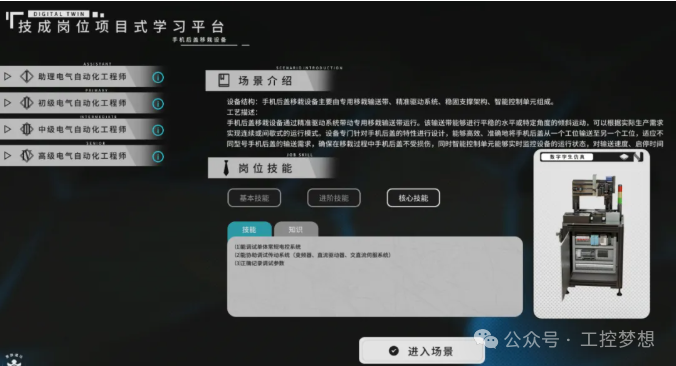
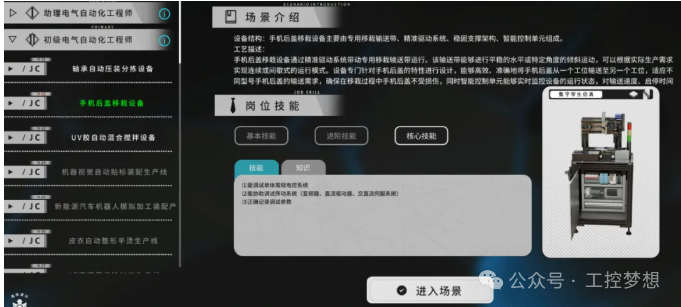
Taking the “Junior Electrical Automation Engineer” position as an example, we immediately see several industrial-grade projects such as mobile phone back cover transplanting equipment and automatic feeding assembly lines. These are not just simple animated demonstrations; each project includes real electrical schematics, PLC program logic, and mechanical action simulations. By clicking “Enter Scene,” you can instantly be transported to a modern production workshop.
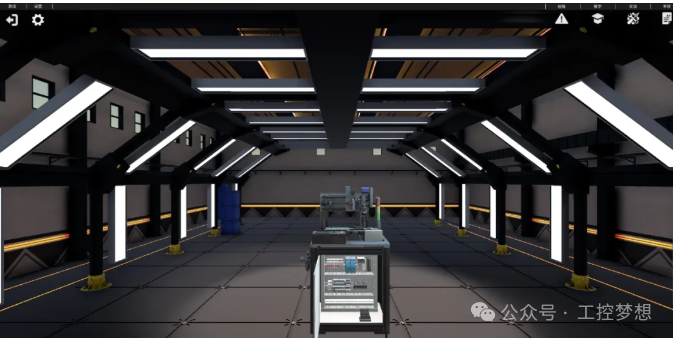
Upon entering the mobile phone back cover transplanting equipment scene, the 3D-rendered workshop environment is impressive. The settings button in the upper left corner allows you to adjust the picture quality and environmental sound effects, while the “Teaching” button in the upper right corner provides step-by-step operational guidance. Notably, the perspective control feature allows you to observe the equipment structure in 360 degrees by dragging the mouse, which is much more convenient than leaning over the machine in a real workshop to see the details.
02
From IO Allocation to Program Debugging: Fully Restoring the Industrial Site Troubleshooting Process
Clicking the “Training” button enters the practical mode, where the system guides you through the entire training process from electrical design to program debugging. The first challenge to overcome is the IO allocation—click the “IO Table” button in the upper right corner, and the variable configuration interface that pops up requires you to fill in the correct addresses. Here’s a key point: input variable addresses cannot use the real I storage area; they must be filled in the M or V area (the Siemens 1200 series supports DB block addresses), and they must strictly correspond to the variables in the actual PLC program.
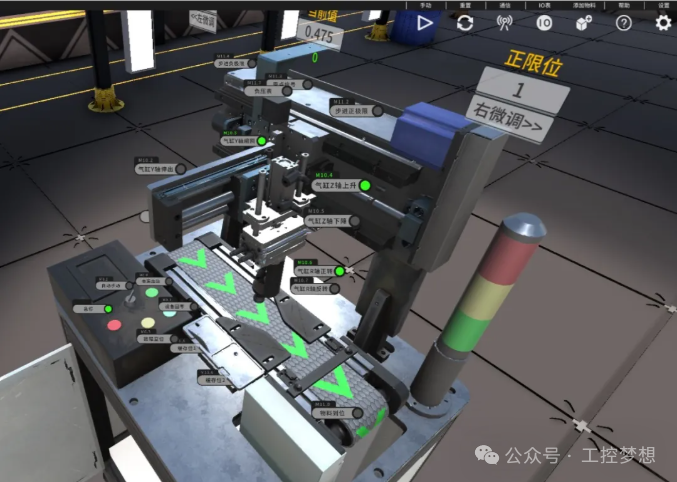
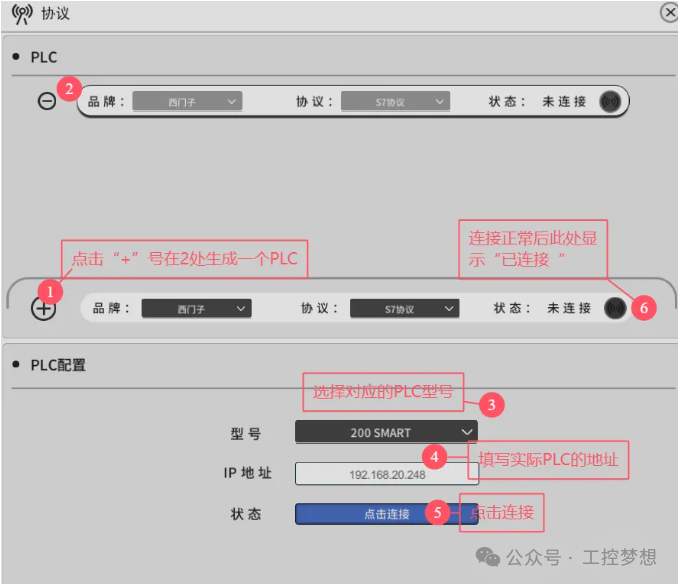
After completing the variable configuration, you enter the communication setup phase, which is a key step for the virtual platform to connect to the real PLC. In the configuration interface that pops up, you need to accurately fill in the PLC’s IP address and test the connection status. Many beginners tend to make mistakes here, so it is recommended to follow the steps of “Add Device – Select Model – Input IP – Test Connection”; the system will automatically save the configuration, and you won’t need to repeat the setup on your next login.
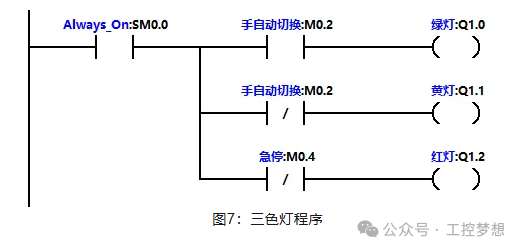
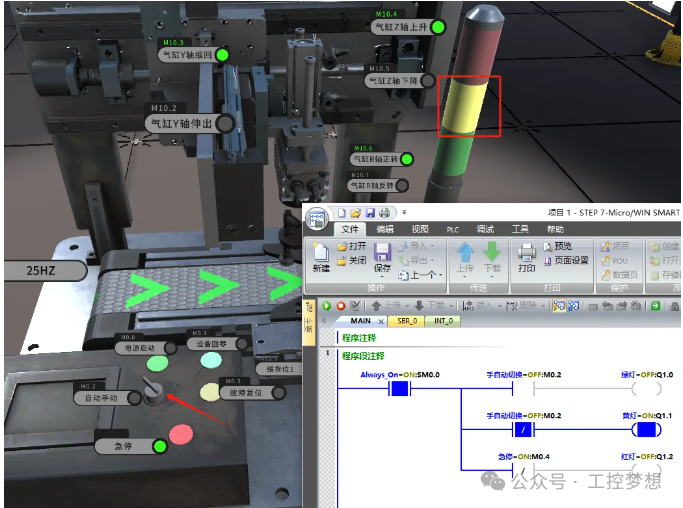
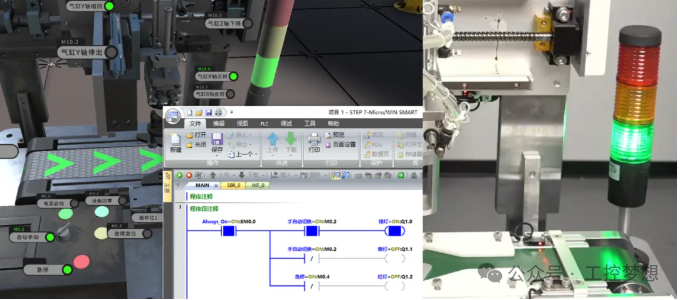
We used a classic three-color light control program to verify the system’s functionality. This program, which includes manual/automatic switching logic, was written in Siemens programming software and downloaded to the actual PLC, after which the simulation platform immediately synchronized to display the device status. In manual mode, the yellow light remains on, and when switched to automatic mode, the green light smoothly lights up—this process is completely consistent with what is observed in a real workshop, but now you can pause at any time to analyze the program logic or even intentionally create bugs to practice troubleshooting skills.
Most astonishing is the virtual-real comparison feature. The left side of the simulation platform displays the running status of the virtual device in real-time, while the right side can call up the synchronized screen of the real device. When a logical error occurs in the program, the virtual platform will highlight the fault point in red and provide an error code prompt; this instant feedback can increase learning efficiency by more than three times.
03
One PLC Controls Hundreds of Devices: The Vocational Skills Accelerator is Now Online
In traditional training modes, a class needs to be equipped with multiple different models of PLCs, various sensors, and actuators, with investments often reaching hundreds of thousands, which deters many training institutions. Jicheng’s simulation platform completely breaks this limitation—students only need one basic PLC (or even the S7-1200 simulation software) to practice programming and debugging for hundreds of industrial devices in a virtual environment. Pilot data from a vocational college shows that after adopting this platform, students’ skill acquisition speed increased by 40%, and equipment wear rate decreased by 90%.
The platform currently covers 80% of mainstream industrial control scenarios, including packaging machinery, machine tool control, logistics sorting, and other typical applications. The Jicheng research and teaching team revealed that next month, a virtual training module for new energy vehicle production lines will be launched, and in the future, they plan to introduce AR glasses operation modes to enable remote collaborative debugging. For newcomers looking to enter the smart manufacturing field, this is not just a learning tool but a key to unlocking career development.
Contact Jicheng service teachers now to activate your account and receive a 7-day free trial. Remember, in the era of Industry 4.0, true competitiveness comes not only from knowledge reserves but also from the ability to solve practical problems—this ability can be repeatedly honed on this integrated training platform. While others are still waiting for laboratory slots, you have already completed hundreds of debugging practices in the virtual workshop, which is the opportunity for a technological leap brought by iterative advancements.
Previous Recommendations
Why Transformer Voltage Regulation Should Be High to High and Low to Low
Detailed Application Method of Omron NX Enumeration Body
The Secrets Repair Technicians Won’t Tell You: The Principles and Applications of Three-Phase Rectifier Circuits
Tutorial on Using the Siemens TIA Portal V18 Simulator
Siemens PLC S7 Communication Simulation Tutorial: Achieving Seamless Data Interaction with TIA Portal
PLC Power Outage Data Loss? 3 Steps to Set Permanent Saving of Key Parameters
Tutorial on Setting Up Installment Payment Function on Wecon Touch Screen
Using Mitsubishi PLC to Add an Electronic Lock to the Touch Screen
Test Your Skills: Real Electrician or Fake Electrician: How to Calculate Current with 5 Turns of a Current Transformer?
Taiwan Chuan Inverter TC600-2S0015G1 User Manual
Wecon Touch Screen OPC UA Server Communication Configuration Instructions
How to Use VBS Script to Automatically Write WinCC7.5 Data into Excel Sheets
How to Achieve Ethernet Communication between MCGS PRO and S7-200 SMART
How to Design a Change-Giving Vending Machine Using MCGS
Wecon Touch Screen Macro Command Conditional Assignment Instructions
Has Kunlun Tongtai Touch Screen Directly Controlled the Inverter?
How Logic Operations Determine the Fate of Draft Picks
Technical Insights | PLC Custom Countdown Timer Program Design is So Simple
Two PLC Implementation Methods for Motor Delayed Start and Stop
How to Control a Park Fountain with PLC to Achieve Multiple Timing Logic
TIA Portal V19 Installation Tutorial: From Beginner to Expert, Including Common Problem Solutions and Jicheng Training Benefits