↑ Click on the above
“ITOT Partner”
Follow us
Written in front of you
As GMP regulatory standards continue to tighten, more and more pharmaceutical companies need to connect their production equipment to information management systems. However, most companies (foreign companies usually complete planning during equipment procurement or new plant construction stages) did not uniformly plan the IP addresses of their equipment during the early procurement phase, leading to a high frequency of IP address duplication issues among devices from different manufacturers or multiple devices of the same model — for example, the 35 Xinhua sterilizers purchased by our company all have a default PLC IP address of 192.168.128.1.
From the perspective of equipment manufacturers, the design of the equipment focuses on independent operation, and during the installation and deployment phase, it only needs to meet the requirements for standalone use. Therefore, there is a lack of proactive planning for IP addresses, which is the core reason for the prevalence of this phenomenon. The prerequisite for connecting equipment to information systems is that each device must have a unique IP address; otherwise, IP conflicts will occur, leading to communication interruptions and preventing data collection and remote control.
To address this issue, the common solutions in the industry mainly fall into two categories: 1) adding network couplers to avoid conflicts, and 2) directly modifying the original IP address of the device.
This article will focus on the second solution, which does not require support from the equipment manufacturer, providing a practical method for quickly and efficiently modifying the device’s IP address.

01 Modify the PLC’s IP Address
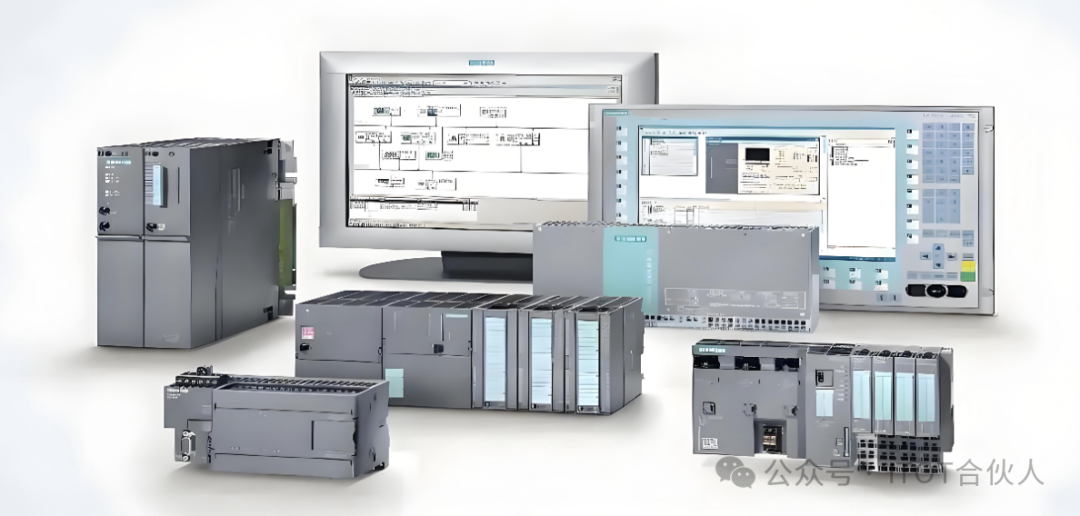
Below, we take the commonly used Siemens 1500 PLC and TP900 Comfort intelligent panel as examples.
1. After powering on the device, open the control panel Control Panel (do not run the project yet; if the project is already running on the HMI, it needs to be closed first)
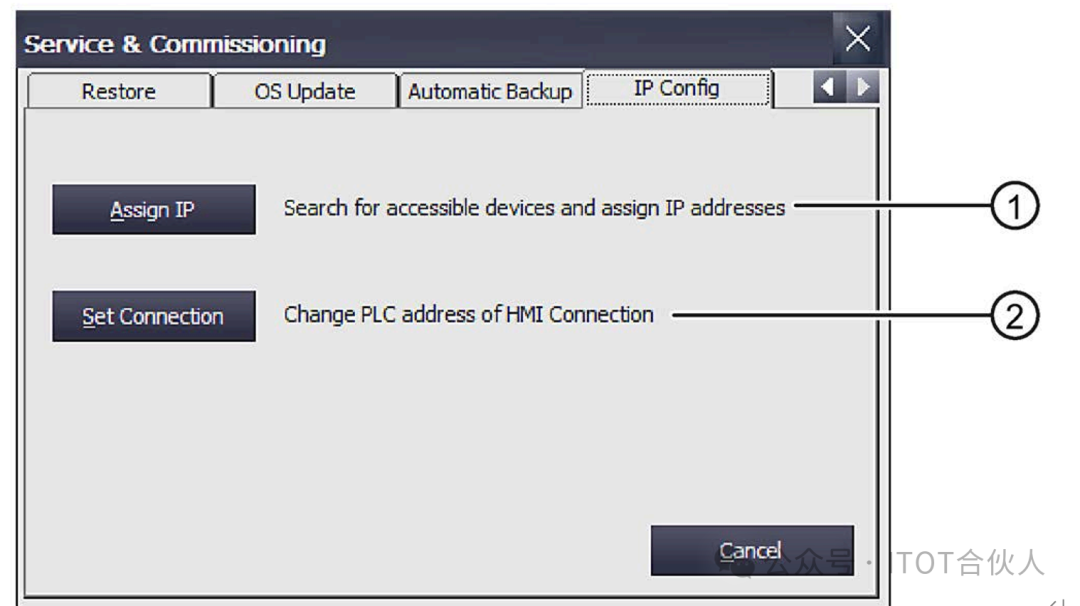
2. Use the “Service & Commissioning” diagram to open the “Service & Commissioning” dialog box and switch to the “IP Config” tab.
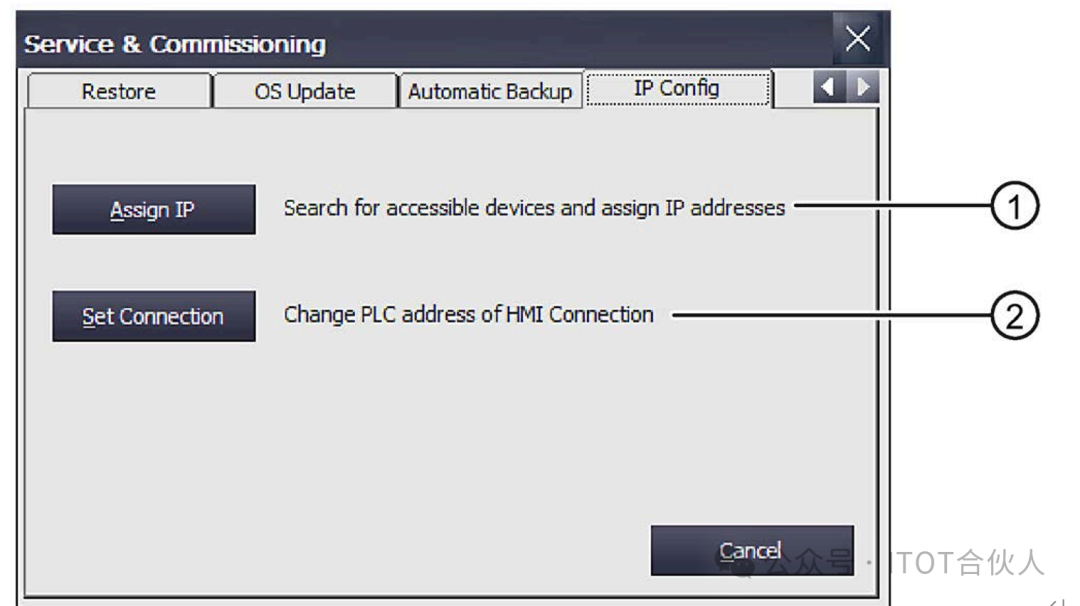
① Button for assigning IP addresses and device names
② Button for changing the configured communication connection
3. Click the “Assign IP” button to open the “Assign IP” dialog box, as shown below:
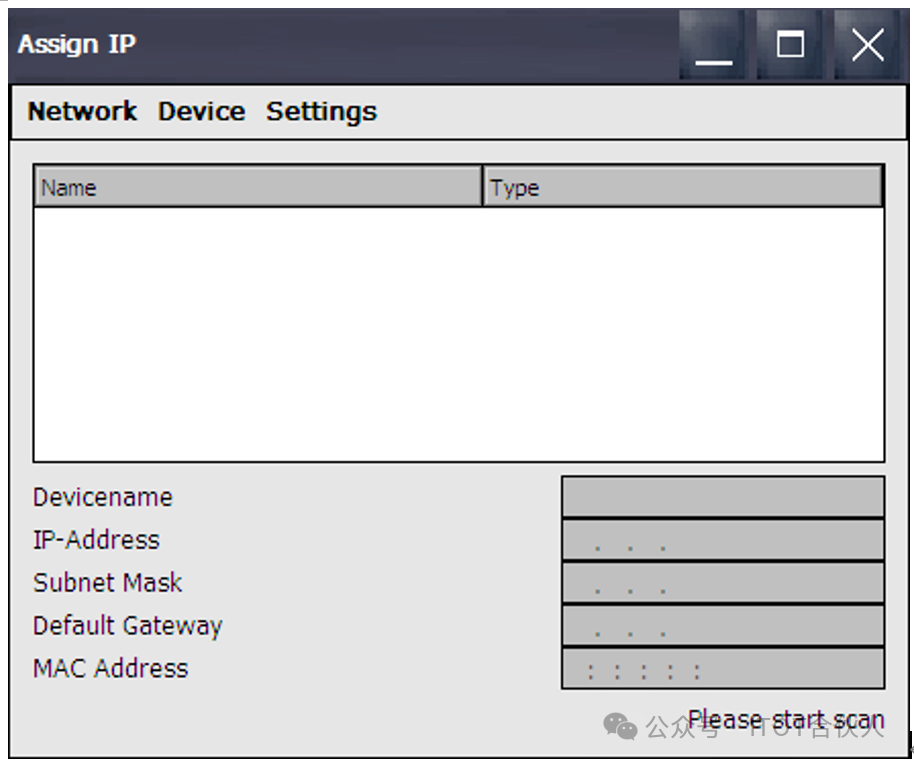
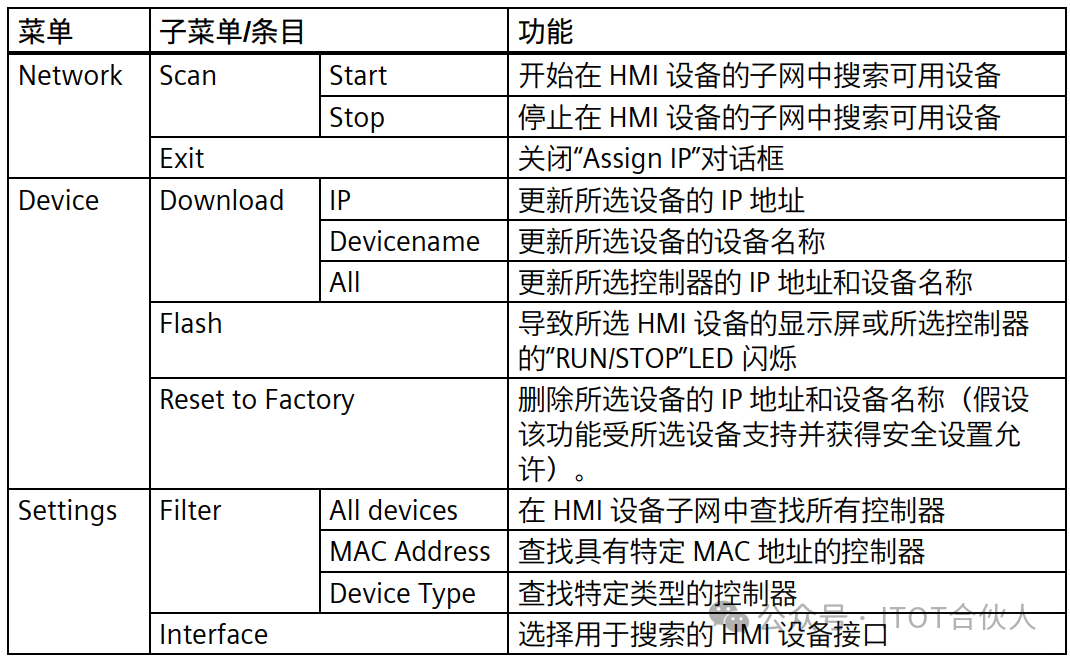
The specific functions of each item in the Assign IP menu are described in detail below:
4. Select “Network > Scan > Start”, to start searching for accessible devices in the HMI device subnet. The main purpose here is to scan all IP addresses in this network (Note: After connecting to the network, it will also include IP addresses that are not from this device, as related IPs may be scanned due to the same subnet or subnet mask).
After the scan automatically stops, the discovered devices will be displayed in the list.
5. Select the target device whose IP address and device name need to be changed, as shown in the example below:
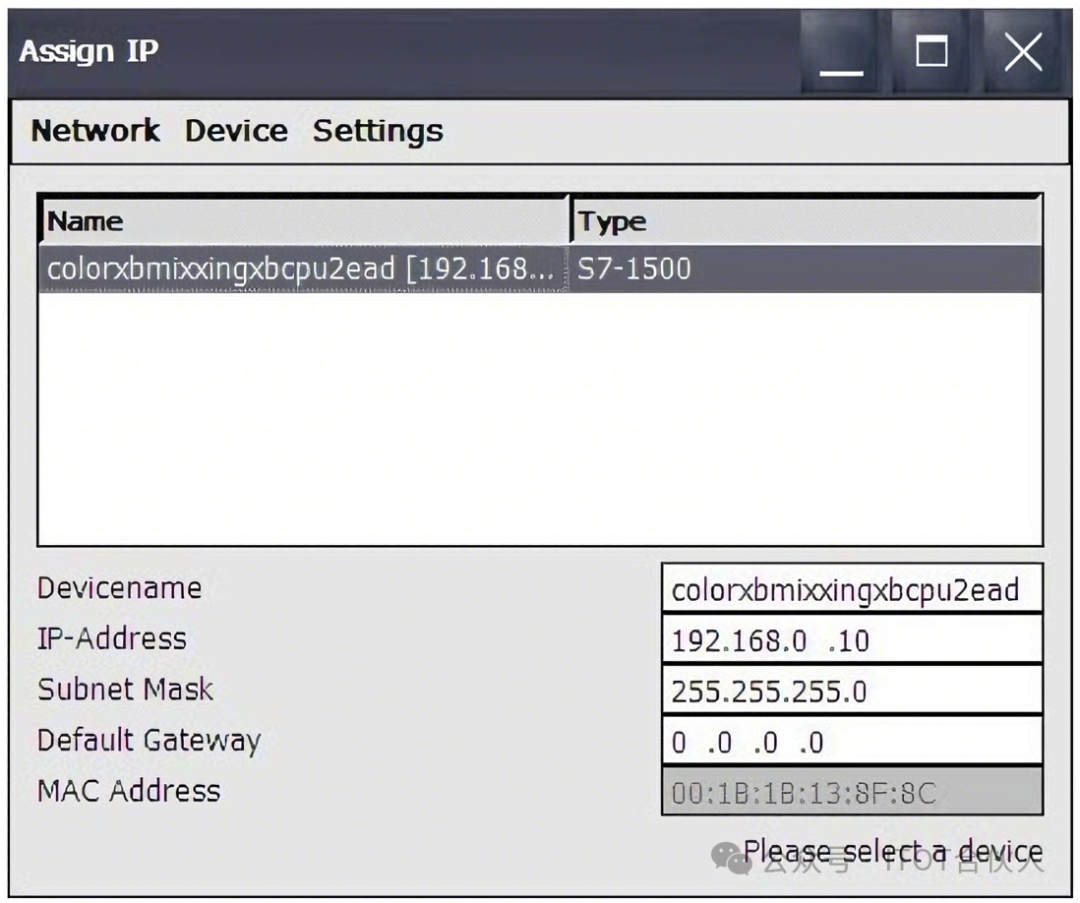
If you need to change the IP address and add a gateway, click the IP-Address below to make changes. After completing this, use “Device > Download” and one of the following options to transfer the data to the target device.
– “IP”: Update the target device’s IP address, subnet mask, and gateway;
– “Device name”: Update the target device’s device name (if the device name has been changed, click this button);
– “All”: Update the target device’s IP address and device name.
Wait a moment One Moment…
A status message will be output in the lower right corner: “IP suite settings could be assigned” after which, click close to finish.

02 Configure Communication Connection
After changing the PLC’s IP address, the related configured connections must be adjusted to ensure the device can communicate normally.
1. Click the button below ② – the “Set Connection” button to open the “Set Connection” dialog box.
2. In the screen that appears, click the “Find Online” button
Wait a moment One Moment…
The following image will appear, select the PLC that was just modified, double-click it, and the new IP address will be updated in the ④ IP address field below, then click “Save” to save.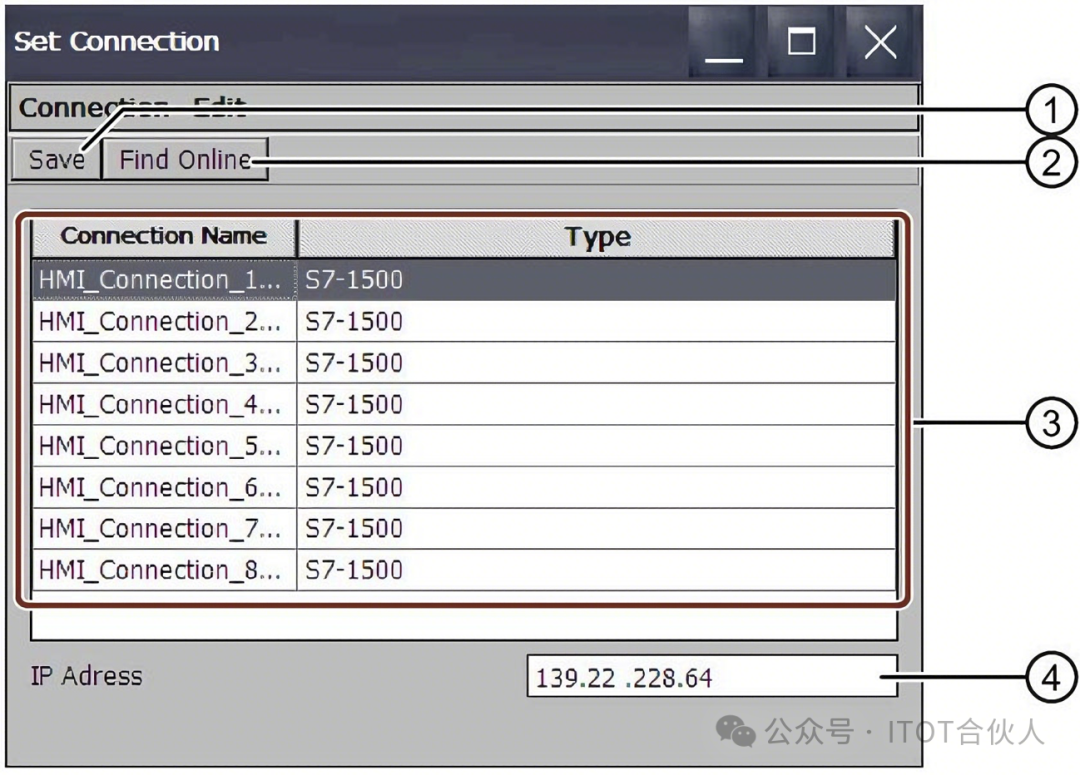
① Save settings ② Selected communication connection
③ List of configured communication connections ④ Text box for IP address
At this point, the connection between the HMI and PLC has been updated!
Note: Of course, you can also directly connect to the PLC using the Boto software to modify the PLC’s address, but this requires the personnel to understand the relevant operations and that the PLC itself is not encrypted; otherwise, it often requires support from the manufacturer (usually at a certain cost).
Interaction at the end of the article:
1. Interested friends can leave comments discussing why the author did not use solution 1 (i.e., directly using a coupler)?
2. What is the purpose of modifying the PLC’s gateway (routing address)?
Conclusion: I have been engaged in automation and information technology in the pharmaceutical industry for over 10 years. Based on practical experience, I have organized this set of implementable steps. If there are any inaccuracies, please feel free to advise. !
!
“Like““See”, let more people see it
Layout: Da Mo / Review: Xiao Yan
Author|LEO
Click to jump to other articles:“Mettler Toledo – PH Meter Conductivity Collection Scheme”
This article is original content, copyright belongs to “ITOT Partner”.Welcome to share, like, and see at the end!Feel free to reprint or republish.