Introduction to LangGraph
In the previous article, we explored the concept of multi-agent systems and how Clearwater Analytics pioneered this approach through CWIC Flow. We also demonstrated how to build a simple multi-agent system without using a specialized framework. Now, let’s explore LangGraph, a powerful library that provides a structured workflow for building complex multi-agent systems.
LangGraph is a library built on top of LangChain that allows you to create stateful multi-agent applications using large language models (LLMs). It provides a structured way to combine chains into graphs, manage state between multiple LLM calls, and build complex workflows with conditional routing.

Understanding the Basics of LangGraph
Before diving into the implementation, let’s first understand some key concepts in LangGraph:
•State: Information that persists between different steps in the graph•Nodes: Functions that process state and return new state•Edges: Define the flow of state between nodes•Graph: The overall workflow formed by connecting nodes through edges
This structured approach allows for more complex interactions between agents, including conditional routing, feedback loops, and persistent memory.
Visualizing LangGraph Workflows
Let’s visualize how a basic LangGraph works:
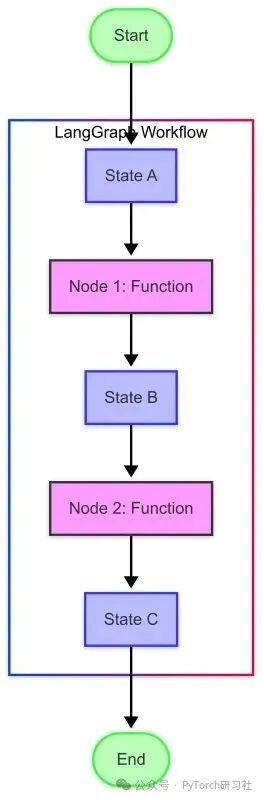
This diagram illustrates the key concepts:
•State (blue box): Contains the data flowing through the graph•Nodes (purple box): Functions that process state and generate new state•Edges (arrows): Define the flow from one node to the next•Entry/Exit Points (green ovals): The starting and ending points of the workflow
Setting Up the Environment
First, ensure that all necessary packages are installed. If you are running this code for the first time, you need to install the following packages.
Installing Required Packages
# Install the latest versions of the required packages!pip install langchain langchain-openai langgraph python-dotenvNow, set up the environment variables. We need an OpenAI API key to use its models. Create a <span>.env</span> file in the same directory as this notebook with the following content:
OPENAI_API_KEY=your_api_key# Load environment variables from .env file
import os
from dotenv import load_dotenv
load_dotenv()
# Load API key from .env file
# Verify if the API key is loaded
if os.getenv("OPENAI_API_KEY") is None:
print("Warning: OPENAI_API_KEY not found in environment variables.")
else:
print("OPENAI_API_KEY found in environment variables.")Importing Required Libraries
Now, import the libraries we need to build the multi-agent system:
# Import necessary libraries
from typing import Dict, List, TypedDict, Annotated, Sequence, Any, Optional, Literal, Union
import json
# Modern imports for langchain and langgraph
from langchain_core.messages import HumanMessage, AIMessage, SystemMessage, BaseMessage
from langchain_openai import ChatOpenAI
from langgraph.graph import StateGraph, END
Creating a Simple LLM Helper Function
Before diving into the multi-agent system, let’s create a simple helper function to interact with the LLM. This will help us understand the basic building blocks of LangGraph.
def ask_llm(prompt, model="gpt-4o", temperature=0.7):
    """A simple function to get a response from the LLM."""
    # Create ChatOpenAI instance
    llm = ChatOpenAI(model=model, temperature=temperature)
    # Create message using the prompt
    messages = [HumanMessage(content=prompt)]
    # Get response from the LLM
    response = llm.invoke(messages)
    # Return the content of the response
    return response.content

# Test our function
response = ask_llm("What is LangGraph and how does it relate to LangChain?")
print(response)
Output Response:
LangGraph is an open-source library designed to build and manage complex applications using large language models (LLMs). It is a framework that provides tools and components to create, customize, and execute workflows involving LLMs, facilitating the integration of these models into various applications. LangGraph is closely related to LangChain and can be seen as an extension or complementary toolkit to LangChain. LangChain is a framework specifically designed for developing LLM applications, focusing on linking different components or tasks to create more complex workflows. LangGraph builds on LangChain to provide additional functionality for defining and managing LLM-based applications in a more structured way. Essentially, LangChain focuses on linking language model-driven tasks, while LangGraph provides a more comprehensive framework that includes graph-based execution flows, enhanced control over tasks, and improved management of interactions between different components. Together, they can be used to simplify the development and deployment of complex applications leveraging LLM capabilities.
Creating a Simple Graph
Let’s create a simple graph with just one agent to understand these concepts:
# Define state type
class SimpleState(TypedDict):
    messages: List[BaseMessage]  # Conversation history
    next: str  # Next step in the graph

# Define a simple agent node
def simple_agent(state: SimpleState) -> SimpleState:
    """A simple agent that responds to the last message."""
    messages = state["messages"]
    llm = ChatOpenAI(model="gpt-4o", temperature=0.7)
    response = llm.invoke(messages)
    return {"messages": messages + [response], "next": "output"}

# Define output node
def output(state: SimpleState):
    """Returns the final state, marking the end of the workflow."""
    return {"messages": state["messages"], "next": END}

# Build graph
def build_simple_graph():
    """Build a simple LangGraph workflow."""
    # Create a new graph
    workflow = StateGraph(SimpleState)
    # Add nodes
    workflow.add_node("agent", simple_agent)
    workflow.add_node("output", output)
    # Add edges
    workflow.add_edge("agent", "output")
    # Set entry point
    workflow.set_entry_point("agent")
    # Compile graph
    return workflow.compile()
Now, let’s run our simple graph:
# Create graph
simple_graph = build_simple_graph()
# Initialize state with test message
initial_state = {"messages": [HumanMessage(content="Explain what a multi-agent system is in simple terms.")], "next": ""}
# Run graph
result = simple_graph.invoke(initial_state)
# Print conversation
for message in result["messages"]:
    if isinstance(message, HumanMessage):
        print(f"User: {message.content}")
    elif isinstance(message, AIMessage):
        print(f"AI: {message.content}")
Output:
User: Explain what a multi-agent system is in simple terms.AI: A multi-agent system is a set of independent “agents” that interact with each other. Each agent can be thought of as an individual capable of independent thought and action, similar to humans. These agents work together or compete to achieve specific goals or complete tasks.In simple terms, imagine a group of robots cleaning your house. Each robot is an agent. One might be responsible for vacuuming the floor, another for wiping the furniture, and another for taking out the trash. They work independently but communicate and coordinate to ensure the entire house is cleaned efficiently. This is the essence of a multi-agent system: multiple entities working together in a coordinated manner to perform complex tasks or solve problems.
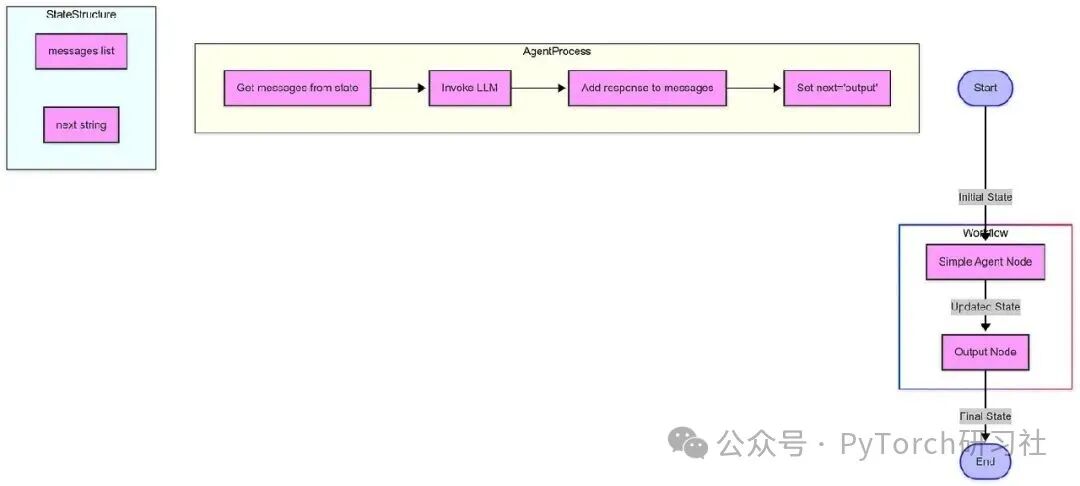
This diagram shows:
•The overall flow from start → agent → output → end•The agent processes sub-graph, showing the internal steps of the simple_agent function•The state sub-graph, showing the components of the SimpleState TypedDict•Color-coded nodes to distinguish different types of components
The workflow starts with an initial state containing messages and a next field, processes through the agent node, where the agent uses the LLM to add a response, and then passes to the output node, returning the final state and ending the workflow.
What Happens Next
We defined the state pattern (SimpleState), containing the fields we want to track. We created nodes for the agent and output functions. We connected these nodes with edges, defining the flow of information. We set the entry point and compiled the graph. We initialized the state with a user message and ran the graph.
This simple example illustrates the basic concepts of LangGraph. In real-world scenarios, you can create more complex graphs with multiple nodes and conditional edges.
Next Steps
Next, we will build our first specialized agent: the researcher agent. We will delve into agent design patterns, learn how to define agent roles and capabilities, and understand how to make agents effectively perform research tasks.
Creating a Specialized Researcher Agent
In the previous steps, we set up the environment and created a simple graph with just one agent. Now, we will build our first specialized agent for the collaborative research assistant system: the researcher agent.
In this step, we will focus on building the researcher agent, which is responsible for gathering and analyzing information.
What is a Researcher Agent?
The researcher agent is an AI system designed to investigate topics in depth and provide comprehensive, structured information. It is the information-gathering component in our multi-agent system, with the following capabilities:
•Deep understanding of research queries•Comprehensive collection of relevant information•Organizing findings in a structured, accessible format•Presenting information objectively and accurately•Identifying limitations and gaps in available information
Building a Modern Researcher Agent with LangGraph
The latest versions of LangGraph and LangChain provide improved methods for building agents. Let’s explore how to create a researcher agent using these modern tools.
Step 1: Setting Up the Environment
First, we need to import the necessary libraries. Note the modern import paths for LangGraph and LangChain:
from typing import Dict, List, TypedDict, Any, Optional
import json
import os
from dotenv import load_dotenv
# Modern imports for langchain and langgraph
from langchain_core.messages import HumanMessage, AIMessage, SystemMessage, BaseMessage
from langchain_openai import ChatOpenAI
from langgraph.graph import StateGraph, END
# Load environment variables
load_dotenv()
Step 2: Defining the Researcher Role
Clear system prompts are crucial for shaping the behavior of the agent:
RESEARCHER_SYSTEM_PROMPT ="""
You are a skilled researcher agent tasked with gathering comprehensive information on a given topic. Your responsibilities include:
1. Analyzing research queries to understand the required information
2. Conducting thorough research to collect relevant facts, data, and viewpoints
3. Organizing findings in a clear, structured format
4. Ensuring the accuracy and objectivity of discoveries
5. Citing sources or indicating information that may need verification
6. Identifying potential gaps in the information
Present your findings in a clear structured format, using appropriate sections and bullet points. Your goal is to provide comprehensive, accurate, and useful information that fully addresses the research query.
"""
Step 3: Creating the Researcher Function
Now we will implement the researcher agent as a function:
def create_researcher_agent(model="gpt-4o", temperature=0.7):
    """Create a researcher agent using the specified LLM."""
    # Initialize model
    llm = ChatOpenAI(model=model, temperature=temperature)
    def researcher_function(messages):
        """Function that processes messages and returns the researcher agent's response."""
        # If messages are empty or the first message is not a system prompt, add the system prompt
        if not messages or not isinstance(messages[0], SystemMessage) or messages[0].content != RESEARCHER_SYSTEM_PROMPT:
            messages = [SystemMessage(content=RESEARCHER_SYSTEM_PROMPT)] + (messages if isinstance(messages, list) else [])
        # Get response from the LLM
        response = llm.invoke(messages)
        return response
    return researcher_function
Integrating with LangGraph: Modern Approach
The latest version of LangGraph uses TypedDict for state management, providing better type safety and clearer state structure:
# Define state type for research workflow
class ResearchState(TypedDict):
    """Type definition for our research workflow state."""
    messages: List[BaseMessage]  # Conversation history
    query: str  # Research query
    research: Optional[str]  # Research findings
    next: Optional[str]  # Next step in the graph
Creating the Researcher Node
Next, we will implement a node for the LangGraph workflow:
def researcher_node(state: ResearchState) -> ResearchState:
    """Node that performs research queries in the graph."""
    # Get query from state
    query = state["query"]
    # Create specific message for the researcher
    research_message = HumanMessage(content=f"Please thoroughly research the following topic: {query}")
    # Get researcher agent
    researcher = create_researcher_agent()
    # Get response from the researcher agent
    response = researcher([research_message])
    # Update state with research findings
    new_messages = state["messages"] + [research_message, response]
    # Return updated state
    return {**state, "messages": new_messages, "research": response.content, "next": "output"}  # In a multi-agent system, this will go to the next agent
Building the Research Workflow
Now we can build a complete LangGraph workflow:
def build_research_graph():
    """Build a simple research workflow using LangGraph."""
    # Create a new graph using our state type
    workflow = StateGraph(ResearchState)
    # Add nodes
    workflow.add_node("researcher", researcher_node)
    workflow.add_node("output", output_node)
    # Add edges
    workflow.add_edge("researcher", "output")
    # Set entry point
    workflow.set_entry_point("researcher")
    # Compile graph
    return workflow.compile()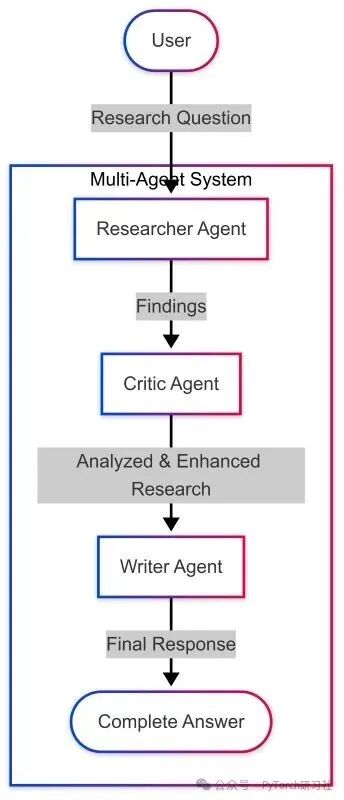
Enhancing the Researcher Agent with Structured Output
To better integrate with other agents, we can enhance the researcher agent to provide structured output:
ENHANCED_RESEARCHER_PROMPT ="""
You are a skilled researcher agent tasked with gathering comprehensive information on a given topic. Your responsibilities include:
1. Analyzing research queries to understand the required information
2. Conducting thorough research to collect relevant facts, data, and viewpoints
3. Organizing findings in a clear, structured format
4. Ensuring the accuracy and objectivity of discoveries
5. Citing sources or indicating information that may need verification
6. Identifying potential gaps in the information
Present your findings in the following structured format:
SUMMARY: A brief overview of the findings (2-3 sentences)
KEY POINTS:
- Key Point 1
- Key Point 2
- Key Point 3
DETAILED FINDINGS:
1. [Topic Area 1]
   - Detailed explanation and rationale
   - Supporting evidence
   - Applicable differing viewpoints
2. [Topic Area 2]
   - Detailed explanation and rationale
   - Supporting evidence
   - Applicable differing viewpoints
GAPS AND LIMITATIONS:
- Identify areas where information may be incomplete
- Point out any contradictory or controversial areas
- Suggest any additional research that may be needed
Your goal is to provide comprehensive, accurate, and useful information that fully addresses the research query.
"""
More Powerful Research Workflow
Using our enhanced researcher agent, we can create a more powerful workflow:
We implement this workflow using specialized state types:
class EnhancedResearchState(TypedDict):
    """Enhanced type definition for our research workflow state."""
    messages: List[BaseMessage]  # Conversation history
    query: str  # Research query
    structured_research: Optional[str]  # Structured research findings
    next: Optional[str]  # Next step in the graph
Researcher Agent in Action: Example Query
Let’s see how our enhanced researcher agent handles a complex query:
Query: “What are the latest advancements in renewable energy technologies?”
Response (Structured Format):
SUMMARY: The latest advancements in renewable energy technologies include significant improvements in solar cell efficiency, innovative wind turbine designs, enhanced energy storage solutions, breakthroughs in green hydrogen production, and the development of advanced biofuels.
KEY POINTS:
•Solar photovoltaic technology has achieved record efficiency levels of over 30% through perovskite-silicon tandem cells•Floating offshore wind turbines are expanding the possibilities for deep-water deployment•Grid-scale battery storage costs have significantly decreased while energy density has increased•Green hydrogen produced through electrolysis is becoming more efficient and economically viable•Advanced biofuels from non-food biomass are nearing commercial viability
DETAILED FINDINGS:
1.Advancements in Solar Energy•Perovskite solar cells have rapidly improved, achieving laboratory efficiencies exceeding 25%•Perovskite-silicon tandem cells have reached efficiencies of 31.25%, approaching theoretical limits•Bifacial solar panels (which capture light from both sides) have increased energy output by 5–30%•Building-integrated photovoltaics (BIPV) have made progress using transparent solar cells for windows•Agrivoltaic systems (combining agriculture and solar production) have shown promising results2.Innovations in Wind Energy•Large turbines with blade lengths exceeding 100 meters have improved capacity factors•Floating offshore wind platforms can be deployed in waters deeper than 60 meters•Aerial wind energy systems (kite and drone-based systems) are in advanced testing stages•Bladeless wind turbines reduce wildlife impact and maintenance costs through oscillation technology•Digital twin technology and AI improve predictive maintenance and output optimization(Other sections omitted for brevity)
GAPS AND LIMITATIONS:
•Long-duration energy storage (10+ hours) remains a significant challenge despite progress•The breakthrough technologies mentioned are mostly still in the scaling phase from laboratory to commercial deployment•Cost comparisons between emerging technologies often lack standardized metrics•The environmental impact of certain new technologies (such as some rare earth element mining for magnets) requires further study•Regional disparities in technology adoption and policy support lead to uneven progress
Advantages of Modern Approaches
The modern approach to building the researcher agent using LangGraph offers the following advantages:
•Type Safety: TypedDict provides better type checking and documentation•Structured State: Clearly defined state structures improve maintainability•Modular Design: Functions and components can be easily reused and tested•Modern APIs: Using the latest LangChain and LangGraph APIs ensures compatibility
Next Steps: Building a Complete Multi-Agent System
The researcher agent is just the first step in building a comprehensive multi-agent system. In future articles, we will explore:
•Building a critic agent to evaluate and challenge the findings of the researcher•Creating a writer agent to synthesize information into coherent content•Implementing a coordinator agent to manage workflows between agents•Developing advanced routing logic for more dynamic agent interactions
Building a modern researcher agent with LangGraph provides a strong foundation for multi-agent systems. By leveraging the latest APIs and structured approaches to agent development, we can create more effective, maintainable, and powerful AI systems that collaboratively solve complex problems.
The researcher agent we built demonstrates how to design specialized agents that fulfill specific roles within a larger system—gathering and organizing information, which is then evaluated, refined, and presented by other agents in the workflow.
As we continue to explore multi-agent systems, we will see how these specialized components collaborate to create AI solutions that go beyond the capabilities of a single model.
Adding a Critic Agent
In the previous steps, we set up the environment and created a researcher agent. Now, we will add a second specialized agent to the collaborative research assistant system: the critic agent.
Concept of the Critic Agent
The critic agent is designed to evaluate, challenge, and improve the work of other agents. Just as human work benefits from peer review and constructive criticism, AI outputs can also be significantly enhanced through specialized evaluation.
The critic agent performs the following key functions in a multi-agent workflow:
•Quality Assurance: Identifying inaccuracies, gaps, or flaws in the research•Bias Detection: Pointing out potential biases in the information•Integrity Checks: Ensuring all aspects of the topic are adequately covered•Alternative Perspectives: Introducing differing viewpoints or interpretations•Constructive Feedback: Providing actionable suggestions for improvement
Modern Implementation with LangGraph
The latest versions of LangGraph and LangChain provide powerful tools for building more robust and maintainable multi-agent systems. Let’s explore how to implement the critic agent using these modern frameworks.
Core Components
Our implementation focuses on three key elements:
•Type Safety: Using TypedDict for state management•Structured Output: Enhancing the critic with structured JSON feedback•Modular Design: Creating reusable agent functions
System Prompt for the Critic
The foundation of the critic agent is a carefully crafted system prompt that establishes its role and responsibilities:
CRITIC_SYSTEM_PROMPT ="""
You are a critic agent, part of the collaborative research assistant system. Your role is to evaluate and challenge the information provided by the researcher agent to ensure its accuracy, completeness, and objectivity. Your responsibilities include:
1. Analyzing the accuracy, completeness, and potential biases of the research findings
2. Identifying gaps or logical inconsistencies in the information
3. Raising important questions that may have been overlooked
4. Suggesting improvements or alternative viewpoints
5. Ensuring the final information is balanced and comprehensive
Your critiques should be constructive, aiming not to negate the researcher’s work but to enhance its quality. Format your feedback in a clear, organized manner, highlighting specific points that need attention. Remember, your ultimate goal is to ensure the quality of the final research output is as high as possible.
"""
Modern State Management
A significant improvement in the latest version of LangGraph is better state management through TypedDict:
class CollaborativeResearchState(TypedDict):
    """State type for the collaborative research assistant."""
    messages: List[BaseMessage]  # Conversation history
    next: Optional[str]  # Next step in the graph
This approach provides clear type hints, making the code easier to maintain.
Workflow: Researcher → Critic
Let’s visualize the basic information flow between the researcher and critic agents:

Our LangGraph implementation defines this workflow using modern syntax:
def build_collaborative_research_assistant():
    """Build a collaborative research assistant with researcher and critic agents."""
    # Create a new graph using our state type
    workflow = StateGraph(CollaborativeResearchState)
    # Add nodes
    workflow.add_node("researcher", researcher_node)
    workflow.add_node("critic", critic_node)
    workflow.add_node("output", output_node)
    # Add edges
    workflow.add_edge("researcher", "critic")
    workflow.add_edge("critic", "output")
    # Set entry point
    workflow.set_entry_point("researcher")
    # Compile graph
    return workflow.compile()
Enhancing the Critic with Structured Output
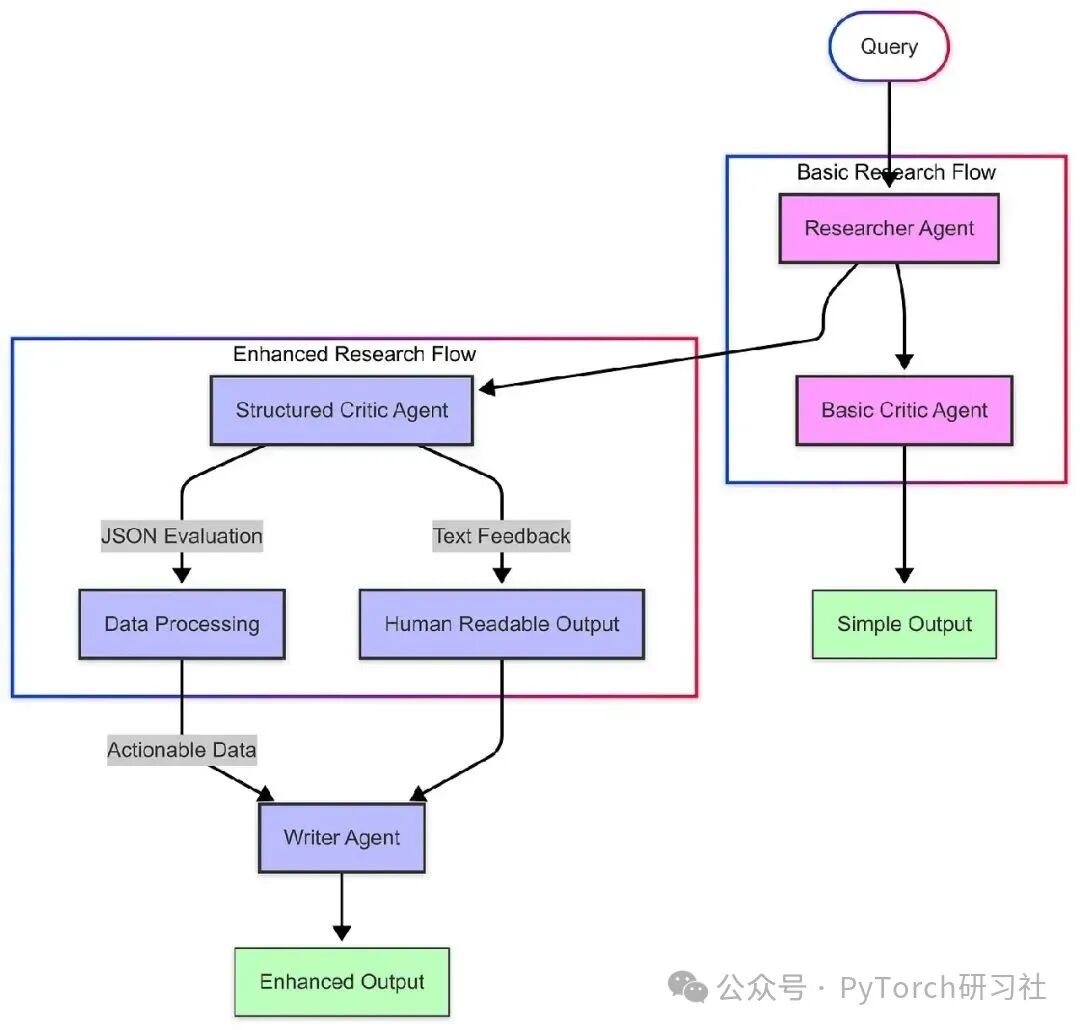
To make the critic agent more useful for downstream processes, we can enhance it to provide structured feedback in JSON format. This makes it easier for other agents (like the writer agent) to process and integrate the critiques.
Here’s how we implement structured critiques:
class CriticEvaluation(BaseModel):
    """Structured format for the critic's evaluation."""
    quality_score: int = Field(description="Overall quality score, 1-10")
    strengths: List[str] = Field(description="Key strengths of the research")
    areas_for_improvement: List[str] = Field(description="Areas that need improvement")
    missing_information: List[str] = Field(description="Important information that was not included")
    bias_assessment: str = Field(description="Assessment of potential biases in the research")
    additional_questions: List[str] = Field(description="Questions that should be addressed")
This structured approach allows us to build a more robust workflow:
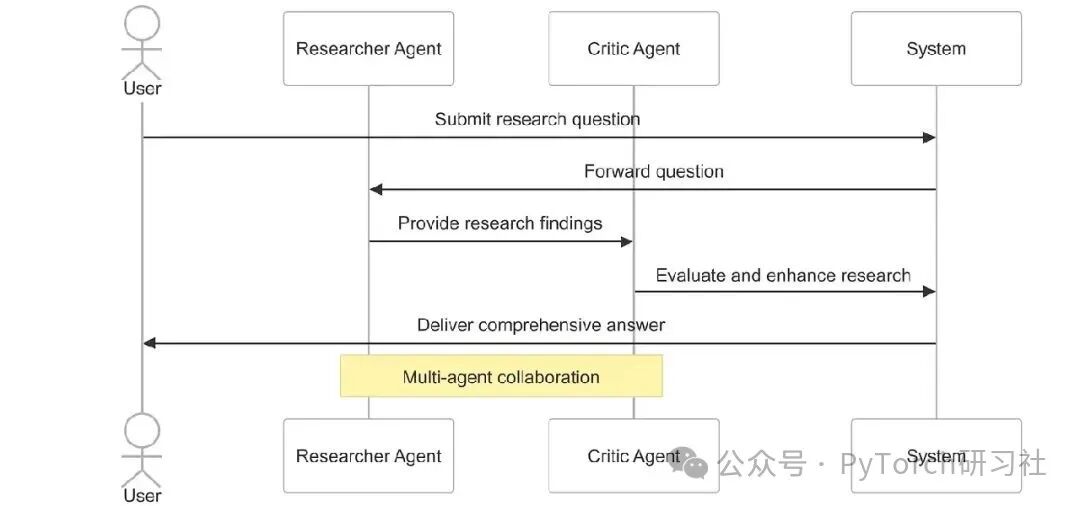
Complete Multi-Agent Research Process
Putting all the parts together, our multi-agent system follows this process:
1.User Input: The user submits a research question2.Research Phase: The researcher agent gathers and organizes information3.Critique Phase: The critic agent evaluates the quality and completeness of the research4.Structured Feedback: The system provides organized, actionable critiques5.Final Output: A comprehensive response combining research and critique
Advantages of Modern Approaches
The modern implementation using the latest LangGraph and LangChain APIs offers the following advantages:
•Type Safety: Correctly typed states reduce errors and improve code maintainability•Structured Output: JSON-formatted critiques facilitate integration with other components•Better Maintainability: Achieving clear separation of concerns through modular agent design•Visualization Support: Built-in tools support workflow visualization and understanding
By adding a critic agent to the multi-agent system, we created a powerful checks and balances mechanism that enhances the quality, accuracy, and completeness of AI-generated research. This approach mimics the collaborative process of humans, where peer review and constructive criticism lead to better outcomes.
The structured critique method also lays the groundwork for the next step in our multi-agent journey: adding a writer agent to synthesize research and critique into a coherent, well-crafted final response.
In the next section, we will explore how to build this writer agent and complete our multi-agent research assistant system.
Writer Agent
In the earlier parts of this article, we explored how to build a collaborative research assistant through specialized agents: the researcher agent gathers information, and the critic agent evaluates and challenges that information. Now, it’s time to add the third key component: the writer agent, which will synthesize this information into coherent, well-crafted responses. This section discusses how to implement a writer agent that synthesizes information and generates coherent, comprehensive outputs—creating a complete collaborative research workflow that mimics a team of human researchers, editors, and authors.
Concept of the Writer Agent
The writer agent serves as the final communicator in the multi-agent system, transforming raw research and critique analysis into refined, coherent content suitable for human consumption.
The writer agent performs the following key functions in the workflow:
•Information Synthesis: Combining insights from the researcher’s findings and the critic’s evaluations•Organization: Structuring information in a logical, accessible manner for the end user•Style Adaptation: Presenting information in clear, engaging language appropriate for the context•Perspective Integration: Balancing different viewpoints to create a comprehensive response•Clarity Enhancement: Simplifying complex concepts without sacrificing accuracy
Modern Implementation with LangGraph
The latest versions of LangGraph and LangChain provide sophisticated tools for building integrated multi-agent systems. Let’s explore how to implement the writer agent using these modern frameworks.
System Prompt for the Writer
The foundation of the writer agent is a carefully crafted system prompt:
WRITER_SYSTEM_PROMPT ="""
You are a writer agent, part of the collaborative research assistant system. Your role is to synthesize the information provided by the researcher agent and the feedback from the critic agent, generating coherent, well-crafted responses. Your responsibilities include:
1. Analyzing the information provided by the researcher and the feedback from the critic
2. Organizing the information in a logical, easy-to-understand structure
3. Presenting the information in a clear, engaging writing style
4. Balancing different viewpoints and ensuring objectivity
5. Creating a comprehensive, accurate, and well-crafted final response
Format your response in a clear, organized manner, using appropriate headings, paragraphs, and bullet points. Use simple language to explain complex concepts and provide examples where helpful. Remember, your goal is to create a final response that effectively communicates information to the user.
"""
Modern State Management and Node Implementation
A key improvement in the latest version of LangGraph is state management using TypedDict, providing better code organization and type safety:
class CollaborativeResearchState(TypedDict):
    """State type for the collaborative research assistant."""
    messages: List[BaseMessage]  # Conversation history
    next: Optional[str]  # Next step in the graph
The implementation of the writer node follows a concise functional approach:
def writer_node(state: CollaborativeResearchState) -> CollaborativeResearchState:
    """Node function for the writer agent."""
    # Extract messages from state
    messages = state["messages"]
    # Create writer message using the system prompt
    writer_messages = [SystemMessage(content=WRITER_SYSTEM_PROMPT)] + messages
    # Initialize LLM, balancing creativity and accuracy
    llm = ChatOpenAI(model="gpt-4o", temperature=0.6)
    # Get response from the writer
    response = llm.invoke(writer_messages)
    # Return updated state
    return {"messages": messages + [response], "next": "output"}
Complete Multi-Agent Workflow
This workflow’s LangGraph implementation is concise and maintainable:
def build_complete_research_assistant():
    """Build a complete research assistant with researcher, critic, and writer agents."""
    # Create a new graph using our state type
    workflow = StateGraph(CollaborativeResearchState)
    # Add nodes
    workflow.add_node("researcher", researcher_node)
    workflow.add_node("critic", critic_node)
    workflow.add_node("writer", writer_node)
    workflow.add_node("output", output_node)
    # Add edges
    workflow.add_edge("researcher", "critic")
    workflow.add_edge("critic", "writer")
    workflow.add_edge("writer", "output")
    # Set entry point
    workflow.set_entry_point("researcher")
    # Compile graph
    return workflow.compile()
Enhancements for Advanced Applications
For more complex applications, we can enhance the writer agent and overall workflow with the following advanced features:
Rich Metadata Tracking
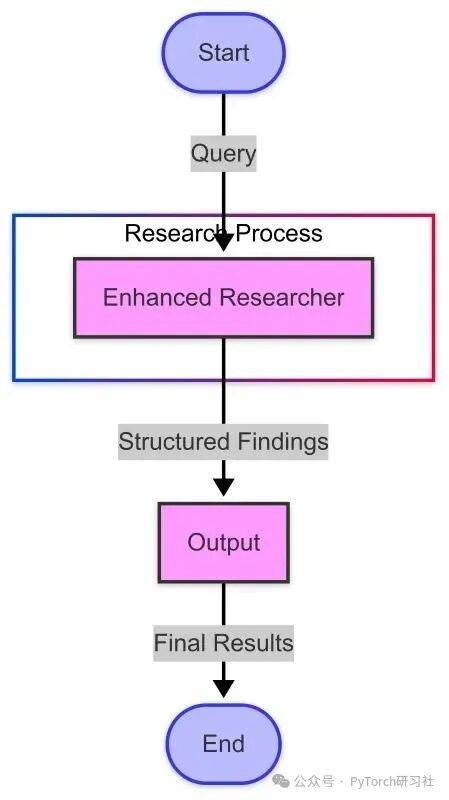
We can create an enhanced state type that tracks metadata for each agent’s contributions:
class EnhancedResearchState(TypedDict):
    """Enhanced state type for research process metadata."""
    messages: List[BaseMessage]  # Conversation history
    metadata: Dict[str, Any]  # Metadata for each step
    next: Optional[str]  # Next step in the graph
This allows us to capture information about processing time, token counts, and model parameters, which is valuable for analysis and optimization:
Flexible Architecture Patterns
The three-agent structure we built (researcher → critic → writer) can adapt to various application needs:
1.Hierarchical Organization:•Research team (multiple specialized researchers) → Editor → Writer2.Parallel Processing:•Multiple researchers handling different aspects → Critic evaluates each part → Writer synthesizes everything3.Hybrid Structure:•Some agents work sequentially, while others work in parallel, based on task requirements
Advantages of the Writer Agent
Adding the writer agent to the multi-agent system provides the following key advantages:
•Improved Communication: Content is presented in a way optimized for human understanding•Consistency: Writing style and structure remain consistent even when research covers different topics•Integration: Various viewpoints and information fragments are woven together coherently•Efficiency: Final output is ready for use without additional editing or reformatting•Adaptability: The writer agent can adjust style and structure based on context and audience
By adding the writer agent, we complete a powerful collaborative workflow that mimics human collaboration in complex information tasks. Each agent in the system has a specialized role:
•The researcher agent gathers comprehensive information•The critic agent evaluates and ensures quality•The writer agent effectively communicates information to the end user
This separation of concerns allows each agent to excel in its specific task while contributing to the overall effort. By using modern features of LangGraph and LangChain, such as TypedDict for state management, we have built a system that is not only powerful but also maintainable and scalable.
Multi-agent systems represent a significant advancement in AI application design, transcending the limitations of single-agent approaches to create more robust, balanced, and effective solutions.
Coordinator Agent
In exploring the use of LangGraph to build complex multi-agent systems, we have examined specialized agents for research, critique, and writing. Now, let’s focus on a key component that transforms fixed, sequential workflows into truly dynamic, intelligent solutions: the coordinator agent.
The Need for Coordination in Multi-Agent Systems
As the complexity of multi-agent systems increases, coordinating interactions between agents becomes increasingly important. A well-designed coordinator can:
•Analyze user queries to determine the best workflow•Skip unnecessary steps for simple requests•Initiate additional research loops when needed•Ensure all relevant experts contribute appropriately•Adjust workflows based on intermediate results
Coordinator Agent Architecture

Unlike previous agents that operate in a fixed sequence, this system uses the coordinator agent to determine the best path at each stage. For simple queries, it can completely bypass research, while for complex queries, it coordinates a full research loop.
Building the Coordinator in Modern LangGraph
Modern LangGraph provides powerful tools for implementing this dynamic architecture:
def coordinator_node(state: ResearchState) -> ResearchState:
    """Coordinator node that decides the workflow path."""
    # Extract messages from state
    messages = state["messages"]
    # Create coordinator message using the system prompt
    coordinator_messages = [SystemMessage(content=COORDINATOR_SYSTEM_PROMPT)] + messages
    # Initialize LLM, using a lower temperature to ensure consistent decisions
    llm = ChatOpenAI(model="gpt-4o", temperature=0.2)
    # Get response from the coordinator
    response = llm.invoke(coordinator_messages)
    # Parse JSON response to determine next step
    try:
        decision = json.loads(response.content)
        next_step = decision.get("next", "researcher")  # Default to researcher if not specified
    except Exception:
        next_step = "researcher"  # Default to researcher if JSON parsing fails
    # Return updated state
    return {"messages": messages, "next": next_step}
A key improvement we implemented is using conditional edges in the workflow graph:
# Add conditional edges from the coordinator
workflow.add_conditional_edges("coordinator", lambda state: state["next"], {"researcher": "researcher", "done": "output"})
Dynamic Decision-Making in Action
Let’s see how the decision-making process of the coordinator agent works:
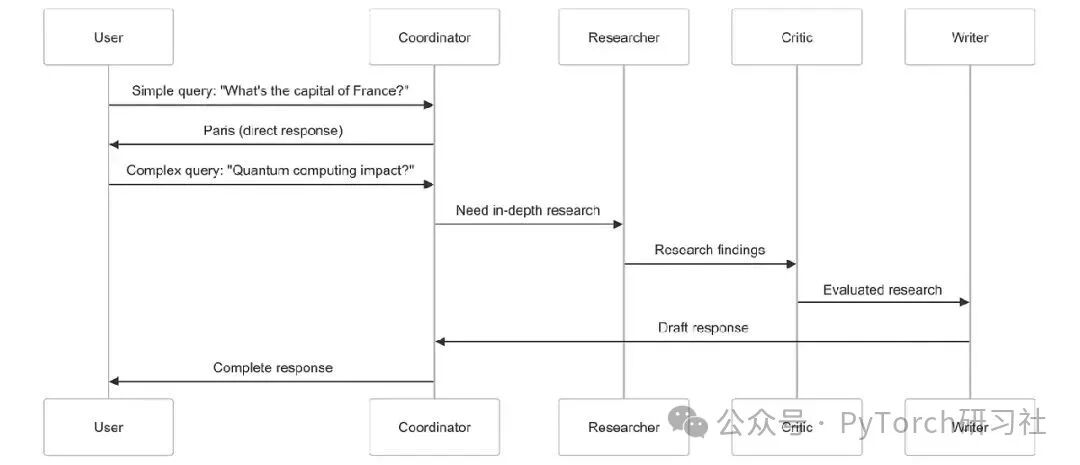
For simple factual queries, the coordinator can provide answers directly, avoiding unnecessary work. For complex topics requiring expertise, it coordinates a complete research loop involving all specialized agents.
Comparing Static and Dynamic Workflows
The dynamic approach with the coordinator agent offers:
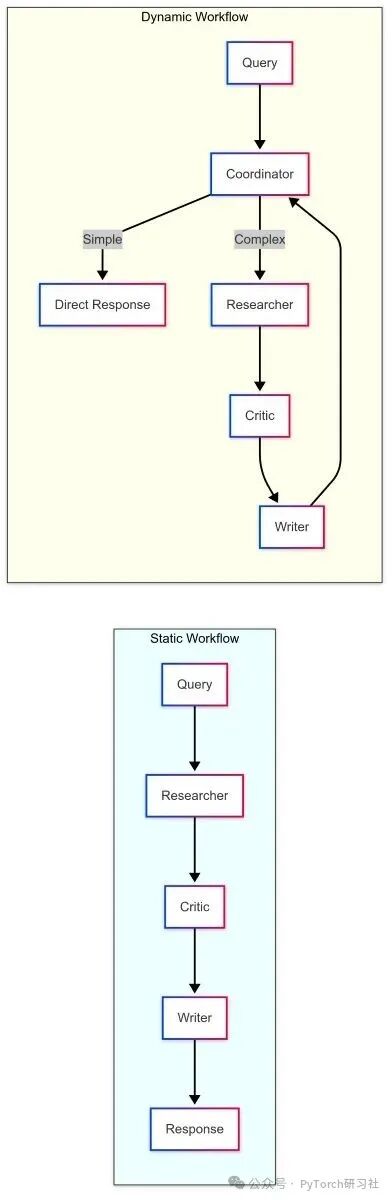
•Efficiency: Simple queries receive instant responses•Adaptability: Workflows change based on query complexity•Intelligence: Making decisions at critical junctures•Recursion: Further research can be iterated when needed
Technical Implementation Details
Our implementation leverages several modern features of LangGraph:
•TypedDict for State Management: Using ResearchState for appropriate type definitions•Conditional Edges: Dynamic routing based on agent decisions•Structured Output: JSON format with reasoning and next steps•Error Handling: Robust parsing with fallbacks•LLM Integration: Using GPT-4o in the example
This approach provides a clean, maintainable, and scalable architecture that can adapt to various applications.
Extending the Coordinator Pattern
The coordinator pattern can be extended in several ways:
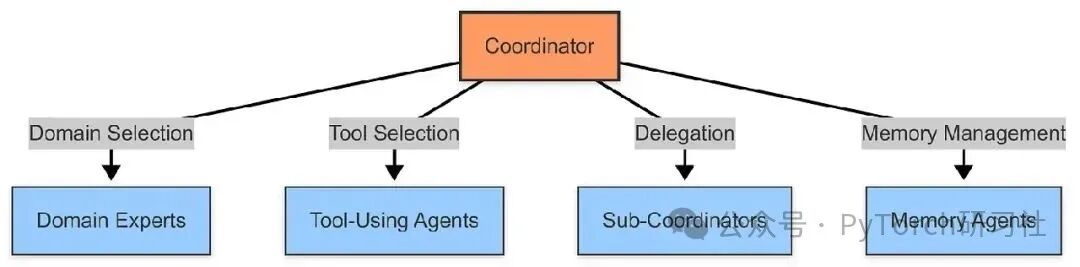
Building a Dynamic Multi-Agent System
By implementing the coordinator agent, we can transform the system from a fixed, sequential workflow into a dynamic system where the coordinator decides which path to take:
def build_dynamic_research_assistant():
    """Build a dynamic research assistant, with the coordinator agent managing the workflow."""
    # Create a new graph
    workflow = Graph()
    # Add nodes
    workflow.add_node("coordinator", coordinator_agent)
    workflow.add_node("researcher", researcher_agent)
    workflow.add_node("critic", critic_agent)
    workflow.add_node("writer", writer_agent)
    workflow.add_node("output", output)
    # Add conditional edges from the coordinator
    workflow.add_conditional_edges("coordinator", lambda state: state["next"], {"researcher": "researcher", "done": "output"})
    # Add remaining edges
    workflow.add_edge("researcher", "critic")
    workflow.add_edge("critic", "writer")
    workflow.add_edge("writer", "coordinator")
    workflow.add_edge("output", END)
    # Set entry point
    workflow.set_entry_point("coordinator")
    # Compile graph
    return workflow.compile()
This creates a dynamic workflow where:
•The coordinator agent first analyzes user queries to decide whether to call the research team or provide a response directly•If research is needed, the query flows through specialized agents: researcher → critic → writer•Once the writer completes the work, control returns to the coordinator, which can either send the response or initiate additional research•This creates a feedback loop where complex queries can be optimized through multiple iterations of research, critique, and writing
Visualizing the Dynamic Multi-Agent System Architecture
Here’s a visual representation of our dynamic multi-agent system:
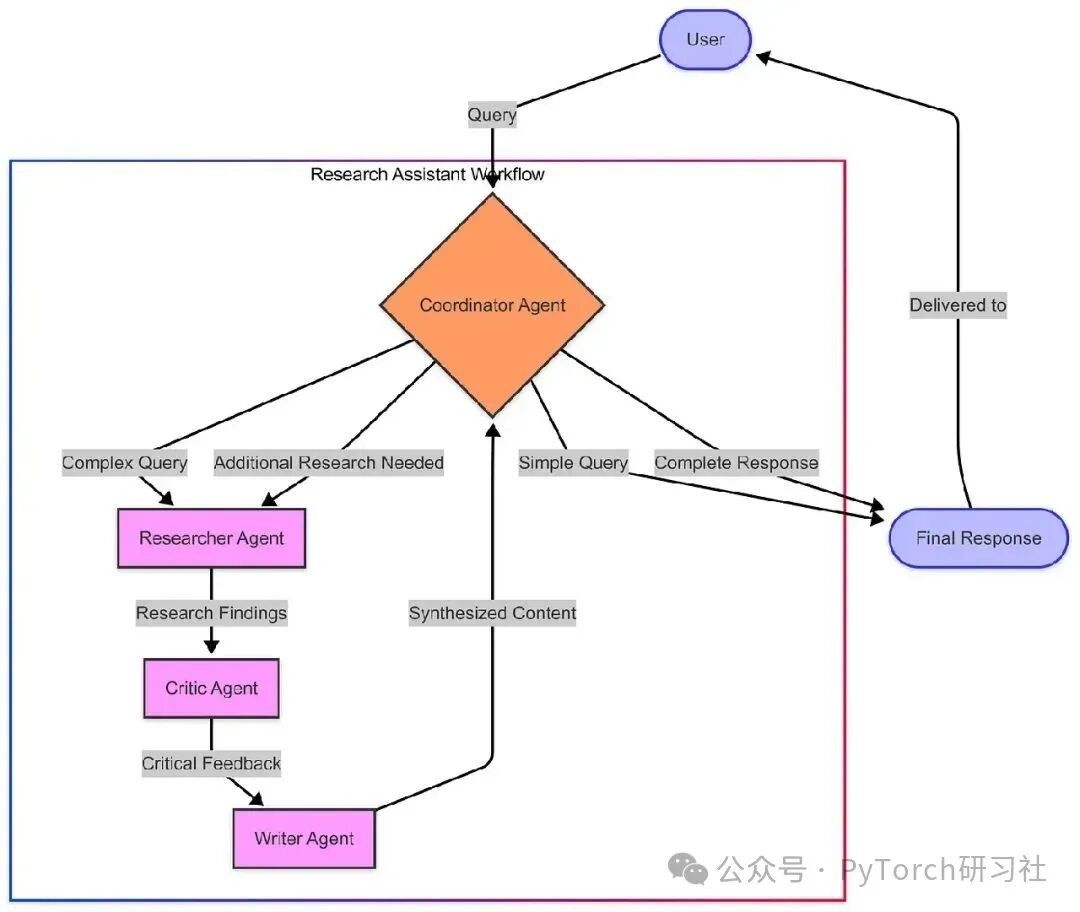
This diagram illustrates the dynamic nature of the system:
•The coordinator agent first receives all user queries•For simple queries, the coordinator can provide responses directly•For complex queries, the coordinator routes them to specialized agents•Once the writer agent generates a response, the coordinator reviews it•The coordinator can either deliver the final response or request additional research
This creates a feedback loop capable of handling complex, multi-step queries.
Decision Flow for Different Query Types
Let’s also visualize how different types of queries flow through the system:
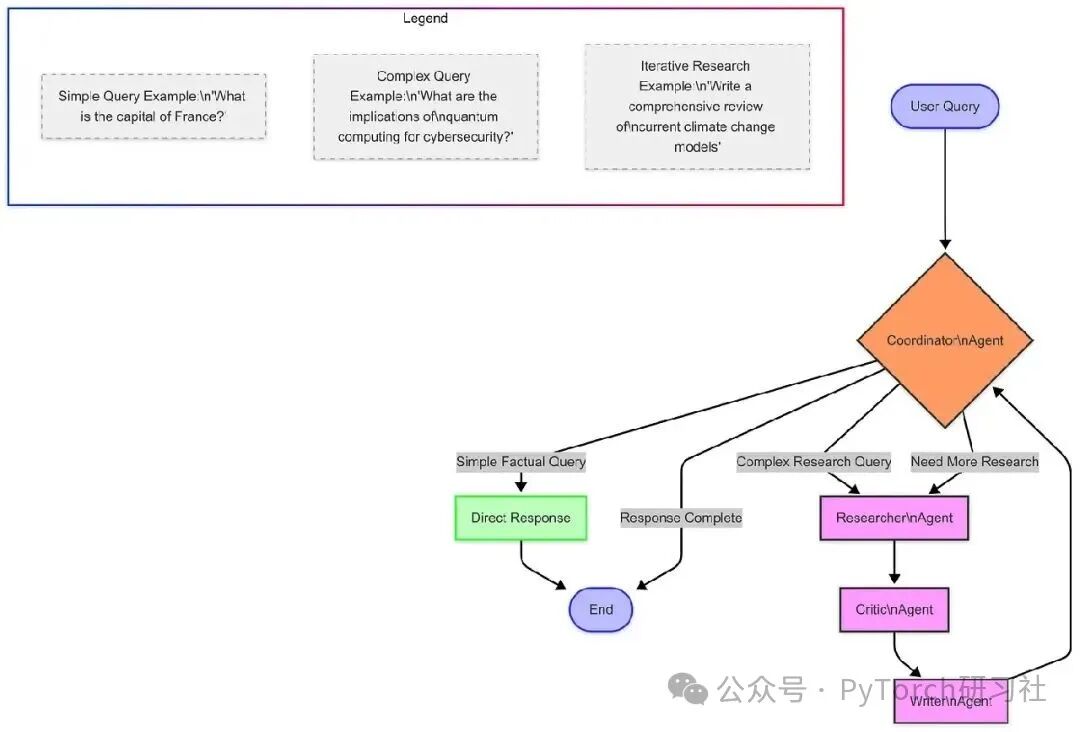
This diagram illustrates the different paths a query can take:
•Simple, factual queries receive direct responses•Complex research queries flow through specialized agents•Some queries may require multiple iterations of research
Dynamic System in Action
Let’s see how our dynamic system handles different types of queries:
Query 1: “What is the capital of France?”
Coordinator:
{"reasoning":"This is a simple factual question asking for the capital of France. The answer is well-known and does not require in-depth research, critique analysis, or specialized writing.","next":"done"}System Response: “The capital of France is Paris.”
Query 2: “What are the implications of quantum computing for cybersecurity?”
Coordinator:
{"reasoning":"This query asks for complex information regarding quantum computing and its relationship to cybersecurity. Detailed information needs to be gathered, different viewpoints evaluated, and a comprehensive response synthesized.","next":"researcher"}[The system then processes this query through the researcher, critic, and writer agents before returning to the coordinator…]
Writer: [Generating comprehensive, structured content about the implications of quantum computing on encryption, security protocols, etc.]
Coordinator (after reviewing the writer’s output):
{"reasoning":"The query has been thoroughly researched, critiqued from multiple angles, and synthesized into a comprehensive response addressing the implications of quantum computing for cybersecurity.","next":"done"}System Response: [Delivering the comprehensive response generated by the writer to the user]
Value of the Coordinator Agent
Adding the coordinator agent transformed our system in several important ways:
•Efficiency: Simple queries can bypass unnecessary processing, providing faster responses•Adaptability: The system takes different paths based on the nature of each query•Iteration: Complex queries can undergo multiple rounds of research and optimization•Intelligence: The system makes high-level decisions on how to process information•Scalability: New specialized agents can be more easily added to the system
Most importantly, the coordinator makes our system feel more like interacting with a group of intelligent experts rather than a fixed mechanical process.
Advanced Coordinator Implementations
While our implementation is already robust, there are several ways to make the coordinator even more sophisticated:
•More Routing Options: Allowing the coordinator to route directly to any agent, not just the researcher•Feedback Loops: Enabling the coordinator to identify gaps and request specific additional research•Memory Management: Allowing the coordinator to maintain a summary of what has been learned so far•Meta-Learning: Allowing the coordinator to learn which paths are most effective for different query types•Multi-Query Planning: Enabling the coordinator to break complex queries into sub-questions
The coordinator agent completes our multi-agent research assistant, transforming it from a sequential workflow into a dynamic, intelligent system. By coordinating the specialized agents we built—researcher, critic, and writer—the coordinator creates a solution that is greater than the sum of its parts.
This approach mimics the effective way human teams work: specialized experts collaborate under thoughtful coordination to solve complex problems. The result is a system that can quickly provide simple answers, thoroughly address complex issues, and adapt to each unique situation.
Advantages of Using LangGraph
Building multi-agent systems with LangGraph offers the following advantages:
•Structured Workflows: LangGraph provides a clear structure for defining agent interactions, making complex systems easier to design and maintain.•State Management: The framework handles state management between multiple LLM calls, ensuring information flows correctly between agents.•Conditional Routing: LangGraph allows for dynamic decisions on the next agent, creating a more adaptive and responsive system.•Checkpoints: Built-in checkpoint functionality facilitates debugging and recovery of long-running processes.•Scalability: The graph-based approach makes it easy to add new agents or modify existing workflows as the system evolves.
Comparison with CWIC Flow
While LangGraph provides an excellent framework for building multi-agent systems, it is worth noting its similarities and differences with Clearwater’s CWIC Flow:
Similarities:
•Both use a graph-based approach to coordinate multiple specialized agents•Both maintain state in agent interactions•Both support conditional routing based on agent outputs
Differences:
•CWIC Flow is designed specifically for financial services with domain-specific agents and tools•CWIC Flow includes production-grade governance features not present in LangGraph•CWIC Flow has deeper integrations with cloud services and data sources
Conclusion
LangGraph provides a powerful framework for building complex multi-agent systems with structured workflows, state management, and conditional routing. While Clearwater Analytics developed CWIC Flow before LangGraph became available, we continue to evaluate emerging technologies like LangGraph to enhance our capabilities.
Whether through customized solutions like CWIC Flow or frameworks like LangGraph, multi-agent approaches represent the future of AI systems. By coordinating specialized agents with different roles and responsibilities, we can create more powerful, robust, and adaptive AI systems that deliver greater value to users.
As AI technology evolves, Clearwater is committed to adopting innovative technologies to enhance our ability to provide actionable insights to our clients while maintaining industry-leading standards of security, compliance, and accuracy.