❝
🌹Hello everyone! Welcome to PoLang‘s homepage. Thank you for your support and encouragement. On the road of AIGC exploration, I will be with you all the way. If you like it, please star and follow PoLang or scan the code at the end of the article to join the discussion group!
1: Introduction to MultiTalk
In the field of digital content creation, audio-driven digital avatar video generation technology is gradually maturing. This article will introduce a recent digital avatar dialogue framework: MultiTalk, which is a cutting-edge framework in the digital avatar field.MultiTalk focuses on audio-driven multi-person dialogue, singing, interactive control, and cartoon-style video generation, providing more efficient and precise digital avatar video creation.
MultiTalk can generate interactive videos based on multichannel audio input, reference images, and prompts, ensuring that the lip movements of characters are synchronized with the audio. Its key features are as follows:
- Supports single and multi-person generation: Whether it’s a single character or a complex multi-person scene, MultiTalk can generate accurately.
- Interactive character control: Directly control the actions and expressions of virtual characters through prompts.
- Excellent generalization performance: Supports cartoon character generation and singing video production, with a wide range of applications.
- Flexible resolution and long video generation: Supports output resolutions of 480p and 720p, adapting to different aspect ratios; can generate videos up to 15 seconds long.
- GitHub: https://github.com/MeiGen-AI/MultiTalk
- Project Homepage: https://meigen-ai.github.io/multi-talk/
2: Model and Environment Installation
This article uses the RunningHUB platformRunninghub MultiTalk plugin for experience. Models and workflows can be downloaded at the end of the article!
- The plugin is currently not open-source and requires online access. Additionally, the plugin requires significant GPU memory and processing time, so it is recommended to use a platform with 48G of GPU memory for the best experience.
- If you need a local deployment experience, you can refer to the project homepage’s TeaCache deployment plan, which can accelerate the process by about 2-3 times.
3: Model Evaluation and Experience
MultiTalk experience includes single and multi-person dialogue workflows.
Single Digital Avatar: 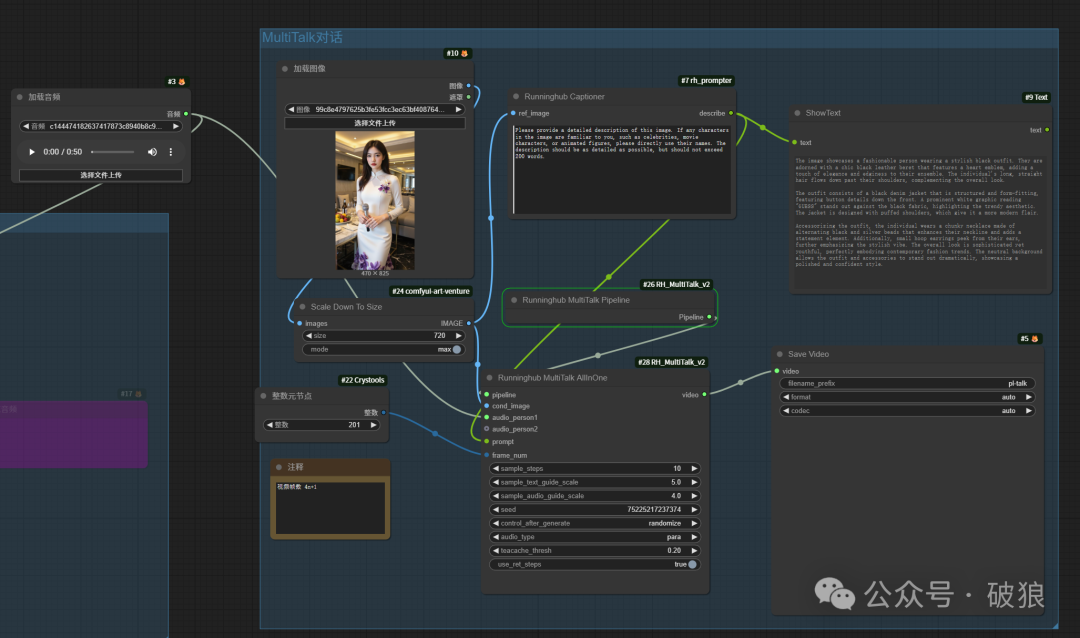
Multi Digital Avatars: 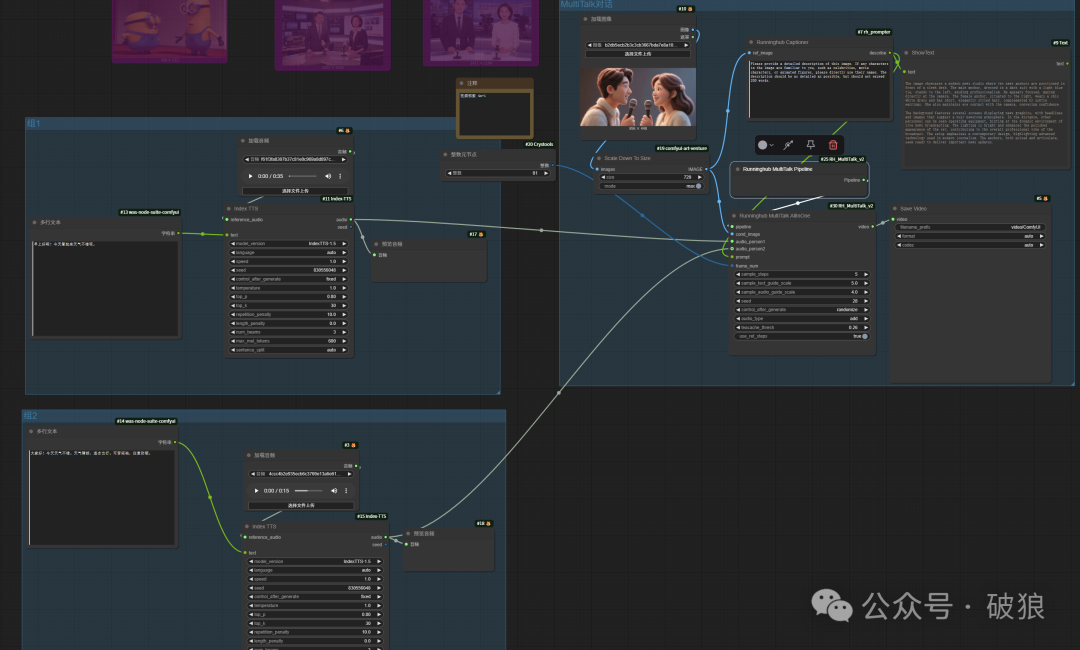
Core Nodes: 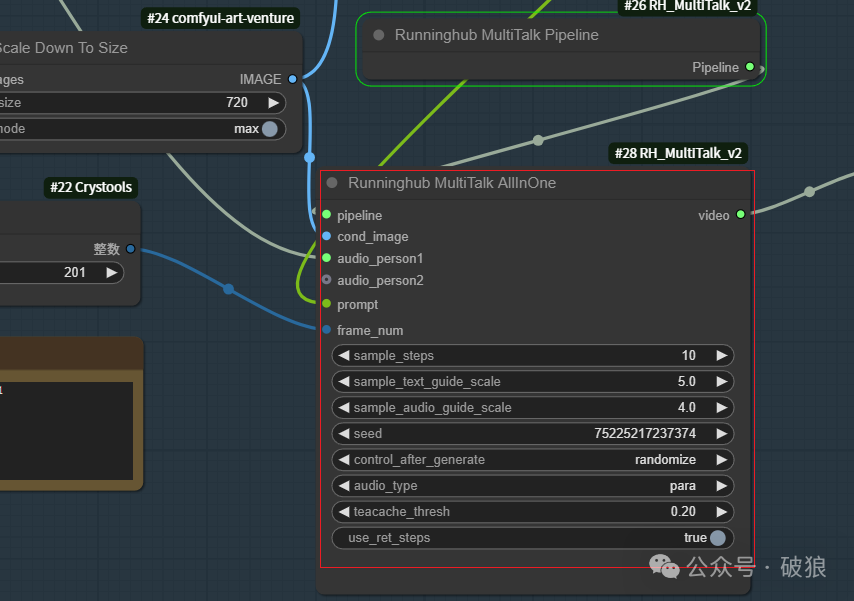
According to the official recommendations, the plugin has been optimized to the extreme, and enabling TeaCache acceleration achieves over 3 times speedup for version v1.
- Lip Sync Accuracy: Audio CFG between 3 – 5 yields the best results; increasing this value can improve synchronization.
- Video Clip Length: The model is trained on 81 frames of video at 25 FPS. Generating 81-frame clips yields better results. It can generate up to 201 frames, but longer clips may affect prompt adherence performance.
- Long Video Generation: Audio CFG affects the color consistency of each clip. Setting it to 3 can reduce color variations.
- Sampling Steps: Reducing sampling steps to 10 can speed up video generation, but this will affect action and visual quality. More steps can improve quality. The plugin defaults to 5, but this needs to be changed to at least 10; otherwise, flickering may occur.
- TeaCache Acceleration: –teacache_thresh optimal range is 0.2 – 0.5. Increasing this can speed up inference but may reduce video quality.
Additionally, there is a selection for audio_type, with options para and add. Testing shows that para represents multi-person dialogue, while add represents sequential dialogue.
01. Single Dialogue Digital Avatar
In a single-person scenario, select audio_type as para; this model performs best in single-person scenarios, capable of generalizing to cartoon, real, and animal avatars. It outperforms the previous Tencent Mixed Yuan digital avatar (Tencent Mixed Yuan Avatar: supports multiple appearances and cartoon animals! Dynamic & controllable emotions & multi-character & multi-style digital avatar framework). The prompts in the workflow use image feedback generation, eliminating the need for handwritten prompts.
02. Multi-Person Dialogue Digital Avatar
In a multi-person scenario, select audio_type as add for best results in dialogue or alternating singing, while para is for choral types. Multi-person scenarios require more GPU memory and processing time.
Add option:
Para option:
4: Recommended Online Experience
1. XianGong Cloud Mirror: It is recommended to use the cloud mirror for experience: new registrations receive 8 yuan free credit.Registration link: https://www.xiangongyun.com/register/UJ6IVE
- Wanxiang, Mixed Yuan, FramePack, and LTXV video comprehensive experience integration mirror: https://www.xiangongyun.com/image/detail/a5702c45-2b5a-4dfa-9f9b-086d885773ec?r=UJ6IVE
2. RunningHUB: Recommended online RunningHUB platform for experiencing AI applications and workflows (new registrations receive 1000 points). More exciting workflows can be experienced online: https://www.runninghub.cn/user-center/1890418187312222210/webapp?inviteCode=kol01-rh059 (Invite code: kol01-rh059).
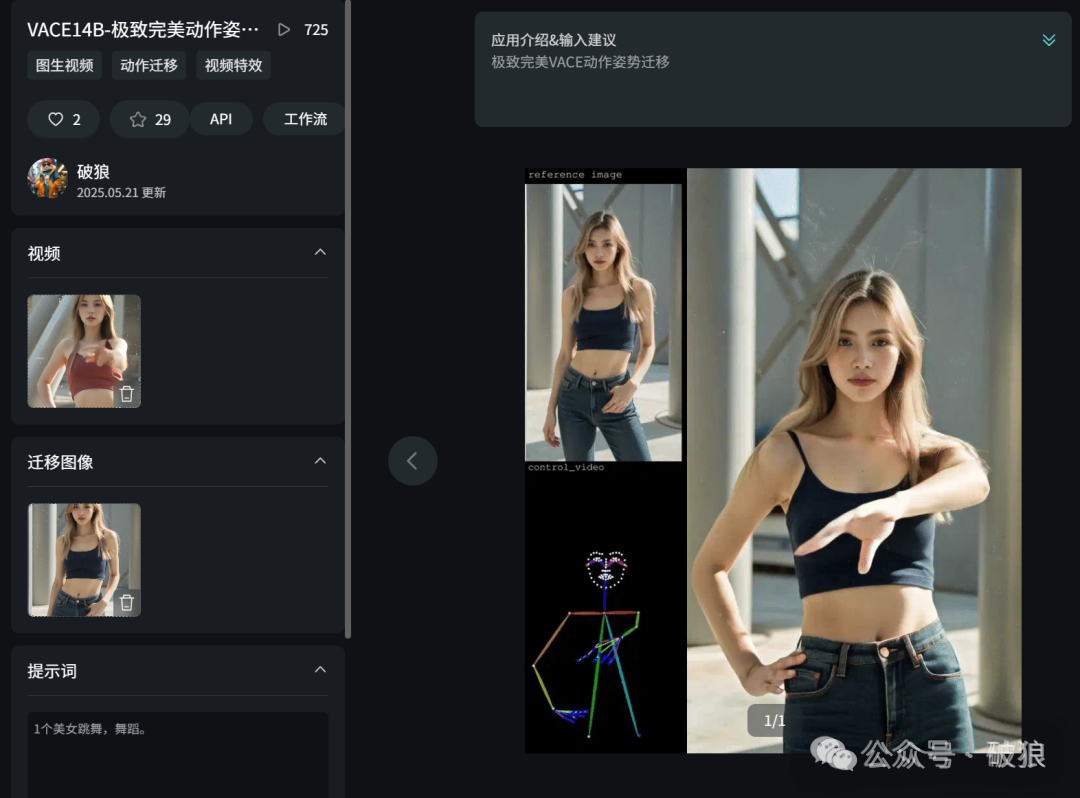
- VACE14B – Ultimate Perfect Motion Pose Transfer: https://www.runninghub.cn/ai-detail/1922722674630606850/?inviteCode=kol01-rh059
Recommended Reading
- MiniMax-Remover: Free and Fast Video Watermark Removal! Just 6 steps for rapid video magic erasure, can be deployed locally.
- Byte MAGREF: ID consistency video generation, surpassing Phantom multi-theme references! Faster lightx2v with only 4 steps acceleration.
- Lumi-Batcher: A boon for designers, dozens of times efficiency! Byte open-source ComfyUI batch task tool! Easily handle batch image, video, and XYZ tasks with one click.
- Self Forcing: Performance surpassing CausVid’s Wanxiang video acceleration tool! Rapid generation of 1280 high-resolution videos, stunning effects.
- Tencent Mixed Yuan Avatar: Supports multiple appearances and cartoon animals! Dynamic & controllable emotions & multi-character & multi-style digital avatar framework.
- FusionX: Top-tier open-source model! Rich movements and details, 6-step acceleration for strong adherence to high-quality long videos! Integrates multiple models including CausVid and VACE.
5: Article Summary
MultiTalk experience requires attention to the following:
- MultiTalk supports the generation of single and multi-person dialogue digital avatars, interactive character control, and excellent generalization performance, especially in cartoon and animal digital avatars.
- It also supports high-quality video generation at 480 and 720 resolutions, and can generate videos up to 15 seconds long. Note that this requires more time and GPU memory.
- Plugin node configuration needs to ensure that TeaCache is enabled and the steps are set to a minimum of 10 (5 steps for animation, at least 10 for real people), as well as a dialogue duration longer than 81 frames.
Workflow and Model Downloads
- Accelerated Version – MultiTalk – Single Dialogue: https://www.runninghub.cn/ai-detail/1934779138240913410/?inviteCode=kol01-rh059
- Accelerated Version – MultiTalk – Multi Dialogue: https://www.runninghub.cn/ai-detail/1934780268601647106/?inviteCode=kol01-rh059
- Project Deployment Guide: https://github.com/MeiGen-AI/MultiTalk?tab=readme-ov-file#%EF%B8%8Finstallation
- Wanxiang Video Model Download: https://pan.quark.cn/s/d6c08d7a3cab
Interested in joining the [AGI Technology Discussion Group]+V

If you find the article good, please follow, leave a message, like, and share for interaction and support!