The most frequently used PLC programming languages currently are Structured Text and Ladder Diagram. For technicians with little background, starting with Ladder Diagram is the quickest way to learn PLC programming. Regardless of the PLC brand, the structure of Ladder Diagrams closely resembles actual electrical control circuits. Below, we recommend several commonly used control circuits for your review.
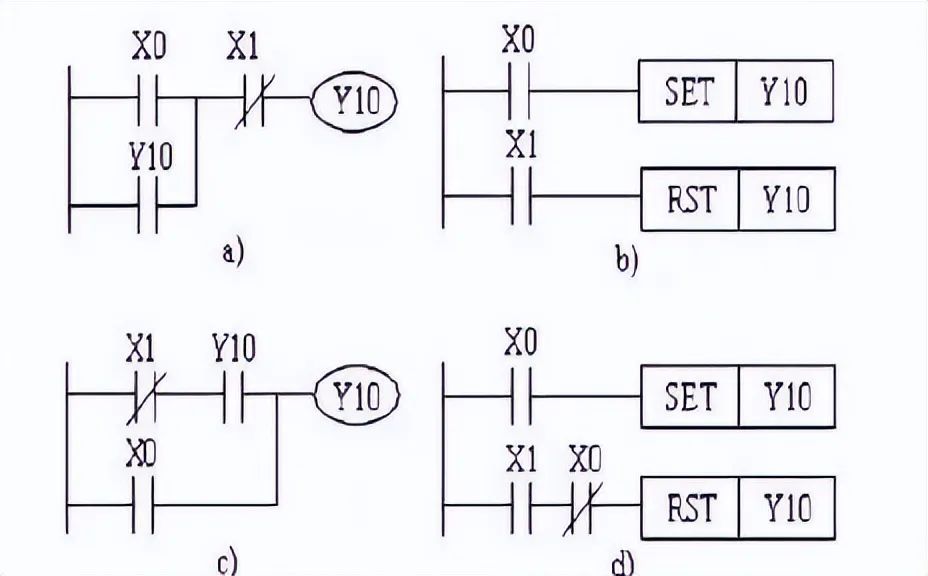
1. Start, Hold, and Stop Circuit
The four Ladder Diagrams for starting, holding, and stopping Y10 are shown in the figure. These Ladder Diagrams can all achieve the functions of starting, holding, and stopping. X0 is the start signal, and X1 is the stop signal. Diagrams a and c use the normally open contact of Y10 to achieve self-locking hold, while diagrams b and d use the SET and RST instructions to achieve self-locking hold.
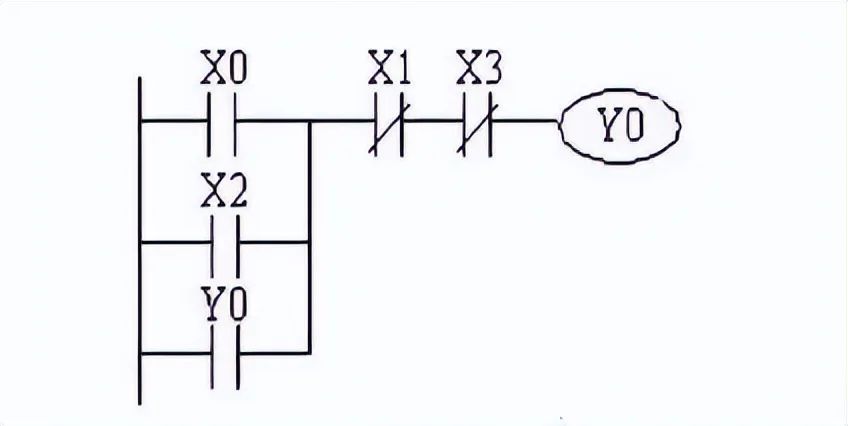
 2. Multi-Location Control Circuit
The following diagram shows a program for controlling a relay coil from two locations. X0 and X1 are the start and stop control buttons for one location, while X2 and X3 are the start and stop control buttons for another location.
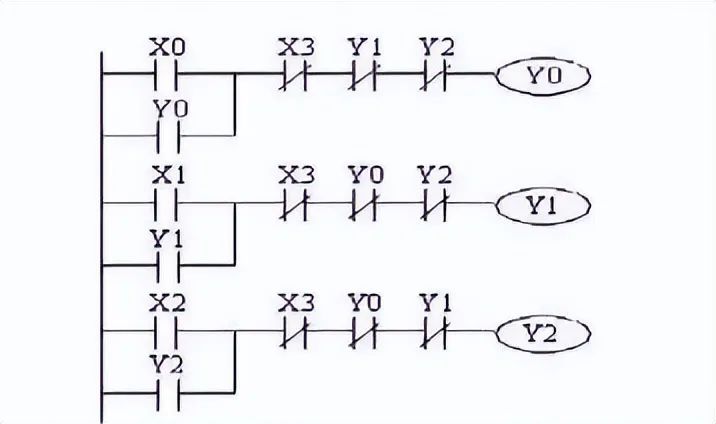
 3. Interlocking Control Circuit
The following diagram shows an interlocking circuit for three output coils. X0, X1, and X2 are the start buttons, and X3 is the stop button. Since Y0, Y1, and Y2 can only be connected one at a time, the normally closed contacts of Y0, Y1, and Y2 are connected in series to the control circuits of the other two coils.
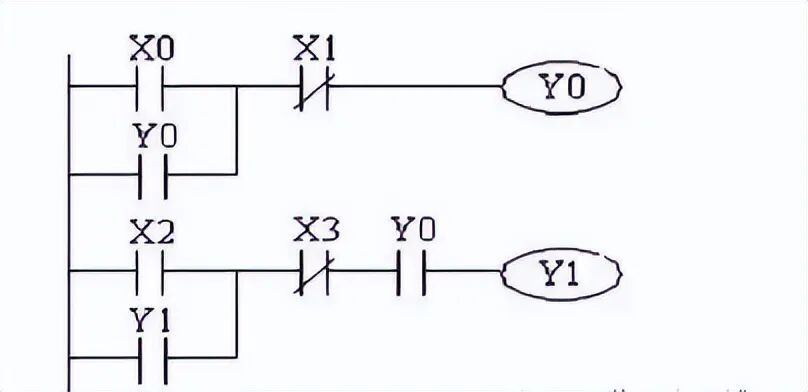
 4. Sequential Start Control Circuit
As shown in the figure, the normally open contact of Y0 is connected in series with the control circuit of Y1, meaning that Y1 can only be activated if Y0 is activated. Thus, Y1 can only be activated when Y0 is on. When Y0 is turned off, Y1 is also turned off, and under the condition that Y0 is on, Y1 can turn on and off by itself. X0 and X2 are the start buttons, while X1 and X3 are the stop buttons.
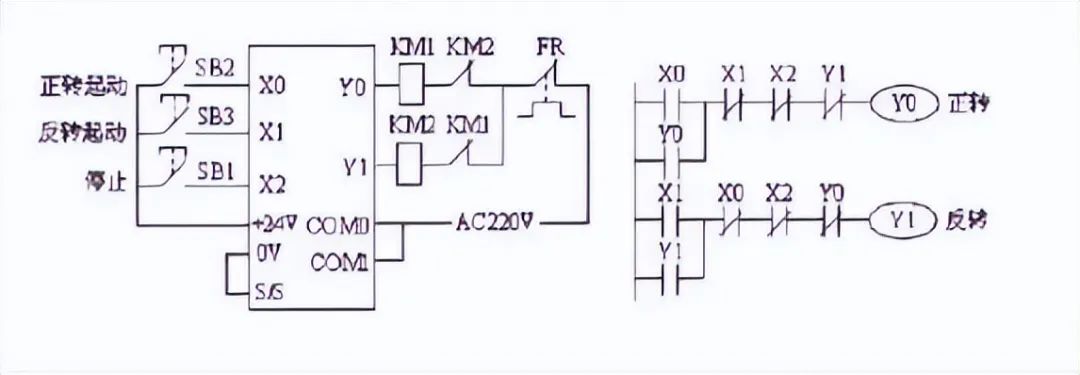
 5. Motor Forward and Reverse Circuit
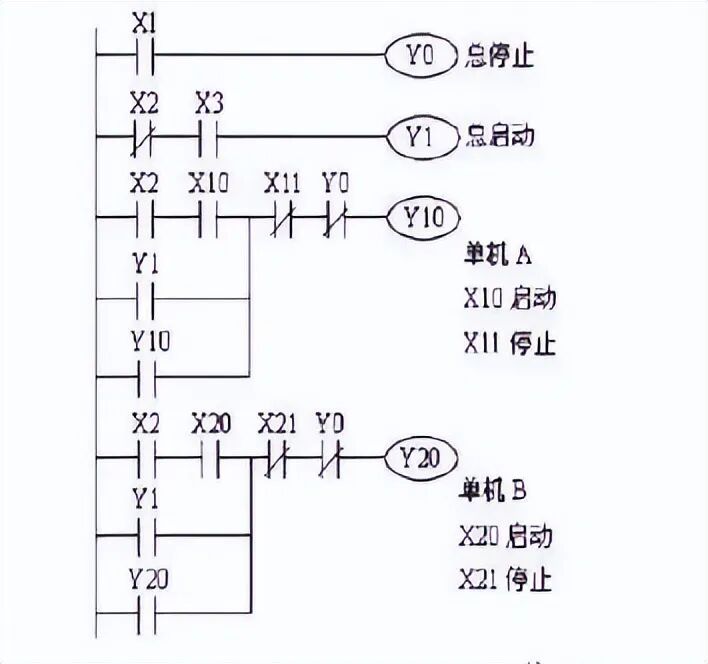
 6. Centralized and Decentralized Control Circuit
In an automatic line composed of multiple individual machines, there is interlocking for centralized control at the main control panel and decentralized control at the individual machine control panels. The Ladder Diagram for centralized and decentralized control is shown in the figure. X2 is the selection switch, which serves as the interlocking contact for centralized and decentralized control. When X2 is ON, it is for decentralized start control; when X2 is OFF, it is for centralized start control. In both cases, both the individual machine and the main control panel can issue stop commands.
Disclaimer: This article is reproduced from the internet, and the copyright belongs to the original author. If there are any copyright issues, please contact us promptly for removal. Thank you!