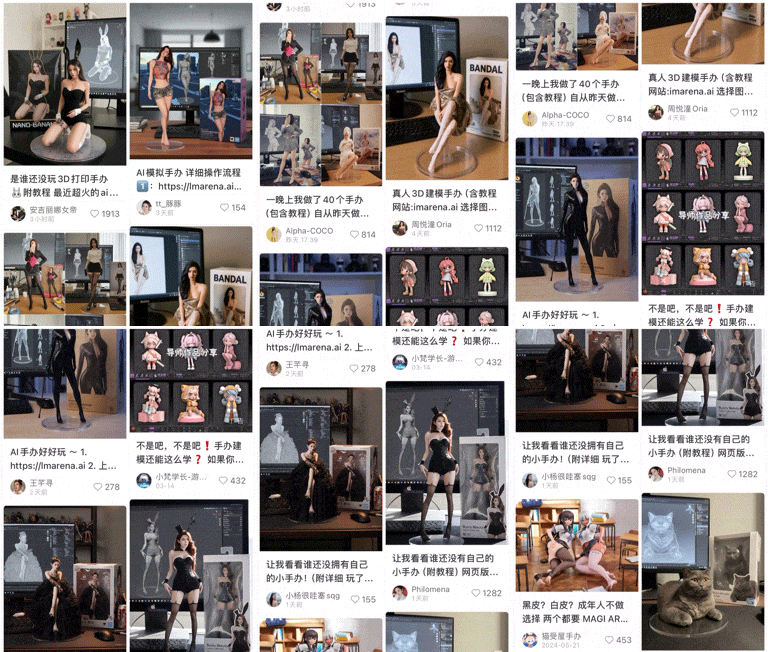
The latest method for generating accounts on a certain platform is surprisingly consistent. A quick scroll reveals a flood of exquisite and realistic figurine images. Upon closer inspection, it seems that everyone, whether in the AI community, the anime circle, the pet lovers’ group, or among cyclists, fitness enthusiasts, and models, is using AI to generate 3D figurines, rapidly gaining followers.
So, which model are they specifically using? Introducing today’s main character: Nano Banana .
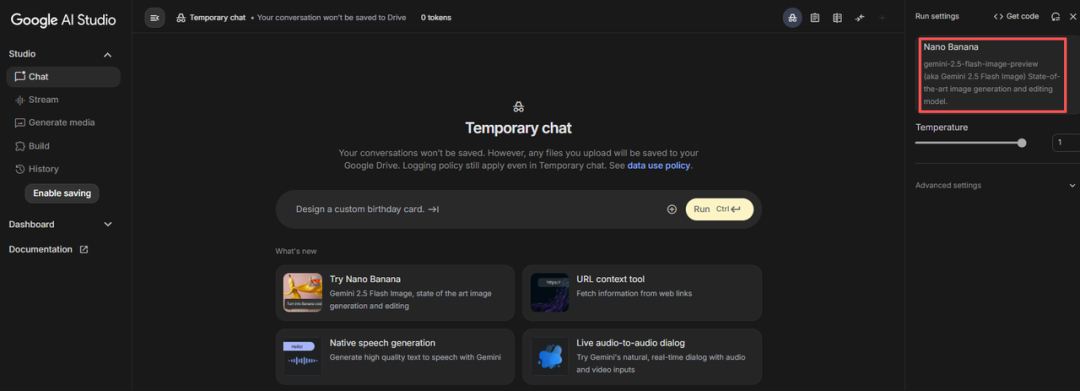
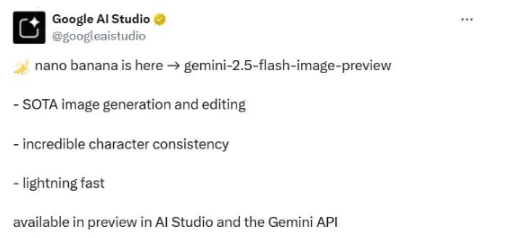
Initially, Nano Banana appeared anonymously on the LM Arena platform, and its impressive performance in generating images led countless netizens to speculate about its origin. It wasn’t until two days later that Google stepped in to claim it, revealing that it was their newly launched Gemini-2.5-Flash-Image-Preview . The official introduction highlights three features:
-
SOTA image generation and editing
-
Incredible subject consistency
-
Lightning-fast speed
It emphasizes brevity and clarity. During my research, I also discovered that Gemini-2.5-Flash-Image-Preview supports 32K context, offers temperature control (which can adjust the model’s creativity), and includes some advanced settings. In terms of pricing, the model charges $0.3 for input/output text and $0.3/$30 for input/output images. The knowledge cutoff date is June 2025.
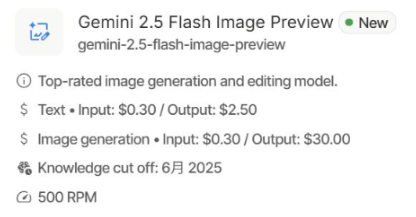
Based on rough calculations, the cost of generating each image with this model is approximately $0.039 (around 0.27 RMB), which is quite affordable. Of course, good models need to be tested! Currently, Nano Banana is available for preview in Google AI Studio and the Gemini API, and everyone can use it for free. Additionally, I have compiled five creative ways to use Nano Banana for you!
Experience entry:
Use in Gemini at: https://gemini.google.com/
Use in AI Studio at: https://aistudio.google.com/
Method 1: Texture Modification
First, I want to introduce the powerful “e-commerce level” texture modification feature of Nano Banana.
For example, if you want to post on social media but only have a low-quality photo of beef and want to make it look more upscale, what can you do? Just upload the original image to Nano Banana and input the prompt:
<span>Adjust the grain of the beef to that of S3-grade beef</span>
Change the texture of the beef to that of S3 grade steak, and you can achieve the desired upscale ambiance!
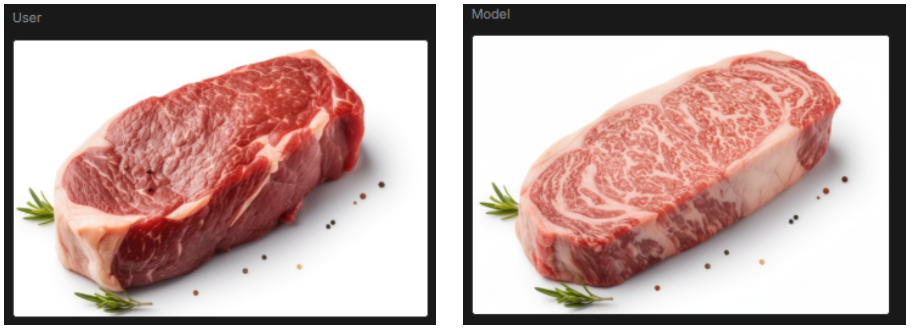
Left is the original input, right is the model output
Such texture modifications, I found, only took 11.5 seconds to run in Google’s AI Studio environment, without any unnecessary thought processes or text, simply outputting the image. Moreover, due to the model’s emphasis on “consistency,” the output image strictly adheres to the prompt instructions. If you have other modifications, such as adding ambient lighting, placing a glass of red wine nearby, or arranging the pieces, you just need to continue adding new prompts in the chat box.
* I also found that in the AI Studio environment, using English prompts has a much higher success rate than using Chinese prompts. Long Chinese prompts are often treated as text and returned by the model unchanged.
Nano Banana’s texture modification feature is particularly suitable for industrial design sample texture development, and it is also very convenient for low-cost generation of product display images on e-commerce platforms, further improving the efficiency of designers. However, during practical testing, I felt that this feature might be a bit problematic. If widely used for modifying food textures, jade textures, or fabric textures, the authenticity of advertising in non-standard fields could be difficult to guarantee.
Method 2: Sketch Control
Here’s a less obvious method: modifying the actions of characters in images through sketches (or line drawings).
In my tests, I found an image of Levi from “Attack on Titan” and hand-drew an action sketch on paper, then uploaded it to Nano Banana with the prompt:
<span>Make the character in Picture 1 pose in the posture shown in Picture 2, with an image aspect ratio of 1:1</span>
Have the character in Picture 1 pose as shown in Picture 2, with an aspect ratio of 1:1, and I got:
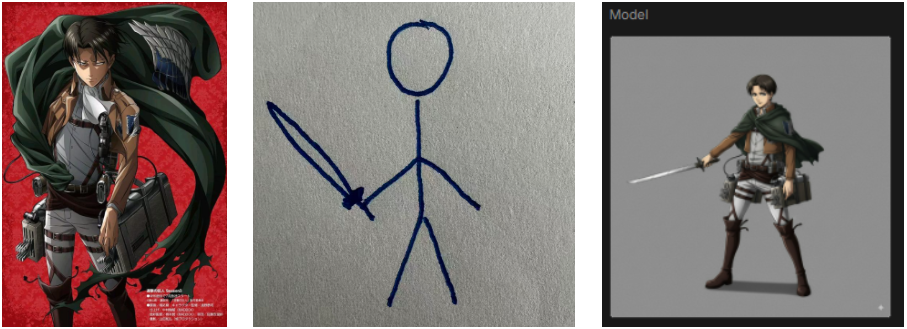
Left is the original input (Image 1), middle is the sketch input (Image 2), right is the model output
Although the generated image did not completely match Image 2, overall, the image generated by Nano Banana had the character’s facial expression very closely aligned, and the details were not neglected: The insignia on the character’s sleeve in Image 1 has 9 feathers, and in Image 3 the AI output still has 9 feathers..
Given my poor drawing skills, I later found two more anime images and added an emoji, then uploaded them to Nano Banana with the prompt:
<span>The two characters interact in the posture shown in Picture 3. The scene background should match the atmosphere of the image, and interactive effects between the environment and the characters should be added. The image aspect ratio is set to 1:1</span>
The two characters interact in the posture shown in Picture 3, the scene background should match the atmosphere of the image, and add interactive effects between the environment and the characters, the aspect ratio is set to 1:1 , and I got:
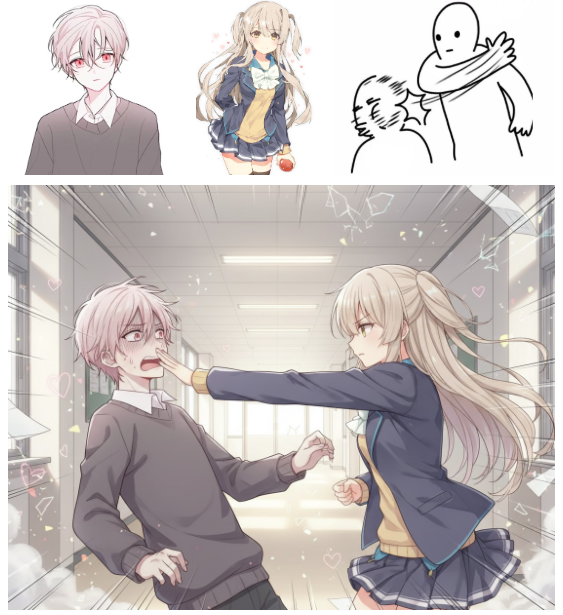
It seems that Nano Banana also considers some realistic possibilities in the human world when processing images, for example: the female character on the right maintains a fist pose while attacking. In terms of scene processing, the corridor floor also generated light projections from the ceiling.
I just want to say: perhaps, once Nano Banana’s generation capabilities improve by another order of magnitude, everyone will be able to draw whatever they want to see!
Method 3: No Prompt
Previously, I tested only anime characters; now, let’s take a look at Nano Banana’s AI portrait generation effect, and importantly: without prompts, but by directly labeling text on the image. For example:
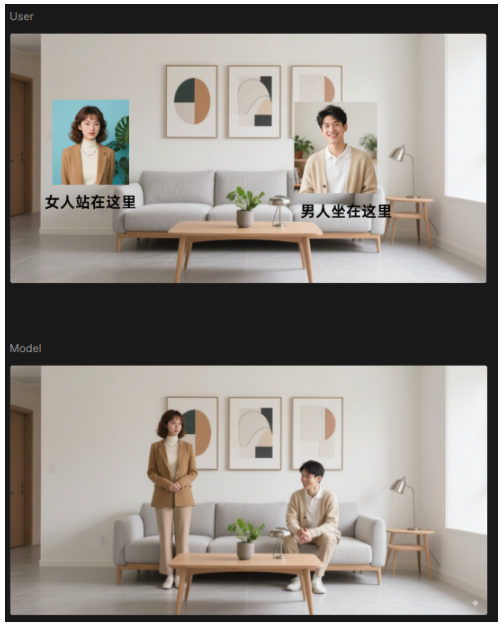
Above is the original input, below is the model output
As you can see, even without any input prompts, Nano Banana can still generate AI images based on the text descriptions in the image, and the clothing of both characters remains consistent with the original image. Here comes the detail: Given that the original image featured two characters, Nano Banana also carefully maintained the spatial positions of the two characters during generation, rather than placing them rigidly.
However, currently, the images generated by Nano Banana’s text labeling function do not have very high clarity, and I look forward to its optimized performance!
Method 4: Image Segmentation
The previous examples mostly discussed “multi-image fusion,” so what about image segmentation? Nano Banana’s visual reasoning capabilities are incredibly strong. For instance, I input a portrait image to Nano Banana and entered:
<span>Extract the clothing worn by the characters in the picture separately to form a single product collection.</span>
Extract the clothing of the characters in the image separately to form a single product collection, and I got:
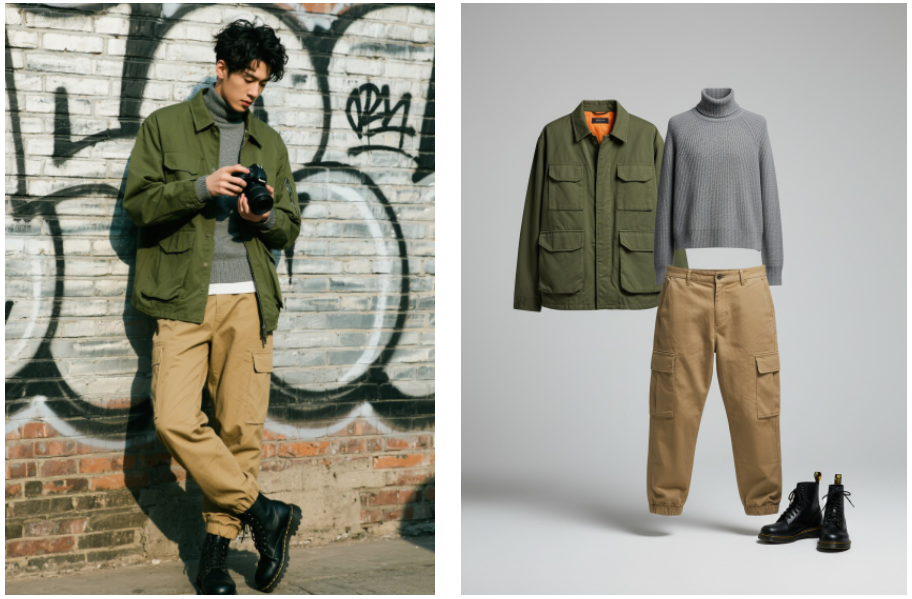
Left is the original input, right is the model output
This is absolutely a “wake-up call” for fashion designers. On one hand, Nano Banana can (almost) perfectly extract the individual items from the original model’s clothing and add some lighting effects appropriately, fulfilling the basic instructions; on the other hand, Nano Banana also added an inner lining design to the collar of the coat, with colors that are compatible with the overall image, bringing new creative points.
Method 5: Image Style Transfer
The last time I was amazed by AI style transfer was with those “Studio Ghibli” style AI images, and now, you just need to input style prompts in Nano Banana to get highly consistent AI style transfers.
I tried several styles with the same image, using the following prompts:
Convert this image to a black-and-white comic style. (黑白漫画风格)
Convert this image to an oil painting style. (油画风格)
Convert this image to a pop art style. (波普风格)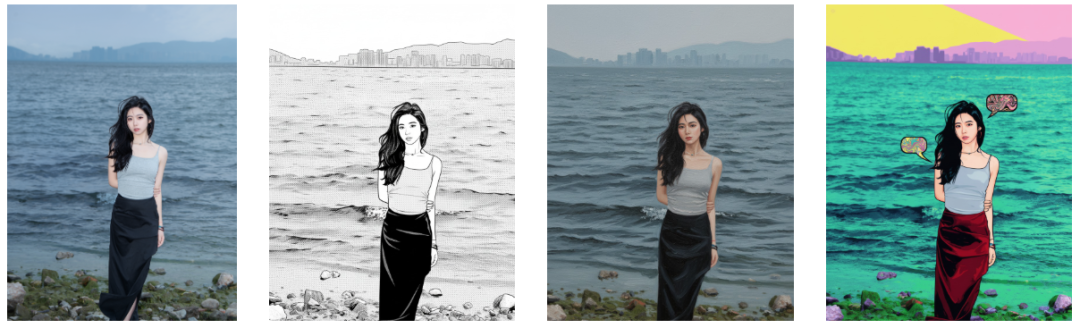
Leftmost is the original input, the rest are model outputs
Previously, using GPT-4o and Flux Kontext, the image style transfer function also impressed me, but it was just that; when it came to portraits and products, even slight deformations significantly reduced their commercial value.
In contrast, Nano Banana is more consistent and rigorous, as evidenced by the details of water patterns and stones. Take a look at the comparison image:
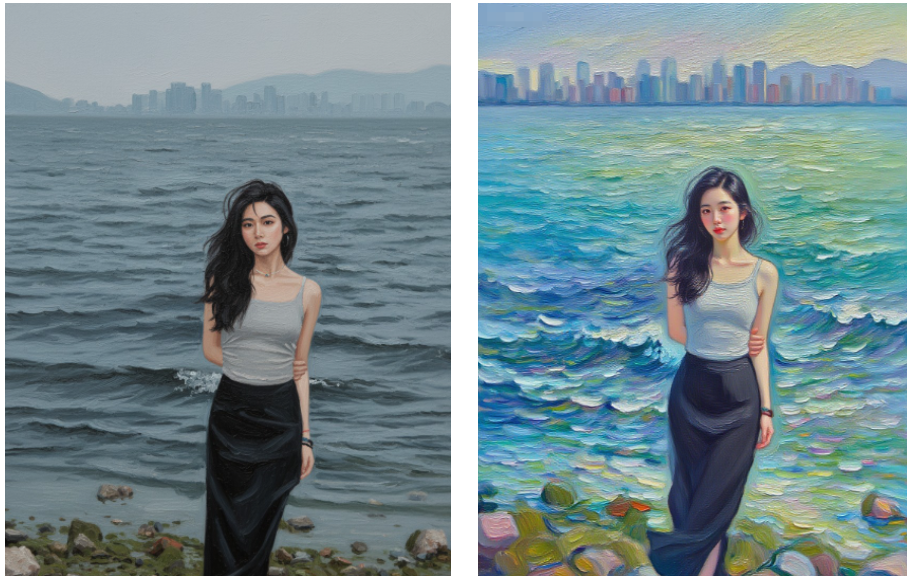
Left is generated by Nano Banana, right is generated by another AI (with consistent prompts)
The portrait on the right has basically deviated from the original image, not only intentionally narrowing the waistline but also resembling a popular internet celebrity; the water patterns are also covered with broad strokes of color that do not belong to the original image.
Method 6: 3D Figurine Images
As mentioned at the beginning of the article, many bloggers are using Nano Banana to generate accounts and attract followers. I also want to share the results I tested, with the following prompt:
<span>Transform this photo into a character figurine. Place a packaging box printed with the character's image behind the figurine, and display a computer next to it, with the Blender modeling production process shown on the screen. Put a circular plastic base in front of the packaging box, on which the character figurine stands. Ensure the PVC material exhibits a clear and realistic texture, and set the scene in an indoor environment as much as possible.</span>
Transform this photo into a character figurine. Place a packaging box printed with the character’s image behind the figurine, and display a computer next to it, with the Blender modeling production process shown on the screen. Put a circular plastic base in front of the packaging box, on which the character figurine stands. Ensure the PVC material exhibits a clear and realistic texture, and set the scene in an indoor environment as much as possible, and I got:
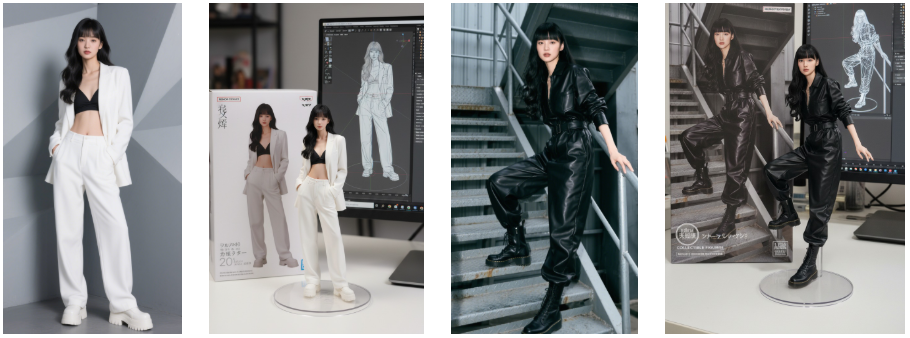
I must say, the entire process was exceptionally smooth, but I also discovered a major issue: whether it is Nano Banana or other generative models, there is often garbled text in the generated images, which is a situation I encountered multiple times during testing.
Final Thoughts:
From the above cases, we can see that Nano Banana is no longer just an image generation model, but is gradually moving towards a “visual reasoning + creative design” commercial-grade tool. What does this mean?
It means that Nano Banana directly challenges the market share of Stable Diffusion and Photoshop, as the latter two still have a certain learning curve, while Nano Banana only requires users to input a sentence or an image to quickly obtain the desired picture, effectively reducing costs and increasing efficiency.
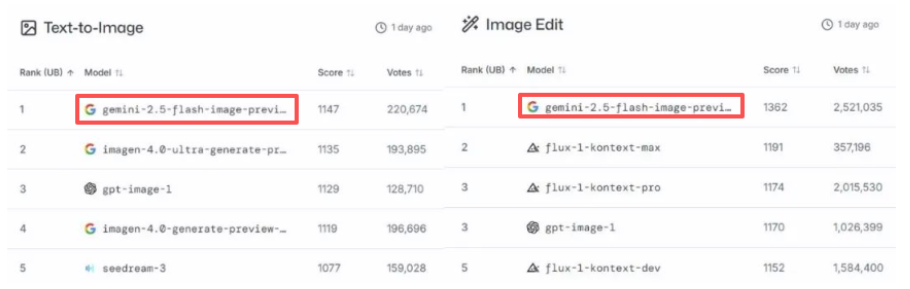
LM Arena Voting List
On the other hand, Nano Banana is an extremely compressed generative model that can run on mobile devices. In other words, it is no longer an “experimental product in the AI workshop,” but a true “instant generation engine” that can be embedded into social media, advertising, and applications.
Imagine a college student who has just started a business and wants to list a pair of sneakers on their e-commerce platform. In the past, they needed to handle models, photography, graphic design, post-production, and copywriting, which would take at least 3-4 days; now, they can upload the product image to the Nano Banana powered “AI product assistant” and quickly generate various banners, product displays, festive atmosphere images, etc. — Nano Banana has brought AI generative images from the “back-end laboratory” to the “front-end real-time scene.”.
Finally, I must remind everyone: the powerful consistency of Nano Banana also means that it may generate some inappropriate or illegal images (you know what I mean), and this is something the model cannot be held morally accountable for, but AI generative images are not above the law.
Meeting adjourned!