In actual development, you often hear <span>this field needs to be desensitized (encrypted)</span>. This is actually a very common requirement, such as:
- Phone numbers and ID numbers need to be encrypted before being stored
- Configuration information and tokens want simple protection
- Logs need to be desensitized, but we hope to be able to decrypt them in the backend to troubleshoot issues
However, many times, we just copy a tool class like AESCipher from the internet, thinking that as long as it runs, that’s enough. But if you ask a little more detail:
- What exactly is AES?
- What is the encryption and decryption process of AES?
- How secure are the common implementations used in business?
If you feel confused when hearing such questions, then this article will clarify this matter from three levels:
- The concept of AES
- The encryption process of AES
- Complete implementation in Java + practical business examples
1. The Concept of AES
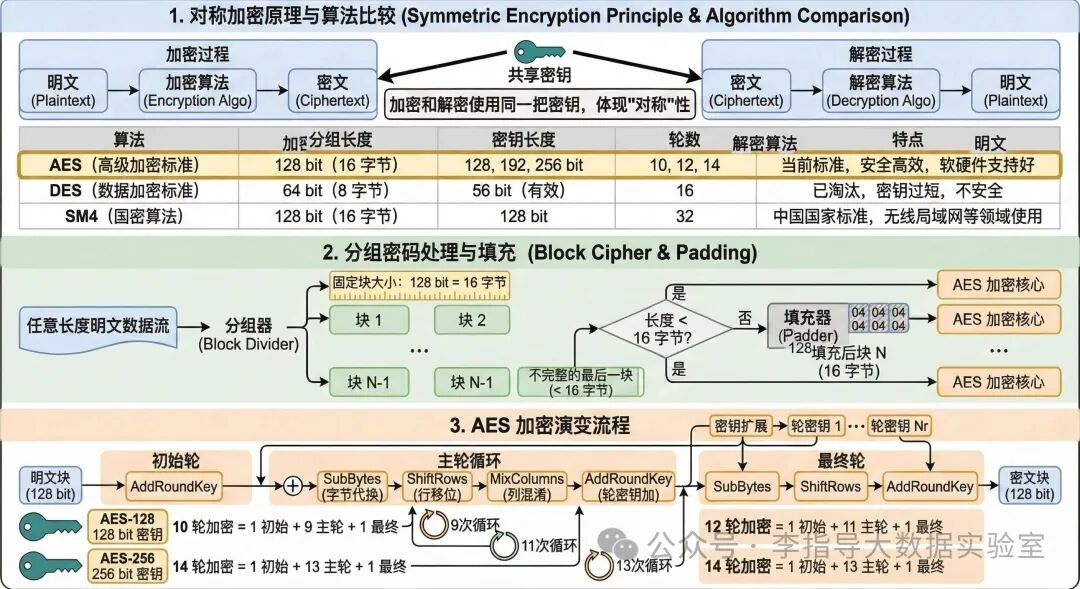
AES stands for Advanced Encryption Standard<span> (AES)</span>, which is a symmetric block cipher algorithm, meaning the same key is used for both encryption and decryption of data. It is the core foundation for ensuring the security of electronic data globally today. The design goals of AES are to balance security, efficiency, and performance. The key points of this encryption method are:
-
Symmetric encryption:
- Encryption and decryption use the same key. Common symmetric algorithms include: AES, DES, SM4, etc.
-
Block cipher:
-
AES processes a fixed length of data at a time, with a block size fixed at 128 bits = 16 bytes.
-
If the plaintext length is not a multiple of 16, padding is required.
-
Key length:
- AES-128: 128-bit key, corresponding to 10 rounds of encryption
- AES-192: 192-bit key, corresponding to 12 rounds of encryption
- AES-256: 256-bit key, corresponding to 14 rounds of encryption
2. The Encryption Process of AES
-
Key Generation
-
AES supports three common key lengths mentioned above: 128, 192, and 256, corresponding to different rounds of encryption;
-
Generally speaking, the longer the key, the higher the cost of brute force cracking, but the computational overhead will also slightly increase. Besides the length itself,
<span>the randomness and confidentiality of the key are also crucial</span>. -
The key should be generated by a secure random number generator (not just a simple “birthday + 123456”);
-
In actual projects, keys are usually not hard-coded but managed centrally through: configuration centers/environment variables, or dedicated key management services;
-
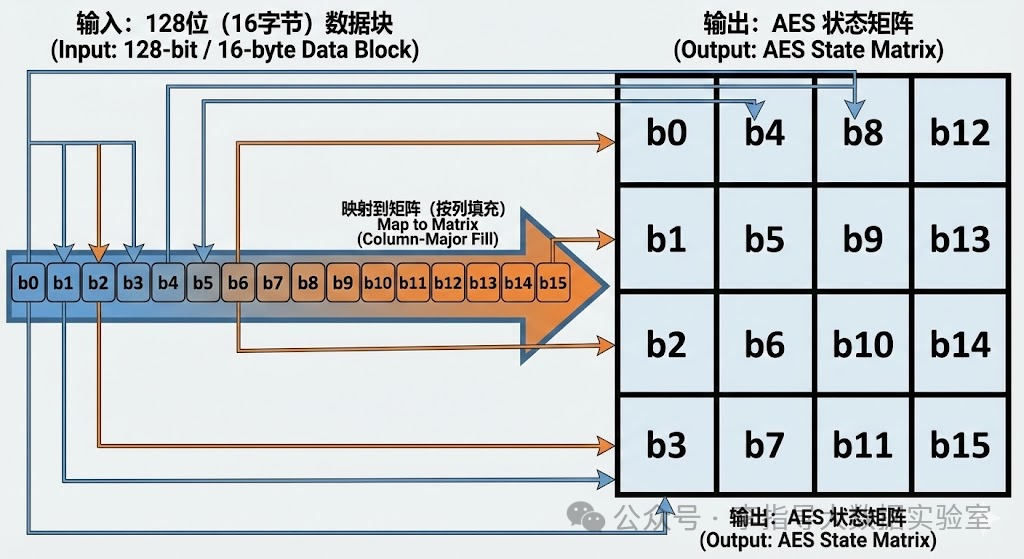
The basic unit of data processed by AES is a 128-bit (16-byte) block. Internally, these 16 bytes are arranged into a 4×4 matrix called the “state”. All encryption operations are transformations on this matrix, as shown;
Plaintext Padding
-
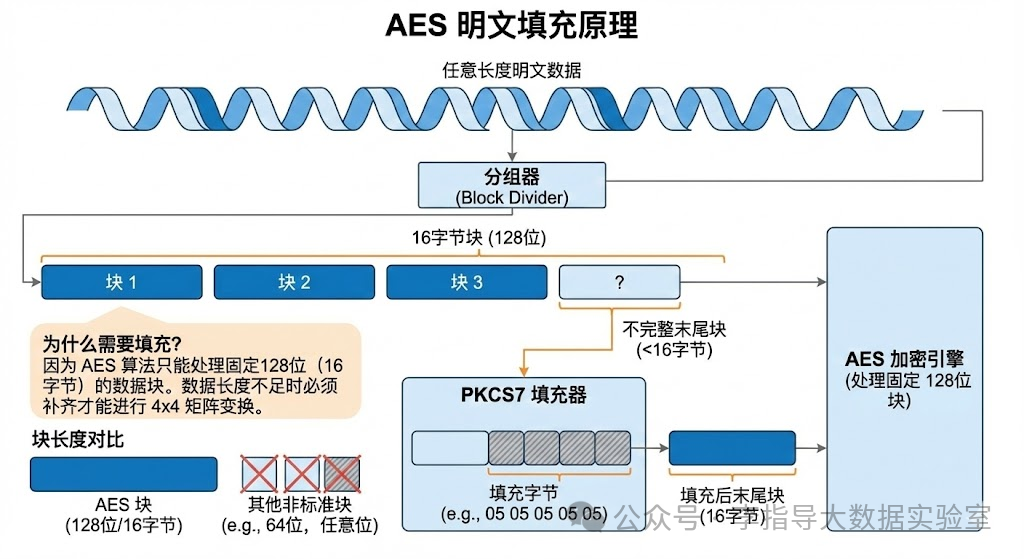
AES requires that the length of the plaintext data must be a multiple of the block length, usually 128 bits (16 bytes). If the plaintext length is not an integer multiple of the block length, padding is required. The most common padding method is PKCS7 padding, which adds an appropriate number of bytes at the end to make the plaintext length a multiple of the block length;
-
Why padding is needed: Because AES can only process fixed 128-bit length data blocks. If there are 5 bytes left in the data stream, they cannot fit into the 4×4 matrix;
Key Expansion
In each round, the current block is represented as a 4×4 byte matrix, and the following operations are performed sequentially (the last round is slightly simplified):
Before the actual encryption starts, there is an initial round of AddRoundKey. In the last round, MixColumns is omitted, and only SubBytes, ShiftRows, and AddRoundKey are performed. After multiple rounds of substitution and permutation, there is no longer an intuitive linear relationship between the plaintext and the final ciphertext.
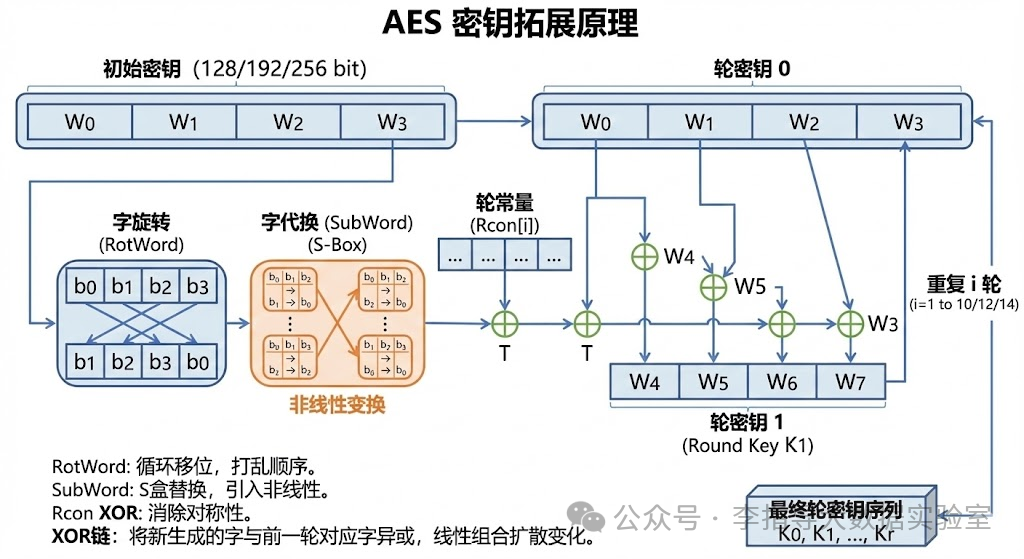
- 128-bit key: 10 rounds
- 192-bit key: 12 rounds
- 256-bit key: 14 rounds
- After padding is completed, the plaintext will be split into several 16-byte blocks, and each block will be encrypted in the same way. AES is a “multi-round iterative block cipher“, and the number of encryption rounds depends on the key length;
- The current matrix is XORed byte by byte with the corresponding “round key” of this round, injecting key information into the operations of each round.
- A linear transformation is performed on each column, mixing the 4 bytes in a column together to enhance diffusion.
- The second row is shifted left by 1 byte, the third row by 2 bytes, and the fourth row by 3 bytes, to scatter the data in each column.
- A fixed S-box (S-Box) is used to perform a table lookup substitution on each byte in the matrix, increasing non-linearity.
- Byte Substitution (SubBytes)
- Row Shifting (ShiftRows)
- Column Mixing (MixColumns)
- Round Key Addition (AddRoundKey)
Ciphertext Generation (Ciphertext Output)
- In ECB mode, blocks are simply concatenated in order;
- In CBC / CTR / GCM modes, blocks are linked together through IV, counters, or chaining structures to further enhance security.
- When each block has completed all rounds of encryption, we will obtain the corresponding ciphertext blocks.
- These blocks will be combined according to the selected mode of operation (such as ECB, CBC, CTR, GCM, etc.).
Finally, all ciphertext blocks are merged to form the complete ciphertext data. Without knowing the key and related parameters (such as IV, counters), an attacker can hardly infer any structural information about the original plaintext from the ciphertext.
3. The Decryption Process of AES
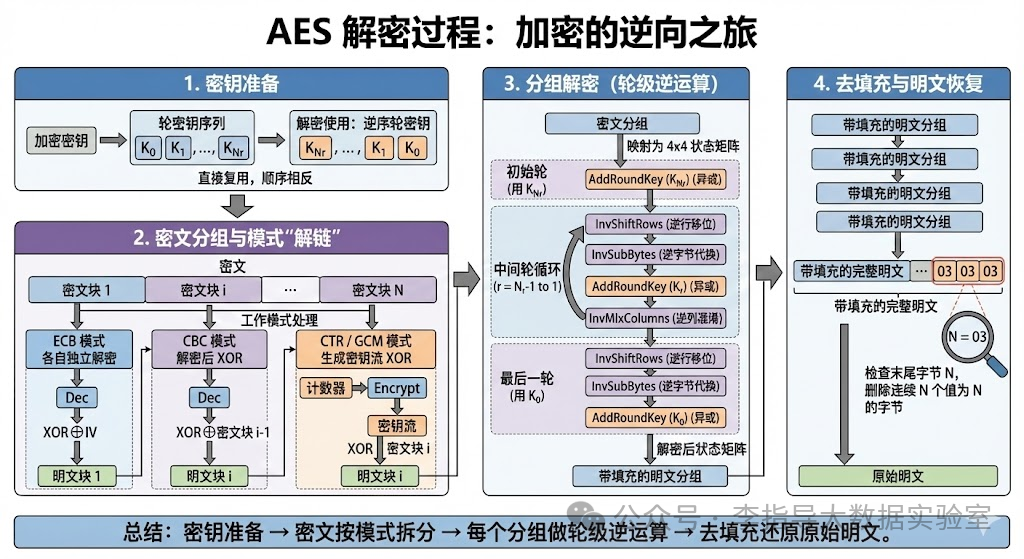
The decryption process is completely symmetric: using the same key, each round operation is restored in the opposite direction and order. From the perspective of ciphertext, it can be divided into the following 4 steps.
-
Key Preparation
The key used in the decryption phase is still the same key used during encryption, as well as all the round keys generated from it.
Some implementations may additionally transform the round keys to pre-generate “decryption round keys”, which is essentially equivalent to the above.
- Encryption: round keys from
<span>K0 → K1 → … → KNr</span> - Decryption: round keys from
<span>KNr → … → K1 → K0</span>
- AES supports 128 / 192 / 256-bit key lengths, corresponding to 10 / 12 / 14 rounds of decryption.
- During decryption, there is no need to redesign a key expansion algorithm,usually directly reusing the key expansion results from encryption, just using the round keys in reverse order:
Decrypting the ciphertext blocks and “unlinking” the mode
Like encryption, decryption also needs to process the ciphertext according to the mode of operation:
After this step,each block is restored to the state “before entering the AES round transformation”, and can proceed to the next step of block decryption.
-
In CBC mode, each ciphertext block after decryption must also XOR with the previous ciphertext block (or IV) to obtain the actual plaintext block:
Block 1:
<span>Plaintext1 = Dec(Cipher1) XOR IV</span>Block i:
<span>Plaintexti = Dec(Cipheri) XOR Cipher(i-1)</span> -
In CTR / GCM modes, the decryption process is structurally the same as encryption: using the same counter sequence to generate the key stream, XORing with the ciphertext to obtain the plaintext.
- In ECB mode, each 16-byte block can be decrypted individually without affecting each other.
-
Splitting the ciphertext into blocks
-
Restoring the true input of each block according to the mode of operation
Block Decryption (Round-level Inverse Operations)
For a specific 16-byte ciphertext block, the decryption process can be roughly divided into:
“
Initial round → Intermediate multiple rounds → Last round
Specifically (taking AES-128 as an example):
- Inverse Row Shifting (InvShiftRows)
- Inverse Byte Substitution (InvSubBytes)
- Round Key Addition (AddRoundKey using the initial round key
<span>K0</span>)
- Inverse Row Shifting: shifting each row back to its original position by moving in the opposite direction and steps compared to encryption.
- Inverse Byte Substitution: using the inverse S-Box to perform a reverse table lookup on each byte, restoring the effect of SubBytes.
- Round Key Addition: XORing the current state matrix with the corresponding round key
<span>Kr</span>. - Inverse Column Mixing: performing the inverse transformation of MixColumns on each column, restoring the linear mixing relationship of the 4 bytes in the column to the state before the previous round.
- XORing the current state with the last round key
<span>KNr</span>, corresponding to the last round’s AddRoundKey during encryption.
- Mapping the 16-byte ciphertext block into a 4×4 byte matrix, serving as the initial state for decryption.
-
Mapping to the state matrix
-
Initial round: AddRoundKey (using the last round key)
-
Intermediate rounds (Nr−1 rounds)
Iterating from
<span>r = Nr−1</span>down to<span>1</span>, executing the inverse operations in order: -
Last round
The structure of the last round is symmetric to the “first round” during encryption, just without InvMixColumns:
Removing padding and restoring the plaintext
After all blocks complete the round-level inverse decryption, they are concatenated in order to obtain the complete “padded plaintext”.
The last step is to remove padding according to the padding rules used during encryption (e.g., PKCS7):
- Check the value N of the last byte;
- Determine if there are N consecutive bytes at the end with the value of N;
- If so, remove these N bytes entirely, leaving the original plaintext.
Thus, a complete AES decryption process is concluded.
“
Key preparation → Splitting ciphertext by mode → Performing round-level inverse operations on each block → Removing padding to restore original plaintext.
4. Java Code Implementation of AES Encryption and Decryption
“
Below are several code snippets that can be directly used in projects:
- Basic version:
<span>AES/ECB/PKCS5Padding</span>+ Hex ciphertext (for easy alignment with your current implementation)- Improved version:
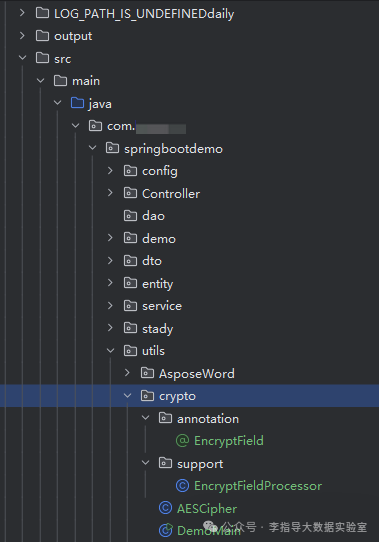
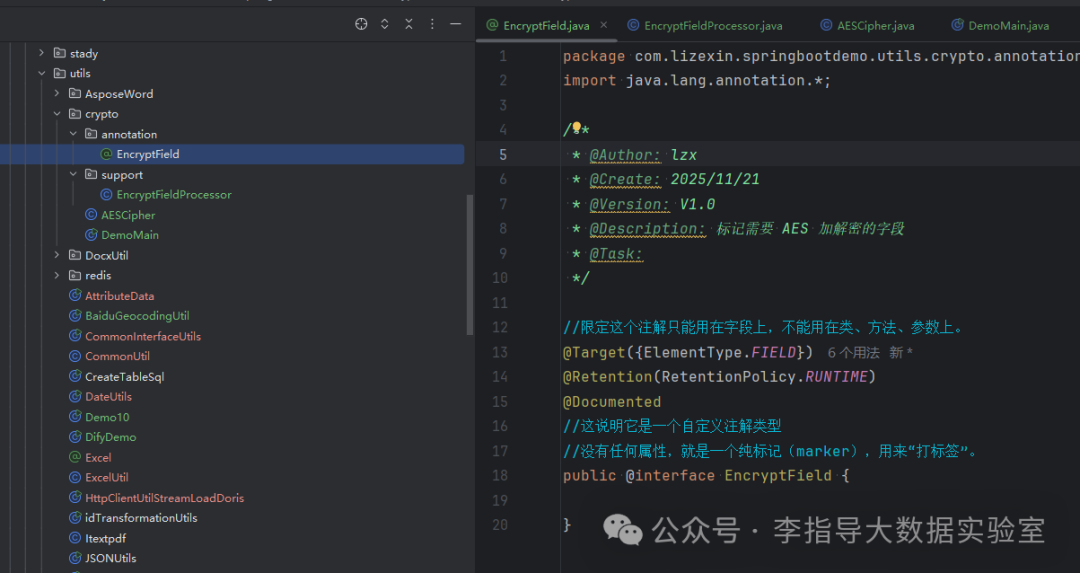
<span>AES/CBC/PKCS5Padding</span>+ Base64 ciphertext (closer to actual production usage)A crypto directory has been created under the utils package in the project directory below; subsequent operations will be performed here;
4.1 Dependency Preparation
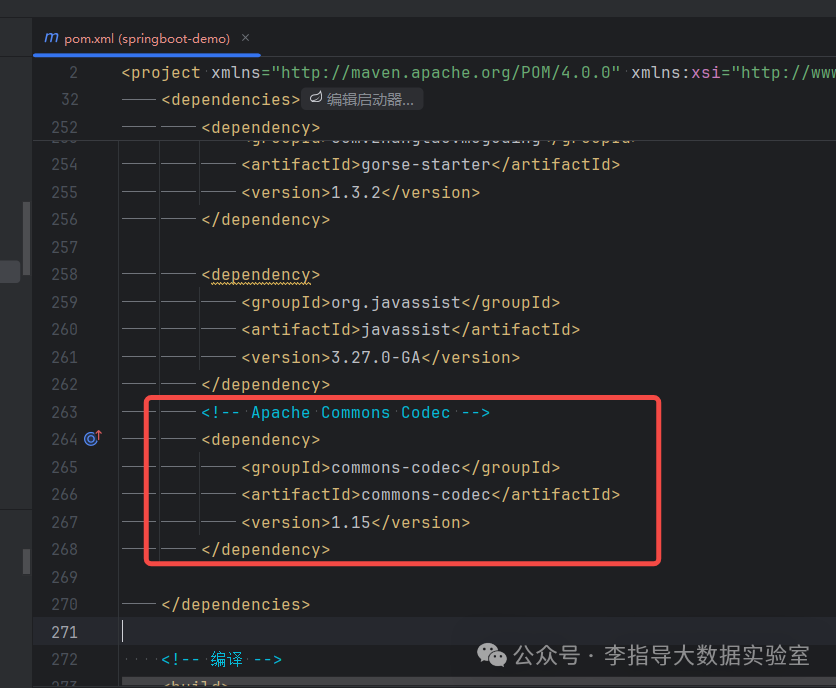
If you want to use the hexadecimal utility class, you can add Apache Commons in the pom file:
<dependency>
    <groupId>commons-codec</groupId>
    <artifactId>commons-codec</artifactId>
    <version>1.15</version>
</dependency>
4.2 Configuring the Key in the Configuration File
“
Directory: springboot-demo\src\main\resources\application-test.yml
The above is my own project configuration, adjust according to actual conditions;
moguding:
  aesSign: SYz945eCQB5EJvX5
4.3 Creating Configuration Class Mapping
“
Directory: com.springbootdemo.config
package com.springbootdemo.config;
import org.springframework.boot.context.properties.ConfigurationProperties;
import org.springframework.stereotype.Component;
/**
 * @Author: lzx
 * @Create: 2025/11/22
 * @Version: V1.0
 * @Description: Read the moguding.aesSign configuration from application-*.yml
 * @Task:
 */
@Component
@ConfigurationProperties(prefix = "moguding")
public class MogudingProperties {
/**
     * AES key, corresponding to moguding.aesSign in yml
     */
private String aesSign;

public String getAesSign() {
return aesSign;
}

public void setAesSign(String aesSign) {
this.aesSign = aesSign;
}
}
“
Note:
<span>@ConfigurationProperties(prefix = "moguding")</span>will automatically map the<span>moguding.*</span>configuration to the fields<span>aesSign</span>corresponds to<span>moguding.aesSign</span>
4.4 Creating AESCipher: The Core Utility Class for AES/ECB/PKCS5Padding Encryption and Decryption
package com.springbootdemo.utils.crypto;
import org.apache.commons.codec.binary.Hex;
import javax.crypto.Cipher;
import javax.crypto.spec.SecretKeySpec;
/**
 * @Author: lzx
 * @Create: 2025/11/21
 * @Version: V1.0
 * @Description: AES encryption and decryption utility class
 * Algorithm: AES/ECB/PKCS5Padding
 * Ciphertext: Hex string
 */
public class AESCipher {
/**
     * AES encryption
     *
     * @param input Plaintext string
     * @param key   Key (recommended length 16 bytes)
     * @return Hexadecimal ciphertext string, returns null if input is empty
     */
public static String encrypt(String input, String key) {
if (input == null || input.trim().isEmpty()) {
return null;
}
byte[] crypted = null;
try {
SecretKeySpec skey = new SecretKeySpec(key.getBytes(), "AES");
Cipher cipher = Cipher.getInstance("AES/ECB/PKCS5Padding");
cipher.init(Cipher.ENCRYPT_MODE, skey);
crypted = cipher.doFinal(input.getBytes());
} catch (Exception e) {
// In production, it is recommended to use logging
            e.printStackTrace();
}
return crypted == null ? null : new String(Hex.encodeHex(crypted));
}
/**
     * AES decryption
     *
     * @param input Hexadecimal ciphertext string
     * @param key   Key
     * @return Plaintext string, returns null if decryption fails
     */
public static String decrypt(String input, String key) {
if (input == null || input.trim().isEmpty()) {
return null;
}
byte[] output = null;
try {
SecretKeySpec skey = new SecretKeySpec(key.getBytes(), "AES");
Cipher cipher = Cipher.getInstance("AES/ECB/PKCS5Padding");
cipher.init(Cipher.DECRYPT_MODE, skey);
output = cipher.doFinal(Hex.decodeHex(input.toCharArray()));
} catch (Exception e) {
// In production, it is recommended to log input
            e.printStackTrace();
}
return output == null ? null : new String(output);
}
}
Completing the above steps already allows for encryption and decryption, but calling the underlying desensitization tool every time a field needs to be desensitized is not very suitable. We can create an EncryptFieldProcessor as an object-oriented automatic encryption and decryption framework;
“
<span>AESCipher</span>is the “underlying encryption and decryption tool”.<span>EncryptFieldProcessor</span>is the “object-oriented automatic encryption and decryption framework”. One is “I know what to encrypt”, the other is “I just mark what to encrypt, you help me do it”..
4.5 Creating EncryptFieldProcessor
AESCipher: Encapsulating the encryption algorithm
- Only cares about two things:
- Passing in a string + key → returns ciphertext string
- Passing in a ciphertext string + key → returns plaintext string
- Completely unconcerned with who is calling, what fields, what objects.
- You can think of it as: a “pure utility function” stored in a warehouse.
EncryptFieldProcessor: Performing “batch field processing” on objects
- It cares about:“Which fields in this object are marked with the @EncryptField tag, I will help you encrypt/decrypt them uniformly.”
- Internally, it will:
- Use reflection to get all fields
- Filter out those marked with
<span>@EncryptField</span> - For these fields, call the underlying
<span>AESCipher.encrypt/decrypt</span> - It does not care about “how AES is specifically implemented”, just “a unified processor based on annotations”.
<spanso between="" is="" like:
<span>AESCipher</span>: Underlying library, only cares about “how to encrypt”.<span>EncryptFieldProcessor</span>: Business framework, only cares about “who to encrypt, where to encrypt, how to process uniformly”.
“
Create directory: package com.springbootdemo.utils.crypto.support;
package com.springbootdemo.utils.crypto.support;
import com.springbootdemo.utils.crypto.AESCipher;
import com.springbootdemo.utils.crypto.annotation.EncryptField;
import java.lang.reflect.Field;
/**
 * @Author: lzx
 * @Create: 2025/11/21
 * @Version: V1.0
 * @Description: Field encryption and decryption processor based on @EncryptField annotation (pure Java version)
 * @Task:
 */
public class EncryptFieldProcessor {
/**
     * Encrypt all String fields marked with @EncryptField in the object
     *
     * @param target Object instance
     * @param key    AES key
     */
public static void encryptFields(Object target, String key) {
if (target == null) {
return;
}
Class clazz = target.getClass();
Field[] fields = clazz.getDeclaredFields();

for (Field field : fields) {
// Only process fields marked with @EncryptField
if (field.isAnnotationPresent(EncryptField.class)) {
boolean accessible = field.isAccessible();
field.setAccessible(true);
try {
Object value = field.get(target);
if (value instanceof String) {
String strVal = (String) value;
if (strVal != null && !strVal.trim().isEmpty()) {
String cipher = AESCipher.encrypt(strVal, key);
field.set(target, cipher);
}
}
} catch (IllegalAccessException e) {
throw new RuntimeException("Field encryption failed: " + field.getName(), e);
} finally {
field.setAccessible(accessible);
}
}
}
/**
     * Decrypt all String fields marked with @EncryptField in the object
     *
     * @param target Object instance
     * @param key    AES key
     */
public static void decryptFields(Object target, String key) {
if (target == null) {
return;
}
Class clazz = target.getClass();
Field[] fields = clazz.getDeclaredFields();

for (Field field : fields) {
if (field.isAnnotationPresent(EncryptField.class)) {
boolean accessible = field.isAccessible();
field.setAccessible(true);
try {
Object value = field.get(target);
if (value instanceof String) {
String strVal = (String) value;
if (strVal != null && !strVal.trim().isEmpty()) {
String plain = AESCipher.decrypt(strVal, key);
// If decryption fails, keep the original value, here we directly overwrite
if (plain != null) {
field.set(target, plain);
}
}
}
} catch (IllegalAccessException e) {
throw new RuntimeException("Field decryption failed: " + field.getName(), e);
} finally {
field.setAccessible(accessible);
}
}
}
}
4.6 Creating a Custom Annotation: EncryptField
“
Directory: package com.springbootdemo.utils.crypto.annotation;
package com.lizexin.springbootdemo.utils.crypto.annotation;
import java.lang.annotation.*;
/**
 * @Author: lzx
 * @Create: 2025/11/21
 * @Version: V1.0
 * @Description: Marks fields that need AES encryption and decryption
 * @Task:
 */
// Limit this annotation to be used only on fields, not on classes, methods, or parameters.
@Target({ElementType.FIELD})
@Retention(RetentionPolicy.RUNTIME)
@Documented
// This indicates that it is a custom annotation type
// It has no properties, just a pure marker (marker), used to "tag".
public @interface EncryptField {
}
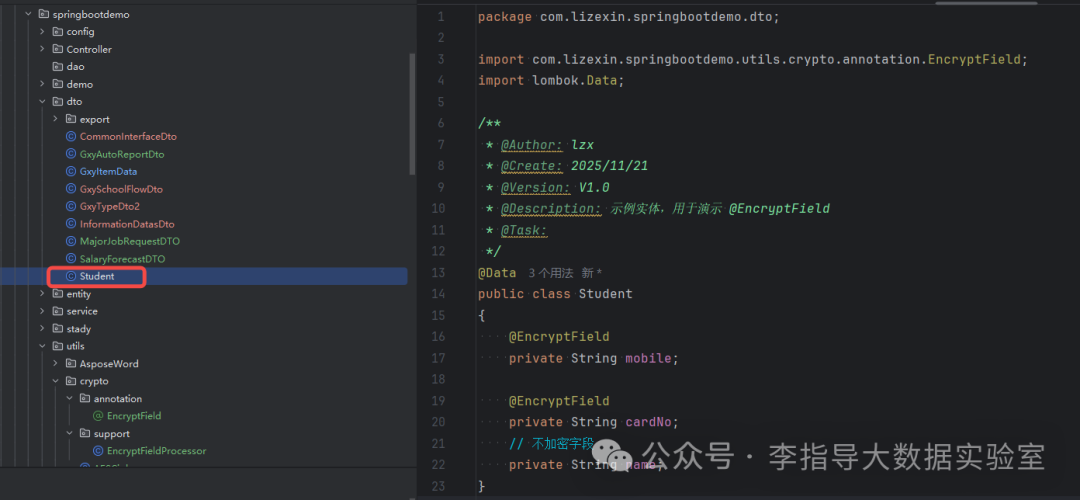
4.7 Setting Annotations for Fields That Need Desensitization in the Object
“
Directory: package com.springbootdemo.dto;
package com.lizexin.springbootdemo.dto;
import com.lizexin.springbootdemo.utils.crypto.annotation.EncryptField;
import lombok.Data;
/**
 * @Author: lzx
 * @Create: 2025/11/21
 * @Version: V1.0
 * @Description: Example entity for demonstrating @EncryptField
 * @Task:
 */
@Data
public class Student {
@EncryptField
private String mobile;

@EncryptField
private String cardNo;
// Non-encrypted field
private String name;
}
4.8 Testing Desensitization
“
Directory: package com.lizexin.springbootdemo.utils.crypto
<span>DemoMain</span>: The entry point for AES demonstration after the project starts.
- Read the key from
<span>moguding.aesSign</span>; - Demonstrate
<span>AESCipher</span>string encryption and decryption; - Demonstrate
<span>@EncryptField + EncryptFieldProcessor</span>automatic encryption and decryption of sensitive fields in entity objects; - Convenient for quickly verifying whether the AES configuration is effective locally, and also serves as a unified entry point for the example code in the article.
package com.lizexin.springbootdemo.utils.crypto;
import com.lizexin.springbootdemo.config.MogudingProperties;
import com.lizexin.springbootdemo.dto.Student;
import com.lizexin.springbootdemo.utils.crypto.support.EncryptFieldProcessor;
import org.springframework.boot.CommandLineRunner;
import org.springframework.stereotype.Component;
/**
 * DemoMain
 *
 * Description:
 *  1) This is a demo class (Demo) used to automatically run an AES encryption and decryption example after SpringBoot starts.
 *  2) Demonstrates two different usage methods:
 *      - Method 1: Directly call {@link AESCipher} tool class for string-level encryption and decryption;
 *      - Method 2: Use {@link EncryptFieldProcessor} + {@link com.lizexin.springbootdemo.utils.crypto.annotation.EncryptField}
 *                to perform "batch, automatic" encryption and decryption on fields marked in the object.
 *  3) The AES key is read from the configuration file (application-*.yml) under moguding.aesSign, rather than hardcoded in the code.
 *
 * Usage scenarios:
 *  - Mainly used for the "executable example" of this project and the accompanying code for the article;
 *  - In production, it is usually not printed directly to the console, but the same logic is embedded in the Service/persistence layer.
 *
 * Implementation method:
 *  - Implement the {@link CommandLineRunner} interface of SpringBoot;
 *  - Marked as {@link Component}, automatically injected and executed when the container starts, calling the {@link #run(String...)} method.
 */
@Component
public class DemoMain implements CommandLineRunner {
/**
     * Encapsulates the configuration in yml with the prefix "moguding",
     * where we only use moguding.aesSign as the AES key.
     */
private final MogudingProperties mogudingProperties;

public DemoMain(MogudingProperties mogudingProperties) {
this.mogudingProperties = mogudingProperties;
}
/**
     * This method will be automatically called after SpringBoot starts.
     * Here we string together complete examples of the two AES usage methods:
     *  1) Pure string encryption and decryption;
     *  2) Object field encryption and decryption based on annotations.
     */
@Override
public void run(String... args) throws Exception {
// =========================================================
// 0. Get the AES key from the configuration file
//    Corresponding to application-*.yml:
//    moguding:
//      aesSign: SYz945eCQB5EJvX5
//    Bound through the configuration class MogudingProperties,
//    achieving "key is centrally managed in configuration, not scattered in hardcoded in code".
// =========================================================
String aesKey = mogudingProperties.getAesSign();
// =========================================================
// 1. Method 1: Directly call AESCipher
//
//    Applicable scenarios:
//      - Only need to encrypt/decrypt a certain string once;
//      - Does not involve batch processing of object fields.
//
//    Steps:
//      1. Prepare the plaintext string;
//      2. Call AESCipher.encrypt(plaintext, key) to get the hexadecimal ciphertext;
//      3. Then call AESCipher.decrypt(ciphertext, key) to restore the plaintext;
//      4. Print the result to verify "decrypted == original plaintext".
// =========================================================
String plain  = "123456789012345678";          // 1) Original plaintext
String cipher = AESCipher.encrypt(plain, aesKey); // 2) Use the aesSign in yml for AES encryption
String back   = AESCipher.decrypt(cipher, aesKey); // 3) Use the same key for decryption

System.out.println("【Method 1: Directly call AESCipher】");
System.out.println("Plaintext:   " + plain);
System.out.println("Ciphertext:   " + cipher);
System.out.println("Decrypted: " + back);
System.out.println();
// =========================================================
// 2. Method 2: Based on @EncryptField annotation + reflection for object field encryption and decryption
//
//    Design purpose:
//      - Which fields in the object need to be encrypted are no longer hardcoded in business code,
//        but are "declaratively" marked with the @EncryptField annotation;
//      - The encryption and decryption logic is centrally placed in EncryptFieldProcessor for unified processing,
//        making it easier to maintain and extend.
//
//    In the current Student class (example):
//      - The mobile field is marked with @EncryptField, indicating it needs encryption and decryption;
//      - The cardNo field is marked with @EncryptField;
//      - The name field is not annotated, so it does not participate in encryption and decryption.
//
//    The following process:
//      1) Construct a Student object, fill in the "plaintext" for each field;
//      2) Call EncryptFieldProcessor.encryptFields(student, aesKey):
//             - Reflectively scan all fields;
//             - Find fields marked with @EncryptField;
//             - Call AESCipher.encrypt on the values of these fields and write the ciphertext back to the object;
//      3) Call EncryptFieldProcessor.decryptFields(student, aesKey):
//             - Similarly reflectively find fields with annotations;
//             - Call AESCipher.decrypt to restore the ciphertext back to plaintext and write it back.
//
//    The benefits of this implementation:
//      - The business layer only needs to add annotations to the fields and call the processor once at the appropriate lifecycle;
//      - When adding sensitive fields to the entity, just add another @EncryptField;
//      - The encryption and decryption algorithms and implementation details are encapsulated in a unified utility class.
// =========================================================
Student student = new Student();
student.setName("张三");
student.setMobile("13800138000");
student.setCardNo("123456789012345678");

System.out.println("【Method 2: Annotation + Reflection】");
System.out.println("Before encryption Student: " + student);
// 2.1 Perform "batch encryption" on fields marked with @EncryptField in the object:
//     After execution, student.mobile / student.cardNo will be replaced with AES ciphertext,
//     while the unannotated name field remains unchanged.
EncryptFieldProcessor.encryptFields(student, aesKey);
System.out.println("After encryption Student: " + student);
// 2.2 Then perform "batch decryption" on the same object:
//     The ciphertext on mobile / cardNo will be restored to plaintext,
//     making it convenient to view the original values in business display/debugging scenarios.
EncryptFieldProcessor.decryptFields(student, aesKey);
System.out.println("After decryption Student: " + student);
}
}
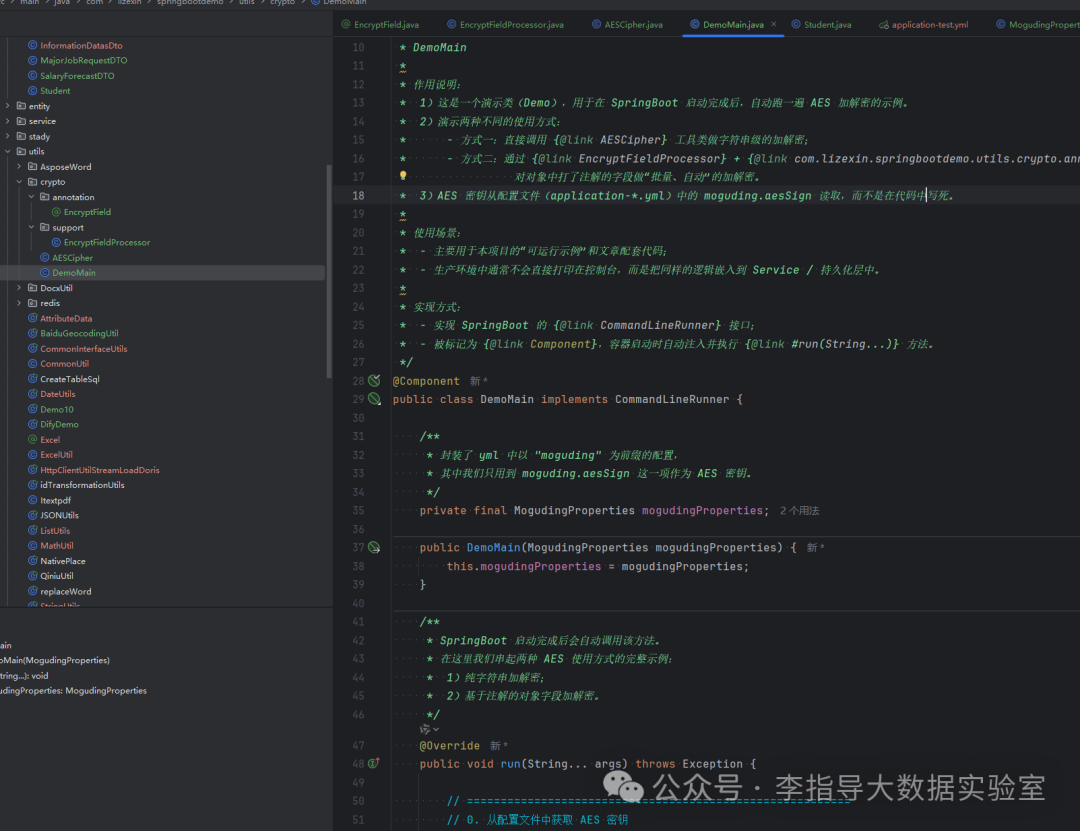
The output after running the project:
| 【Method 1: Direct Call】 | |
|---|---|
| Plaintext: | 123456789012345678 |
| Ciphertext: | 9d859a58a6645f51c46dbad9c0b97c8c0258f14d7a1a00ba4164ab7ee7f3cb76 |
| Decrypted: | 123456789012345678 |
| Before encryption Student: | Student(mobile=13800138000, cardNo=123456789012345678, name=张三) |
| After encryption Student: | Student(mobile=a67f3b94ce50e9c7abed7abe4fa82e0b, cardNo=9d859a58a6645f51c46dbad9c0b97c8c0258f14d7a1a00ba4164ab7ee7f3cb76, name=张三) |
| After decryption Student: | Student(mobile=13800138000, cardNo=123456789012345678, name=张三) |

5. Summary and Reflection
This article has walked through the complete loop of AES encryption and decryption from principles to code implementation:
-
Starting with the concept
- We clarified that AES is a symmetric block cipher algorithm with a fixed block size of 128 bits, supporting key lengths of 128/192/256. By distinguishing between symmetric/asymmetric encryption and block/stream encryption, we laid a unified cognitive foundation for the subsequent implementation.
-
Understanding the algorithm itself in conjunction with the encryption/decryption process
- In the “encryption process”, from key generation, plaintext padding, block encryption, ciphertext output, we broke down AES’s multiple rounds of transformation into: SubBytes, ShiftRows, MixColumns, AddRoundKey, and the role of key expansion.
- Then in the “decryption process”, we organized InvShiftRows, InvSubBytes, InvMixColumns, and the reverse use of round keys from a symmetric perspective, helping us view AES as a “reversible multi-round transformation system”, rather than just a few lines of Cipher API.
-
Implementing AES/ECB/PKCS5Padding in Java code
In the engineering practice section, we gradually built a runnable example starting from dependency preparation, configuring the key in yml, and mapping configuration classes:
- AESCipher encapsulates the underlying AES/ECB/PKCS5Padding into simple encrypt/decrypt calls, serving as a utility class at the algorithm level;
- EncryptFieldProcessor scans the @EncryptField annotation via reflection, performing batch encryption and decryption on marked fields in the object, serving as a unified processor at the object level;
- The custom annotation @EncryptField is responsible for declaring which data is sensitive from the “field dimension”, allowing business code to mark encryption and decryption rules with a single annotation;
- Finally, through DemoMain, we linked together the “directly calling the utility class” and “automatically encrypting and decrypting based on annotations” methods, forming a runnable demo that can directly verify whether the configuration is correct.
From “usable” to “user-friendly” small loop
The standalone <span>AESCipher</span> allows us to “use AES”; the configuration key + annotations + processors enable us to use AES in a more elegant and maintainable way in actual projects: the business layer only needs to declare which fields are sensitive, while the specific encryption and decryption details are centrally handled in the utility layer, achieving the design goal of “centralized logic, decentralized usage”.
Looking ahead to future directions: having mastered AES-ECB, we can continue to try introducing CBC/GCM and other more secure modes of operation, combined with random IV, key management services (KMS), log desensitization, and other practices, gradually evolving this demo into a truly reusable “data security infrastructure”. In this way, AES is no longer just a concept in books and a few lines of utility methods, but becomes a part of our daily big data development work.
6. More Documentation
For more documentation, please refer to CSDN homepage[1]