1. Introduction: When Linux devices encounter issues, do you feel “at a loss”?
When operations and maintenance personnel log into domestic Linux servers, they often find that SSH connections frequently fail, yet they do not know which command to use to check the login logs; small and medium-sized enterprises’ NAS devices running Ubuntu display a “abnormal traffic alert” in the background, but they cannot find a graphical tool similar to Windows Task Manager to investigate processes; in the government sector, domestic terminals suddenly fail to run core programs, and faced with a black screen terminal showing a “Permission denied” error, they can only repeatedly restart in an attempt to fix it—these scenarios are not fictional but represent the real dilemmas faced by an increasing number of IT professionals during the localization replacement process.
In the past, Windows systems became the “default system” familiar to most people due to their graphical interface and intuitive operations: when issues arose, opening Task Manager to kill processes and checking logs in Event Viewer became almost instinctive actions. Today, Linux systems have significantly optimized desktop displays and graphical tools, allowing users to easily manage processes and view system status through graphical interfaces in desktop environments like GNOME and KDE. However, in emergency response scenarios, Linux still retains the traditional advantages of command-line efficiency and flexibility: checking processes with ps, viewing login records with last, and blocking IPs requires configuring iptables. This characteristic of “coexistence of graphics and commands” leads those accustomed to Windows graphical operations to still fall into the dilemma of “not finding the breakthrough point” when facing Linux failures due to differences in thinking and operational modes.
More critically, the application scenarios of Linux systems are rapidly penetrating from “programmer development machines” to “critical business devices”. In the process of deploying domestic servers, the scale of applications in related fields continues to expand. For example, in government, finance, and energy sectors, according to the CCID Consulting’s “2024 China Domestic Server Market Research Report”, it is projected that over 900,000 domestic servers will be sold in 2024, with more than 90% of these devices based on the Linux kernel, such as mainstream operating systems like Kylin, Tongxin, and Euler. If these devices encounter intrusions, data tampering, or service outages, a lack of knowledge in Linux emergency response means that timely damage control cannot be executed, potentially affecting business continuity and even public services.
This article serves as the introduction to a series on Linux emergency response, starting with “Why You Must Learn Linux Emergency Response”. It will dissect the core differences between Linux and Windows emergency responses and outline general emergency response strategies, laying the groundwork for subsequent technical explanations—helping you transition from being “unfamiliar with Linux emergency response” to “understanding its core logic”, marking a crucial step in the operations and maintenance of domestic systems.
2. Why Learn Linux Emergency Response Now? Three “Unignorable” Realities
Many people believe that “Linux is far from them”, but data and trends tell us: Linux has become the “mainstream system” in critical fields, and understanding its emergency methods is an essential skill to cope with the wave of localization.
1. Localization Replacement: Linux Becomes a “Necessity System”, Covering All Industries
According to the CCID Consulting’s “2024 China Linux Server Operating System Market Research Report”, the market size of China’s Linux server operating system reached 15.66 billion yuan in 2023, a year-on-year increase of 19.6%. Additionally, IDC data shows that in the first quarter of 2024, the shipment of Linux servers in China accounted for over 60% of the overall server market. In critical industry applications, the adoption of Linux systems in government, finance, and industrial sectors continues to deepen:
Government Sector: Domestic operating systems are rapidly penetrating government information construction, with Linux kernel-based operating systems becoming mainstream choices;
Finance Sector: In the first half of 2024, the deployment ratio of Linux in state-owned banks’ core systems exceeded 70%;
Industrial Scenarios: In industrial internet platforms, Linux-based solutions account for over 65% of the underlying systems.
These data indicate that under the wave of digital transformation, Linux systems have become the core support for infrastructure construction across various industries.
Government Sector: Government platforms and data centers at all levels commonly use Kylin Linux servers. If such devices experience SSH brute force attacks (Linux remote login port 22 is a high-frequency attack target), it is necessary to quickly configure the fail2ban tool to automatically block attacking IPs—if one does not understand Linux commands, they can only rely on outsourcing, missing the best handling time (according to the CNCERT’s “2024 Mid-Year Cybersecurity Situation Report”, attackers implant malicious programs within an average of 15 minutes after a successful brute force attack);
Industrial Sector: Industrial control devices (such as production line controllers and smart sensors) are gradually being replaced by domestic systems based on Linux. If these devices experience production interruptions due to process crashes, it is necessary to use ps -ef | grep process_name to locate the faulty process and systemctl restart service_name to restart the service—if relying on graphical operations, it may be impossible to proceed due to the lack of interfaces on industrial devices, resulting in production losses;
Small and Medium Enterprises: Common devices such as NAS storage and web servers are increasingly adopting Linux distributions like Ubuntu and CentOS. If these devices experience 100% CPU usage due to mining programs, it is necessary to use top to find the mining process PID and then use kill -9 PID to terminate it—if one does not understand commands, they can only reinstall the system, leading to data loss.
These scenarios confirm a fact:Linux is no longer a “niche system” but a “foundation” supporting critical business operations. Without understanding its emergency methods, one cannot ensure stable operation of devices and may even bear the responsibility for business interruptions.
2. Linux Characteristics: Troubleshooting Relies More on “Professional Methods”, No Intuitive Interface to Depend On
The design logic of Linux centers on “efficiency and stability” rather than “usability”, which leads to a much higher difficulty in troubleshooting compared to Windows—there are no pop-up prompts indicating “where the error is”; one can only rely on the command line to “peel back the layers” to find the cause:
Logs are Stored Dispersedly: Windows logs are centralized in the “Event Viewer”, but Linux logs are dispersed by function in the /var/log directory (e.g., /var/log/secure stores login records, /var/log/messages stores system messages, with slight variations in paths across different systems). For example, in the case of a “web service crash”: Windows can directly see “IIS errors” in the “Application Log”, while Linux must first locate the log path (e.g., Apache logs are in /var/log/httpd/error.log), and then use grep “Error” /var/log/httpd/error.log to filter error messages; if one does not know the path, they cannot even find the cause of the failure.
Process Management Requires Commands: Windows can kill processes with a right-click in Task Manager, while Linux requires first obtaining the process ID (PID) using ps -aux | grep process_name, and then using kill -9 PID to force termination. According to statistics from domestic operating system vendors’ technical documents, about 60% of Linux novices encounter issues during emergencies due to “not finding the PID” or “using the wrong kill parameters”, leading to processes that cannot be terminated or even triggering process restarts.
This characteristic of “command line dependency” determines that Linux emergency response cannot be a “last-minute effort”—one must master basic commands and troubleshooting logic in advance to respond quickly when failures occur.
3. Security Risks: Surge in Linux Attack Incidents, Greater Concealment
Many people mistakenly believe that “Linux is safer than Windows”, but data shows that security threats to Linux devices are rapidly increasing. In the first half of 2024, mining attacks and ransomware attacks targeting Linux systems continued to grow, and the attacks are more concealed:
Mining Attacks: Attackers log into Linux servers through SSH brute force and implant mining programs (such as XMRig), setting up scheduled tasks through crontab (to automatically restart the mining process). If one does not check crontab -l (to view scheduled tasks), simply killing the process will not resolve the issue—according to statistics from domestic operating system security teams, about 70% of Linux mining attack cases involve novices who fail to clear scheduled tasks, leading to the mining program restarting repeatedly.
Vulnerability Exploitation Attacks: Vulnerabilities like Log4j (CVE-2021-44228) and SpringShell (CVE-2022-22965) account for over 60% of exploitation on Linux systems. After attackers exploit vulnerabilities to implant backdoors, they modify /etc/passwd to add hidden users—if one does not know how to use cat /etc/passwd | grep -v “x:0:” to check for abnormal users, long-term security risks will remain.
Dealing with these attacks relies on Linux-specific emergency methods—without understanding these methods, even if one detects device anomalies, they cannot completely eliminate the threats.
3. Core Differences Between Linux and Windows Emergency Responses: From “Operational Habits” to “Thinking Logic”
Learning Linux emergency response requires breaking the “thinking patterns” of Windows. The differences between the two are not just about “graphics” versus “command line” but also about the underlying logic:
1. Operational Methods: From “Clicking the Mouse” to “Entering Commands”
This is the most intuitive difference and the core barrier to entry. Below is a comparison of high-frequency emergency operations:
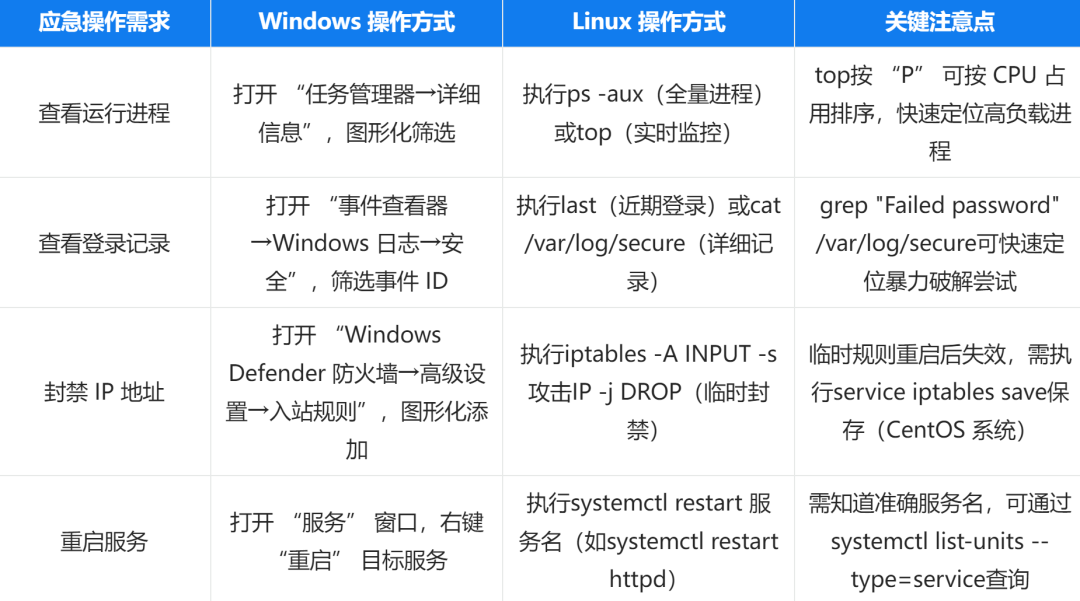
2. Logging System: From “Centralized Classification” to “Dispersed Archiving”
Windows manages all logs by “application, security, and system”, while Linux stores logs dispersed by “functional scenarios” in the /var/log directory, with each file corresponding to a type of log (data source: Linux System Administrator’s Manual):
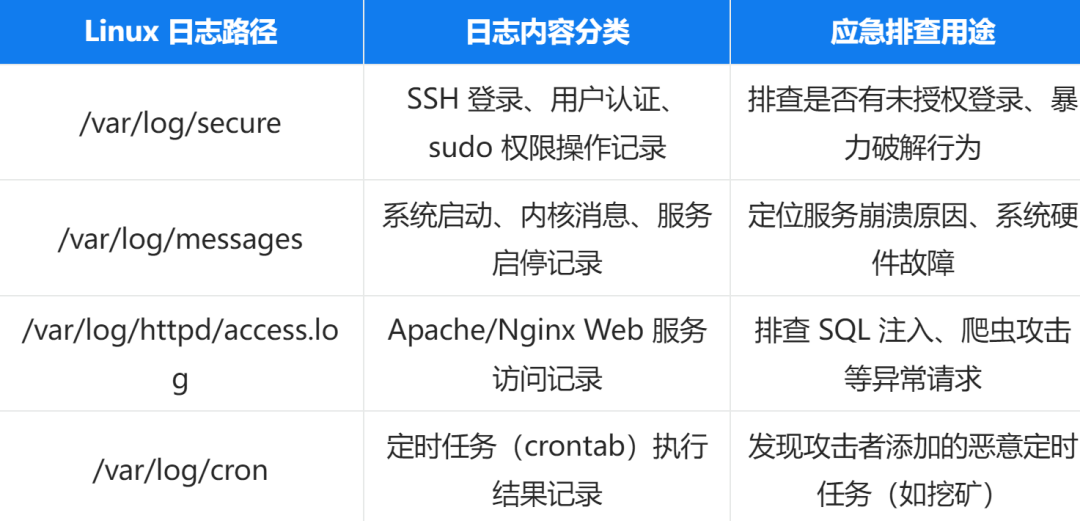
For example: To investigate “Linux server being remotely logged into”, one must first check /var/log/secure, rather than directly opening the Event Viewer as in Windows—if one does not know this path, even if logs exist, they cannot obtain key clues.
3. Permission Management: From “Administrator All-Powerful” to “Refined Control”
Windows’ “administrator account” has almost all operational permissions, while Linux follows the POSIX permission standard, dividing permissions into “owner, group user, and other users”. Even the root (super administrator) must adhere to permission rules:
File Permission Example: -rwxr–r– indicates “owner can read, write, and execute (rwx), group user can only read (r–), other users can only read (r–)”. If an ordinary user attempts to view /var/log/secure during an emergency, they will receive a “Permission denied” message and must use sudo cat /var/log/secure to temporarily elevate privileges (and must know the sudo password).
User Permission Differences: Windows’ “ordinary users” can open most system logs, while Linux’s ordinary users cannot access sensitive resources like /var/log/secure and /etc/shadow (password file)—this design enhances security but also poses challenges for emergencies: if one forgets the root password, they may not even be able to view core logs.
Conclusion: Linux Emergency Response is Not a “Technical Barrier”, but a “Necessary Skill”
Many people’s fear of Linux emergency response stems from “unfamiliarity with the command line”—but in reality, the commands needed for emergency response are not many; the core is “knowing when to use which command”: check logins with /var/log/secure, kill processes with ps + kill, block IPs with iptables. These commands are like “tools in a first aid kit”; remembering their uses is more important than memorizing syntax.
This article serves as the series introduction, focusing on “establishing awareness”: helping you understand “why learn Linux emergency response”, “how it differs from Windows”, and “what the general process is”. The next article, “Analysis of Linux System Architecture and Core Components”, will delve into the underlying logic of Linux—explaining the core principles of the Linux kernel, file systems, and service management, which are the foundation for “understanding Linux emergency response”: only by knowing the design logic of the /var/log directory can one quickly locate logs; only by understanding systemd service management can one efficiently restart or troubleshoot service failures.
Learning Linux emergency response is like learning to ride a bicycle—initially, it seems difficult, but once you master the balance (core logic) and practice (hands-on operation), you will quickly get the hang of it. Subsequent articles in this series will take the form of “commands + scenarios”, guiding you from “being able to use basic commands” to “being able to independently handle failures”, gradually building your Linux emergency response capabilities to prepare for the wave of localization.