In the collaborative design between the file system and the kernel, mmap is a core mechanism that combines elegance and complexity. It is far more than just “mapping files to memory”; it involves the intricate cooperation of virtual memory, file systems, page cache, and even hardware MMU.
Today, we will penetrate the abstraction, delve into its implementation mechanisms, and discuss its correct application in engineering.
1. Re-examining: mmap is not just about “avoiding one copy”
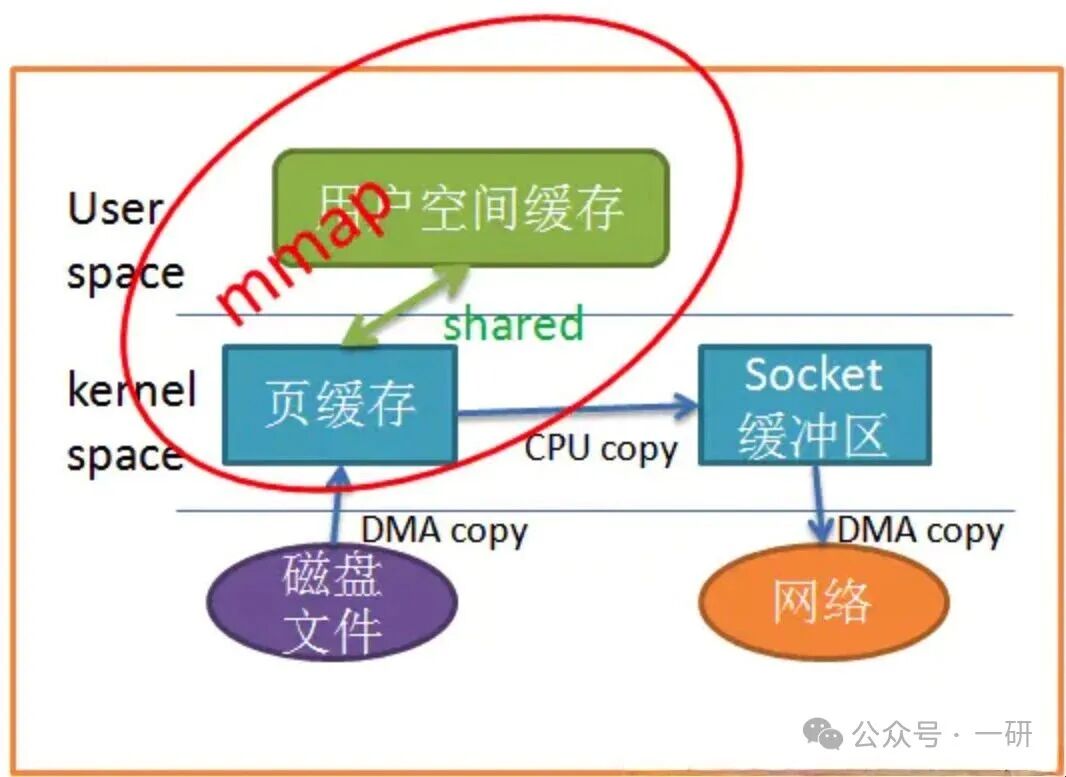
The common view is that the advantage of mmap lies in reducing one data copy from kernel mode to user mode compared to read/write. This statement is correct but overly simplified, failing to touch on the full source of performance advantages.
The true performance advantages come from the following three aspects:
1. Reduction in copy operations: As mentioned, it eliminates the copy from the kernel buffer to the user buffer.
2. Elimination of system calls and context switches:
read/write: Each call involves a switch from user mode to kernel mode. For a large number of small I/O operations, this overhead significantly impacts performance.
mmap: It only involves the kernel when establishing the mapping and first access (triggering a page fault). Subsequent accesses are purely CPU memory operations, with no system call overhead. This is crucial for random access patterns.
3. CPU cache friendliness: By accessing the mapped area through pointers, the data naturally resides in the CPU cache. In contrast, data obtained via read must first be copied to the user buffer, which may not be in the cache, leading to more cache misses.
2. Core Mechanism: The Journey from Virtual Address to Disk Block
Let’s take an mmap read operation char c = ptr[4096] as an example to dissect the complete processing flow between the kernel and the file system.
Step 1: Establishing the mapping (mmap system call)
When calling mmap, the kernel’s main task is:
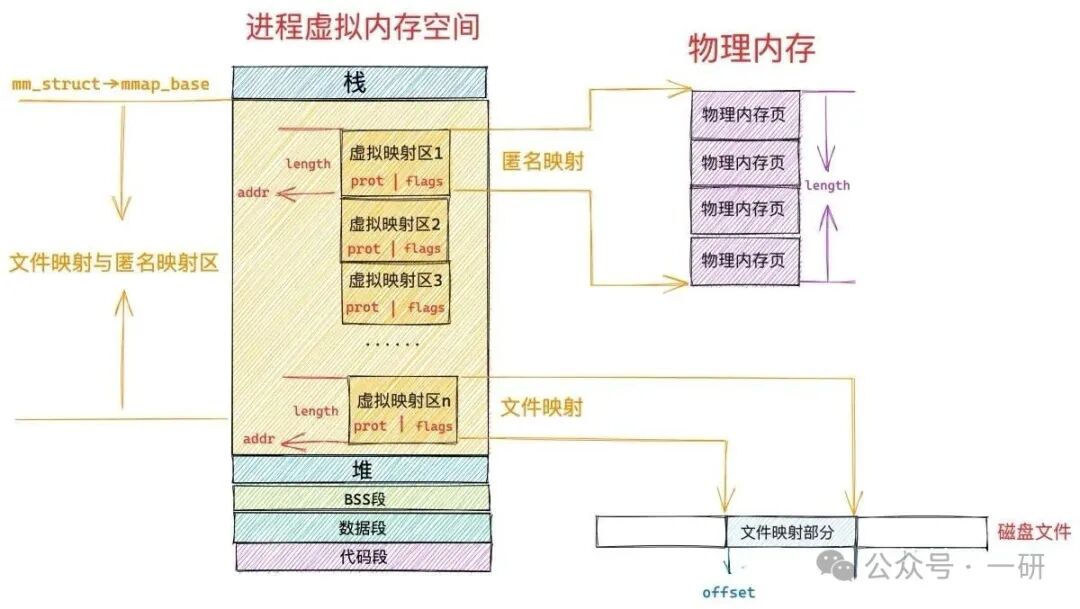
To create a new VMA in the process’s virtual memory area set (vm_area_struct linked list).
To point this VMA’s vm_file to the opened file object and set vm_pgoff to the file offset.
At this point, no physical memory is allocated, nor is any file data read.
Step 2: First access and page fault
The CPU executes the load instruction ptr[4096]:
1. The MMU finds that the virtual address ptr+4096 does not exist in the page table (Invalid), triggering a page fault.
2. The CPU transitions from user mode to kernel mode, executing the page fault handler.
Step 3: The Key Role of the File System – .fault() Operation
The kernel’s page fault handler discovers that the address belongs to a file-mapped VMA, thus calling the file operation set associated with this VMA – specifically, the .fault method in vm_operations_struct.
For most disk file systems (like ext4, XFS), this .fault method ultimately points to the filemap_fault function. This is the core link connecting virtual memory and file systems!
Step 4: Page Cache Lookup and Allocation
filemap_fault begins its work:
1. Calculate the file page index: Based on the file offset (e.g., 4KB), calculate the page number in the file.
2. Search the page cache: Look for the page number in the Radix Tree (or XArray).
Cache hit: If the page is already in the cache (page->mapping is not null) and the state is correct, directly retrieve the page and jump to step 6.
Cache miss: This is a more complex and critical situation.
Step 5: Cache Miss – File System I/O Request
If the page is not in the cache, filemap_fault needs to “request the page”:
1. Allocate a clean physical memory page.
2. Initialize a struct bio request, specifying the target device, block location, etc.
3. Submit the bio request to the block device layer, ultimately executed by the device driver for synchronous or asynchronous disk reading.
4. The process may sleep here, waiting for the I/O to complete.
5. After I/O completion, insert the newly read data page into the page cache Radix Tree.
Step 6: Establishing Page Table Mapping
Regardless of whether the page comes from the cache or is newly read, the final step is the same: the kernel modifies the process’s page table, mapping this physical page frame to the virtual address that triggered the page fault.
Step 7: Returning to User Mode
With the page fault handling complete, the process returns from kernel mode and re-executes the instruction that triggered the exception. This time, the MMU can successfully translate the virtual address to a physical address and complete the memory read.
3. Writing and Backing: Profound Differences Between Shared and Private Mappings
The write behavior of mmap is determined by the flags parameter, and its differences have significant impacts on data consistency and performance.
MAP_SHARED (Shared Mapping)
•Behavior: Modifications to the mapped area directly affect the pages in the page cache.
•Kernel Mechanism: When the process executes a write instruction, the CPU marks the corresponding page table entry as “dirty”. The kernel’s pdflush (page writeback) thread periodically scans these dirty pages and calls the file system’s writepage operation to write the dirty data back to the disk file.
•Consistency: Other processes mapping the same file immediately see these modifications, as they share the same page cache.
•Use Cases: Inter-process communication (IPC), persistent storage.
MAP_PRIVATE (Private Mapping)
•Behavior: Initially, it behaves like a shared mapping, mapping to the page cache. However, the first attempt to write triggers copy-on-write.
•Kernel Mechanism: On the first write, a protection page fault is triggered. The kernel allocates a new physical page for the writing process, copies the data from the original page cache to the new page, and then modifies the process’s page table to point to this new, private copy page. Subsequent writes only affect this private copy.
•Consistency: Modifications are not visible to the original file and other mappers.
•Use Cases: Loading dynamic libraries (.so), processes after fork() (the entire address space is COW).
4. Expert Traps and Performance Considerations
1. TLB Shootdown is a significant overhead
When the mapping range is large (e.g., 1GB), calling munmap or mremap requires the kernel to invalidate old TLB (Translation Lookaside Buffer) entries on all CPU cores, a process known as TLB shootdown.
This is a cross-core interrupt, with extremely high synchronization costs, potentially causing noticeable pauses in the process and the entire system.
For scenarios with frequent mapping/unmapping, this can be devastating.
2. Degradation under memory pressure
When the system is memory constrained, the kernel needs to reclaim page cache pages.
If the reclaimed pages are dirty pages mapped by mmap, synchronous I/O must first be performed to write them back to disk, which can directly block the process triggering the page fault.
In the worst case, this can lead to I/O thrashing, causing a performance avalanche.
3. I/O Error Handling – The Nightmare of SIGBUS
If mmap maps a file, but during access the file is truncated or a media error occurs in the underlying storage, the process will receive a SIGBUS signal when accessing the “invalid” area.
This is much harder to handle and predict than read returning -1 and setting errno.
4. Not all file systems are “equal”
For certain network file systems (like NFS) or pseudo file systems (like procfs), the implementation of their .fault operation may differ from local disk file systems, leading to subtle differences in performance and semantics, requiring consultation of specific file system documentation.
5. Engineering Best Practices: When and How to Use?
Golden Use Cases:
•Large, long-lived read-only or read-mostly files: Such as game assets, read-only data files of databases.
•Large files requiring fine, complex random access: Such as in-memory databases, persistence of large arrays.
•Large-scale data sharing between processes: MAP_SHARED | MAP_ANONYMOUS.
Scenarios to Avoid:
•Frequent mapping/unmapping of small files: The cost of TLB shootdown far exceeds the I/O benefits.
•Streaming, sequential I/O: Using read/write with large buffers (or splice) is usually simpler and more efficient.
•Memory overcommit-sensitive environments: mmap commits a large amount of virtual address space, potentially exacerbating the risk of OOM Killer.
•Applications with very high requirements for tail latency: Page fault interrupts and potential synchronous I/O can introduce unpredictable latencies.
Advanced Techniques:
•Use madvise(MADV_SEQUENTIAL) to inform the kernel that your access pattern is sequential, allowing the kernel to prefetch more data and immediately release cached pages after access.
•Use mlock to lock critical pages, preventing them from being swapped out, but use with caution, as misuse can undermine the overall memory management capabilities of the system.
6. Conclusion
mmap is one of the most powerful I/O primitives provided by Linux to developers. It achieves extremely high performance ceilings by deeply integrating file systems, virtual memory, and hardware MMU.
However, as we have seen, its internal mechanisms are exceptionally complex, and performance characteristics are highly dependent on access patterns, working set sizes, and system loads.
As a rigorous engineer, understanding its underlying hardcore principles is not for show, but to make the right technical choices in the correct scenarios and to have the capability to conduct deep tracing when performance issues arise.
I hope this article helps everyone not only to “use” mmap but also to “understand it” and “master it”.

Any support, whether through likes or views, is a great encouragement. Let’s grow together.