This article mentions the <span>trap</span> command in the Linux Shell script debugging advanced (trap bashdb). Here we will further introduce the <span>trap</span> command.
<span>trap</span> is a powerful command in the shell used to capture and handle <span>signals</span>. It allows you to respond to system signals during script execution, achieving <span>graceful exits</span>, <span>resource cleanup</span>, and <span>debugging</span> functionalities. Its functionality is equivalent to the <span>signal()</span> or <span>sigaction()</span> calls in the <span>C</span> language.
The trap[1] command is a built-in command in the Shell, so you can use the following command to get help.
bash-5.3$ help trap
trap: trap [-Plp] [[action] signal_specifier ...]
    Set traps for signals and other events.
    Define and activate handlers to be executed when the shell receives signals or meets other conditions.

    Other content omitted......
<span>Non-Bash environment:</span>
bash -c "help trap"
<span>Syntax:</span>
trap [-lpP] [action] [sigspec ...]
Each <span><sigspec></span> can be a signal name or signal number from <span><signal.h></span>. Signal names are case-sensitive, and the <span>SIG</span> prefix is optional.
<span>View signal numbers and signal names:</span>
bash-5.3$ trap -l
 1) SIGHUP       2) SIGINT       3) SIGQUIT      4) SIGILL       5) SIGTRAP
 2) SIGABRT      7) SIGBUS       8) SIGFPE       9) SIGKILL     10) SIGUSR1
1)  SIGSEGV     12) SIGUSR2     13) SIGPIPE     14) SIGALRM     15) SIGTERM
2)  SIGSTKFLT   17) SIGCHLD     18) SIGCONT     19) SIGSTOP     20) SIGTSTP
3)  SIGTTIN     22) SIGTTOU     23) SIGURG      24) SIGXCPU     25) SIGXFSZ
4)  SIGVTALRM   27) SIGPROF     28) SIGWINCH    29) SIGIO       30) SIGPWR
5)  SIGSYS      34) SIGRTMIN    35) SIGRTMIN+1  36) SIGRTMIN+2  37) SIGRTMIN+3
6)  SIGRTMIN+4  39) SIGRTMIN+5  40) SIGRTMIN+6  41) SIGRTMIN+7  42) SIGRTMIN+8
7)  SIGRTMIN+9  44) SIGRTMIN+10 45) SIGRTMIN+11 46) SIGRTMIN+12 47) SIGRTMIN+13
8)  SIGRTMIN+14 49) SIGRTMIN+15 50) SIGRTMAX-14 51) SIGRTMAX-13 52) SIGRTMAX-12
9)  SIGRTMAX-11 54) SIGRTMAX-10 55) SIGRTMAX-9  56) SIGRTMAX-8  57) SIGRTMAX-7
10) SIGRTMAX-6  59) SIGRTMAX-5  60) SIGRTMAX-4  61) SIGRTMAX-3  62) SIGRTMAX-2
11) SIGRTMAX-1  64) SIGRTMAX

# kill -l can also list the signal list
bash-5.3$ kill -l
Generally, the commonly used signals are as follows.
| Signal | Description |
|---|---|
| 0) EXIT | Triggered when the script exits |
| 1) SIGHUP | Terminal hangup or control process termination |
| 2) SIGINT | Interrupt signal (Ctrl+C) |
| 3) SIGQUIT | Quit signal (Ctrl+) |
| 9) SIGKILL | Force termination (non-catchable) |
| 15) SIGTERM | Termination signal |
| EXIT | Executed on exit |
| DEBUG | Triggered before each command execution |
| RETURN | Triggered when a function returns |
| ERR | Triggered when a command returns a non-zero status |
<span>EXIT</span>,<span>DEBUG</span>,<span>RETURN</span>,<span>ERR</span> are not displayed in <span>trap -l</span> because they are not real <span>signals</span>, but rather Bash pseudo-signals.
1. Signal Interaction Demonstration
First, let’s run the following script to experience and understand the signal interaction process.
#!/usr/bin/env bash
# signal.sh
#
# Function: Signal interaction, understanding the signal interaction process.
#

# Signal counter
declare -A SIGNAL_COUNTS=()

# General signal handling function
signal_handler() {
    local signal_name=$1
    local signal_num=$2

    # Increase counter
    SIGNAL_COUNTS[$signal_name]=$(( ${SIGNAL_COUNTS[$signal_name]:-0} + 1 ))

    echo "Received signal: $signal_name ($signal_num)"
    echo "This signal has been received ${SIGNAL_COUNTS[$signal_name]} times"
    echo "All signal statistics:"

    for sig in "${!SIGNAL_COUNTS[@]}"; do
        echo "  $sig: ${SIGNAL_COUNTS[$sig]} times"
    done
    echo "---"
}

# Register multiple signals
trap 'signal_handler SIGINT 2' SIGINT
trap 'signal_handler SIGTERM 15' SIGTERM
trap 'signal_handler SIGHUP 1' SIGHUP
trap 'signal_handler SIGUSR1 10' SIGUSR1
trap 'signal_handler SIGUSR2 12' SIGUSR2

echo "Signal interaction script started (PID: $$)"
echo "Available test commands:"
echo "  Ctrl+C          -  Send SIGINT"
echo "  kill -15 $$     -  Send SIGTERM"
echo "  kill -10 $$     -  Send SIGUSR1"
echo "  kill -12 $$     -  Send SIGUSR2"
echo "  kill -1  $$     -  Send SIGHUP"
echo ""
echo "Type 'exit' to quit"

while true; do
    read -p "> " command
    case "$command" in
        exit|quit)
            echo "Exiting interaction"
            break
            ;;
        stats)
            echo "Current signal statistics:"
            for sig in "${!SIGNAL_COUNTS[@]}"; do
                echo "  $sig: ${SIGNAL_COUNTS[$sig]} times"
            done
            ;;
        *)
            echo "Unknown command"
            ;;
    esac
done
First, open a terminal to run the program:
$ bash signal.sh
Signal monitoring script started (PID: 25783)
Available test commands:
  Ctrl+C          -  Send SIGINT
  kill -15 25783     -  Send SIGTERM
  kill -10 25783     -  Send SIGUSR1
  kill -12 25783     -  Send SIGUSR2
  kill -1  25783     -  Send SIGHUP

Type 'exit' to quit
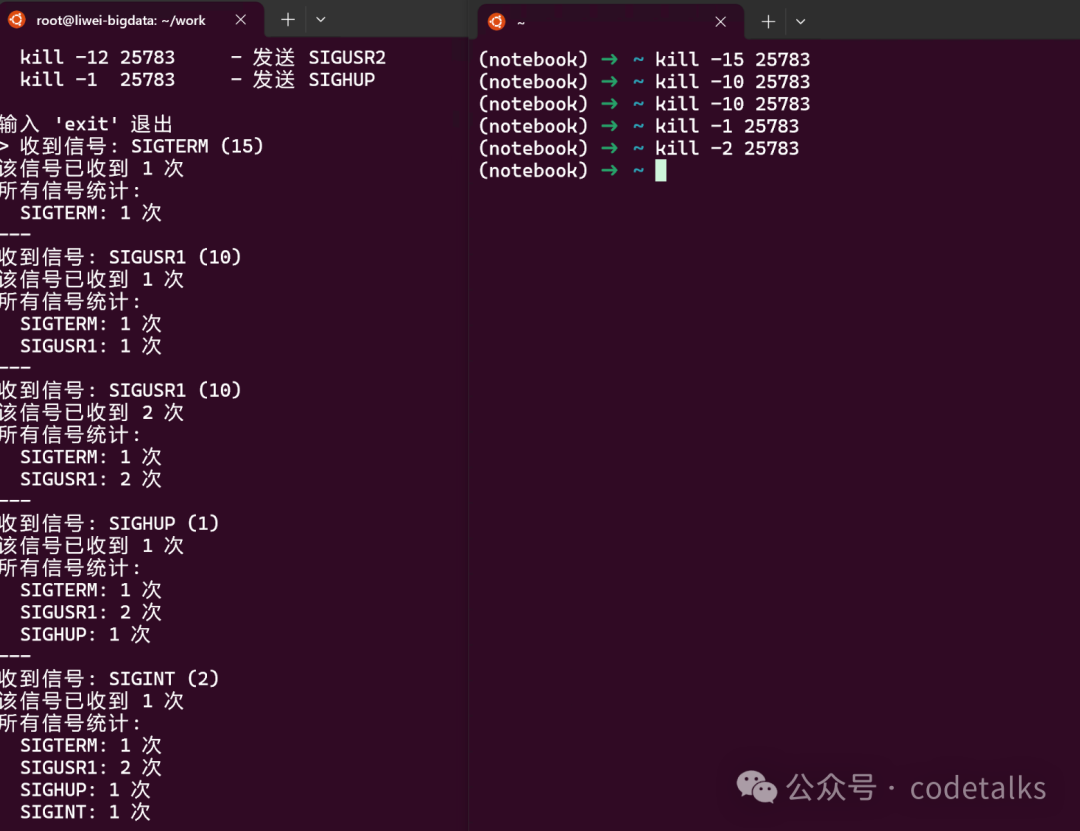
Then open another terminal and run the <span>test commands</span> as prompted:
kill -15 25783
kill -10 25783
kill -10 25783
kill -1 25783
kill -2 25783
The entire interaction process and output are shown in the figure:
<span>Note:</span>
<span>Ctrl+C</span>: Why does it only count and not exit here? Because the<span>SIGINT</span>signal’s default behavior is to terminate the process, and the<span>default behavior</span>is overridden by our registered signal handler.
2. EXIT DEBUG RETURN ERR Signals
- If the signal specification is
<span>EXIT</span>, then the<span>action</span>is executed when the shell exits. - If the signal specification is
<span>DEBUG</span>, then the<span>action</span>is executed before each simple command. - If the
<span>signal</span>is specified as DEBUG[2], it will execute before each simple command,<span>for</span>command,<span>case</span>command,<span>select</span>command,<span>((</span><span> arithmetic command, </span><code><span>[[</span>conditional command, arithmetic<span>for</span>command execution, and before the<span>first command</span>in shell functions, the corresponding action will be executed. - If the signal specification is
<span>RETURN</span>, then the<span>action</span>is executed each time a<span>shell function</span>or a script run by the<span>.</span>or<span>source</span>built-in command completes execution. - If the signal specification is
<span>ERR</span>, then the<span>action</span>is executed when a command fails and causes the shell to exit (when the -e option is enabled). - The author tested that it also triggers without specifying
<span>-e</span>.
#!/usr/bin/env bash
# trap_debug.sh

# Exit signal
trap 'echo "Signal(EXIT): Exiting at line $LINENO, status: $?"' EXIT
# Error signal
trap 'echo "Signal(ERR): Error occurred at line $LINENO" >&2' ERR

# Function-level debugging
debug_trap() {
    trap 'echo "Function $FUNCNAME (line number: $LINENO) is about to execute: ${BASH_COMMAND}, parameters: $@"' DEBUG
    local input=$1
    echo "-----> Processing input: $input"

    # Remove DEBUG trap
    trap - DEBUG
}

echo "Main program starts (PID): $$"

# List a non-existent file
ls -l /tmp/no_file_xxx.txt

debug_trap "hello"

for i in {1..5}; do
    echo "-----> Working... $(date '+%H:%M:%S')"
    sleep 3
done

echo "Main program ends"
<span>Running result:</span>
bash-5.3$ bash trap_debug.sh
Main program starts (PID): 71438
ls: /tmp/no_file_xxx.txt: No such file or directory
Signal(ERR): Error occurred at line 22
Function debug_trap (line number: 12) is about to execute: local input=$1, parameters: hello
-----> Processing input: hello
Function debug_trap (line number: 16) is about to execute: trap - DEBUG, parameters: hello
-----> Working... 16:55:10
-----> Working... 16:55:13
-----> Working... 16:55:16
-----> Working... 16:55:19
-----> Working... 16:55:22
Main program ends
Signal(EXIT): Exiting at line 1, status: 0
<span>Specifying -e:</span>
bash-5.3$ bash -e trap_debug.sh
Main program starts (PID): 72288
ls: /tmp/no_file_xxx.txt: No such file or directory
Signal(ERR): Error occurred at line 22
Signal(EXIT): Exiting at line 1, status: 1
<span>RETURN</span> signal needs to be discussed separately, mainly because its actual execution results contradict the author’s initial understanding. Here are the author’s test results.
- Each function’s
<span>RETURN</span>trap is independent and can only be set inside the function.
# return.sh

function_01() {
    trap 'echo "trap01--> Function $FUNCNAME (line number: $LINENO) has completed, returning..."' RETURN
    echo "Function 01 starts executing"
    echo "Function 01 is performing some operations..."
}

function_02() {
    trap 'echo "trap02--> Function $FUNCNAME (line number: $LINENO) has completed, returning..."' RETURN
    echo "Function 02 starts executing"
    echo "Function 02 is performing some operations..."
}

echo "Before calling function 01"
function_01
echo "After calling function 01"
echo "----------"
echo "Before calling function 02"
function_02
echo "After calling function 02"
<span>Running script:</span>
# Execute directly through bash
bash-5.3$ bash return.sh
Before calling function 01
Function 01 starts executing
Function 01 is performing some operations...
trap01--> Function function_01 (line number: 3) has completed, returning...
After calling function 01
----------
Before calling function 02
Function 02 starts executing
Function 02 is performing some operations...
trap02--> Function function_02 (line number: 9) has completed, returning...
After calling function 02
<span>If you comment out the </span><code><span>trap</span> command in <span>function_02</span>, then <span>function_02</span> will not respond to the <span>RETURN</span> signal.
So what effect does setting a global <span>RETURN trap</span> have?
# return.sh
# Setting RETURN trap outside the function is ineffective
trap "echo 'This will not execute'" RETURN
my_function() {

    echo "Inside the function"
    return 0
}

my_function
<span>Running script:</span>
bash-5.3$ bash return.sh
Inside the function
This indicates that the global <span>RETURN trap</span> does not affect the return of the function.
- When executing the script using the source command, it will be affected by the
<span>RETURN trap</span>set inside the function.
First, look at the effect of executing the following script using <span>source</span>.
# return.sh
# Setting RETURN trap outside the function is ineffective
trap "echo 'This will not execute'" RETURN
my_function() {

    echo "Inside the function"
    return 0
}

my_function
<span>Running script:</span>
bash-5.3$ source return.sh
Inside the function
This will not execute
This time, the global <span>RETURN trap</span> is effective because it was executed using the source command, while the function did not.
Modify the code to add a <span>RETURN trap</span> in <span>my_function</span>:
# return.sh
# Setting RETURN trap outside the function is ineffective
trap "echo 'This will not execute'" RETURN
my_function() {
    trap 'echo "trap01--> Function $FUNCNAME (line number: $LINENO) has completed, returning..."' RETURN
    echo "Inside the function"
    return 0
}

my_function
<span>Running script:</span>
bash-5.3$ source return.sh
Inside the function
trap01--> Function my_function (line number: 7) has completed, returning...
trap01--> Function (line number: 2) has completed, returning...
Here it can be seen that the function’s set <span>RETURN trap</span> affected the globally set <span>RETURN trap</span>.
So, based on the test results:
- Each function needs to independently set its own
<span>RETURN trap</span>. - To respond to the
<span>RETURN trap</span>of the source command, set it at the end of the script.
# return.sh

my_function() {
    # Each function independently sets its own RETURN trap
    trap 'echo "trap01--> Function $FUNCNAME (line number: $LINENO) has completed, returning..."' RETURN
    echo "Inside the function"
    return 0
}

my_function

# Set at the end of the script to respond to the source command
trap "echo 'source script.sh return'" RETURN
bash-5.3$ source return.sh
Inside the function
trap01--> Function my_function (line number: 7) has completed, returning...
source script.sh return
3. Resource Cleanup
#!/usr/bin/env bash
# cleanup_resource.sh
#
# Function: Demonstrate trap resource cleanup: close open files and background processes
#

# Define resource cleanup function
cleanup_resources() {
    echo "Cleaning up resources..."

    # Delete temporary files
    [[ -n "$TEMP_FILE" && -f "$TEMP_FILE" ]] &&& rm -f "$TEMP_FILE"

    # Close file descriptors
    exec 3>&-

    # Stop background working processes
    [[ -n "$BACKGROUND_PID" ]] &&& kill "$BACKGROUND_PID" 2>/dev/null

    echo "Resource cleanup completed"

    exit 0
}

# Register cleanup function
trap cleanup_resources EXIT INT TERM

# Create resources
script_basename=$(basename $0)
TEMP_FILE=$(mktemp -p /tmp ${script_basename}.XXXXXX)
echo "Created temporary file: $TEMP_FILE"

# Open file descriptor
exec 3> "$TEMP_FILE"
echo "----> Writing data to temporary file" >&3

# Start background working process
sleep 1000 &
BACKGROUND_PID=$!
echo "Started background process (PID): $BACKGROUND_PID"

echo "Main program running...PID: $$"
echo "Press Ctrl+C to test resource cleanup"

# Simulate work
for i in {1..100}; do
    echo "Working loop $i"
    sleep 3
done

echo "Normal exit"
The mktemp command is used to create temporary files: you can specify where to create them, the prefix of the filename, and placeholders like
<span>XXXXXX</span>.
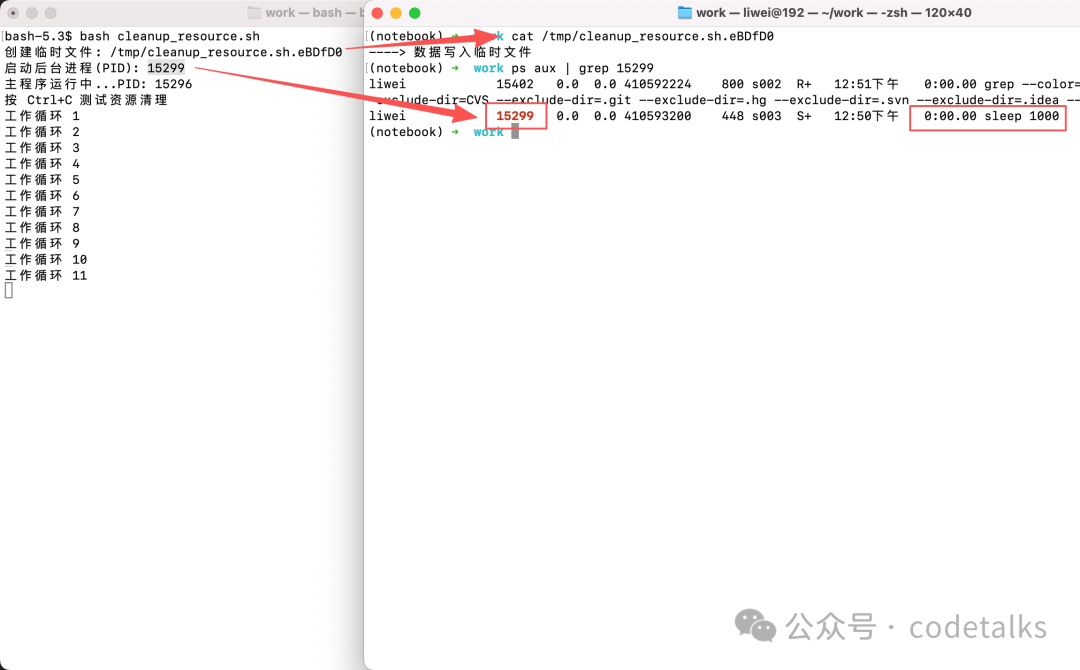
Open two terminal windows, one of which<span> runs the script and observes the output</span>:
bash-5.3$ bash cleanup_resource.sh
Created temporary file: /tmp/cleanup_resource.sh.eBDfD0
Started background process (PID): 15299
Main program running...PID: 15296
Press Ctrl+C to test resource cleanup
Working loop 1
Working loop 2
Working loop 3
The main process is continuously running in a loop, now open another window to check the <span>temporary file content</span> and <span>background process</span>:
(notebook) ➜ cat /tmp/cleanup_resource.sh.eBDfD0
----> Writing data to temporary file
(notebook) ➜ ps aux | grep 15299
15299   0.0  0.0 410593200    448 s003  S+   12:50下午   0:00.00 sleep 1000
<span>As shown in the figure:</span>
Next, in the window running the script, press <span>ctrl+c</span> to terminate the program and check the temporary file and background process again:
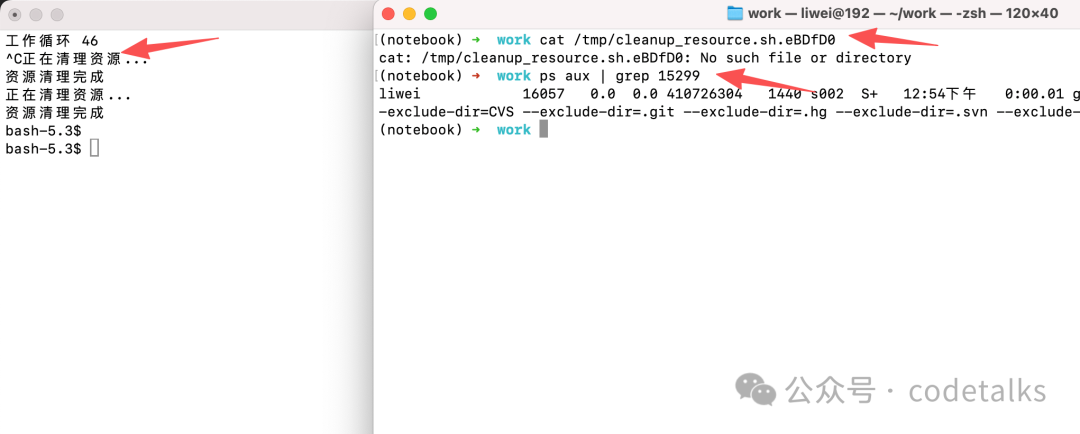
You can see that both the temporary file and the background process have been closed, achieving the goal of resource cleanup.
4. Timeout Handling
#!/usr/bin/env bash
# timeout_handler.sh
#
# Function: Demonstrate trap ALRM signal: simulate main process working timeout
#

TIMEOUT=10

timeout_handler() {
    echo "Timeout! Execution time exceeds ${TIMEOUT} seconds"
    echo "Terminating process..."
    # Kill all child processes
    pkill -P $$
    exit 124
}

# Set timeout trap
trap timeout_handler ALRM

# Set timeout
(sleep $TIMEOUT &&& kill -ALRM $$) &

# Save timeout process PID
TIMEOUT_PID=$!

echo "Script started, timeout duration: ${TIMEOUT} seconds"

# Simulate long task
read -p "Type 'long' to simulate long task, others complete quickly: " choice

if [[ "$choice" == "long" ]]; then
    echo "Executing long task..."
    sleep 20  # This will trigger timeout
else
    echo "Executing quick task..."
    sleep 2
    # Cancel timeout
    kill $TIMEOUT_PID 2>/dev/null
    echo "Task completed, timeout canceled"
fi

echo "Script ends"
<span>Demonstrating timeout:</span>
bash-5.3$ bash timeout_handler.sh
Script started, timeout duration: 10 seconds
Type 'long' to simulate long task, others complete quickly: long
Executing long task...
Timeout! Execution time exceeds 10 seconds
Terminating process...
bash-5.3$ echo $?
124
bash-5.3$
References
[1]
trap: https://www.gnu.org/software/bash/manual/html_node/Bourne-Shell-Builtins.html
[2]
DEBUG: https://www.gnu.org/software/bash/manual/html_node/Bourne-Shell-Builtins.html