Source fromLinux Mainland
Introduction to ShellCheck
ShellCheck is a widely used open-source tool designed for Shell script developers, aimed at helping to identify and correct errors in scripts. It can statically analyze various Shell scripts such as bash, sh, ksh, and dash, providing detailed warnings and suggestions to help developers improve the reliability and maintainability of their scripts.
ShellCheck not only checks for syntax errors but also identifies potential logical errors, non-standard coding practices, and security vulnerabilities, making it a valuable assistant in the Shell script development process.
Github link: https://github.com/koalaman/shellcheck
Features
Extensive Check Coverage
ShellCheck can identify various common errors and pitfalls, including but not limited to syntax errors, variable usage errors, command invocation errors, input/output errors, and security vulnerabilities. It also provides suggestions based on POSIX standards and best practices for Shell scripting, helping developers avoid some hard-to-detect issues.
Detailed Feedback
For each issue detected, ShellCheck provides a detailed explanation of why it is a problem and how to fix it. This detailed feedback mechanism helps developers better understand the errors in their scripts and quickly make corrections.
Easy to Use and Integrate
ShellCheck can be used directly from the command line or integrated into text editors and IDEs such as VS Code, Sublime Text, and Vim. Additionally, it can be automatically run as part of CI/CD processes to ensure code quality at every stage of development.
Cross-Platform Support
ShellCheck runs on various operating systems, including Linux, macOS, and Windows, and is compatible with common Shell interpreters such as Bash, Dash, and Zsh. This makes it a very flexible and practical tool that can be easily used regardless of your development environment.
Strong Community Support
As an open-source project, ShellCheck has an active community that continuously adds new features and improvements. Developers can seek help, share experiences, and participate in the project’s development through the community.
Installation and Usage
For Debian/Ubuntu systems, you can install it using the apt command:
sudo apt-get install shellcheckFor RHEL, CentOS, and Fedora systems, you first need to enable the EPEL Repo, then install using yum:
sudo yum install epel-release
sudo yum install shellcheck
Using ShellCheck is very simple. You can run it from the command line to check script files by just adding the name of the Shell script after the<span>shellcheck</span> command. For example:
shellcheck test.shShellCheck will output all suggestions and warnings found in the script, helping you improve the quality of your script.
We write a simple Shell script<span>test.sh</span> with the following content:
#!/bin/bash
echo $userinput
This script attempts to print the value of the variable<span>userinput</span>, but the variable has not been defined.
Using ShellCheck to check this script will yield the following output:
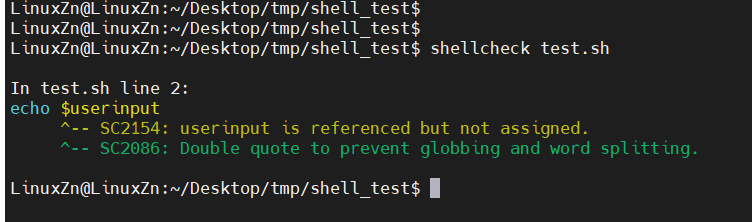
ShellCheck tells us that Userinput is referenced but not assigned.
With the help of ShellCheck, we can quickly identify and correct these common errors, thereby improving the quality and maintainability of our scripts.