 Source: juejin.cn/post/7395433541482823715
Hello everyone, I am Guide Jun
Stable sales without needing to bypass official ChatGPT, Claude, or Midjourney
- What is Java’s SPI
- Difference between SPI and API
- Implementation process
What is Java’s SPI
Java SPI (Service Provider Interface) is a service provider interface that provides a service discovery and loading mechanism in Java, allowing developers to define multiple implementations for an interface and dynamically discover and load these implementations at runtime.
The core of the Java SPI mechanism is that it provides a way for service providers to offer specific implementation classes for an interface according to the SPI’s conventions. These implementation classes are placed in specific locations, such as the META-INF/services directory, and specified through configuration files. When these services are needed, the Java runtime environment can automatically scan these directories to find and load the corresponding implementation classes, thus achieving dynamic discovery and loading of services.
The main uses of Java SPI include:
- Service providers can provide extension points for frameworks or libraries without modifying business code.
- Allows dynamic insertion or replacement of component implementations at runtime, encouraging loose coupling design principles.
- Allows third-party extensions and replacements of components in core libraries, enriching the Java ecosystem and providing great flexibility for developers.
In Java, SPI is widely used in various frameworks and libraries for extension, such as servlet container initialization, type conversion, logging, etc. Through the SPI mechanism, Java applications can easily integrate and use third-party service implementations without modifying business code, thus improving the scalability and maintainability of software.
Difference between SPI and API
The main differences between SPI and API lie in their definition methods, invocation methods, flexibility, dependencies, and uses.
- Definition Method: API is actively written by developers and made public for other developers to use, while SPI is an interface defined by framework or library providers for third-party developers to implement.
- Invocation Method: API uses direct method calls to use functionality, while SPI specifies concrete implementation classes through configuration files, which are then automatically loaded and invoked by the framework or library.
- Flexibility: The implementation classes of API must be determined at compile time and cannot be dynamically replaced; while the implementation classes of SPI can be dynamically loaded and replaced at runtime based on the content of configuration files.
- Dependency Relationship: API is depended upon by the caller, meaning the application needs to include the library where the API resides to use its functionality; while SPI is depended upon by the caller, meaning the framework or library needs to include the library of third-party implementation classes to load and invoke.
- Use: API is usually used to describe programming interfaces provided externally by libraries, frameworks, operating systems, services, etc. Developers use API to call corresponding functionalities to implement their applications. SPI defines a plugin-based architecture, allowing developers to define interfaces and provide different implementations through service providers, with the main purpose of allowing the system to discover and load specific service providers at runtime, thus achieving dynamic extension and replacement capabilities.
In summary, API is a specification that describes how to interact with a component; while SPI is a mechanism used to dynamically discover and load components that implement specific interfaces.
Implementation Process
0. Directory Structure
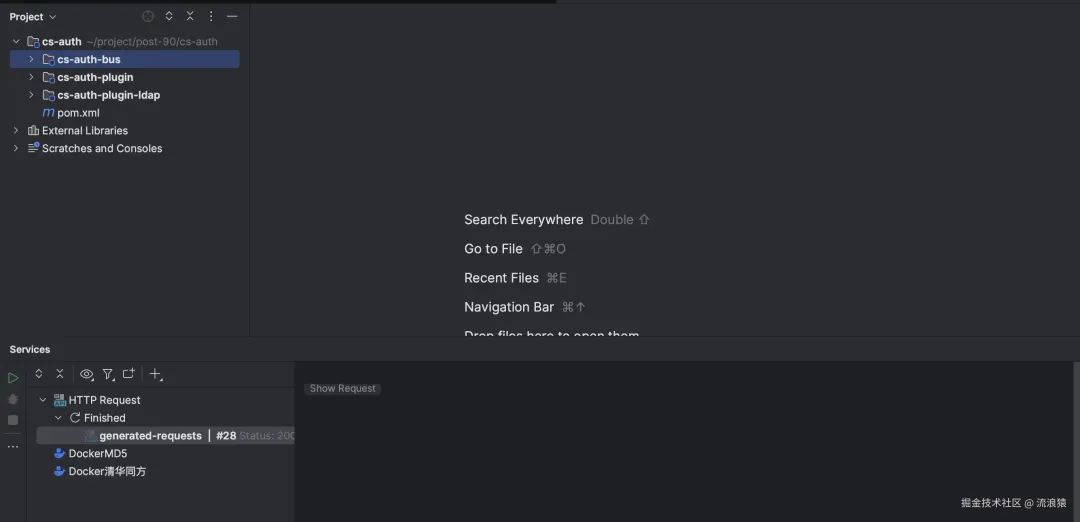
sa-auth  Parent Project
-- sa-auth-bus Business Project
-- sa-auth-plugin Project Defining SPI Interfaces
-- sa-auth-plugin-ldap Simulated Third-party Library Implementation Project
1. Create a pom project named sa-auth in IDEA, the pom is as follows
<?xml version="1.0" encoding="UTF-8"?>
<project xmlns="http://maven.apache.org/POM/4.0.0" xmlns:xsi="http://www.w3.org/2001/XMLSchema-instance"
xsi:schemaLocation="http://maven.apache.org/POM/4.0.0 https://maven.apache.org/xsd/maven-4.0.0.xsd">
    <modelVersion>4.0.0</modelVersion>
        <parent>
            <groupId>org.springframework.boot</groupId>
            <artifactId>spring-boot-starter-parent</artifactId>
            <version>2.1.16.RELEASE</version>
        </parent>
    <groupId>com.vijay</groupId>
    <artifactId>cs-auth</artifactId>
    <version>0.0.1-SNAPSHOT</version>
    <name>cs-auth</name>
    <packaging>pom</packaging>
    <description>cs-auth</description>
    <properties>
        <java.version>1.8</java.version>
        <project.build.sourceEncoding>UTF-8</project.build.sourceEncoding>
        <maven.compiler.compilerVersion>1.8</maven.compiler.compilerVersion>
    </properties>
    <modules>
        <module>cs-auth-plugin</module>
        <module>cs-auth-bus</module>
        <module>cs-auth-plugin-ldap</module>
    </modules>
    <dependencyManagement>
        <dependencies>
            <dependency>
                <groupId>org.projectlombok</groupId>
                <artifactId>lombok</artifactId>
                <version>1.18.20</version>
            </dependency>
            <dependency>
                <groupId>com.vijay</groupId>
                <artifactId>cs-auth-plugin</artifactId>
                <version>0.0.1-SNAPSHOT</version>
            </dependency>
        </dependencies>
    </dependencyManagement>
</project>
2. Then create sa-auth-plugin, the pom is as follows
<?xml version="1.0" encoding="UTF-8"?>
<project xmlns="http://maven.apache.org/POM/4.0.0" xmlns:xsi="http://www.w3.org/2001/XMLSchema-instance"
xsi:schemaLocation="http://maven.apache.org/POM/4.0.0 https://maven.apache.org/xsd/maven-4.0.0.xsd">
    <modelVersion>4.0.0</modelVersion>
    <parent>
        <groupId>com.vijay</groupId>
        <artifactId>cs-auth</artifactId>
        <version>0.0.1-SNAPSHOT</version>
        <relativePath>../pom.xml</relativePath>
    </parent>
    <artifactId>cs-auth-plugin</artifactId>
    <name>cs-auth-plugin</name>
    <description>cs-auth-plugin</description>
</project>
3. sa-auth-bus, the pom is as follows
<?xml version="1.0" encoding="UTF-8"?>
<project xmlns="http://maven.apache.org/POM/4.0.0" xmlns:xsi="http://www.w3.org/2001/XMLSchema-instance"
xsi:schemaLocation="http://maven.apache.org/POM/4.0.0 https://maven.apache.org/xsd/maven-4.0.0.xsd">
    <modelVersion>4.0.0</modelVersion>
    <parent>
        <groupId>com.vijay</groupId>
        <artifactId>cs-auth</artifactId>
        <version>0.0.1-SNAPSHOT</version>
        <relativePath>../pom.xml</relativePath>
    </parent>
    <artifactId>cs-auth-bus</artifactId>
    <name>cs-auth-bus</name>
    <description>cs-auth-bus</description>
    <dependencies>
        <dependency>
            <groupId>org.springframework.boot</groupId>
            <artifactId>spring-boot-starter</artifactId>
        </dependency>
        <dependency>
            <groupId>org.springframework.boot</groupId>
            <artifactId>spring-boot-starter-test</artifactId>
            <scope>test</scope>
        </dependency>
        <dependency>
            <groupId>com.vijay</groupId>
            <artifactId>cs-auth-plugin</artifactId>
        </dependency>
        <dependency>
            <groupId>org.springframework.boot</groupId>
            <artifactId>spring-boot-starter-web</artifactId>
        </dependency>
        <dependency>
            <groupId>org.projectlombok</groupId>
            <artifactId>lombok</artifactId>
        </dependency>
    </dependencies>
    <build>
        <resources>
            <resource>
                <directory>src/main/resources</directory>
                <filtering>true</filtering>
            </resource>
        </resources>
        <plugins>
            <plugin>
                <groupId>org.springframework.boot</groupId>
                <artifactId>spring-boot-maven-plugin</artifactId>
                <version>2.1.1.RELEASE</version>
                <executions>
                    <execution>
                        <goals>
                            <goal>repackage</goal>
                        </goals>
                    </execution>
                </executions>
            </plugin>
        </plugins>
    </build>
</project>
4. sa-auth-plugin-ldap, the pom is as follows
<?xml version="1.0" encoding="UTF-8"?>
<project xmlns="http://maven.apache.org/POM/4.0.0" xmlns:xsi="http://www.w3.org/2001/XMLSchema-instance"
xsi:schemaLocation="http://maven.apache.org/POM/4.0.0 https://maven.apache.org/xsd/maven-4.0.0.xsd">
    <modelVersion>4.0.0</modelVersion>
    <parent>
        <groupId>com.vijay</groupId>
        <artifactId>cs-auth</artifactId>
        <version>0.0.1-SNAPSHOT</version>
        <relativePath>../pom.xml</relativePath>
    </parent>
    <artifactId>cs-auth-plugin-ldap</artifactId>
    <name>cs-auth-plugin</name>
    <description>cs-auth-plugin-ldap</description>
    <dependencies>
        <dependency>
            <groupId>com.vijay</groupId>
            <artifactId>cs-auth-plugin</artifactId>
        </dependency>
    </dependencies>
</project>
5. The created project structure is as follows
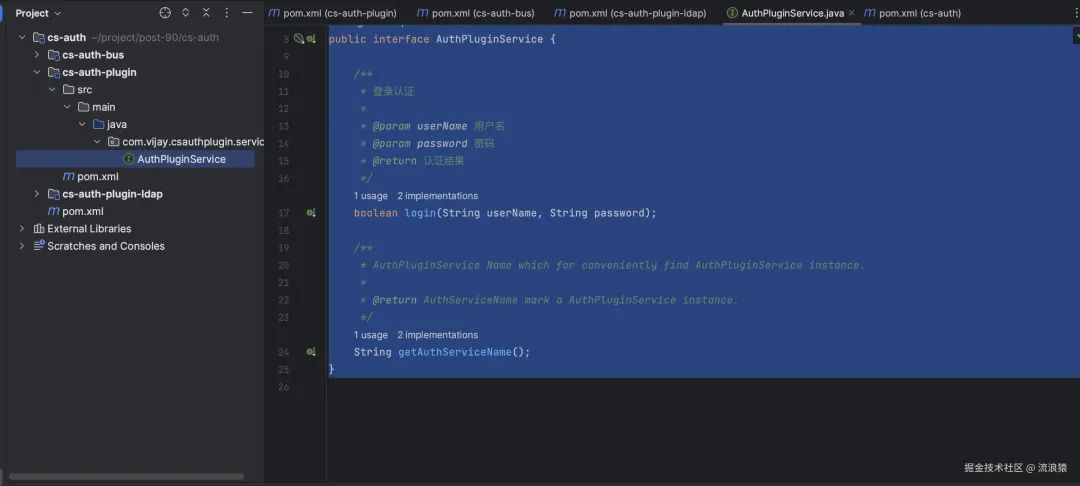
6. Open sa-auth-plugin and define the SPI interface
package com.vijay.csauthplugin.service;

/**
* Plugin SPI Interface
*
* @author vijay
*/
public interface AuthPluginService {

    /**
    * Login Authentication
    *
    * @param userName Username
    * @param password Password
    * @return Authentication result
    */
    boolean login(String userName, String password);

    /**
    * AuthPluginService Name which for conveniently find AuthPluginService instance.
    *
    * @return AuthServiceName mark a AuthPluginService instance.
    */
    String getAuthServiceName();
}
7. Implement the SPI interface in cs-auth-plugin-ldap and package it into a jar, simulating an externally provided plugin jar
1. Implement the introduced cs-auth-plug package’s SPI interface package com.vijay.csauthplugin.ldap;
package com.vijay.csauthplugin.ldap;
import com.vijay.csauthplugin.service.AuthPluginService;
/**
* @author vijay
*/
public class LdapProviderImpl implements AuthPluginService {
    @Override
    public boolean login(String userName, String password) {
        return "vijay".equals(userName) && "123456".equals(password);
    }

    @Override
    public String getAuthServiceName() {
        return "LdapProvider";
    }
}
2. Create a META-INF/services directory under the resources directory, and create a file named with the fully qualified name of the SPI interface class com.vijay.csauthplugin.service.AuthPluginService in that directory, writing the fully qualified name of the implementation class LdapProviderImpl as com.vijay.csauthplugin.ldap.LdapProviderImpl in the file.
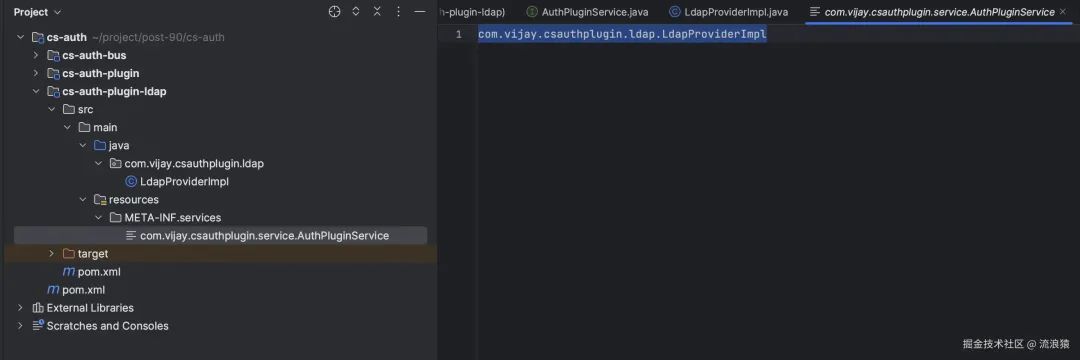
3. Package cs-auth-plugin-ldap into a jar
8. Open cs-auth-plugin-bus
1. Create a plugin package under the project, and add a default implementation of the plugin DefaultProviderImpl
package com.vijay.bus.plugin;

import com.vijay.csauthplugin.service.AuthPluginService;

/**
* Default Plugin Implementation
*
* @author vijay
*/
public class DefaultProviderImpl implements AuthPluginService {
    @Override
    public boolean login(String userName, String password) {
        return "vijay".equals(userName) && "123456".equals(password);
    }

    @Override
    public String getAuthServiceName() {
        return "DefaultProvider";
    }
}
2. Create a META-INF/services directory under the resources directory and create a file with the fully qualified name of the SPI interface class com.vijay.csauthplugin.service.AuthPluginService, with the content being the fully qualified name of DefaultProviderImpl com.vijay.bus.plugin.DefaultProviderImpl.
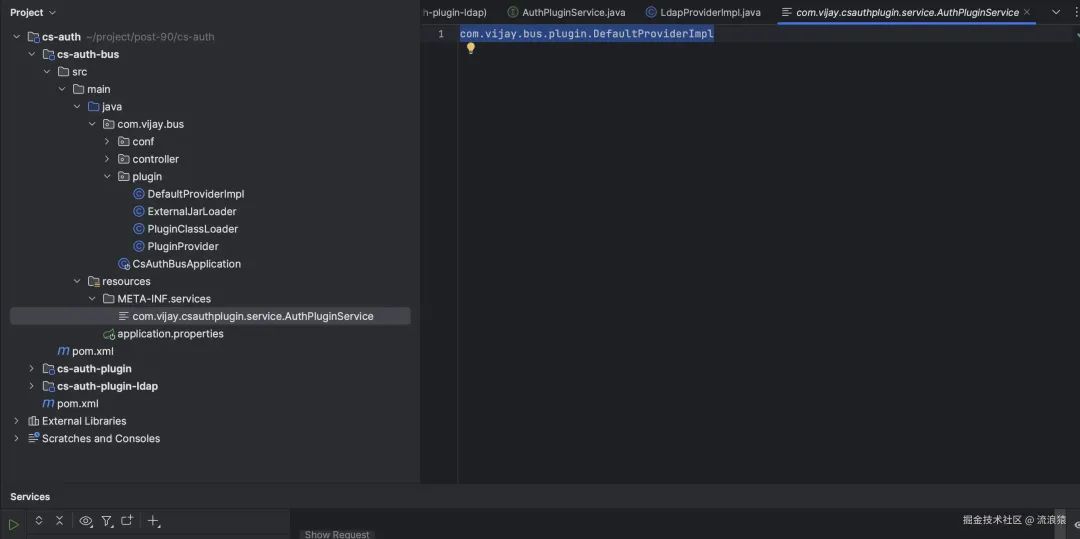
3. Custom Class Loader
package com.vijay.bus.plugin;

import java.net.URL;
import java.net.URLClassLoader;

/**
* Custom Class Loader
*
* @author vijay
*/
public class PluginClassLoader extends URLClassLoader {

    public PluginClassLoader(URL[] urls) {
        super(urls);
    }

    /**
    * @param url Path
    */
    public void addzURL(URL url) {
        super.addURL(url);
    }
}
4. Define a class to load external jar packages
package com.vijay.bus.plugin;

import java.io.File;
import java.net.URL;
import java.util.ArrayList;
import java.util.List;
import java.util.Objects;

/**
* Load specified directory jar packages
* @author vijay
*/
public class ExternalJarLoader {

    /**
    * Load external jar packages
    *
    * @param externalDirPath Jar package directory
    */
    public static void loadExternalJars(String externalDirPath) {
        File dir = new File(externalDirPath);
        if (!dir.exists() || !dir.isDirectory()) {
            throw new IllegalArgumentException("Invalid directory path");
        }
        List<URL> urls = new ArrayList<>();
        File[] listFiles = dir.listFiles();
        if (Objects.nonNull(listFiles) && listFiles.length > 0) {
            ClassLoader contextClassLoader = Thread.currentThread().getContextClassLoader();
            try {
                for (File file : listFiles) {
                    if (file.getName().endsWith(".jar")) {
                        urls.add(file.toURI().toURL());
                    }
                }
                PluginClassLoader customClassLoader = new PluginClassLoader(urls.toArray(new URL[0]));
                Thread.currentThread().setContextClassLoader(customClassLoader);
            } catch (Exception e) {
                e.printStackTrace();
                Thread.currentThread().setContextClassLoader(contextClassLoader);
            }
        }
    }
}
5. Add the class loader in the startup class
package com.vijay.bus;

import com.vijay.bus.plugin.ExternalJarLoader;
import org.springframework.boot.SpringApplication;
import org.springframework.boot.autoconfigure.SpringBootApplication;

/**
* @author vijay
*/
@SpringBootApplication
public class CsAuthBusApplication {
    public static void main(String[] args) {
        String jarPath="/Users/vijay/Downloads/build/plugin";
        ExternalJarLoader.loadExternalJars(jarPath);
        SpringApplication.run(CsAuthBusApplication.class, args);
    }
}
6. Create a plugin provider class PluginProvider to provide implementation classes for Spring Boot injection
package com.vijay.bus.plugin;

import com.vijay.csauthplugin.service.AuthPluginService;

import java.util.ServiceLoader;

/**
* Plugin Provider
*
* @author vijay
*/
public class PluginProvider {

    /**
    * Provide a plugin for injection (default returns the plugin from the external directory, if no plugin in the external directory, returns the default plugin)
    *
    * @return Specific plugin implementation
    */
    public static AuthPluginService getAuthPluginService() {
        ServiceLoader<AuthPluginService> defaultLoad = ServiceLoader.load(AuthPluginService.class);
        AuthPluginService plugin = null;
        for (AuthPluginService authPluginService : defaultLoad) {
            if (authPluginService instanceof DefaultProviderImpl) {
                plugin = authPluginService;
            } else {
                return authPluginService;
            }
        }
        return plugin;
    }
}
7. Create a conf package under the project to inject implementation classes into springboot
package com.vijay.bus.conf;

import com.vijay.bus.plugin.PluginProvider;
import com.vijay.csauthplugin.service.AuthPluginService;
import org.springframework.context.annotation.Bean;
import org.springframework.context.annotation.Configuration;


/**
* @author vijay
*/
@Configuration
public class PluginConfig {

    @Bean
    public AuthPluginService authPluginService() {
        return PluginProvider.getAuthPluginService();
    }
}
8. Create a controller package under the project, define the controller interface, and call for testing
package com.vijay.bus.controller;

import com.vijay.csauthplugin.service.AuthPluginService;
import org.springframework.web.bind.annotation.GetMapping;
import org.springframework.web.bind.annotation.RestController;

import javax.annotation.Resource;
import java.util.HashMap;
import java.util.Map;

/**
* @author vijay
*/
@RestController
public class TestController {
    @Resource
    private AuthPluginService authPluginService;
    @GetMapping("test")
    public Object test() {
        return new HashMap() {{
            put("name", authPluginService.getAuthServiceName());
            put("login", authPluginService.login("vijay", "123456"));
        }};
    }
}
Complete structure
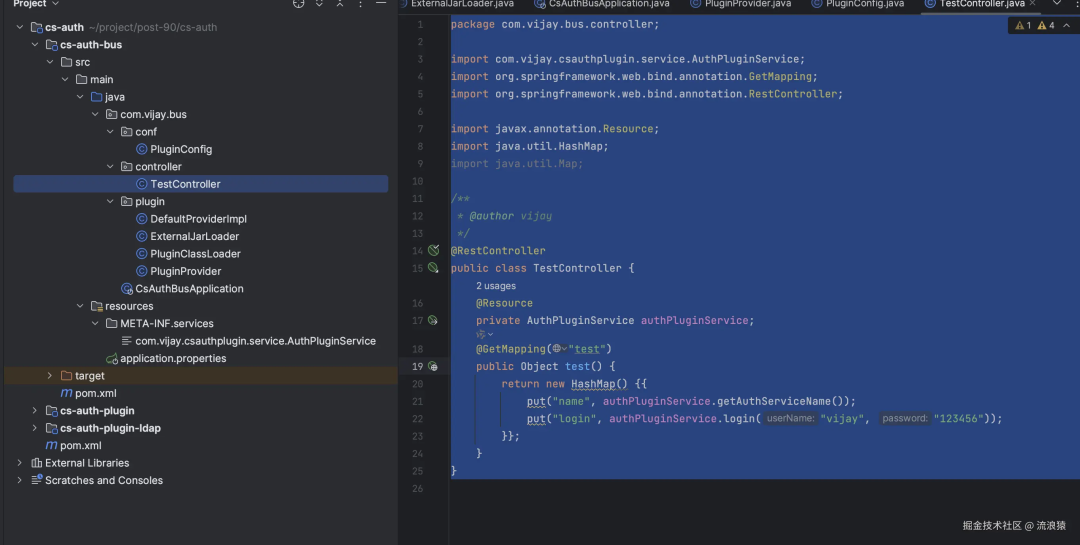
9. Request the interface and test the implementation
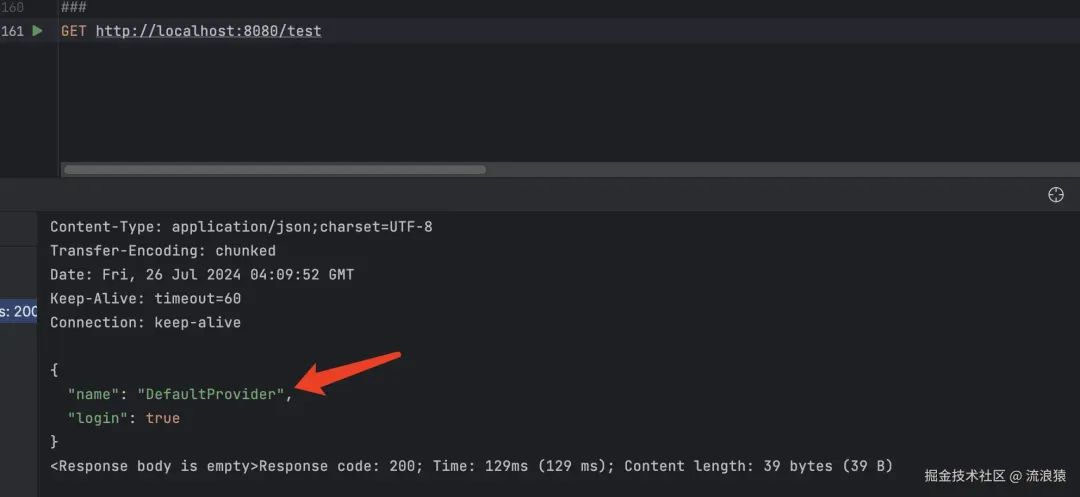
At this point, the return is the default implementation. Place the simulated third-party package from the cs-auth-plugin-ldap project into the external jar loading directory, restart the project, and then initiate a request.
The implementation is now the simulated jar’s implementation.