This white paper’s text was produced by High Integrity Systems, with illustrations and text translation completed by the Edian team. For the original text link, please click the bottom left corner at the end of the document.

Chapter 1 Introduction
1.1 How Does Software Affect Climate?
The carbon footprint generated by software is rapidly increasing. Most organizations recognize the necessity of reducing greenhouse gas emissions and acknowledge that carbon dioxide, a byproduct of fossil fuel energy, is a major factor in the greenhouse effect. The “net zero carbon” goal has become widely disseminated. However, as the momentum shifts towards electric vehicles and residential heating pump technologies, the demand for electricity will exceed our current renewable and nuclear energy capacities. Therefore, this surge in demand will lead to a corresponding increase in carbon dioxide emissions for the foreseeable future.
A significant driver of electricity demand is the rapid proliferation of programmable devices and their supporting infrastructure. Although these devices are generally more efficient than their predecessors, their sheer volume translates into astonishing energy demands. Recent estimates indicate that the power consumption of digital devices and networks is growing at more than twice the rate of overall electricity demand.
The power consumption of digital devices is not solely determined by hardware; software plays a crucial role in influencing energy usage. As responsible engineers, we can strive to maximize the value of every gram of carbon dioxide emitted. We have a responsibility to minimize environmental impact when designing hardware and software.
1.2 What Does This Article Cover?
This article will delve into energy-saving strategies for embedded software applications using embedded real-time operating systems (RTOS).
First, we will explore a proof of concept developed by WITTENSTEIN High Integrity Systems (WHIS) that integrates a single line of code into the idle task of an RTOS application, which can save over one-third of the total processor energy consumption. Next, we will discuss comprehensive energy-saving measures for the entire embedded system, focusing on the application of energy-saving technologies. After that, we will briefly explore specific energy-saving methods for automotive and industrial software applications.
Engineers play a key role in shaping the power consumption of future devices. Given the daunting task of building carbon-efficient applications, where should we start? First, we must recognize that the design, development, and deployment of software have a significant impact on energy consumption.
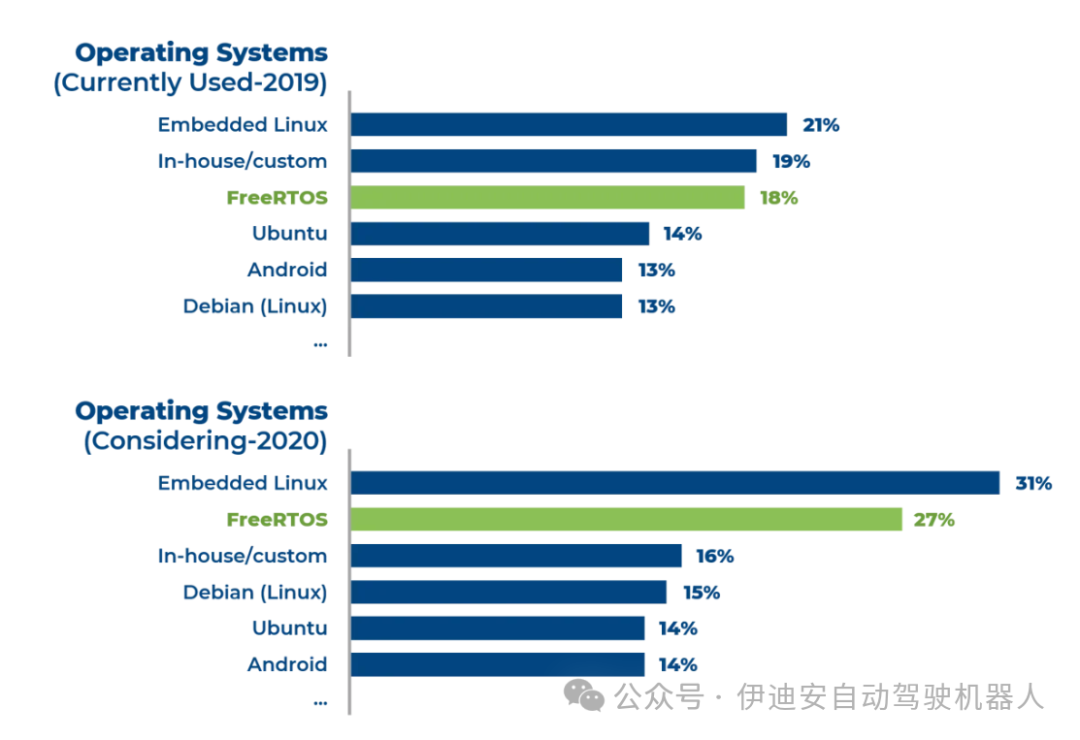
Chapter 2 How to Save Power Using RTOS
2.1 Saving Power Through Coding: A Complete Case Study
Many common processors include one or more specific power-saving instructions that place the CPU in a low-power mode until an interrupt occurs. The Arm Cortex-M processor has an instruction called WFI (Wait For Interrupt). The WFI instruction enters a low-power mode, but the system tick timer continues to run at normal speed. When using a preemptive priority-based RTOS, implementing power-saving on an ARM Cortex-M processor or any processor with similar instructions is straightforward. Simply place a WFI instruction in the RTOS idle hook function. This function is typically the lowest priority task and executes only when the RTOS has no other tasks to schedule. Once the idle task runs, it calls the idle hook, triggers WFI, and the processor enters a low-power sleep mode until the next interrupt occurs. This is usually the clock tick interrupt of the next system clock cycle. The processor will resume full power operation until the idle hook function is called again. The implementation on the ARM Cortex-M platform is simple:
void vApplicationIdleHook( void ){asm volatile (" WFI \n");}2.2 Proof of Concept
WHIS used a simple LED color cycling application in the workshop demonstration “Upgrading from FreeRTOS to SAFERTOS®” on a ready-made Cortex-M processor. This application contains multiple busy tasks, but most of the time, all tasks are in a blocked state,
so the processor spends most of its time in the idle task during each clock cycle. Therefore, we created an idle hook function identical to the one above, which includes a WFI. To quantify the energy savings we could achieve, we ran the application with WFI and then compared it to the same application with the WFI instruction commented out.
To compare power consumption, as shown in Figure 1, we modified the circuit board running the demonstration, disconnected the solder bridge on the target CPU power rail, and inserted a jumper that could be replaced with a digital multimeter to read the current (in milliamps (mA)). Power (in watts) equals current (in amps) multiplied by voltage (in volts), and energy consumption equals power (in watts) multiplied by time—energy units are joules (J) or watt-seconds, or watt-hours (W.h) commonly used in household electricity bills. The current was approximately 50 mA, with the processor powered at 3.3V, resulting in about 150 mW.
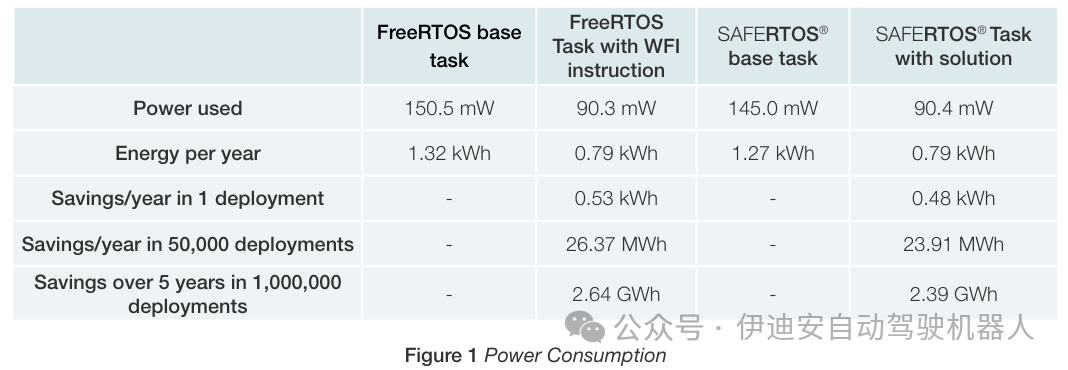
Note: The multimeter introduces some resistance to measure current, which reduces the core voltage (nominally 3.3 V). The core will still use the same power, so the current will be higher than it would be without the meter. Multiplying by the nominal 3.3-volt voltage, the power consumption figures will be slightly higher than the actual values. However, the difference is small, and all readings are affected similarly, so the comparison of using/not using WFI in the idle hook is valid. The differences in actual applications will be more pronounced.
2.3 Energy Saving Explanation
2.3.1 Without Power Saving
Typically, without power-saving measures, the processor remains busy at all times, and power consumption remains roughly the same. We can illustrate a typical task, interrupt, and idle time pattern as shown in Figure 2.
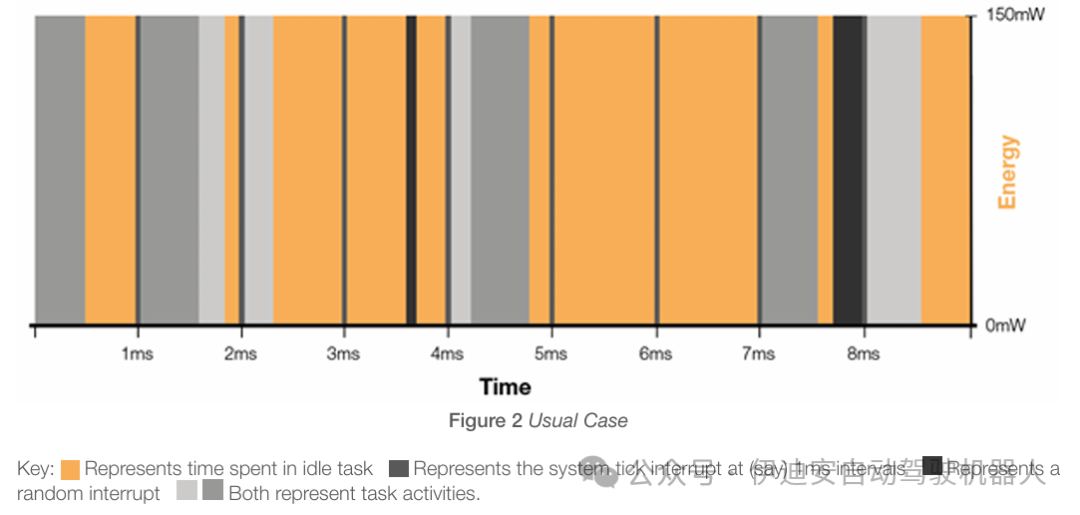
When the SAFERTOS® scheduler has no other tasks to execute, it selects the idle task because the processor does not stop. This task simply loops, doing nothing or repeatedly calling the “idle hook function” provided by the application writer.
FreeRTOS behaves similarly. The idle hook function can be used to perform various non-urgent background tasks or to attempt to save power.
2.3.2 Saving Power Using the Idle Hook
If we place a WFI in the idle hook, power consumption will drop as soon as we encounter the idle task until the next interrupt occurs. This can be demonstrated in Figure 3.
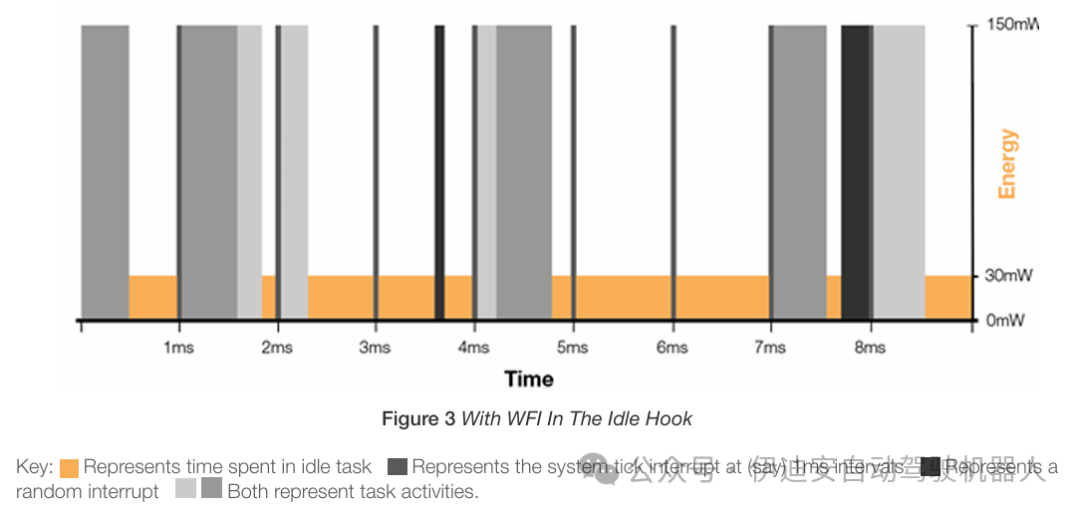
Now, whenever the processor is in the idle task, it will pause or slow down, significantly reducing power consumption. Nevertheless, the tick timer still runs and can handle external interrupts. For each interrupt, the processor will be woken up and return to full power to handle the interrupt, and if there is a ready task, it can resume that task. If the only runnable task is the idle task, it will return to that task and call WFI again.
2.3.3 “No Tick” Port
In a no-tick port, whenever the processor enters the idle task, the kernel code determines the scheduling run time of the next task. If that value exceeds a predefined tick threshold (usually 1), the kernel programs an external timer to wake the processor after a specified number of ticks in the future. The kernel will turn off the tick interrupt timer and other functions to further save power. The processor will then be woken up by the pre-programmed future ticks (which can also be woken up by any other interrupts that occur during this period). When the processor is woken up in future ticks, the internal tick counter will increment as if it had processed the intermediate ticks. This can be seen in Figure 4.
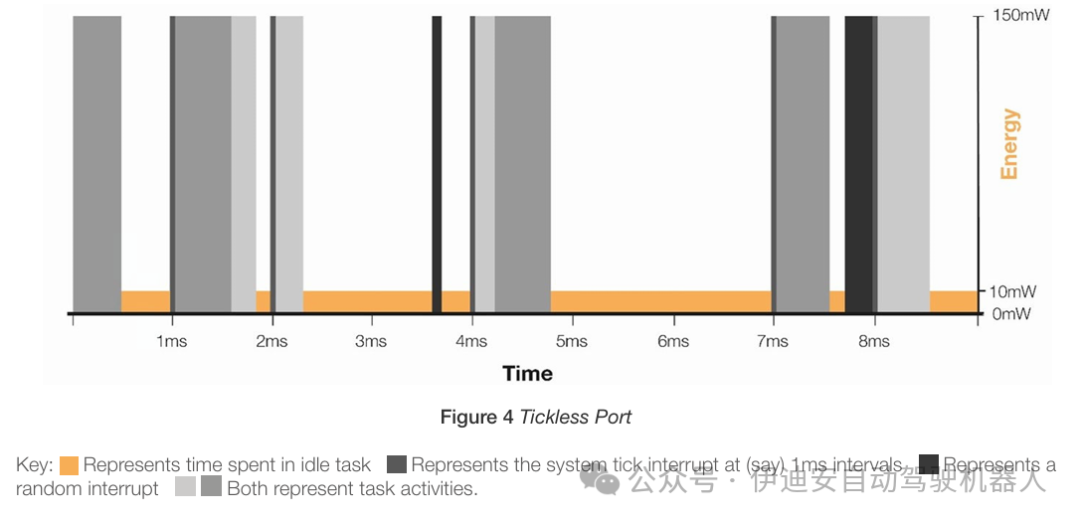
As shown in Figure 4, ticks at 3ms, 5ms, and 6ms do not occur because they do not need to wake any tasks, but instead use the external timer to wake the processor at 4ms and 7ms. After calling WFI, the power consumption in the idle state is lower because the processor peripheral bus driving components like the internal tick timer has also been turned off. Clearly, the optimal approach and the potential overall energy savings depend on the idle task usage pattern of the application. Additionally, by subtly changing the behavior of the application, power consumption can be significantly affected.
Chapter 3 Energy Saving for the Entire Embedded System
When designing embedded systems, it is essential to consider the entire design.
3.1 Processor Selection
Choosing a processor that precisely matches your application needs without exceeding them is crucial. If the application fails to fully utilize its capabilities, an overpowered processor will consume unnecessary energy. Many processors integrate power-saving features, although performance varies across different devices. Selecting a processor equipped with such features can significantly reduce energy consumption. However, beyond these considerations, evaluating the wake-up speed of the processor is also critical.
Choosing a processor often requires balancing numerous sometimes even conflicting demands. Fortunately, most manufacturers offer low-power versions of popular MCUs, and newer versions often come with enhanced energy-saving features. When considering a new product version for widespread deployment, migrating to an architecture that can significantly improve efficiency may be beneficial. Nevertheless, it is worth noting that alternatives often come with additional energy-saving characteristics, such as deep sleep modes, optimized sleep wake-up performance, streamlined functionality, or enhanced component integration, which may require additional devices.
3.2 Peripheral Selection
Within the processor, when designing applications, it is essential to turn off unnecessary peripherals in the final product. This will reduce the overall system power consumption and simplify integration while improving reliability. Overall, designs with higher functional integration are more reliable because IO ports are driven in an energy-efficient manner, and fewer working circuits are exposed to external interactions (e.g., driving output signals, etc.). Processors often contain subsystems that are not used in the design.
Optimizing efficiency requires selecting processor variants that suit your design’s specific needs, avoiding unnecessary sleep functions. Utilizing available processor features, such as selectively turning off components like USART (except for intermittent communication), can significantly save energy. Generally, highly integrated system-on-chip (SoC) solutions tend to be more efficient than systems relying on multiple discrete devices. However, if an SoC contains large subsystems that are rarely used and cannot be completely turned off, integrating an external system with power-off capabilities may provide higher efficiency. Conversely, some subsystems can operate independently, allowing the processor itself to enter longer shutdown periods, further enhancing efficiency.
3.3 Selection of Operating Frequency
In short, the faster a processor runs, the greater its power consumption. If feasible, selecting a lower chip speed may be a valuable energy-saving feature. However, choosing an operating frequency is not a simple decision.
Generally, higher frequency operation consumes more power, but there is a delicate balance between maximizing idle time in low-power modes and minimizing power consumption during active operation. Determining the optimal trade-off depends on specific application requirements and design considerations. If an application requires frequent CPU activity but the overall system load is low, reducing the operating frequency can save power. Conversely, if the processor is only intermittently active, operating at a relatively high frequency can enhance energy savings by minimizing the duration of processor activity. This decision depends on the precise workload and power consumption at different frequencies.
To achieve optimal power efficiency, designs may need to dynamically change the CPU operating frequency. Given the complexity and variability of applications, there is no one-size-fits-all approach. Achieving truly optimal power consumption requires thorough analysis and adjustments at every design stage, keeping energy-saving goals in mind.
3.4 Application Design
As consumer demand for energy-efficient products grows, engineers face an urgent task: to minimize the power consumption of their designs. Considering that most electricity is generated by burning fossil fuels, energy supply is a major source of carbon emissions. Improving application efficiency is one of the most effective ways to reduce power consumption.
WHIS has demonstrated a significant approach in this regard. Typically, even in idle states, applications maintain static power consumption, so many processors need to implement low-power modes. WHIS’s research indicates that integrating the Wait For Interrupt (WFI) instruction into the idle task of Cortex-M processors can save up to one-third of power consumption. By embedding energy-saving mechanisms into architectural design, energy savings become easier to achieve. Using RTOS in task-oriented designs has strategic advantages. Tasks are prioritized based on their importance, and during inactivity, applications can seamlessly transition to idle tasks, which is the ideal time to implement energy-saving measures. While idle tasks may perform background processing, the system primarily remains in a ready state until events trigger task activation. In contrast, non-RTOS application designs typically rely on continuous sequential calls, leading to permanent execution loops.
Furthermore, RTOS enhances code cleanliness and organization, providing a structured framework for functional development. Therefore, even in scenarios where real-time functionality is not required, RTOS remains a good choice. Silicon devices and microprocessors compatible with RTOS offer a wealth of low-power modes. These modes support the selective shutdown of various unused processor components, such as peripheral units or unused oscillators. While the wake-up time from low-power modes varies depending on the microprocessor and its configuration, they possess valuable energy-saving capabilities. RTOS simplifies the transition to low-power modes by prioritizing tasks and scheduling them at intervals, streamlining the process and facilitating efficient energy management.
Chapter 4 Cross-Industry Energy Saving
4.1 Automotive
Automobiles easily deploy a large number of embedded processors. A modern car can easily have over 3,000 chips and more than 100 microprocessors [1]. With the emergence of advanced driver-assistance systems (ADAS) and autonomous vehicles, as well as the increasing importance of software security, software will increasingly control vehicles. As the situation evolves, the complexity of automotive software is continuously upgrading at both functional and architectural levels, and automotive manufacturers will have to utilize their software in unprecedented ways [2]. Reducing architectural complexity and software design in the automotive industry not only helps improve energy-saving effects but is also crucial for winning the software competition. Safety is paramount in the automotive industry, where the timely deployment of airbags and anti-lock braking systems can mean the difference between life and death. Even the slightest timing error can have catastrophic consequences. This underscores the necessity of real-time operating systems (RTOS), as they ensure that all operations by drivers, passengers, and application designers occur within time constraints. In automobiles, multiple software tasks run on various microprocessors. RTOS systems have a high degree of control over task prioritization. By leveraging this high degree of control, systems can be designed more efficiently.
4.2 Industrial Equipment
Over the past decade, the adoption of digital technology in industrial applications has continued to grow; this is referred to as the new industrial revolution [3]. To keep pace with market demands, efficient and safe technologies are needed to support industrial development. In seeking embedded designs for industrial equipment, safety and power consumption are key, while technology adoption is critical to success. As customer and supplier expectations are higher than ever, we have reason to expect that various industries will pursue greater efficiency. This will include embracing new technologies such as digitalization, artificial intelligence, and robotics. Consequently, various industries will drive sustainable growth [4].
With the development of new automation technologies, companies face greater pressure to reduce energy emissions, as more and more companies are not only concerned about the sustainability of their own operations but also about the sustainability of the planet. Like the automotive industry, software will begin to exert more control over industrial equipment and system architectures, and software design will become crucial in the broader context of success and sustainability. By specifically supporting the needs of industrial equipment developers, safe real-time operating systems can significantly reduce program risks, lower development costs, and shorten time-to-market for industrial equipment products. Moreover, as this white paper demonstrates, it can significantly save application power consumption.
In industrial environments, safety is critical, as machinery operations are subject to strict requirements, and reducing technical risks is essential. Considerations such as heat management in deeply embedded or physically constrained environments, as well as precise process control in motor operations, highlight the necessity for meticulous attention to detail. Additionally, in large-scale production, balancing energy savings with maintaining quality is crucial, especially in battery-powered applications like electric vehicles.
Chapter 5 Conclusion
This white paper explores the typical significance of software energy saving in embedded systems. Clearly, we need transformative changes to address the climate crisis—changes that will rely on technology, innovation, and cross-industry collaboration.
We have demonstrated significant energy-saving scalability by merging a single line of code across multiple processors. At first glance, saving a small amount of energy for a single application running on a single processor may seem trivial. For these seemingly simple applications, it is easy to overlook the optimization work. However, when we consider the vast scale of electronic devices deployed across various industries, even the slightest adjustments can have significant implications.
To reduce carbon emissions and promote sustainability, application designers must prioritize minimizing energy consumption throughout their product’s lifecycle. To achieve this, energy factors must be considered at the product design stage, as most of the environmental impact of a product is determined at this stage.
Embedded safety software is an exciting field, especially in this era of exponential growth. WITTENSTEIN High Integrity Systems is pleased to share this information with you, hoping that engineers will have another tool to save energy as much as possible.