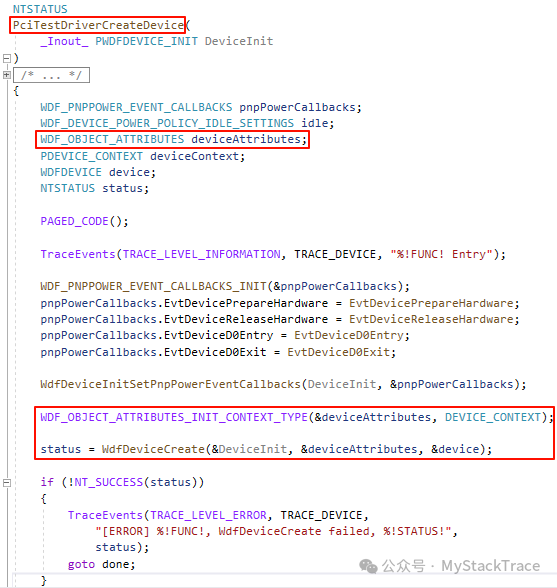
When writing WDF drivers, we often need to bind some driver-defined data structures to WDF objects (such as device objects, queue objects, request objects). These data structures provide the driver with the capability to store and manage state information specific to the object, which we commonly refer to as context. These contexts are essentially data structures defined by the driver, associated with specific framework objects by the WDF framework. The framework is responsible for allocating memory (if needed), storing pointers, and managing access to the context during the object’s lifetime. In this article, we will introduce how to bind context data structures to WDF objects.We will take the device context (Device Context) as an example and first discuss the general process of binding context to WDF objects.The first step is to define the device context data structure DEVICE_CONTEXT and use the macro WDF_DECLARE_CONTEXT_TYPE_WITH_NAME to create a function DeviceGetContext that retrieves the pointer to the DEVICE_CONTEXT bound to the WDF device object handle.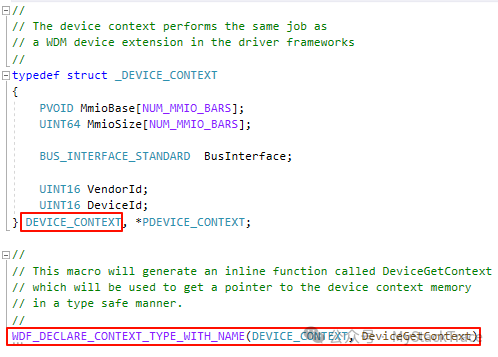 The second step is to bind the DEVICE_CONTEXT data structure defined in the first step to the WDF device object being created. Specifically, we first use the macro WDF_OBJECT_ATTRIBUTES_INIT_CONTEXT_TYPE to set the DEVICE_CONTEXT structure to deviceAttribute, which is a structure of type WDF_OBJECT_ATTRIBUTES. Then we pass deviceAttribute to the function WdfDeviceCreate to create the WDF device object. This way, the created device object is bound to the DEVICE_CONTEXT data structure, and the memory occupied by DEVICE_CONTEXT is allocated along with the WDF device object.
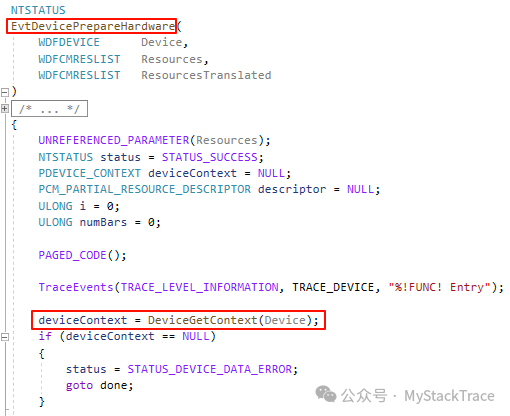
 The third step is to call the function DeviceGetContext generated in the first step to obtain the pointer to the context structure when we need to use DEVICE_CONTEXT. Below is the code where we retrieve the DEVICE_CONTEXT pointer in the PrepareHardware function.
 It can be seen that the important operations in the process of binding DEVICE_CONTEXT and WDFDEVICE together are the two macros: WDF_DECLARE_CONTEXT_TYPE_WITH_NAME and WDF_OBJECT_ATTRIBUTES_INIT_CONTEXT_TYPE.First, let’s look at the first macro. The purpose of this macro is to create a function to retrieve the context pointer. After expanding the macro defined at the position of DEVICE_CONTEXT, we get the following code, which is divided into two parts. The first part defines a global variable, and the second part defines a function named DeviceGetContext. The first part defines a global variable named _WDF_DEVICE_CONTEXT_TYPE_INFO, which is of type WDF_OBJECT_CONTEXT_TYPE_INFO.
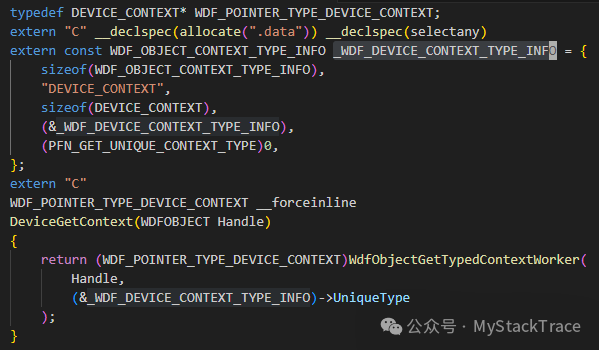 The definition of the structure WDF_OBJECT_CONTEXT_TYPE_INFO is as follows.Based on the layout of this structure and the initialization code of the global variable _WDF_DEVICE_CONTEXT_TYPE_INFO after the macro expansion, we can see that the member ContextName is the string “DEVICE_CONTEXT“, the member ContextSize is the size of the device context structure DEVICE_CONTEXT, and the most important member UniqueType is the global variable _WDF_DEVICE_CONTEXT_TYPE_INFO, which is its own address.
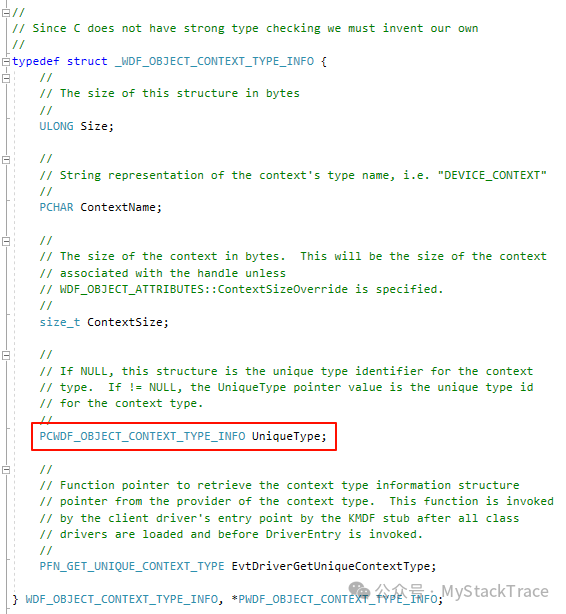 Next, let’s look at the second macro WDF_OBJECT_ATTRIBUTES_INIT_CONTEXT_TYPE after expansion. The expanded code first initializes deviceAttributes, and then assigns the member UniqueType of the global variable _WDF_DEVICE_CONTEXT_TYPE_INFO, which is the address of the global variable _WDF_DEVICE_CONTEXT_TYPE_INFO, to the member ContextTypeInfo of deviceAttributes. When the function WdfDeviceCreate creates the WDFDEVICE, the WDF framework code knows that we have bound a context to this device object based on the value of ContextTypeInfo and can find the type information of this context, which is the global variable _WDF_DEVICE_CONTEXT_TYPE_INFO. Consequently, the WDF framework code will allocate a block of memory for the DEVICE_CONTEXT structure when creating the device object.
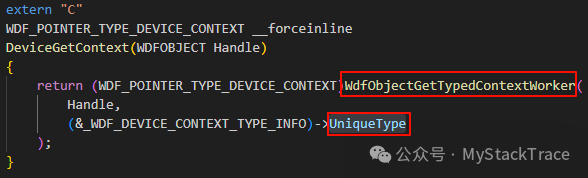
 Now let’s return to the second part of the expanded first macro WDF_DECLARE_CONTEXT_TYPE_WITH_NAME, which is the implementation of the function DeviceGetContext. The code for the function DeviceGetContext is quite simple; it calls the internal WDF function WdfObjectGetTypedContextWorker. This function has two parameters: the first parameter is of type WDFOBJECT, which is the handle of the WDF object, and the second parameter is a pointer of type WDF_OBJECT_CONTEXT_TYPE_INFO. According to the macro expansion results, the actual argument passed here is the address of the global variable _WDF_DEVICE_CONTEXT_TYPE_INFO. Thus, it can be seen that this UniqueType is very important. Earlier, we created the context data structure for the device object based on UniqueType, and here we retrieve the pointer to the previously created context data structure from the device object based on UniqueType. The WDF object and its context structure are associated with each other through this UniqueType.
 In the above, we used the device object as an example to explain how to bind the device object context. In fact, the method of binding context for other objects is similar; we can basically follow the same pattern. To summarize, there are three steps: First, use the macro WDF_DECLARE_CONTEXT_TYPE_WITH_NAME to associate the defined context data structure with a function to retrieve the context (the XxxGetContext function); second, use the macro WDF_OBJECT_ATTRIBUTES_INIT_CONTEXT_TYPE to specify the context structure for the WDF object to be created. Then, when the WDF framework code creates the WDF object, it will automatically bind the created object with the specified context structure; third, when we need to use the context, we call the XxxGetContext function created in the first step to retrieve the pointer to the context structure from the object handle. Understanding this context binding process is crucial for writing efficient, reliable, and maintainable WDF drivers.