Click the card below to follow Arm Technology Academy
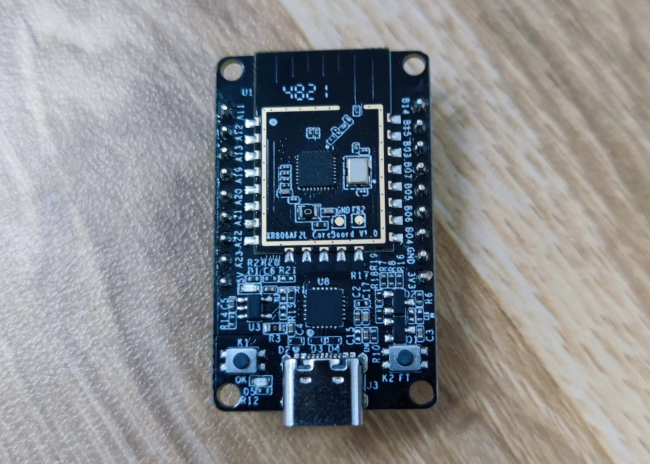
This article is from the Jishu Community’s evaluation activity of the Allwinner XR806 development board. The author used the XR806 development board and the XR806 SDK based on FreeRTOS to implement custom sending of 802.11 Beacon frames, and conducted wireless packet analysis and scanning tests to verify the frame sending results.
Environment Configuration Process
The environment setup can refer to the official documentation for development environment setup (https://xr806.docs.aw-ol.com/rtos/env/). The development environment used in this test is Ubuntu 22.04. It is important to note that when downloading the ARM Toolchain, the link in the documentation is no longer available due to website updates. The current available download link is https://developer.arm.com/downloads/-/gnu-rm, where you can find the corresponding gcc-arm-none-eabi-8-2019-q3-update version to download.
After configuring the environment, select a Demo or Example for compilation. In Ubuntu, the flashing tool used is the <span>phoenixMC</span> executable program located in the tools directory of the SDK. The example flashing command is
./phoenixMC -c /dev/ttyUSB0 -i ../out/xr_system.imgOther parameter information can be obtained using <span>-h</span>. After flashing, you can connect to the serial port to view the output. The console output may have misaligned line breaks, which need to be corrected. The serial tool used in this test is <span>picocom</span>, which requires converting the output <span> to
</span><span>. The example command to connect to the serial port is
</span>
picocom -b 115200 --imap lfcrlf /dev/ttyUSB0During flashing, the development board needs to enter upgrade mode. If the current program supports the <span>upgrade</span> command, you can directly send the <span>upgrade</span> command. If not supported, you need to short-circuit the two contacts on the development board or use a flashing tool on Windows, checking the hardware reset flashing mode on the tool.
Testing Process
By browsing the XR806 SDK, it can be found that the API int wlan_send_raw_frame(struct netif *netif, int type, uint8_t *buffer, int len); is provided in wlan.h. This API supports sending custom 802.11 frames, requiring only the network interface, frame type, data frame, and length. Inspired by esp32-80211-tx, this test sends custom Beacon frames based on this API to create the illusion of multiple APs existing simultaneously. In an IBSS network architecture, an AP sends a Beacon frame periodically to announce its 802.11 network’s existence. Passive scanning of Wi-Fi is also based on Beacon frames.
Using API to Construct Beacon
Further browsing the SDK reveals that the API <span>wlan_construct_beacon</span> is provided, which simplifies the process of constructing a Beacon. You only need to provide some field information of the beacon, such as SA, DA, BSSID, Channel, etc. The specific code is as follows:
#include <stdio.h>
#include <string.h>
#include "net/wlan/wlan.h"
#include "net/wlan/wlan_defs.h"
#include "net/wlan/wlan_ext_req.h"
#include "net/wlan/wlan_frame.h"
#include "common/framework/net_ctrl.h"
#include "common/framework/platform_init.h"
#include "lwip/inet.h"

#define CMD_WLAN_NETIF              wlan_netif_get(WLAN_MODE_NONE)

#define BEACON_FRAME_LEN 256
static uint8_t beacon_frame_buf[BEACON_FRAME_LEN];
typedef struct {    uint8_t *data;    uint32_t len;} frame_data;
static uint8_t beacon_addr[6];
static char beacon_ssid[32];
static uint32_t beacon_len;
static frame_data beacon_frame;
char *ssids[] = {    "1 Hello Wireless World",    "2 from Allwinner XR806",    "3 running on FreeRTOS",    "4 for Jishu Community"    };
uint8_t bssid[4][6] = {    {0xba, 0xde, 0xaf, 0xfe, 0x00, 0x06},    {0xba, 0xde, 0xaf, 0xfe, 0x00, 0x07},    {0xba, 0xde, 0xaf, 0xfe, 0x00, 0x08},    {0xba, 0xde, 0xaf, 0xfe, 0x00, 0x09},};
#define TOTAL_LINES (sizeof(ssids) / sizeof(char *))
uint8_t line = 0;
static void beacon_frame_create(void){    wlan_ap_config_t config;    memset(&config, 0, sizeof(config));    config.field = WLAN_AP_FIELD_SSID;    if (wlan_ap_get_config(&config) != 0) {        printf("get config failed\n");        return;    }    printf("ssid:%s,ssid_len: %d\n", ssids[line], strlen(ssids[line]));    memcpy(beacon_ssid, ssids[line], strlen(ssids[line]));    memcpy(beacon_addr, bssid[line], IEEE80211_ADDR_LEN);    beacon_len = wlan_construct_beacon(beacon_frame_buf, BEACON_FRAME_LEN, beacon_addr, NULL, beacon_addr,                                       (uint8_t *)beacon_ssid, strlen(ssids[line]), 1);    if (++line >= TOTAL_LINES)    {        line = 0;    }    beacon_frame.data = beacon_frame_buf;    beacon_frame.len = beacon_len;    printf("beacon_len %d\n", beacon_len);    int ret = 0;    ret = wlan_send_raw_frame(CMD_WLAN_NETIF, IEEE80211_FC_STYPE_AUTH, beacon_frame.data, beacon_frame.len);    printf("Send beacon frame: %d\n", ret);}

int main(void){    platform_init();    net_switch_mode(WLAN_MODE_HOSTAP);    while(1)    {        OS_MSleep(100 / TOTAL_LINES);        beacon_frame_create();    }    return 0;}
The basic logic of the code is as follows: first, predefine the SSIDs and their corresponding BSSIDs to be sent, then initialize AP mode in the main function, and send all Beacons every 100ms. Before sending the Beacon, the content of the Beacon frame needs to be filled in.
The test effect is as follows, and the SSID list used in the code is
"1 Hello Wireless World", "2 from Allwinner XR806", "3 running on FreeRTOS", "4 for Jishu Community"After powering on, the program starts, and you can view these AP information by scanning Wi-Fi with a mobile phone.
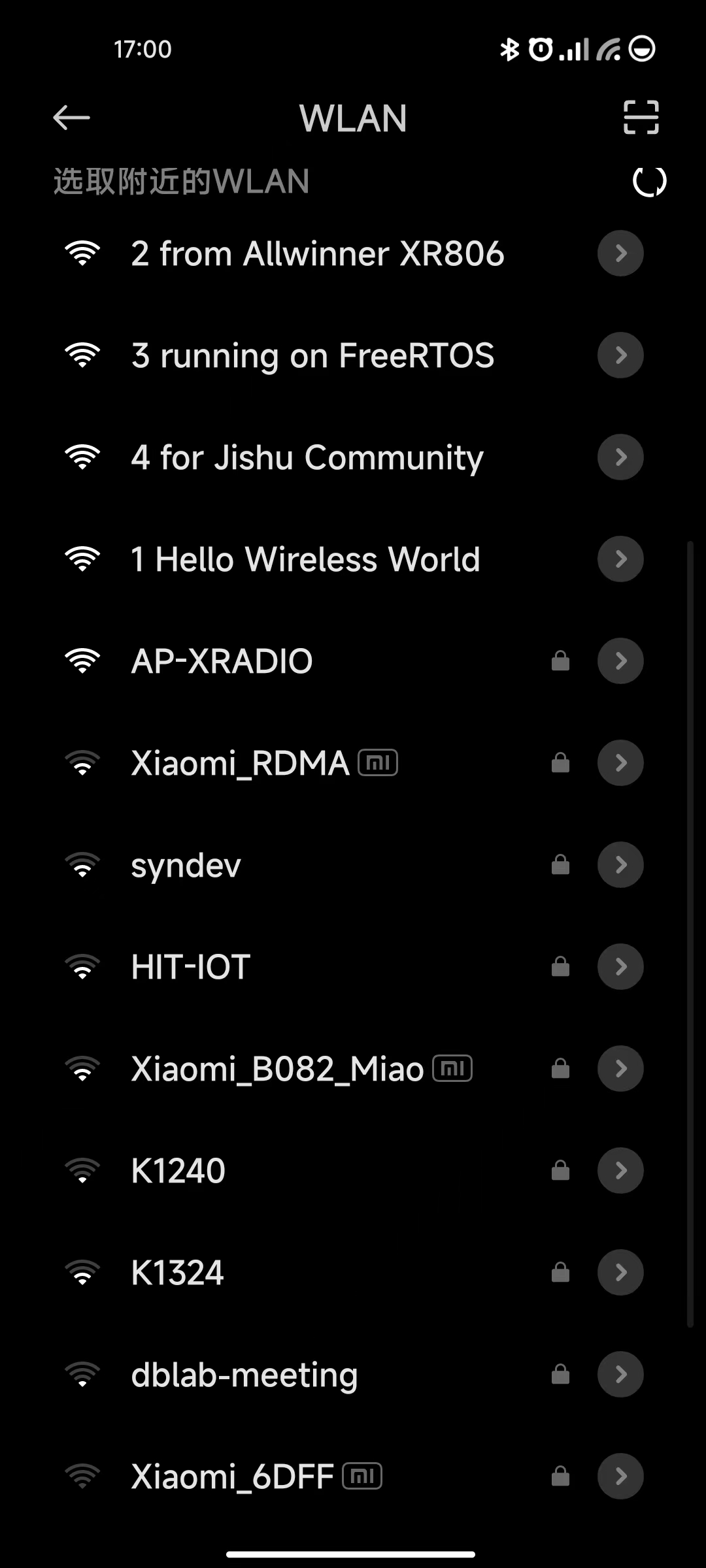
Among them, AP-XRADIO is the default AP name.
Constructing Beacon Without Using API
We can also fill in the content directly without using the relevant API. For demonstration, the implementation of the reference project is migrated here, and the specific code is as follows:
#include <stdio.h>
#include <string.h>
#include "net/wlan/wlan.h"
#include "net/wlan/wlan_defs.h"
#include "net/wlan/wlan_ext_req.h"
#include "net/wlan/wlan_frame.h"
#include "common/framework/net_ctrl.h"
#include "common/framework/platform_init.h"
#include "lwip/inet.h"

#define CMD_WLAN_NETIF              wlan_netif_get(WLAN_MODE_NONE)

uint8_t beacon_raw[] = {    0x80, 0x00,                            // 0-1: Frame Control    0x00, 0x00,                            // 2-3: Duration    0xff, 0xff, 0xff, 0xff, 0xff, 0xff,                // 4-9: Destination address (broadcast)    0xba, 0xde, 0xaf, 0xfe, 0x00, 0x06,                // 10-15: Source address    0xba, 0xde, 0xaf, 0xfe, 0x00, 0x06,                // 16-21: BSSID    0x00, 0x00,                            // 22-23: Sequence / fragment number    0x00, 0x01, 0x02, 0x03, 0x04, 0x05, 0x06, 0x07,            // 24-31: Timestamp (GETS OVERWRITTEN TO 0 BY HARDWARE)    0x64, 0x00,                            // 32-33: Beacon interval    0x31, 0x04,                            // 34-35: Capability info    0x00, 0x00, /* FILL CONTENT HERE */                // 36-38: SSID parameter set, 0x00:length:content    0x01, 0x08, 0x82, 0x84,    0x8b, 0x96, 0x0c, 0x12, 0x18, 0x24,    // 39-48: Supported rates    0x03, 0x01, 0x01,                        // 49-51: DS Parameter set, current channel 1 (= 0x01),    0x05, 0x04, 0x01, 0x02, 0x00, 0x00,                // 52-57: Traffic Indication Map    };
char *rick_ssids[] = {    "01 Never gonna give you up",    "02 Never gonna let you down",    "03 Never gonna run around",    "04 and desert you",    "05 Never gonna make you cry",    "06 Never gonna say goodbye",    "07 Never gonna tell a lie",    "08 and hurt you"};
#define BEACON_SSID_OFFSET 38
#define SRCADDR_OFFSET 10
#define BSSID_OFFSET 16
#define SEQNUM_OFFSET 22
#define TOTAL_LINES (sizeof(rick_ssids) / sizeof(char *))
int main(void){    platform_init();    net_switch_mode(WLAN_MODE_HOSTAP);    uint8_t line = 0;    // Keep track of beacon sequence numbers on a per-songline-basis    uint16_t seqnum[TOTAL_LINES] = { 0 };
    int ret = 0;    while (1)     {        OS_MSleep(100 / TOTAL_LINES);
        // Insert line of Rick Astley's "Never Gonna Give You Up" into beacon packet        printf("%i %i %s\r\n", strlen(rick_ssids[line]), TOTAL_LINES, rick_ssids[line]);
        uint8_t beacon_rick[200];        memcpy(beacon_rick, beacon_raw, BEACON_SSID_OFFSET - 1);
        beacon_rick[BEACON_SSID_OFFSET - 1] = strlen(rick_ssids[line]);
        memcpy(&beacon_rick[BEACON_SSID_OFFSET], rick_ssids[line], strlen(rick_ssids[line]));
        memcpy(&beacon_rick[BEACON_SSID_OFFSET + strlen(rick_ssids[line])], &beacon_raw[BEACON_SSID_OFFSET], sizeof(beacon_raw) - BEACON_SSID_OFFSET);
        // Last byte of source address / BSSID will be line number - emulate multiple APs broadcasting one song line each        beacon_rick[SRCADDR_OFFSET + 5] = line;
        beacon_rick[BSSID_OFFSET + 5] = line;
        // Update sequence number        beacon_rick[SEQNUM_OFFSET] = (seqnum[line] & 0x0f) << 4;
        beacon_rick[SEQNUM_OFFSET + 1] = (seqnum[line] & 0xff0) >> 4;
        seqnum[line]++;
        if (seqnum[line] > 0xfff)            seqnum[line] = 0;
        // esp_wifi_80211_tx(WIFI_IF_AP, beacon_rick, sizeof(beacon_raw) + strlen(rick_ssids[line]), false);
        ret = wlan_send_raw_frame(CMD_WLAN_NETIF, IEEE80211_FC_STYPE_AUTH, beacon_rick, sizeof(beacon_raw) + strlen(rick_ssids[line]));
        printf("Send beacon: %d\n", ret);
        if (++line >= TOTAL_LINES)            line = 0;
    }        return 0;}
The test effect is as follows: using the Netspot tool to obtain the wireless AP list
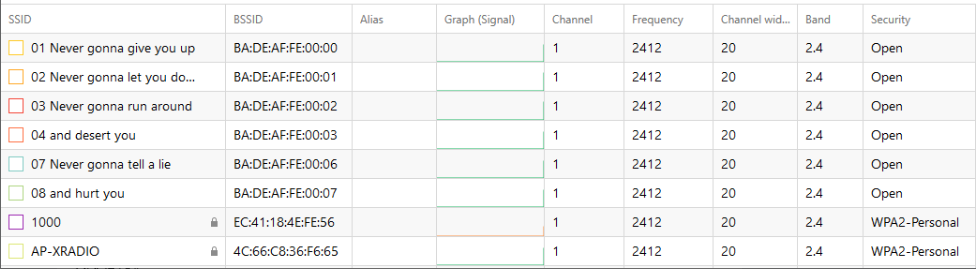
It can be seen that the SSID list we defined (Never gonna give you up:)) is displayed, along with the default AP name AP-XRADIO.
Wireless packet analysis of the XR806’s Beacon shows the following:
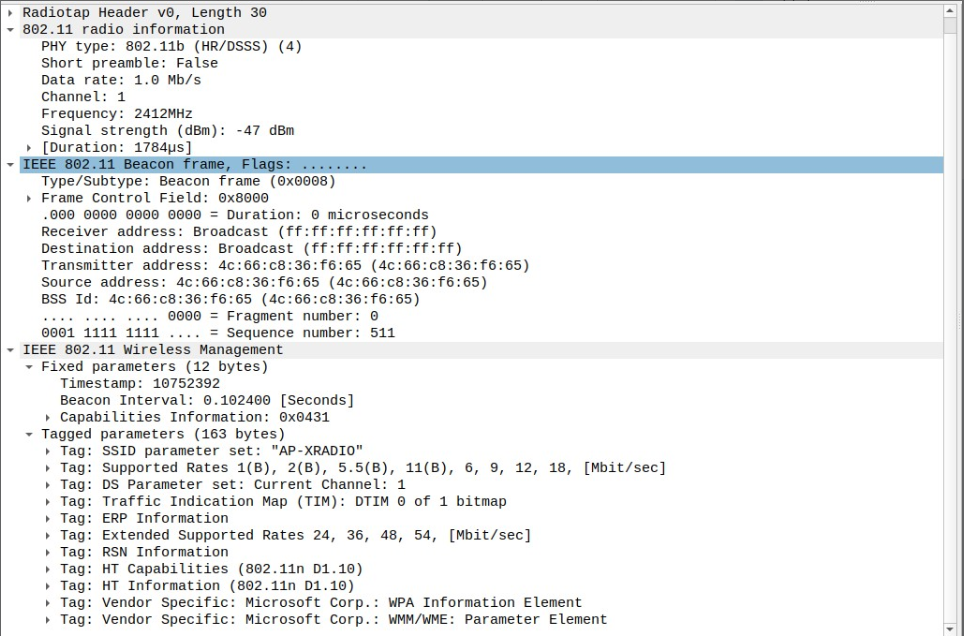
It can be seen that the XR806 supports various rates and other features.
Conclusion
This test sent custom Beacon frames. In fact, the XR806 also supports sending other types of frames, which can be further explored later. Finally, thanks to the Jishu Community and Allwinner Technology for the development board activity, as well as the community staff and all the friends in the community for their Q&A support.
Recommended Reading
-
[XR806 Development Board Trial] Using Encoder for Dimming
-
Deploying Advanced Fuzzy Controllers for Competitive Robots on the XR806 Development Board Based on FreeRTOS
-
Implementing Single Leg Kinematic Inverse Solution and Overall Gait Planning for Parallel Quadruped Robots Using Allwinner XR806 Development Board



Long press to recognize the QR code to add Miss Jishu on WeChat (aijishu20) and join the Arm Technology Academy reader group.
Follow Arm Technology Academy