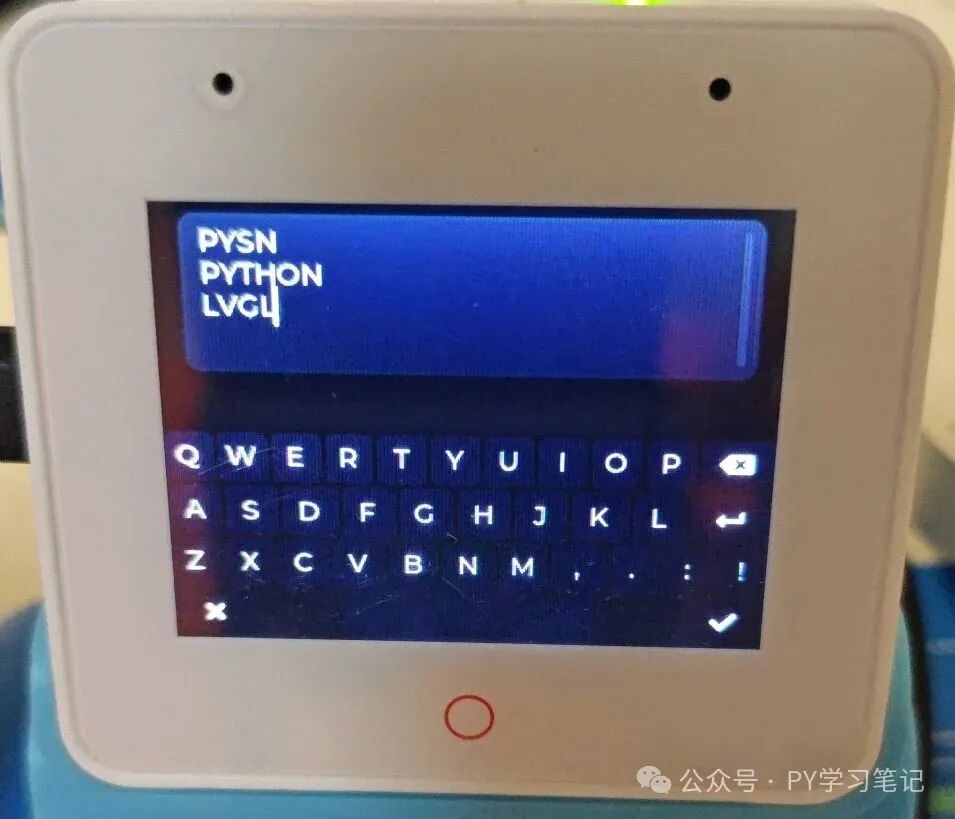
Previous articles introduced how to flash the <span>ESP32S3-BOX3</span> with <span>LVGL-Micropython</span> firmware, showcasing examples of a clock dial, tab view, button examples, and menu examples. This note will continue to share a keyboard example based on <span>LVGL-Micropython</span>.
1. Introduction to ESP32S3-BOX3
The ESP32-S3-BOX-3 is an open-source AIoT development kit equipped with the ESP32-S3 chip, featuring <span>16 MB Quad Flash and 16 MB Octal PSRAM</span>. It has a 2.4-inch SPI display (320×240 resolution, with a capacitive touch panel), dual digital microphones, a speaker, a Type-C port, and a high-density PCIe connector for hardware expansion.
The ESP32-S3-BOX-3 also offers a variety of accessories, with the sensor accessory <span>ESP32-S3-BOX-3-SENSOR</span> integrating temperature and humidity sensors, infrared transmitters and receivers, radar sensors, etc., making it suitable for various development scenarios.

2. LVGL-Micropython Firmware
Referring to “Compile an LVGL-Micropython Firmware in Three Simple Steps“, the firmware suitable for ESP32S3-BOX3 was compiled. The compilation command is:<span>python3 make.py esp32 clean BOARD=ESP32_GENERIC_S3 BOARD_VARIANT=SPIRAM_OCT --flash-size=16 DISPLAY=ili9341 INDEV=gt911</span>
Due to the complexity of the screen and touch drivers in LVGL-Micropython, we encapsulated it into a driver module <span>screen.py</span>. This module allows for easier initialization of the display and touch, thus simplifying the development process.
Download link: QQ group or https://gitee.com/py2012/esp32-s3-box3.git
LVGL version: 9.2.2
Micropython version: 1.24.1
Note: LVGL 9.2.2 + Micropython 1.25 is unstable and cannot be used normally at this time.
3. Example Code
LVGL provides a wealth of examples (Examples — LVGL Documentation), but unfortunately, the examples for LVGL version 9.2 only support C language. If you want to program using MicroPython, it is recommended to combine the C language examples from version 9.2 with the MicroPython examples from version 8.2 (Examples — Baiwen LVGL Chinese Tutorial Documentation) to write code.
The keyboard example code is as follows:
import lvgl as lv
import screen
import time
# Initialize screen
scrn = lv.screen_active()
scrn.set_style_bg_color(lv.color_hex(0x000000), 0)

def lv_example_keyboard_2():    # Create AZERTY keyboard layout    kb_map = [        "Q", "W", "E", "R", "T", "Y", "U", "I", "O", "P", lv.SYMBOL.BACKSPACE, "\n",        "A", "S", "D", "F", "G", "H", "J", "K", "L", lv.SYMBOL.NEW_LINE, "\n",        "Z", "X", "C", "V", "B", "N", "M", ",", ".", ":", "!", "\n",        lv.SYMBOL.CLOSE, " ", " ", " ", lv.SYMBOL.OK, None    ]
    # Set button relative widths and other controls    kb_ctrl = [        4, 4, 4, 4, 4, 4, 4, 4, 4, 4, 6,        4, 4, 4, 4, 4, 4, 4, 4, 4, 6,        4, 4, 4, 4, 4, 4, 4, 4, 4, 4, 4,        2, lv.buttonmatrix.CTRL.HIDDEN | 2, 6, lv.buttonmatrix.CTRL.HIDDEN | 2, 2    ]
    # Create keyboard    kb = lv.keyboard(scrn)
    # Set keyboard mapping    kb.set_map(lv.keyboard.MODE.USER_1, kb_map, kb_ctrl)
    # Set keyboard mode    kb.set_mode(lv.keyboard.MODE.USER_1)
    # Create text area    ta = lv.textarea(scrn)    ta.align(lv.ALIGN.TOP_MID, 0, 10)    ta.set_size(lv.pct(90), 80)    ta.add_state(lv.STATE.FOCUSED)
    # Associate keyboard with text area    kb.set_textarea(ta)
# Create keyboard example
lv_example_keyboard_2()
Correction: lvgl_Micropython does not require the use of while True, the main loop in the previous code of “ESP32S3-BOX3 Implementing Clock Dial Based on LVGL” can be removed.
Recommended Reading:
- ESP32S3-BOX3 Menu Example Based on LVGL
- ESP32S3-BOX3 Resource Manager Based on LVGL
- ESP32S3-BOX3 Button Example (Recording and Playback) Based on LVGL
- ESP32S3-BOX3 Clock Dial Implementation Based on LVGL
- ESP32 Handheld Device Image Rotation and Scaling Based on LVGL
- ESP32 Handheld Device Curve Graph Effect Based on LVGL
- ESP32 Handheld Device Temperature Meter Effect Based on LVGL
- Practical ESP32C3 Breakout Game Based on LVGL-Micropython
- Practical ESP32C3 Touch Control Screen Backlight Brightness Based on LVGL-Micropython
- Practical ESP32C3 Dynamic Temperature and Humidity Meter Based on LVGL-Micropython
-
Practical ESP32C3 Simple Level Meter Based on LVGL
-
Practical ESP32S3: Simple Music Player Based on LVGL
