★
Embedded AI Series – Installing RKNN-Toolkit (Twisted Pitfall Version)
”
1 Purpose
- The main purpose of installing RKNN-Toolkit is to convert existing models into the RKNN format supported by RKNPUs.
- As for other functionalities of RKNN-Toolkit, such as accuracy, performance, and memory usage evaluations, these are generally handled by algorithm engineers. If interested, further study is recommended.
2 Notes
- This document fully records the entire process of setting up the RKNN-Toolkit development environment, including various pitfalls. Therefore, the following steps also include incorrect commands. If readers are not concerned about these twisted experiences and just want to quickly install RKNN-Toolkit, please refer to the next article “Embedded AI Series – Installing RKNN-Toolkit (Smooth Version)”.
3 Preparing the Development Environment
- Git repository: https://github.com/rockchip-linux/rknn-toolkit
- It is best to have an x86 Linux server: developers who are already employed can use the company’s idle server, and then deploy an Ubuntu container using Docker. In the container, you can experiment freely without affecting the host environment.
4 Downloading the RKNN-Toolkit Installation Package
4.1 Enter the Docker container of the Linux server environment (with root privileges), execute the following command to create a working directory and enter it
# mkdir -p /work/workbench/rk/download; cd /work/workbench/rk/download 4.2 Download and extract the RKNN-Toolkit compressed package
# wget https://github.com/rockchip-linux/rknn-toolkit/releases/download/v1.7.5/rknn-toolkit-v1.7.5-packages.tar.gz# tar xvzf rknn-toolkit-v1.7.5-packages.tar.gz -C ..4.3 Download the example code documentation and other compressed packages (for backup)
# wget https://github.com/rockchip-linux/rknn-toolkit/archive/v1.7.5.tar.gz5 Installing RKNN-Toolkit
This section refers to the document “RKNN SDK Quick Start Guide” section 3 for quick start on Ubuntu platform.
5.1 Install dependencies such as python3, pip3, etc.
# apt-get install python3# apt-get install python3-pip5.2 Enter the directory where RKNN-Toolkit was extracted
# cd ../packages/5.3 Install Python dependencies as described in the “RKNN SDK Quick Start Guide”
# pip3 install tensorflow==1.14.0 // Installation failed# pip3 install mxnet==1.5.0# pip3 install torch==1.10.0+cpu -f https://download.pytorch.org/whl/torch_stable.html // Installation failed# pip3 install torchvision==0.11.0+cpu -f https://download.pytorch.org/whl/torch_stable.html // Installation failed# pip3 install gluoncvPitfall
- Both deep learning frameworks TensorFlow and PyTorch failed to install due to outdated versions or incompatibility with the newly installed python3. Temporarily install newer versions:
# pip3 install tensorflow-
During the installation of TensorFlow, there were errors, as shown in the image below:

Reason: The previously installed MXNet 1.5.0 is incompatible with the current installed NumPy version 2.1.3. Upgrade MXNet with the following command:
# pip3 install --upgrade mxnet# pip3 install tensorflow // For safety, execute again# pip3 install torch --index-url https://download.pytorch.org/whl/cpu# pip3 show torch // Show the currently installed torch version is 2.7.1+cpu# pip3 install torchvision==0.18.1+cpu -f https://download.pytorch.org/whl/torch_stable.html // Install the TorchVision version that matches PyTorch, this command will actually reinstall torch5.4 Attempt to install RKNN-Toolkit
# pip3 install rknn_toolkit-1.7.5-cp36-cp36m-linux_x86_64.whlPitfall
- Installation error, indicating “not supported”, as shown in the image below:

At this point, I was confused and didn’t know where to start…
I found documentation on GitHub:
“Rockchip_Trouble_Shooting_RKNN_Toolkit_V1.7.5_CN.pdf”,
After reading, I understood that the RKNN-Toolkit installation package depends on the Python version, and the package name contains the corresponding Python version number.
There is also a document:
“Rockchip_User_Guide_RKNN_Toolkit_V1.7.5_CN.pdf”,
which mentions the image installation method, but unfortunately, I couldn’t find the Docker image and had to install it manually.
5.5 Clean up the environment before manual reinstallation
I also observed the contents of the packages directory and found several dependency description files:
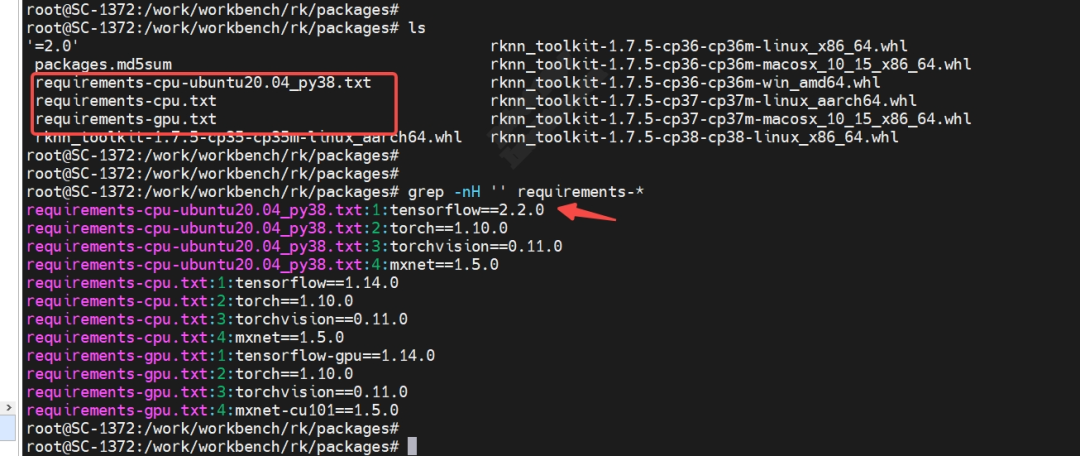
The previous steps have proven that TensorFlow 1.14.0 can no longer be installed. Only the version requirements in requirements-cpu-ubuntu20.04_py38.txt are relatively new. I will try to reinstall according to this dependency and update to Python 3.8.
Execute the following commands to clean up the environment:
# pip3 uninstall -y tensorflow tensorflow-gpu keras  # Uninstall TensorFlow and related packages# pip3 uninstall -y mxnet                            # Uninstall MXNet # pip3 uninstall -y torch torchvision torchaudio     # Uninstall the entire PyTorch family
# rm -rf ~/.cache/pip                                # Clean cache# rm -rf ~/.local/lib/python3.*/site-packages/*torch*# rm -rf ~/.local/lib/python3.*/site-packages/*tensorflow*# rm -rf ~/.local/lib/python3.*/site-packages/*mxnet*
# pip3 list | grep -E "tensorflow|mxnet|torch|keras"  # Verify uninstallation results
5.6 Install Python 3.8 version
Use the following command to install:
# apt update# apt install python3.8 python3.8-venvPitfall
- Error: “E: Package ‘python3.8’ has no installation candidate“
Adjust the installation command:
# apt update# apt install software-properties-common# add-apt-repository ppa:deadsnakes/ppa # Add deadsnakes PPA (which contains multiple Python versions)# apt update# apt install python3.8 python3.8-dev python3.8-venv# python3.8 --version # Should display Python 3.8.x5.7 Create a virtualenv environment
Currently, two Python versions are installed: 3.10 and 3.8. Now, use a Python virtual environment to create an isolated environment for this project to solve dependency version conflicts between different projects.
# apt install virtualenv # Install virtualenv# virtualenv -p python3.8 myenv # Create a Python 3.8 virtual environment# source myenv/bin/activate # Activate the environment(myenv) # python --version # Verify: should display 3.8.xps: If in a virtual environment, the command line prompt will show the environment name:

5.8 Install dependencies in the Python virtual environment
Execute the following commands:
(myenv) # pip3 -V # Check if pip path points to myenv, the response should include the string "python 3.8"(myenv) # pip3 install -r requirements-cpu-ubuntu20.04_py38.txt # Install dependenciesThe installation takes a long time and may have interruption errors:
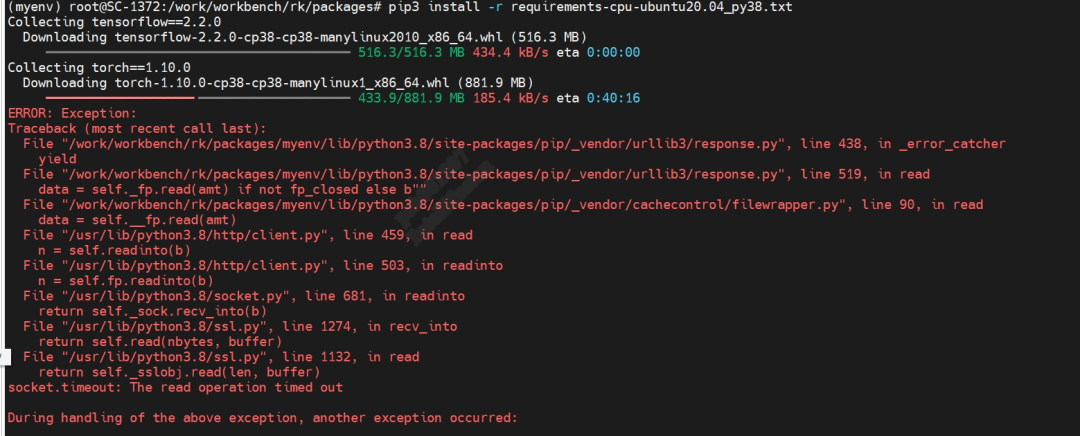
It seems to be a network IO issue. I tried to execute the command again, but still encountered pitfalls with dependency conflicts:
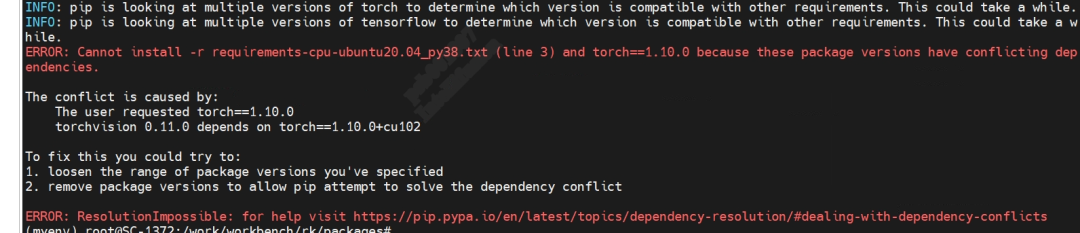
As described in “the conflict is caused by”, the reason for this conflict is that torchvision 0.11.0 depends on torch==1.10.0+cu102, which is inconsistent with the dependency file’s torch==1.10.0. I will try to install manually:
(myenv) # pip3 install torch==1.10.0+cpu torchvision==0.11.0+cpu -f https://download.pytorch.org/whl/torch_stable.html(myenv) # pip3 install tensorflow==2.2.0(myenv) # pip3 install mxnet==1.5.05.9 Install RKNN-Toolkit in the Python virtual environment
(myenv) packages# pip3 install rknn_toolkit-1.7.5-cp38-cp38-linux_x86_64.whlThis takes a long time and may also encounter network issues with interruption errors:

Re-executing the above command will eventually print success:
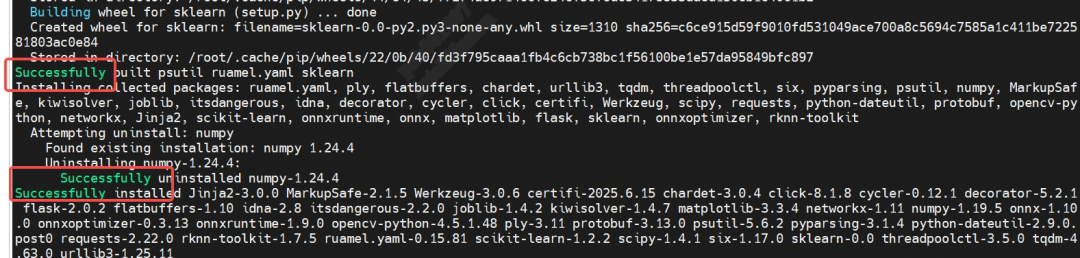
5.10 Verify if RKNN-Toolkit is installed successfully
Verify the successful installation of RKNN-Toolkit by executing the command to list connected devices.
(myenv) # python3 -m rknn.bin.list_devices I do not have a development board on hand, so there are no connected devices, but the RKNN-Toolkit version is printed, indicating that RKNN-Toolkit has been installed successfully:
<img src=”https://mmbiz.qpic.cn/sz_mmbiz_png/nSt9FfLSGic9GDVuTNBBaJwSHRJeeKA2IHeUQEGePAgu9xMibKiaguRTHzDWUwsPt9nSKRYACaxGPojraP2daOagA/640?wx_fmt=png&from=appmsg”