Are you interested in DIY electronics but deterred by the high prices of various instruments? I recently got into DIY and was considering purchasing an oscilloscope when I stumbled upon a treasure project—EMBO (EMBedded Oscilloscope). For just six dollars (USD), you can transform an STM32 into an oscilloscope, logic analyzer, voltmeter, counter, PWM/signal generator… it’s cost-effective and fun, and I must share it with everyone!
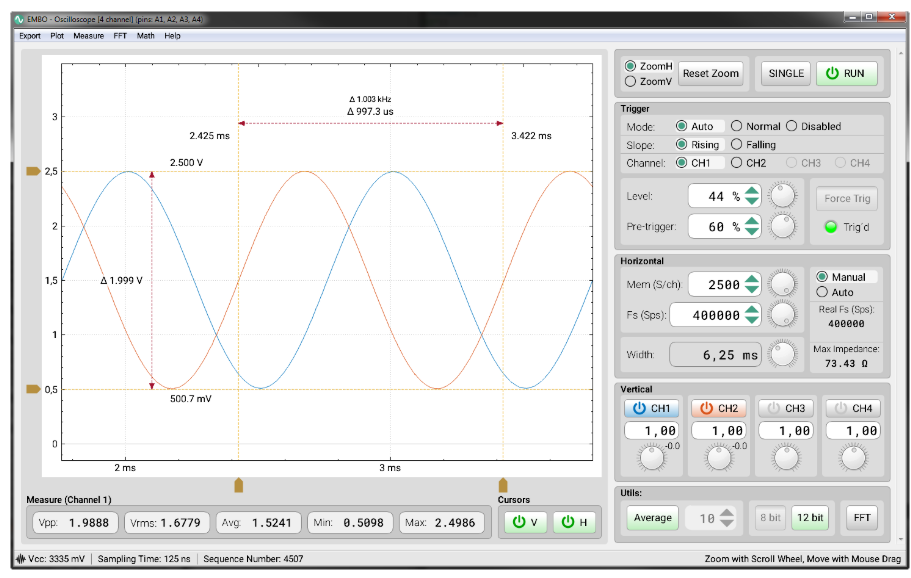
What is EMBO? EMBO, short for EMBedded Oscilloscope, is not just an oscilloscope; it is an embedded all-in-one measurement platform consisting of three main devices and three auxiliary devices:
- • Main Devices:
- • Oscilloscope (Scope)
- • Logic Analyzer
- • Digital Voltmeter
- • Auxiliary Devices:
- • Frequency Counter
- • PWM Waveform Generator
- • General Signal Generator
The PC software is written in C++/Qt and supports Windows, Linux, and macOS. The firmware provides HEX packages for STM32 series (F1, F3, L4), with L0 and G0 series also in experimental stages. It is open-source under the MIT license, allowing for extensive customization.
What Problems Does EMBO Solve? Common confusions in electronic DIY:
- • Do I have to spend a lot of money to buy a high-end instrument?
- • Do I need to buy separate oscilloscopes, logic analyzers, voltmeters… it’s too painful!
- • Poor portability; carrying a bunch of tools for on-site debugging is cumbersome…
EMBO addresses multiple needs at once:
- 1. Cost and Space Saving: With STM32 and a few components, you can have a multifunctional “instrument panel” at a total cost that will make you smile.
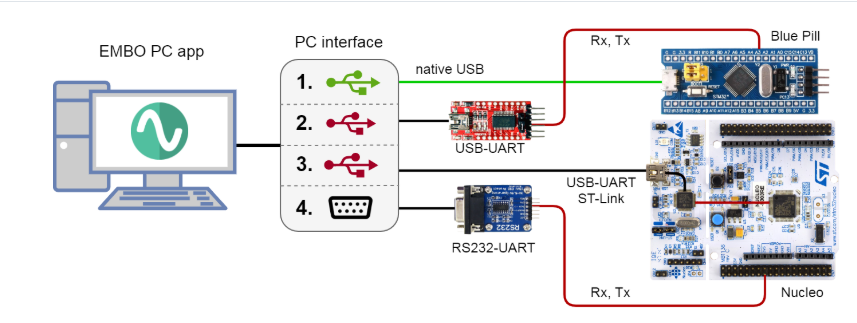
- 2. High Portability: A small blue board (Blue Pill) or Nucleo-64 can be plugged into a computer for measurement.
- 3. Easy Expansion: Open-source firmware can be easily flashed, allowing for new features and interface optimizations without pressure.
In fact, EMBO is like giving you a small laboratory, allowing you to play with signal measurement and generation for minimal cost.
How to Install and Use?
- 1. Hardware Preparation
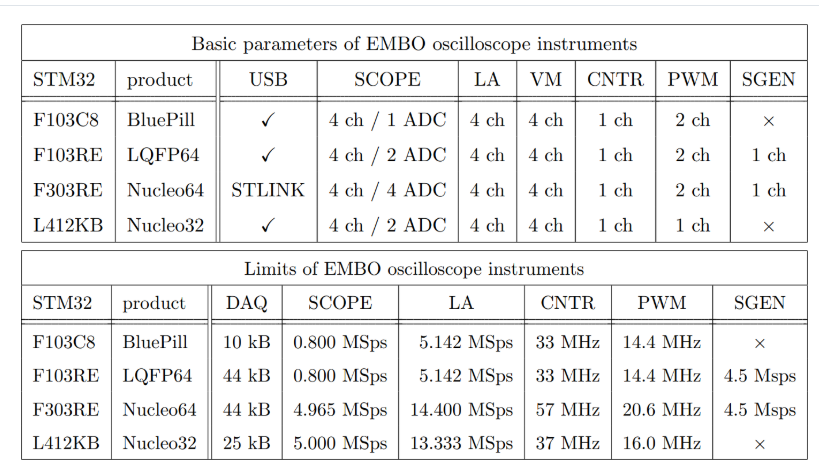
- • One STM32F103C8 (Blue Pill), STM32F303RE (Nucleo-64), or STM32L412KB; a small board can be obtained for just a few dollars;
- • A USB to serial (or ST-LINK) cable;
- • If you want to use the signal generator, the MCU must have a DAC (like F303RE).
- • Download the latest HEX:
st-flash write embo_firmware.hex 0x8000000(Alternatively, you can use STM32CubeProgrammer or OpenOCD.)
- • Windows: Double-click the installer;
- • Linux/Mac: Extract and run
<span>./EMBO</span>; - • The interface is based on Qt5, and all dependencies are packaged.
- • Plug in the device and use a serial tool to check the port;
- • Open the EMBO application, select the port on the left, and click “Connect”;
- • The status bar at the top will display the MCU model, firmware version, communication latency, and uptime.
- 5. Experience Auxiliary Functions
- • Counter: Slow/Fast modes, capable of measuring signals up to MHz;
- • PWM Generator: 1–2 synchronized channels, adjustable frequency, duty cycle, and phase offset;
- • Signal Generator: Six modes including constant, sine, triangle, sawtooth, square wave, and noise, with amplitude/offset display.
Pros and ConsPros:
- • Budget-friendly: Hardware costs as low as a few dollars;
- • Comprehensive functionality: Six devices included;
- • Open-source and customizable: Both firmware and PC side can be developed further;
- • Cross-platform: Compatible with Win/Linux/macOS;
Cons:
- • Limited hardware performance: Maximum sampling rate and memory depth do not match high-end desktop instruments;
- • UART transmission bottleneck: High data volumes may result in delays of hundreds of ms;
- • Experimental nature: Some MCU series features are still being refined;
- • Learning curve: Requires knowledge of flashing firmware and using serial ports to get started.
ConclusionOverall, EMBO provides electronic enthusiasts with a “universal key”: it can serve as an oscilloscope, logic analyzer, voltmeter, and can also handle signal generation, PWM control, and frequency counting. Don’t compare it to high-end desktop instruments costing thousands; its charm lies in being user-friendly and affordable. Whether you want to debug at home, in a factory, or a lab, or if you want to flash firmware and modify source code for customization, EMBO can meet your needs. If you want to save money while having functionality, give this open-source gem a try!
Project Address: https://github.com/parezj/EMBO