Connecting the “Meridians” of Microcontrollers: Discussing Serial Communication
Getting Acquainted: What is Serial Communication?
Imagine you have a message to tell your friend across the room. You have two ways to do it:
-
Shouting: Sending out 8 messengers at once, each holding a sign to spell out the complete message. This is parallel communication, fast but requires many people (uses many I/O ports).
-
Whispering: You send just one messenger to lean in and tell the message one bit at a time. This is serial communication. It saves people but requires clarity in every detail.

Serial communication is this “whispering” method. It has two core characteristics:
-
Serial: Data is lined up in a queue, transmitted one bit at a time.
-
Asynchronous: The communicating parties do not have a unified “heartbeat” or “metronome”. They simply agree in advance: “I will speak at a speed of 9600 bits per second, and you will listen at that same pace.” This agreed speed is famously known as “baud rate”.
Rules of the Game: What Does a Data Frame Look Like?
Since it’s whispering, it can’t be random; it must have a fixed format, just like a letter needs an envelope. Each data frame in serial communication is a standard “envelope”:
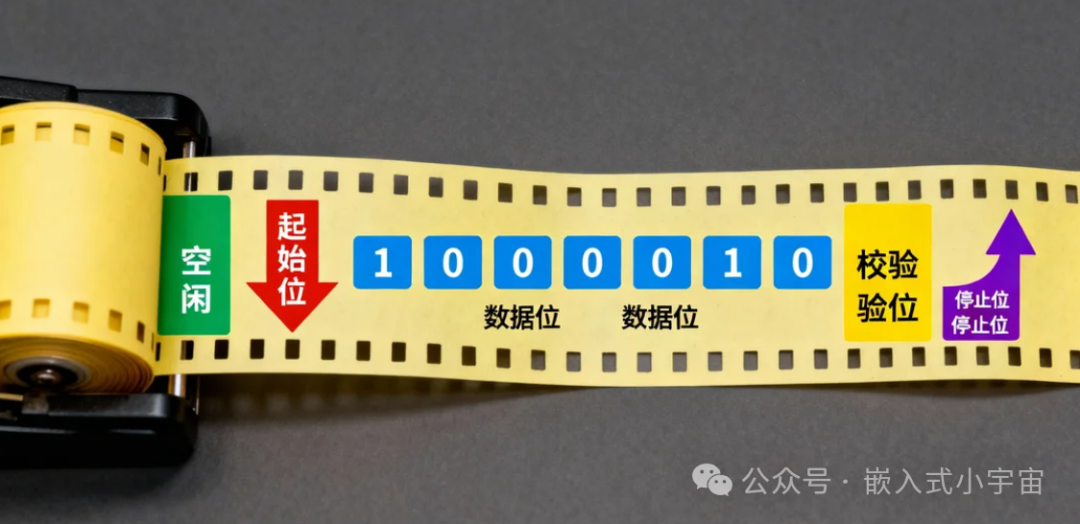
[ Line Idle ] -> [ Shouting "Start!" ] -> [ Core Content ] -> [ Error Check Code ] -> [ Shouting "End!" ]Breaking it down:-
Start Bit (Shouting “Start!”): The communication line is normally high (1), like a quiet standby state. To start talking, it first pulls down to low (0), equivalent to shouting “Hey! Attention!” to inform the receiver: “I am about to start speaking!”
-
Data Bit (Core Content): Next comes the actual data you want to send, usually 7 or 8 bits.And it starts from the least significant bit (LSB), like an impatient person, revealing the smallest details first.
-
Parity Bit (Error Check Code): An optional simple “code”. For example, agreeing that “the number of ‘1’s in this sentence is always even” (even parity). If the receiver counts and finds it odd, they know there was an error in transmission.
-
Stop Bit (Shouting “End!”): Finally, it must maintain one or one and a half high bits (1), loudly announcing: “I am done speaking!” Then the line returns to idle, waiting for the next communication.
Remember, both parties must adhere to the same rules: the same baud rate, the same data bits, the same parity method, and the same stop bits. The classic combination is <span>9600-8-N-1</span>, known as the “Mandarin” of the embedded world.
Hardware Realm: TX, RX, and “Talking Past Each Other”
Serial communication primarily relies on two pins:
-
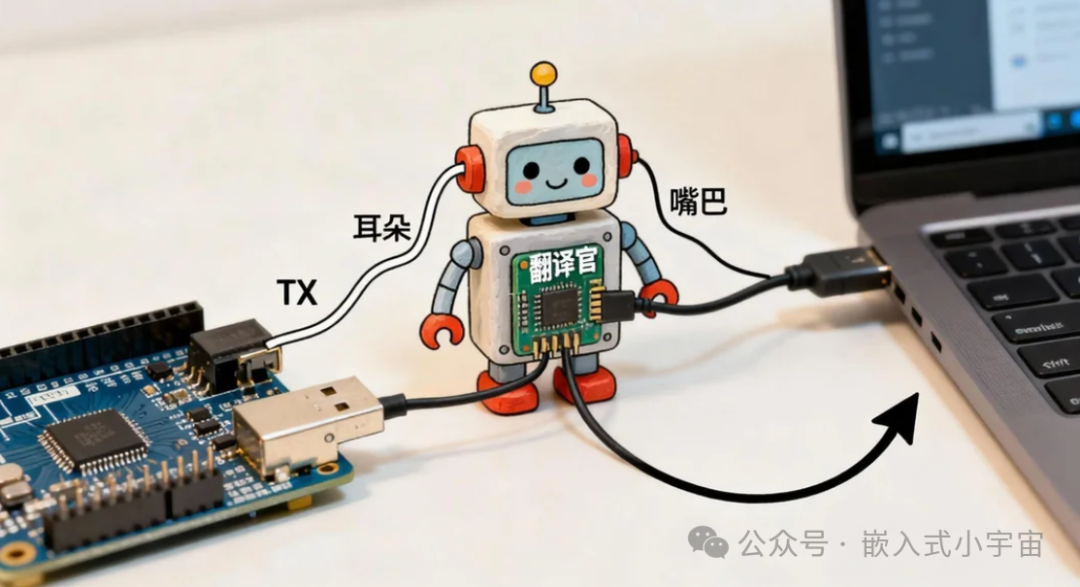
TX (Transmit): The “mouth” of the data.
-
RX (Receive): The “ear” of the data.
When connecting, remember the first rule of the realm:Your TX must connect to the other party’s RX, your RX must connect to the other party’s TX, and GND (ground) must be connected together. This is “cross-connection”, like making a phone call, your receiver must align with my transmitter.
⚠️ Important Warning: The “Language Barrier” of LevelsThe microcontroller’s serial port speaks the TTL level dialect (0V represents 0, 3.3V/5V represents 1). Meanwhile, the old computer’s serial port (COM port) speaks the RS-232 level standard language (-3~-15V represents 1, +3~+15V represents 0). If you let a microcontroller that speaks dialect directly communicate with a computer that speaks standard language, it will definitely be “talking past each other”, and may even damage the circuit! Therefore, you must employ a “translator”—USB to TTL module. This small module perfectly solves the level conversion and USB protocol conversion issues, making it an essential tool for debugging serial communication.
Code Realm: Polling vs. Interrupts, Two Work Attitudes
In the world of microcontroller programming, there are two classic “work attitudes” for handling serial data:
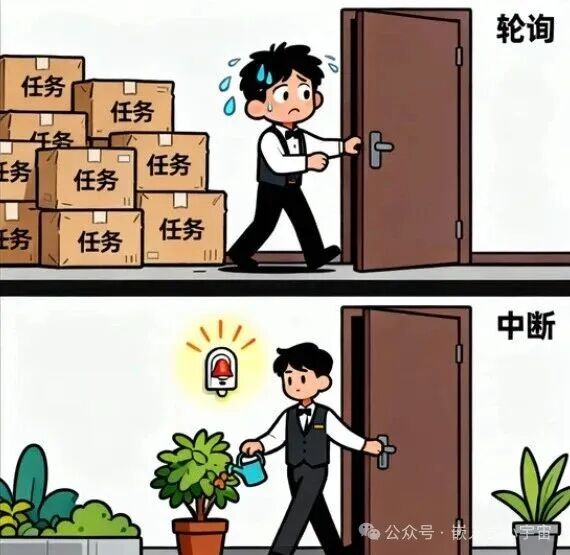
1. Polling Mode: The Diligent “Doorman”
Like a diligent doorman, he keeps running to the door to check: “Is there data coming? Can I send the next data?”
c
// Pseudo code example: Sending a string
void sendMessage(char* msg){
while(*msg != '\0'){
while(!(UART_STATUS & READY_TO_SEND));// Keep checking: Is it ready?
UART_DATA = *msg;// Ready, hurry and send!
msg++;
}
}
Advantages: Simple and straightforward program, beginner-friendly.
Disadvantages: CPU time is spent on "waiting", low efficiency, cannot multitask.
2. Interrupt Mode: The Smart “Housekeeper”
The housekeeper does not need to keep an eye on the door; he can handle other chores. But he has installed a doorbell (interrupt) at the door. When data arrives, the doorbell rings, and the housekeeper temporarily puts down his current task to handle the data, then returns to continue.
c
// Pseudo code example: Interrupt reception
volatile char receivedData;
void UART_Interrupt_Service(){
if(data_arrived){
receivedData = UART_DATA;// Read data// Notify main program: New message!
}
}
int main(){
// Initialize serial port and turn on the "doorbell" (enable interrupt)
setup_UART();
enable_interrupts();
while(1){
// Main program can safely blink LED, read sensors...
if(newMessageArrived)
{
handleMessage(receivedData);// Process received message
}
}
}
Advantages: High CPU efficiency, can handle multiple tasks simultaneously, strong real-time performance.
Disadvantages: More complex program structure, needs to manage data sharing between interrupt service routine and main program.
Advanced Techniques: On more powerful microcontrollers (like STM32), you can even employ a “super courier”—DMA. It can automatically handle large data transfers without disturbing the CPU (housekeeper), achieving efficient data throughput.
Application Realm: Creating Your Communication Protocol
When you need to transmit complex data (like temperature, humidity, control commands), a simple “envelope” is not enough. You need to establish your own “communication protocol”, just like designing a well-structured official document:

-
Frame Header: For example,
<span>0xAA, 0x55</span>, like the “red header” of an official document, used to identify the start of a frame. -
Data Length: Indicates how much data follows, preventing over-receiving or under-receiving.
-
Command Word: What is this frame of data for? Is it querying temperature or controlling a motor?
-
Data Payload: The actual useful information, such as
<span>25.6</span>(temperature value). -
Checksum/CRC: A complex “anti-counterfeiting code” used to ensure the entire frame of data is intact during transmission.
A well-designed protocol is the cornerstone of stable project operation.
Conclusion
Serial communication, a perennial tree in the embedded realm, seems simple but contains profound mysteries. From understanding bit streams to skillfully using interrupts and DMA, from connecting USB to TTL modules to designing robust communication protocols, each step is an engineer’s training.
I hope this “guide to the realm” helps you have a smoother “conversation” with microcontrollers next time!