BACnet Slave to PROFIBUS Slave– ADFWEB Gateway Converter– Guangzhou Xinyu IoT
Author: www.adfweb.com.cn Zou Wuyi Mobile185-020-77899 Email[email protected]
1 Features:
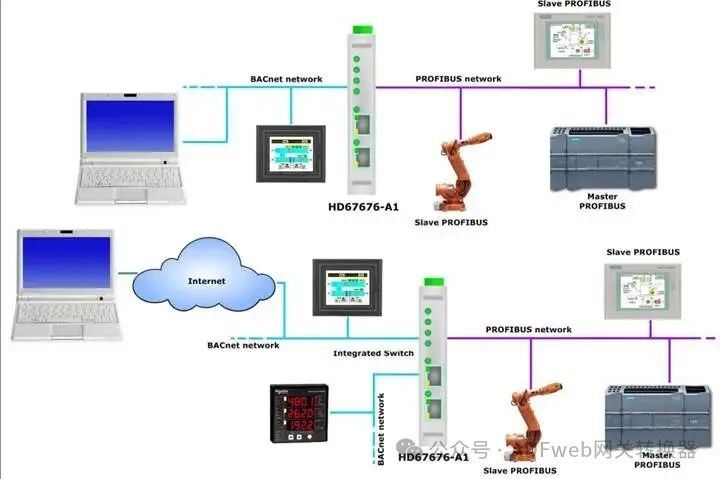
HD67676 is a BACnet Slave/ PROFIBUS Slave converter.
It has the following features:
• Supports up to2000 BACnet objects (read/write);
• Provides triple isolation betweenBACnet and power,BACnet and PROFIBUS, power and PROFIBUS;
• Supports bidirectional information transmission betweenBACnet and PROFIBUS;
• Can be installed on a35mm DIN rail;
• Wide power input range:8…24V AC or 12…35V DC;
• Wide operating temperature range:-40°C / 85°C [-40°F / +185°F];
Configuration:
You need to install the Compositor SW67676 software on your PC to perform the following:
• Define parameters for theBACnet line;
• Define parameters for thePROFIBUS line;
• Define BACnet objects for receiving data from PROFIBUS master;
• Define BACnet objects for sending data to PROFIBUS master;
• Update the device.
2 New Configuration / Open Configuration:
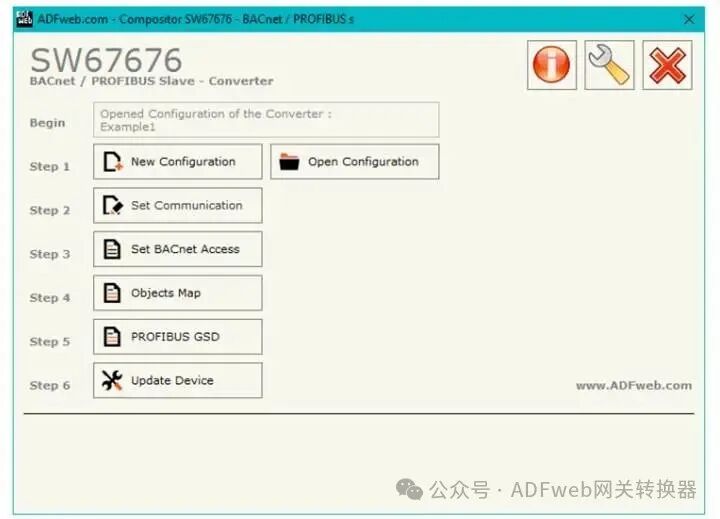
Clicking the “New Configuration” button will create a folder containing all configuration information for the device.
The device configuration can also be imported or exported:
If you need to clone a programmable “BACnet Slave/PROFIBUS Slave converter” configuration to configure another device in the same way, you must keep the folder and all its contents;
If you need to clone a project to obtain different versions of that project, simply copy and rename the project folder, then open the new folder using the “Open Configuration” button.
3 Communication Settings:
This section defines the basic communication parameters for the two types of buses (BACnet and PROFIBUS).
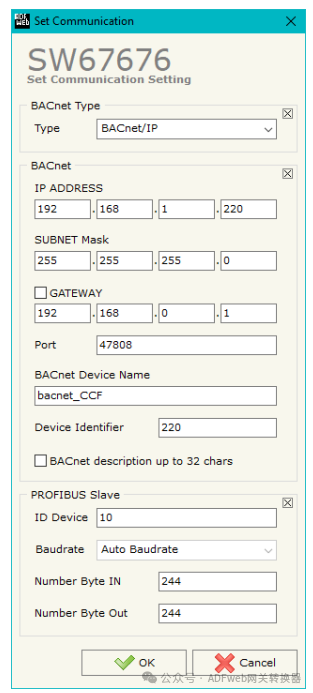
In the SW67676 main interface, click the “Set Communication” button (see Figure 2), which will pop up the “Communication Settings” window (see Figure 3). This window is divided into three areas:BACnet type selection area,BACnet parameter configuration area, andPROFIBUS parameter configuration area.
In the “BACnet Type“ area, you can select the availableBACnet types:
• BACnet/IP (Ethernet-based)
• BACnet MS/TP (RS485-based)
BACnet parameter field descriptions are as follows:
• “IP Address“: Defines the IP address on the BACnet/IP side of the converter.
• “Subnet Mask”: Defines the subnet mask of the converter.
• “Gateway”: Defines the default gateway for the network. This function can be enabled/disabled by checking the checkbox, which is used for network exit.
• “Port”: Defines the port number used for BACnet communication.
• “BACnet Device Name“: Defines the name on the BACnet side of the converter.
• “Device Identifier”: Defines the identifier on the BACnet side of the converter.
If you check the “BACnet Description (up to 32 characters)”, the converter name can be set to a maximum of 32 characters.
PROFIBUS Slave parameter field descriptions are as follows:
• “Device ID”: Defines the device identification number on the PROFIBUS side.
• “Baud Rate”: Fixed to “Auto Baud Rate”
• “Input Byte Count”: Defines the number of input bytes on the PROFIBUS side (maximum 244 bytes).
• “Output Byte Count”: Defines the number of output bytes on the PROFIBUS side (maximum 244 bytes).
4 Set BACnet Access Rights:
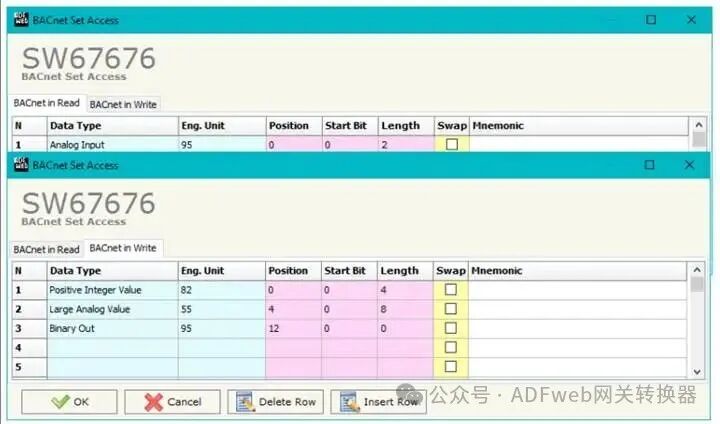
By clicking the “Set BACnet Access” button in the main window of SW67676 (Figure 2), the “BACnet Access Settings” window will pop up (Figure 4).
This window is divided into two parts: the “BACnet Readable” part contains BACnet objects that can be read by the BACnet master (the PROFIBUS data associated with these objects is written by the PROFIBUS master); the “BACnet Writable” part contains BACnet objects that can be written by the BACnet master (the PROFIBUS data associated with these objects is read by the PROFIBUS master).
The meanings of the fields in the window are as follows:
In the “Data Type” field, define the data type of the BACnet object;
In the “Engineering Unit” field, double-clicking will pop up the “Select BACnet Engineering Unit” window (Figure 5);
In the “Location” field, define the byte where data is read/saved from the PROFIBUS array;
In the “Starting Bit” field, define the specific bit in the selected location (for binary objects);
In the “Length” field, define the byte size of the BACnet object (in the “BACnet Writable” part, this field is not editable);
If the “Swap” field is checked, byte swapping will occur when transferring data between the BACnet object and the master;
In the “Mnemonic” field, define the description of the object.