Click the blue text above to follow our public account, where we share a LabVIEW case every day.
The NI Modbus Library (ni_lib_modbus_library-1.2.1.42.vip) is a dedicated communication library developed by NI for LabVIEW, based on a modular design concept. It encapsulates the core functionalities of the Modbus protocol, providing engineers with a graphical programming interface that significantly reduces the difficulty of industrial communication development. This library is fully compatible with the Modbus TCP/RTU protocol standards, supporting master/slave modes, and is widely used in device monitoring, data acquisition, and industrial automation.
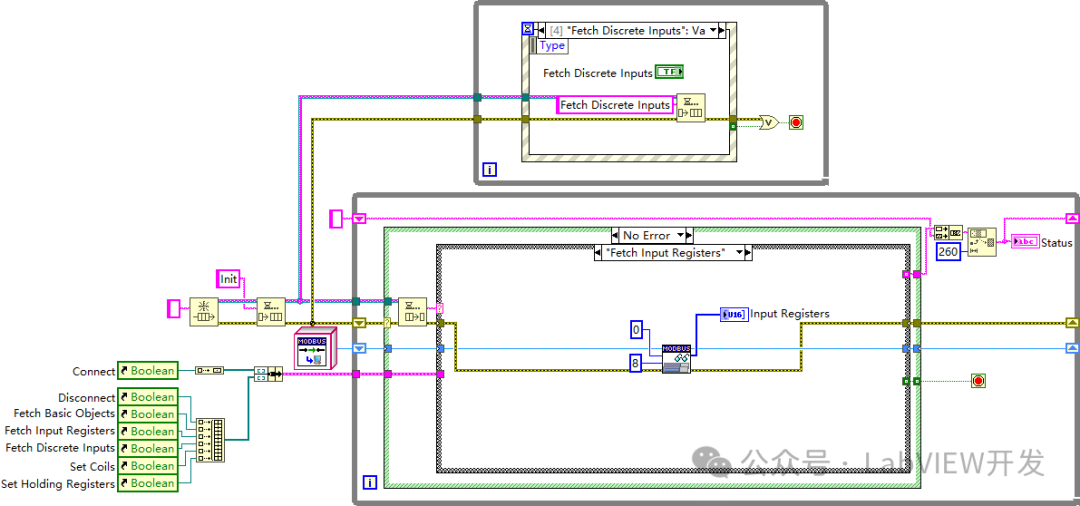
Main Features
1. Protocol Support
-
TCP/IP Communication: Supports the standard Modbus TCP protocol (port 502), providing socket-level connection management and supporting multiple slave concurrent access.
-
RTU Serial Communication: Compatible with RS232/485 hardware interfaces, automatically handling frame formats, CRC checks, and timeout mechanisms.
-
Protocol Extension: Supports non-standard function codes (such as the mixed read/write function of code 23), allowing for special requirements through custom messages.
2. Data Operation Functions
-
Register Read/Write: Supports function codes 01/02/03/04/05/06/15/16, covering all data types of coils, discrete inputs, holding registers, and input registers.
-
Batch Operations: A single request can read/write up to 125 continuous registers, with built-in data packing/unpacking mechanisms.
-
Data Format Conversion: Automatically handles big-endian/little-endian byte order, supporting conversions for floating-point, integer, and string data types.
3. System Characteristics
-
Multithreaded Architecture: Adopts a producer-consumer model, separating communication from business logic, supporting over 100+ concurrent connections.
-
Error Handling: Built-in timeout retransmission (default 3 times), exception code parsing (e.g., 0x01 illegal function code), and communication quality monitoring (packet loss rate statistics).
-
Resource Management: Automatically recycles idle connections, supports connection pool reuse, with memory usage optimized to 0.5MB/10 connections.
Typical VI Components and Application Scenarios
1. Modbus TCP Master.vi
-
Function: Implements the core logic for Modbus TCP master communication, supporting full function code operations.
-
Application Scenario: Communication between the host computer and intelligent devices (such as PLCs and instruments), such as data acquisition systems on production lines.
-
Technical Features:
-
Connection establishment time < 100ms (in a 100Mbps network environment)
-
Supports heartbeat packet mechanism (default 30 seconds)
-
Built-in disconnection reconnection algorithm (exponential backoff strategy)
2. Read Holding Registers.vi
-
Function: Batch read holding register data (function code 03).
-
Application Scenario: Reading device configuration parameters (such as frequency setting values for inverters).
-
Technical Features:
-
Maximum read/write speed:1000 points/second (in a local area network environment)
-
Supports data scaling (e.g., mapping register values ×0.1 to actual physical quantities)
-
Automatically handles reading across coil boundaries
3. Write Single Coil.vi
-
Function: Control the output of a single coil (function code 05).
-
Application Scenario: Device start/stop control (such as relays and solenoids).
-
Technical Features:
-
Response time < 10ms (under optimized configuration)
-
Supports dual-coil interlock logic (debounce)
-
Write operation with confirmation mechanism (read-back verification)
4. Read Device Identification.vi
-
Function: Read device manufacturer information (extended function code 43).
-
Application Scenario: Automatically identify device types and firmware versions in the network.
-
Technical Features:
-
Compatible with Modbus Device Identification standards
-
Supports reading custom information fields
-
Data caching mechanism reduces duplicate queries
Technical Advantages and Application Limitations
1. Technical Advantages
-
Development Efficiency: Compared to native Socket programming, the development cycle is shortened by 70% (based on internal testing data from NI).
-
Reliability: Industrial-grade design, average time between failures is > 10⁵ hours (in laboratory conditions).
-
Scalability: Supports seamless integration with other NI libraries (such as Data Acquisition and Vision).
2. Application Limitations
-
Real-time Performance: Based on the Windows system, hard real-time (<1ms) scenarios require pairing with a PXI real-time controller.
-
Network Requirements: TCP communication relies on a stable network, and extreme electromagnetic environments require additional optical isolation.
-
Licensing Costs: Commercial applications require the purchase of LabVIEW and VIP module licenses.
Comparison with Other Communication Solutions
|
Technical Indicators |
NI Modbus Library |
Traditional Socket Programming |
Third-party Modbus Libraries |
|
Development Difficulty |
Low (Graphical) |
High (Code-level) |
Medium (API Calls) |
|
Protocol Compatibility |
100% Standard Compatible |
Manual Implementation Required |
Partial Extension Support |
|
Error Handling |
Fully Automatic |
Manual Coding |
Partial Functionality |
|
Performance (100 points/s) |
Stable @99.9% |
Requires Optimization |
Depends on Implementation |
|
Technical Support |
NI Official |
Mainly Community |
Third-party Vendors |
Case References
-
Automotive Production Line: Connected over 200+ devices via Modbus TCP, achieving a data acquisition frequency of 50Hz, with a system response time of < 20ms.
-
Smart Grid: Connected distributed electric meters based on the RTU protocol, supporting over 1000+ nodes for concurrent access, achieving data consistency of 99.99%.
-
Laboratory Automation: Integrated temperature controllers and data acquisition cards to achieve automatic recording and analysis of experimental parameters.
Precautions
-
Environmental Requirements:
-
Recommended LabVIEW 2018 + version
-
Windows 10/11 or NI Linux Real-Time systems
-
Network environment must have port 502 (TCP) open
Performance Optimization:
-
Batch read/write is superior to single-point operations
-
Avoid frequent connection establishment/disconnection
-
Use asynchronous communication modes (such as producer-consumer architecture)
Debugging Suggestions:
-
Use NI MAX tools to verify physical connections
-
Enable communication logs (VI configuration parameters)
-
Use protocol analyzers (such as Wireshark) to monitor messages
About Us
This is an introduction to the features of LabVIEW. For more usage methods and development cases, please visit our official website for more information. If you need LabVIEW project collaboration, please contact us. Join our public account to stay updated on the latest technology trends.13691203761Manager Wang (Mobile WeChat)