 Arduino Sensor: HS-S01A Infrared SensorArduino Sensor: HS-S02P Infrared Sensor (Obstacle Avoidance)Arduino Sensor: HS-S03P Ultraviolet SensorArduino Sensor: HS-S05P Sound SensorArduino Sensor: HS-F07P Active BuzzerArduino Sensor: HS-S08P Flame SensorArduino Sensor: HS-S09LB Raindrop SensorArduino Sensor: HS-S09PC Soil Moisture Sensor
Arduino Sensor: HS-S10P Mist Sensor
Arduino Sensor: HS-S11-L Gas Sensor
Arduino Sensor: HS-S20P Ambient Light Sensor
Arduino Sensor: HS-S21P Tilt SensorArduino Sensor: HS-S22P Grayscale SensorArduino Sensor: HS-S24P Digital Temperature SensorArduino Sensor: HS-S26A Temperature and Humidity SensorArduino Sensor: HS-S28P Potentiometer
Arduino Sensor: HS-S31P Touch Sensor
Arduino Sensor: HS-S37PS Water Level Sensor
Arduino Sensor: HS-S38P Human Body Sensor
Arduino Sensor: HS-S40P Hall Magnetic Sensor
Arduino Sensor: HS-S45P Barometric Pressure Sensor
Arduino Sensor: HS-S46P Weighing Sensor
Arduino Sensor: HS-S59P Slot Photoelectric Sensor
Arduino Sensor: HS-S70P Heart Rate and Blood Oxygen Sensor
Arduino Sensor: Photoresistor Sensor
Arduino Sensor: Infrared Receiver Module
Arduino Sensor: Infrared Transmitter Module
Arduino Sensor: Clock Module
Arduino Sensor: Rotary Encoder Module
Arduino Sensor: Dual-axis Joystick Module
Arduino Sensor: Gyroscope Module
Arduino Sensor: Voice Broadcast Module
Arduino Sensor: Voice Recognition Control Module
Arduino Communication Module: Bluetooth Module
Arduino Power Module: Motor Driver Module
Arduino Control Module: Self-locking Button ModuleArduino Storage Module: SD Card Module
Arduino Control Module: Conductive Switch Module
Arduino Execution Module: Electromagnet Module
Arduino Detection Module: Ultrasonic ModuleArduino Interaction Module: Button Switch ModuleArduino Display Module: Single Digit DisplayArduino Display Module: Four Digit DisplayArduino Display Module: 8*8 Dot Matrix DisplayArduino Display Module: E-Ink Screen— Previous Recommendations —

01Basic Understanding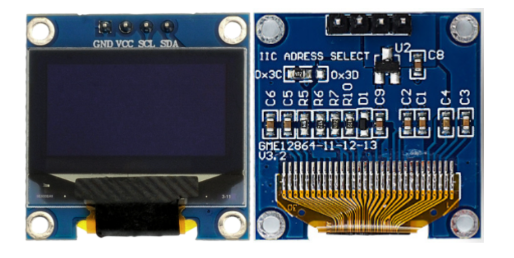 Model:HS-F19-PName:OLED ScreenSeries:Display ModuleDescription: This is a display module equipped with a small-sized OLED (Organic Light Emitting Diode) panel, commonly available in sizes of 0.96 inches / 1.3 inches (depending on the actual product), with a resolution of 128×64 pixels, supporting monochrome / blue-white dual-color display. The core uses the I2C communication protocol and communicates with Arduino through four pins: G (GND), V (VCC), SDA (data), and SCL (clock). The module featureshigh contrast(self-emitting characteristics, pure black background),wide viewing angle(≥160° full viewing angle clarity),low power consumption(static display current only a few mA),fast response(≤10μs, no ghosting), among other advantages, and can display text, graphics, icons, and simple animations, making it an ideal display component for Arduino portable devices and smart controllers.Usage Scenarios:Smart home controllers (e.g., displaying air conditioning temperature, light brightness adjustment interface); industrial equipment status monitoring (e.g., displaying real-time sensor data, equipment operating parameters); primary and secondary school science experiments (exploring the self-emitting principle of OLED, I2C communication protocol), in line with the “General Education Guidelines for Artificial Intelligence in Primary and Secondary Schools (2025 Edition)” practical requirements; portable detection devices (e.g., displaying real-time temperature curves with HS-S24P temperature sensor, displaying pressure values with HS-S45P barometric pressure sensor); wearable device interfaces (e.g., simple smart wristbands displaying time, steps); toy interactive screens (e.g., displaying game graphics, character status).Interdisciplinary Integration:Physics,MathematicsMaterials ScienceInformation TechnologyEthical Education:OLED display content must be accurate and standardized to avoid user operation errors caused by display errors (e.g., industrial equipment parameter display deviations); module production must comply with environmental protection standards, reducing the use of harmful substances in OLED panel manufacturing and minimizing electronic waste pollution; for visually sensitive groups, brightness can be reduced to lessen visual stimulation, reflecting inclusive design; power consumption must be reasonably controlled during use to balance display effects and device endurance; when used outdoors, visibility under strong light conditions must be considered to avoid resource waste; long-term storage must avoid moisture to prevent OLED panel aging and damage.Note: Images are sourced from the internet, and products are based on actual purchases.
02Technical Parameters
Working Principle:
The core of the module consists of an “OLED display panel” and a “dedicated driver chip (e.g., SSD1306)” to achieve high-definition display through I2C communication: Display principle: The OLED panel is composed of numerous organic light-emitting diodes, with each pixel independently emitting light. The driver chip controls the brightness and switching state of the pixels, forming text and graphics; no backlight is needed, relying on self-emission for display, resulting in lower power consumption and higher contrast; communication logic: The SDA (I2C data) pin receives display commands and data (e.g., pixel on/off information) sent by Arduino, while the SCL (I2C clock) pin provides data transmission synchronization timing to ensure accurate data transmission to the driver chip; the driver chip converts the received serial data into parallel signals to control the corresponding pixels of the OLED panel; driver advantages: dedicated driver chips (e.g., SSD1306) have built-in memory and display control logic, supporting various display modes (e.g., horizontal scrolling, vertical scrolling), simplifying Arduino program writing, and also feature brightness adjustment functions to adapt to different usage scenarios.
Parameter Analysis:
G(GND): Power input negative/cathodeV(VCC): Power input positive/anode levelSDA(Serial Data): I2C data pinSCL(Serial Clock): I2C clock pinScreen Specifications: Common sizes of 0.96 inches / 1.3 inches, resolution of 128×64 pixels, supporting monochrome / blue-white dual-color display, OLED self-emitting panelDisplay Characteristics: Contrast ≥1000:1, viewing angle ≥160° (horizontal/vertical), response time ≤10μsOperating Current: Static display current 3-8mA (3.3V), full-screen high-brightness display current ≤20mAOperating Temperature: -20℃~70℃ (suitable for most indoor and outdoor scenarios, with no significant display degradation at low temperatures)Communication Protocol: Standard I2C protocol, default slave address 0x3C or 0x3D (can be switched via hardware jumper)Display Functions: Supports text display, graphic drawing, animation effects (scrolling, blinking), and partial refresh03Code Example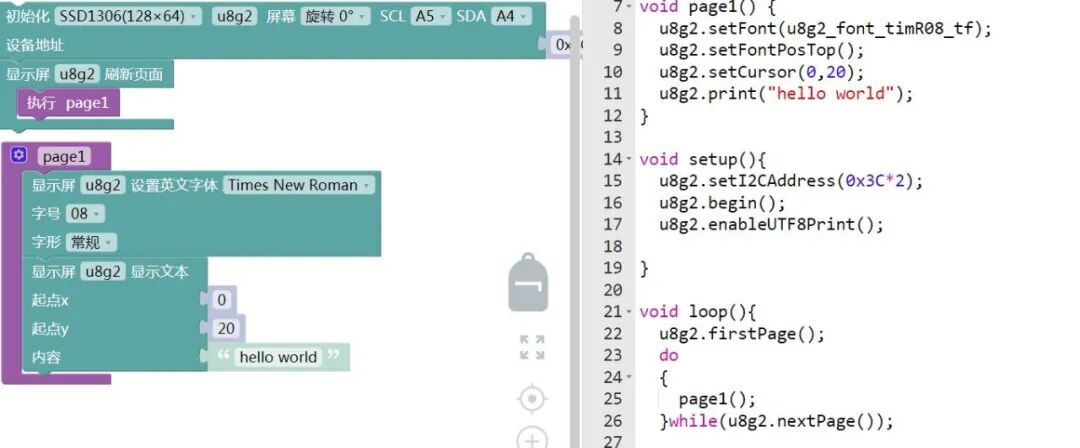
Connect the pins to SCL\A5; SDA\A4.
04Safety Measures
1. Power off before wiring, strictly distinguish pin voltages: If the module only supports 3.3V, do not connect to Arduino 5V pins, otherwise, the OLED panel and driver chip may be damaged; reversing the positive and negative terminals (V to GND, G to V) will directly lead to module failure;
2. Do not touch the surface of the OLED panel with hands: The surface is made of fragile organic materials, touching will leave fingerprints or scratches, affecting display quality, and long-term touching may damage the panel;
3. Avoid using in extreme environments: Do not use in high temperatures (>70℃) or high humidity (relative humidity >85%) for extended periods, as high temperatures accelerate OLED aging and high humidity can cause pin oxidation and short circuits;
4. Take precautions when soldering pins: Soldering iron temperature ≤300℃, single pin soldering time ≤3 seconds, the soldering iron tip should not touch the OLED panel, it is recommended to use pin headers for soldering to avoid direct soldering to the module;
5. If display abnormalities occur during debugging: first check if the I2C address is correct (default 0x3C/0x3D), then confirm if the wiring is secure, and finally check if the driver library is correctly imported; if the screen flickers, check if the power supply voltage is stable;
6. Avoid prolonged high-brightness display: Prolonged (e.g., 24 hours) full-screen high-brightness will accelerate OLED pixel decay, shortening lifespan; it is recommended to turn off the display or reduce brightness when not in use;
7. Pay attention to protection during long-term storage: Store the module in a dry and cool environment (temperature 10-30℃, humidity ≤60%), pack in an anti-static bag to avoid static discharge damaging the driver chip or moisture damaging the panel.
05Extensions
Students can try the following methods:
1. Create a “Smart Temperature and Humidity Monitoring Screen”: Link with the HS-S26A temperature and humidity sensor to display real-time temperature, humidity values, and change curves on the OLED screen. When temperature/humidity exceeds the set range, trigger the HS-F07P active buzzer alarm;2. Build a “Simple Electronic Photo Album”: Use with the SD card module to read BMP format images from the SD card and display them in a loop on the OLED screen, using a button module to switch images, achieving a portable electronic album function;3. Design a “Game Console”: Create a simple Snake game based on the OLED screen, using the dual-axis joystick module to control the snake’s movement direction, increasing the score when it eats “food” and displaying “Game Over” and the final score when the game ends;4. Develop a “Bluetooth Data Receiver”: Link with the Bluetooth module to receive text messages (e.g., notifications, messages) sent from a mobile app and display them on the OLED screen; also supports sending sensor data (e.g., temperature) collected by Arduino via Bluetooth to the mobile phone, achieving bidirectional data interaction.