 Arduino Sensor: HS-S01A Infrared SensorArduino Sensor: HS-S02P Infrared Sensor (Obstacle Avoidance)Arduino Sensor: HS-S03P Ultraviolet SensorArduino Sensor: HS-S05P Sound SensorArduino Sensor: HS-F07P Active BuzzerArduino Sensor: HS-S08P Flame SensorArduino Sensor: HS-S09LB Raindrop SensorArduino Sensor: HS-S09PC Soil Moisture Sensor
Arduino Sensor: HS-S10P Fog Sensor
Arduino Sensor: HS-S11-L Gas Sensor
Arduino Sensor: HS-S20P Ambient Light Sensor
Arduino Sensor: HS-S21P Tilt SensorArduino Sensor: HS-S22P Grayscale SensorArduino Sensor: HS-S24P Digital Temperature SensorArduino Sensor: HS-S26A Temperature and Humidity SensorArduino Sensor: HS-S28P Rotary Potentiometer
Arduino Sensor: HS-S31P Touch Sensor
Arduino Sensor: HS-S37PS Water Level Sensor
Arduino Sensor: HS-S38P Human Body Sensor
Arduino Sensor: HS-S40P Hall Magnetic Sensor
Arduino Sensor: HS-S45P Barometric Pressure Sensor
Arduino Sensor: HS-S46P Weighing Sensor
Arduino Sensor: HS-S59P Slot Photoelectric Sensor
Arduino Sensor: HS-S70P Heart Rate and Blood Oxygen Sensor
Arduino Sensor: Photoresistor Sensor
Arduino Sensor: Infrared Receiver Module
Arduino Sensor: Infrared Transmitter Module
Arduino Sensor: Clock Module
Arduino Sensor: Rotary Encoder Module
Arduino Sensor: Dual-axis Joystick Module
Arduino Sensor: Gyroscope Module
Arduino Sensor: Voice Broadcast Module
Arduino Sensor: Voice Recognition Control Module
Arduino Communication Module: Bluetooth Module
Arduino Power Module: Motor Driver Module
Arduino Control Module: Self-locking Button ModuleArduino Storage Module: SD Card Module
Arduino Control Module: Conductive Switch Module
Arduino Execution Module: Electromagnet Module
Arduino Detection Module: Ultrasonic ModuleArduino Interaction Module: Button Switch Module
01Basic Understanding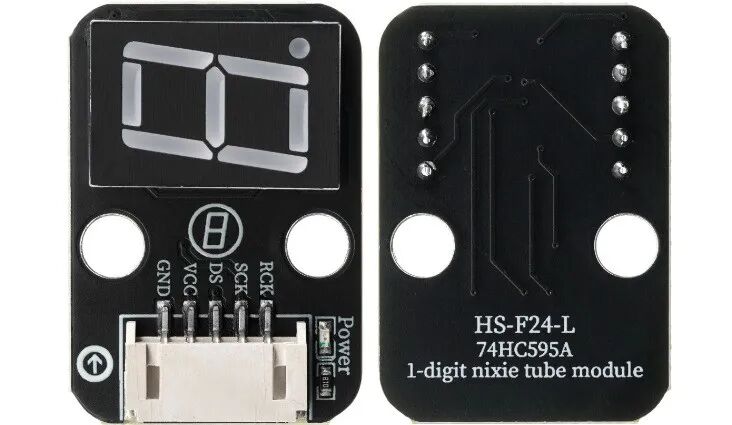 Model:HS-F24-LName:Single Digit DisplaySeries:Display ModuleDescription:This is a digital display module based on the 74HC595A shift register and a single common cathode / common anode digit display (depending on the actual product definition). It achieves “serial input – parallel output” functionality through the shift register, requiring only 3 Arduino pins to control the display of numbers 0-9 and some letters (such as A-F). It features low pin usage, simple control, clear display, and low cost, making it a common component for displaying digital parameters (such as temperature, humidity, counting results) in Arduino projects.Usage Scenarios:Smart home data display (e.g., displaying indoor temperature and humidity values, power consumption of sockets); industrial equipment status indication (e.g., displaying production line running counts, equipment fault codes); primary and secondary school science experiments (exploring the principles of digital display, working mechanisms of shift registers), in line with the “Guidelines for Artificial Intelligence General Education in Primary and Secondary Schools (2025 Edition)” practical requirements; interactive toy devices (e.g., displaying game scores, countdown times); portable detection devices (e.g., displaying light intensity, relative soil moisture values in conjunction with sensors); electronic clock display (displaying hour/minute digits in conjunction with clock modules).Interdisciplinary Integration:Physics, MathematicsMaterials ScienceInformation TechnologyEthical Education:Data displayed on the digital tube must be clear and easy to read, avoiding user misjudgment due to unclear display (e.g., incorrect display of equipment fault codes); attention must be paid to the compliance and environmental friendliness of electronic components during module production, reducing the use of harmful substances; different groups (e.g., elderly, visually impaired) have different needs for display brightness and digit size, requiring inclusive design; long-term use must consider module power consumption, balancing display effects with energy-saving needs; during project development, ensure the accuracy of displayed data to avoid misleading information output due to program bugs.Note: Images are sourced from the internet, and the product is based on the actual purchased item.
02Technical Parameters
Working Principle:
The core of the module is the 74HC164D 8-bit serial input parallel output shift register and a single common cathode digit display. The 74HC164D receives binary data through SER (serial data input) and shifts the data into the internal register on the rising edge of CLK (clock signal). When all 8 bits of data are shifted in, the parallel output terminals (Q0-Q7) output the corresponding levels simultaneously, directly driving the 8 segments of the digit display (7 segments for digits + 1 decimal point). By sending different 8-bit binary codes to the shift register, different numbers or symbols can be displayed on the digit display.
Parameter Analysis:
G(GND): Power input negative/cathodeV(VCC): Power input positive/anode levelDS(Serial Data):Serial data input pin, receives serial data output from ArduinoSCK(Shift Clock):Shift clock pin, each clock pulse shifts data from the SER pin into the shift registerRCK(Register Clock):Storage clock pin, clock pulse triggers the latching of shift register data into the output registerDigit Display Type: Single 7-segment digit display (including decimal point), common cathode / common anode (as marked on the actual product)Display Range: 0-9 digits, A-F letters (hexadecimal display), decimal point controlled separatelyWorking Current: Approximately 5-10mA current for a single segment (adjust according to actual power supply to avoid overcurrent damage)Response Time: ≤1μs (74HC595A data transmission response time), no noticeable delay in lighting the digit displayOperating Temperature: -40℃~85℃ (74HC595A operating temperature range, suitable for most indoor and outdoor environments)03Code Example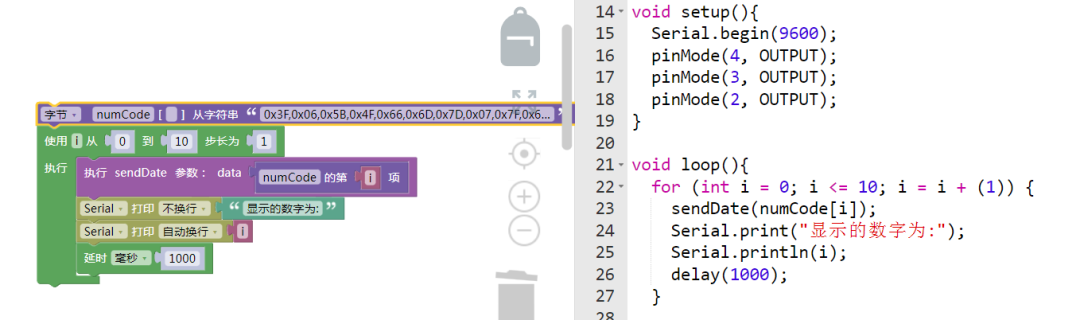
Connect pins as follows: DS\D2; SCK\D3; RCK\D4.
04Safety Measures
1. Power must be turned off before wiring, and confirm VCC voltage (3.3V-5V); exceeding 5V will burn the 74HC164D chip;
2. The output current of the 74HC164D is limited (maximum 25mA per pin), do not directly drive high-power loads, only suitable for the digit display that comes with the module;
3. Avoid touching the surface of the digit display with sharp objects to prevent scratching the LED protective layer;
4. The soldering iron must be grounded during soldering to prevent static electricity from damaging the 74HC164D chip (CMOS devices are sensitive to static damage);
5. The clock signal frequency should not be too high (recommended ≤1MHz), otherwise it may lead to data transmission errors;
6. If garbled display occurs during debugging, check if the CLK and SER pins are reversed, or if the data sending order is incorrect (high bits must be sent first);
7. When storing for a long time, use anti-static bags to avoid oxidation of chip pins or static damage.
05Extensions
Students can try the following methods:
1. Create a “Button Counter”: in conjunction with the HS-KEY1B-P button switch, each time the button is pressed, the digit display shows the number incremented by 1 (cycling from 0-9);2. Build a “Temperature Indicator”: in conjunction with the HS-S26A temperature and humidity sensor, simplify the display of the temperature’s unit digit (e.g., 25℃ shows 5), understanding data trade-offs.3. Design a “Counting Alarm”: in conjunction with the HS-S31P touch sensor, each touch increments the counter by 1 and displays it on the digit display; when the count reaches a set value (e.g., 10 times), control the HS-F01P RGB LED module to light up a red light as a warning;4. Develop a “Light-Controlled Digital Indicator”: in conjunction with the HS-S01A light sensor, display different numbers based on ambient light intensity (e.g., light <200lux shows “1”, 200-500lux shows “2”, >500lux shows “3”), providing intuitive feedback on light levels.

— Previous Recommendations —